


- Posts: 21
- Thank you received: 0
3 Post Moderation Rule for New Boarders (25 Jan 2021)
New boarders will have their posts moderated - Don't worry if you cannot see your post immediately.
Need help tracking an object to a specific path
12 Aug 2015 05:10 - 12 Aug 2015 05:11 #67353
by Cromonius
Need help tracking an object to a specific path was created by Cromonius
Hey fcp.co community! I am doing a logo for a client and I am learning this wonderful Motion program and I love it so far. Before I finally get to bed I have an inquiry:
I'm using the brush tool to write out a word. I want a pencil to move along with it so it looks like the pencil is writing it. Is there an easier way to do this without keyframing the heck out of the pencil to go along with the writing? I do have TrackX installed for FCPX and believe it is loaded with Motion. Do I need to use it?
Thanks in advance!
I'm using the brush tool to write out a word. I want a pencil to move along with it so it looks like the pencil is writing it. Is there an easier way to do this without keyframing the heck out of the pencil to go along with the writing? I do have TrackX installed for FCPX and believe it is loaded with Motion. Do I need to use it?
Thanks in advance!
Last edit: 12 Aug 2015 05:11 by Cromonius.
Please Log in to join the conversation.

12 Aug 2015 11:53 - 12 Aug 2015 11:54 #67361
by BenB
Replied by BenB on topic Need help tracking an object to a specific path
Very simple, tracking will overly complicate this effect, stick with what works quickly and easily.
You drew you Airbrush line, and applied the Write On behavior, or whatever.
And you placed your pencil in the Canvas, also. Ssssoooo...
You drew you Airbrush line, and applied the Write On behavior, or whatever.
And you placed your pencil in the Canvas, also. Ssssoooo...
- Apply the Motion Path behavior to the Pencil.
- In the Inspector, change the Path Shape to Geometry.
- Drag the line layer into the Shape Source image well.
- Un-check the Attach To Shape box (because the pencil will not line up correctly, but will follow the correct path).
- Select the Pencil layer, change to the default Select (arrow) tool.
- Move the Pencil layer where it needs to be so it lines up.
Last edit: 12 Aug 2015 11:54 by BenB.
Please Log in to join the conversation.
- Karsten Schlüter
-

- Offline
- Moderator
-

Less
More
- Posts: 3790
- Thank you received: 718
13 Aug 2015 07:31 - 13 Aug 2015 07:33 #67389
by Karsten Schlüter
Replied by Karsten Schlüter on topic Need help tracking an object to a specific path
follow Ben's advice slavishly, and you get exactly what your looking for.
When I try to create this effect, I always miss that 'geometry' thingie ... :blink:
When I try to create this effect, I always miss that 'geometry' thingie ... :blink:
Last edit: 13 Aug 2015 07:33 by Karsten Schlüter.
Please Log in to join the conversation.
13 Aug 2015 20:45 - 13 Aug 2015 20:48 #67408
by Cromonius
Replied by Cromonius on topic Need help tracking an object to a specific path
Thanks guys! That totally helped! Now I am at yet another issue and it has me goin NUTS! I simply want to zoom in to the pencil as it writes, follow it and zoom back out. I active the camera and go 3D (not sure if 3D is even necessary for this) but the cam seems zoomed in slightly from the get and even if I add keyframing and the zoom in behavior, it doesnt really do anything. This project is due tomorrow and I am wasting so much time scratching my head!
Last edit: 13 Aug 2015 20:48 by Cromonius.
Please Log in to join the conversation.
13 Aug 2015 21:03 #67409
by Cromonius
Replied by Cromonius on topic Need help tracking an object to a specific path
Okay I got the camera moving but it throws off my pencil completely. Why would the camera do that? It should just be viewpoint....?
Please Log in to join the conversation.
- ronny courtens
-

- Offline
- Moderator
-
Less
More
- Posts: 4455
- Thank you received: 962
13 Aug 2015 21:22 #67410
by ronny courtens
Replied by ronny courtens on topic Need help tracking an object to a specific path
If you only need to zoom in and out, don't use a camera. Put all your layers inside a Group, then use keyframes or a behavior on the group to zoom in and out.
- Ronny
- Ronny
Please Log in to join the conversation.
- Karsten Schlüter
-
- Offline
- Moderator
-
Less
More
- Posts: 3790
- Thank you received: 718
14 Aug 2015 08:16 - 14 Aug 2015 08:25 #67423
by Karsten Schlüter
What Ronny says: two options, move the camera or move the scenery...
In a 3D surrounding, you first have to check if paper, ink/text and pencil are on the same position in the z-axis;
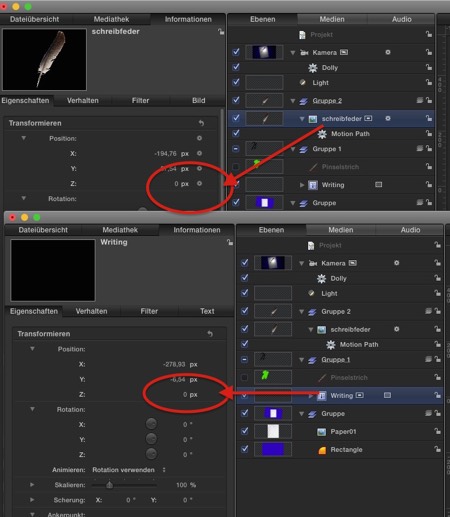
.. if so, I applied a Dolly behavior to the camera and zooooom it flies closer to the paper, no keyframes needed, even better: while playback you can 'interactively' set the start/end point...
now, to follow the pencil is different cup tea ...
If you don't need a 'dizzy drone's perspective', following every tiny movement of pencil, I would set 3-4 keyframes ...
Replied by Karsten Schlüter on topic Need help tracking an object to a specific path
Cromonius wrote: …Now I am at yet another issue and it has me goin NUTS! I simply want to zoom in to the pencil as it writes,...!
What Ronny says: two options, move the camera or move the scenery...
In a 3D surrounding, you first have to check if paper, ink/text and pencil are on the same position in the z-axis;
.. if so, I applied a Dolly behavior to the camera and zooooom it flies closer to the paper, no keyframes needed, even better: while playback you can 'interactively' set the start/end point...
now, to follow the pencil is different cup tea ...
If you don't need a 'dizzy drone's perspective', following every tiny movement of pencil, I would set 3-4 keyframes ...
Last edit: 14 Aug 2015 08:25 by Karsten Schlüter.
Please Log in to join the conversation.
