


- Posts: 45
- Thank you received: 1
3 Post Moderation Rule for New Boarders (25 Jan 2021)
New boarders will have their posts moderated - Don't worry if you cannot see your post immediately.
Masking an Effect and Adjustment Layers
01 May 2015 20:38 #63916
by dorin
Masking an Effect and Adjustment Layers was created by dorin
Hello,
Two n00b questions here.
01: how to mask an effect to affect only one portion of a layer without duplicating/cloning that layer?
02: I there a way to create/use adjustments layers like in After Effects?
Thank You
Two n00b questions here.
01: how to mask an effect to affect only one portion of a layer without duplicating/cloning that layer?
02: I there a way to create/use adjustments layers like in After Effects?
Thank You
Please Log in to join the conversation.

04 May 2015 20:23 #64039
by BenB
Replied by BenB on topic Masking an Effect and Adjustment Layers
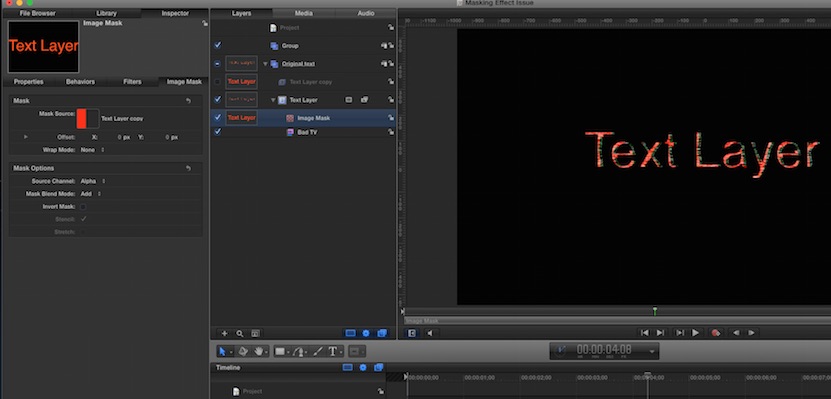
1- Yes. Right-click a layer, from the pop-up menu select "Add Image Mask". Then get one of the drawing tools, draw a mask. Drag that layer onto the original Layer's "Image Mask"'s image well.
2- Depends on what you want to do. Motion works different, layers interact differently. What effect are you trying to achieve? Most are easier in Motion. Need specifics.
2- Depends on what you want to do. Motion works different, layers interact differently. What effect are you trying to achieve? Most are easier in Motion. Need specifics.
Please Log in to join the conversation.
05 May 2015 08:29 #64063
by dorin
Replied by dorin on topic Masking an Effect and Adjustment Layers
Thank you Ben for your answer.
I want to mask only the effect on a layer, not the entire layer.
EX: picture with blur. I want to mask the blur filter to affect only a portion of the image. Layer masking masks the picture and the blur effect. I need only the blur to be affected by mask.On filters you can not add image masks . In After Effects you can add an adjustment layer > apply effect > mask the adjustment layer. In CC you can mask directly the effect.
So how to mask an effect/filter in Apple Motion without cloning the original layer and applying the filter and mask to the clone layer?
I want to mask only the effect on a layer, not the entire layer.
EX: picture with blur. I want to mask the blur filter to affect only a portion of the image. Layer masking masks the picture and the blur effect. I need only the blur to be affected by mask.On filters you can not add image masks
. In After Effects you can add an adjustment layer > apply effect > mask the adjustment layer. In CC you can mask directly the effect.So how to mask an effect/filter in Apple Motion without cloning the original layer and applying the filter and mask to the clone layer?
Please Log in to join the conversation.

05 May 2015 10:14 #64065
by lichinho
Replied by lichinho on topic Masking an Effect and Adjustment Layers
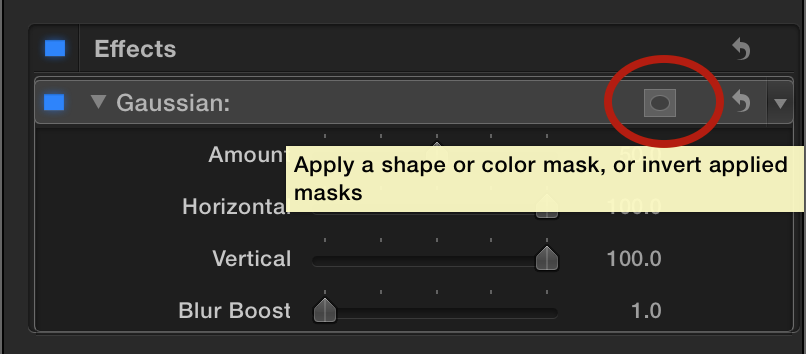
This is easy. In 10.2 you can add color and shape masks to every effect.
Look at the effect in the Inspector: there is an add mask button.
Look at the effect in the Inspector: there is an add mask button.
Please Log in to join the conversation.
05 May 2015 10:48 #64067
by lichinho
Replied by lichinho on topic Masking an Effect and Adjustment Layers
Well, it is one of those things that only show when you hover your mouse pointer around the area, which makes it less than obvious if you don't know it is there. Sorry I did not realize that (probably because I know it is there).
See the attached picture.
See the attached picture.
Please Log in to join the conversation.
05 May 2015 10:59 #64068
by lichinho
Replied by lichinho on topic Masking an Effect and Adjustment Layers
Sorry, only after I wrote did I see you want this for Motion. AFAICT the functionality I described for FCP X does not exist in Motion. Maybe someone more knowledgeable in Motion can chime in. I would use a duplicate group in order to achieve what you describe.
Please Log in to join the conversation.
05 May 2015 12:01 - 05 May 2015 12:02 #64075
by BenB
Replied by BenB on topic Masking an Effect and Adjustment Layers
No, you can't mask an effect by itself.
How is duplicating a layer, and masking it difficult? You'd have a second layer if you used an Adjustment Layer, pretty much the same thing.
How is duplicating a layer, and masking it difficult? You'd have a second layer if you used an Adjustment Layer, pretty much the same thing.
Last edit: 05 May 2015 12:02 by BenB.
Please Log in to join the conversation.
05 May 2015 12:07 #64077
by dorin
Replied by dorin on topic Masking an Effect and Adjustment Layers
It is not difficult but gets confusing with layer count increase. Thank you all for replays.
Please Log in to join the conversation.
05 May 2015 18:05 #64092
by BenB
Replied by BenB on topic Masking an Effect and Adjustment Layers
Rename your layers and group them, you can keep them pretty organized. I do some pretty massive Motion projects, and I don't have any confusion, as long as I'm using good names and groups.
Please Log in to join the conversation.
12 May 2015 12:52 - 12 May 2015 12:53 #64369
by dorin
Replied by dorin on topic Masking an Effect and Adjustment Layers
Another problem with masking the clone layer with the effect is this: the original layer it is visible beneath the masked layer with effect Other ideas for how to mask only the effect.
Last edit: 12 May 2015 12:53 by dorin.
Please Log in to join the conversation.
12 May 2015 14:05 - 12 May 2015 14:06 #64375
by BenB
Replied by BenB on topic Masking an Effect and Adjustment Layers
That's not how clone layers work, they're not effect layers.
I just duplicate the layer, put them both in a group together, then I only have the one track.
I just duplicate the layer, put them both in a group together, then I only have the one track.
Last edit: 12 May 2015 14:06 by BenB.
Please Log in to join the conversation.
12 May 2015 14:09 #64376
by dorin
Replied by dorin on topic Masking an Effect and Adjustment Layers
Hello Ben
I am confused. How to clone layers and use masking to mask effects? Please edit my attached project so the mask to affect only a portion of the text without original layer visible beneath.
I am confused. How to clone layers and use masking to mask effects? Please edit my attached project so the mask to affect only a portion of the text without original layer visible beneath.
Please Log in to join the conversation.
12 May 2015 19:15 #64385
by BenB
Replied by BenB on topic Masking an Effect and Adjustment Layers
Please Log in to join the conversation.
12 May 2015 19:42 #64386
by dorin
Replied by dorin on topic Masking an Effect and Adjustment Layers
Thank you Ben, but is not what I'm looking for.
I need something like this.
s18.postimg.org/x64phgc89/Example.gif
How can I do something like that in Motion. I made that animation in After Effect but I need to do something like that in Motion. How? [the effect is not important, can be anything, how to mask it to affect only portions of the text is the question]
I need something like this.
s18.postimg.org/x64phgc89/Example.gif
How can I do something like that in Motion. I made that animation in After Effect but I need to do something like that in Motion. How? [the effect is not important, can be anything, how to mask it to affect only portions of the text is the question]
Please Log in to join the conversation.
13 May 2015 01:08 #64394
by BenB
Replied by BenB on topic Masking an Effect and Adjustment Layers
Ah, so you only want portions of the text to be effected, not all of the text? Then you want to use a replicator as your mask source. Let me work it up and post a screen shot.
Please Log in to join the conversation.
