


- Posts: 109
- Thank you received: 5
3 Post Moderation Rule for New Boarders (25 Jan 2021)
New boarders will have their posts moderated - Don't worry if you cannot see your post immediately.
Odd Behavior in the Timeline
- DSvoboda356
-
 Topic Author
- Offline
- Premium Member
-

Less
More
04 Feb 2015 00:56 #59292
by DSvoboda356
Odd Behavior in the Timeline was created by DSvoboda356
Hey Guys,
I was wondering if anyone had ever seen this before. When trying to make a box swing I was using the oscillate behavior. I keyframed the amplitude to get the swing to slow down. Everything works great. However if I move the group in the Timeline it completely disregards the timing set by the keyframes. It is especially evident in the keyframe editor. I made a quick little video to help be illustrate.
Thanks,
-dan
I was wondering if anyone had ever seen this before. When trying to make a box swing I was using the oscillate behavior. I keyframed the amplitude to get the swing to slow down. Everything works great. However if I move the group in the Timeline it completely disregards the timing set by the keyframes. It is especially evident in the keyframe editor. I made a quick little video to help be illustrate.
Thanks,
-dan
Please Log in to join the conversation.

04 Feb 2015 03:01 - 04 Feb 2015 03:05 #59293
by BenB
Replied by BenB on topic Odd Behavior in the Timeline
OK, you're working with a Behavior, not with Keyframes. Focus on, and show us where the Behavior Layer is. You have it hidden.
You may also want to check out one of my old free tutorials about this, also.
www.macprovideo.com/hub/motion/swinging-...ls-in-apple-motion-5
Do this, set the timing (placement/duration) of the Behavior in its own Layer, FIRST. Then keyframe parameters inside of it. You should have no troubles moving it around. The Behaviors will change keyframe timing when its Duration is changed, which is happening to you. The Behavior's timing in its own Layer is changing.
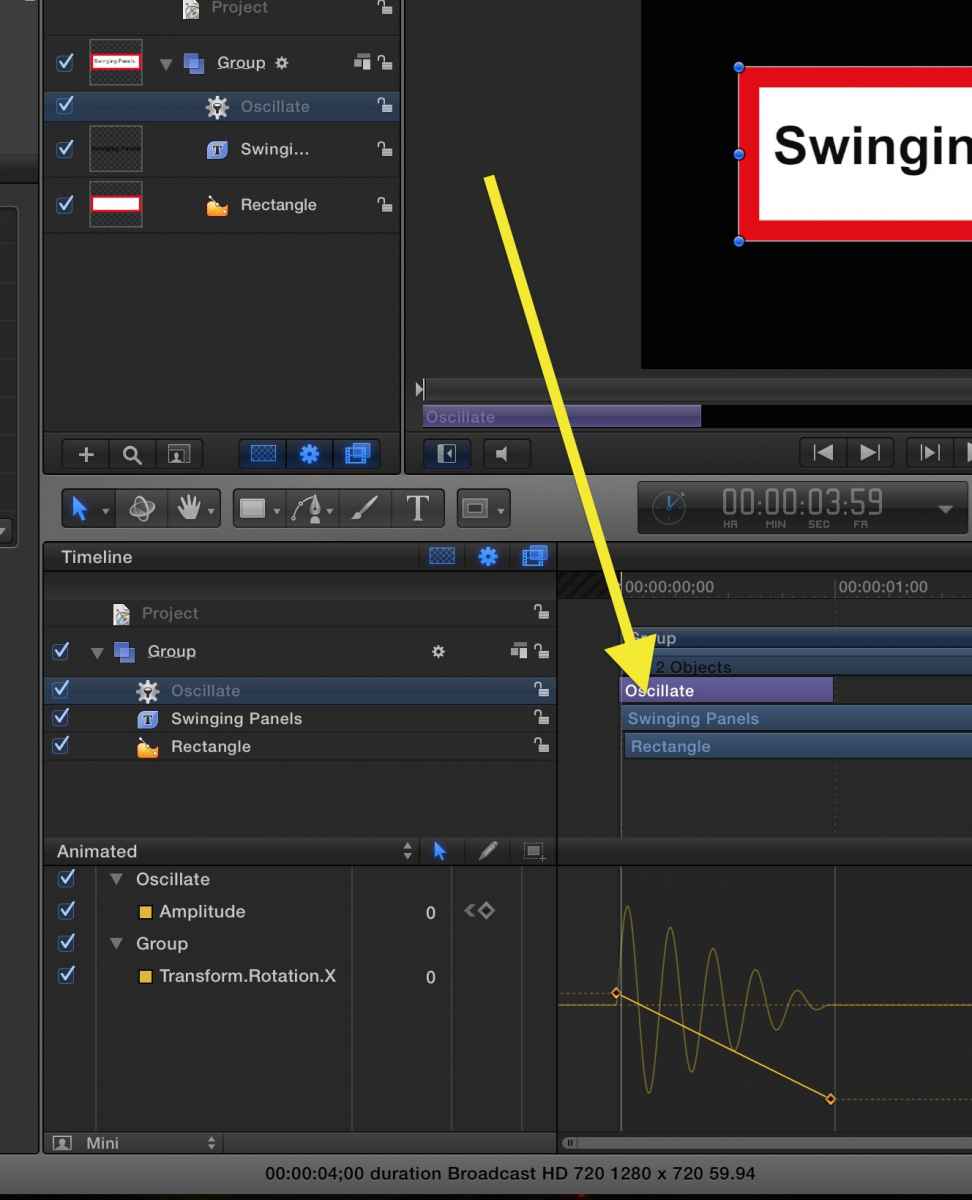
You may also want to check out one of my old free tutorials about this, also.
www.macprovideo.com/hub/motion/swinging-...ls-in-apple-motion-5
Do this, set the timing (placement/duration) of the Behavior in its own Layer, FIRST. Then keyframe parameters inside of it. You should have no troubles moving it around. The Behaviors will change keyframe timing when its Duration is changed, which is happening to you. The Behavior's timing in its own Layer is changing.
Last edit: 04 Feb 2015 03:05 by BenB.
Please Log in to join the conversation.
- DSvoboda356
-
Topic Author
- Offline
- Premium Member
-
Less
More
- Posts: 109
- Thank you received: 5
04 Feb 2015 03:15 #59294
by DSvoboda356
Replied by DSvoboda356 on topic Odd Behavior in the Timeline
Thanks Ben, When I do this the animation just doesn't seem as smooth when it lands. I found this video online as well, I think it is a bug in this current version.
www.studiostahre.se/temp/140927motionbug.mp4
As you can see both keyframes and behaviors are being used here. When you move the group with the behavior the sine wave extends well past keyframe ending point, increasing the speed.
As you can see both keyframes and behaviors are being used here. When you move the group with the behavior the sine wave extends well past keyframe ending point, increasing the speed.
Please Log in to join the conversation.
04 Feb 2015 12:00 #59303
by BenB
Replied by BenB on topic Odd Behavior in the Timeline
Again, when I do it as discribed, nothing goes out of whack at all.
In that video, they are also making the same mistake of not trimming the beaver's duration first. When you move it down the timeline, the end of the project becomes an outpoint, so you're changing that. Trim it first, no issues at all.
In that video, they are also making the same mistake of not trimming the beaver's duration first. When you move it down the timeline, the end of the project becomes an outpoint, so you're changing that. Trim it first, no issues at all.
Please Log in to join the conversation.
