


- Posts: 233
- Thank you received: 6
3 Post Moderation Rule for New Boarders (25 Jan 2021)
New boarders will have their posts moderated - Don't worry if you cannot see your post immediately.
Footage / Image too long in timeline
- damiangrady
-
 Topic Author
- Offline
- Elite Member
-

Less
More
03 Jan 2015 10:57 - 03 Jan 2015 11:04 #57917
by damiangrady
Footage / Image too long in timeline was created by damiangrady
Hi there,
Quick one, how do I get to the end of an image or piece of footage that is beyond the length of the the duration of the project?
For example, if the project is 10s long and I drop a clip that is 20s long into the timeline (but only need the first 5s) I can't seem to navigate to the end of the clip to size it left.
Cheers
Quick one, how do I get to the end of an image or piece of footage that is beyond the length of the the duration of the project?
For example, if the project is 10s long and I drop a clip that is 20s long into the timeline (but only need the first 5s) I can't seem to navigate to the end of the clip to size it left.
Cheers
Last edit: 03 Jan 2015 11:04 by damiangrady.
Please Log in to join the conversation.

03 Jan 2015 17:57 - 03 Jan 2015 17:58 #57924
by BenB
Replied by BenB on topic Footage / Image too long in timeline
Are you able to get the playhead to the end of the clip, or are you not able to ripple the tail of the clip in shorter?
Hit "A" while the Timeline pane is active, to be sure you're not accidentally trying to work with a different tool other than the Arrow (Select) tool.
Hit "A" while the Timeline pane is active, to be sure you're not accidentally trying to work with a different tool other than the Arrow (Select) tool.
Last edit: 03 Jan 2015 17:58 by BenB.
Please Log in to join the conversation.
- damiangrady
-
Topic Author
- Offline
- Elite Member
-
Less
More
- Posts: 233
- Thank you received: 6
03 Jan 2015 18:15 #57927
by damiangrady
Replied by damiangrady on topic Footage / Image too long in timeline
Hey BenB,
Thanks for the reply.
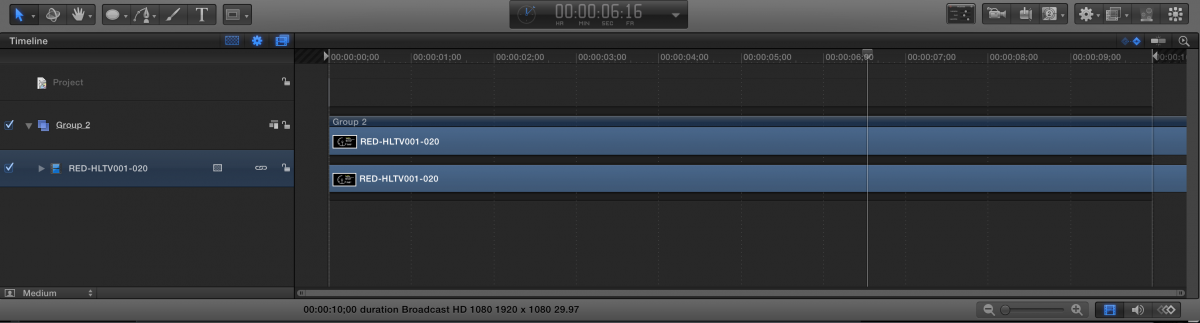
I can't physically navigate to the end of the clip that is too long for the project duration (See Screengrab).
Of course, I can move the clip left until I see the end of the clip and start resizing from there but then invariably I have to then move the clip right again to make sure the beginning of the clip starts at frame 1 in the timeline.
Surely there's an easier way to do this?
Cheers
Thanks for the reply.
I can't physically navigate to the end of the clip that is too long for the project duration (See Screengrab).
Of course, I can move the clip left until I see the end of the clip and start resizing from there but then invariably I have to then move the clip right again to make sure the beginning of the clip starts at frame 1 in the timeline.
Surely there's an easier way to do this?
Cheers
Please Log in to join the conversation.
04 Jan 2015 03:44 #57936
by BenB
Replied by BenB on topic Footage / Image too long in timeline
Ah, Motion, duh! Wake up, Ben!
OK, easy. Click the "clock" in the Dashboard to change it to read Project Duration. Double click it, and enter the duration of your clip. Then you can access the whole thing.
Or, if you just want to trim the clip, select that image layer, place the playhead where you want to trim it to, use "i" to set its In Point there, or "o" to set its Out Point there.
OK, easy. Click the "clock" in the Dashboard to change it to read Project Duration. Double click it, and enter the duration of your clip. Then you can access the whole thing.
Or, if you just want to trim the clip, select that image layer, place the playhead where you want to trim it to, use "i" to set its In Point there, or "o" to set its Out Point there.
Please Log in to join the conversation.
