


- Posts: 138
- Thank you received: 15
3 Post Moderation Rule for New Boarders (25 Jan 2021)
New boarders will have their posts moderated - Don't worry if you cannot see your post immediately.
layer duplication!!! so many layers!!!
02 Oct 2014 16:50 - 02 Oct 2014 16:54 #53558
by muddygun
layer duplication!!! so many layers!!! was created by muddygun
I currently just wrote this into apple feedback
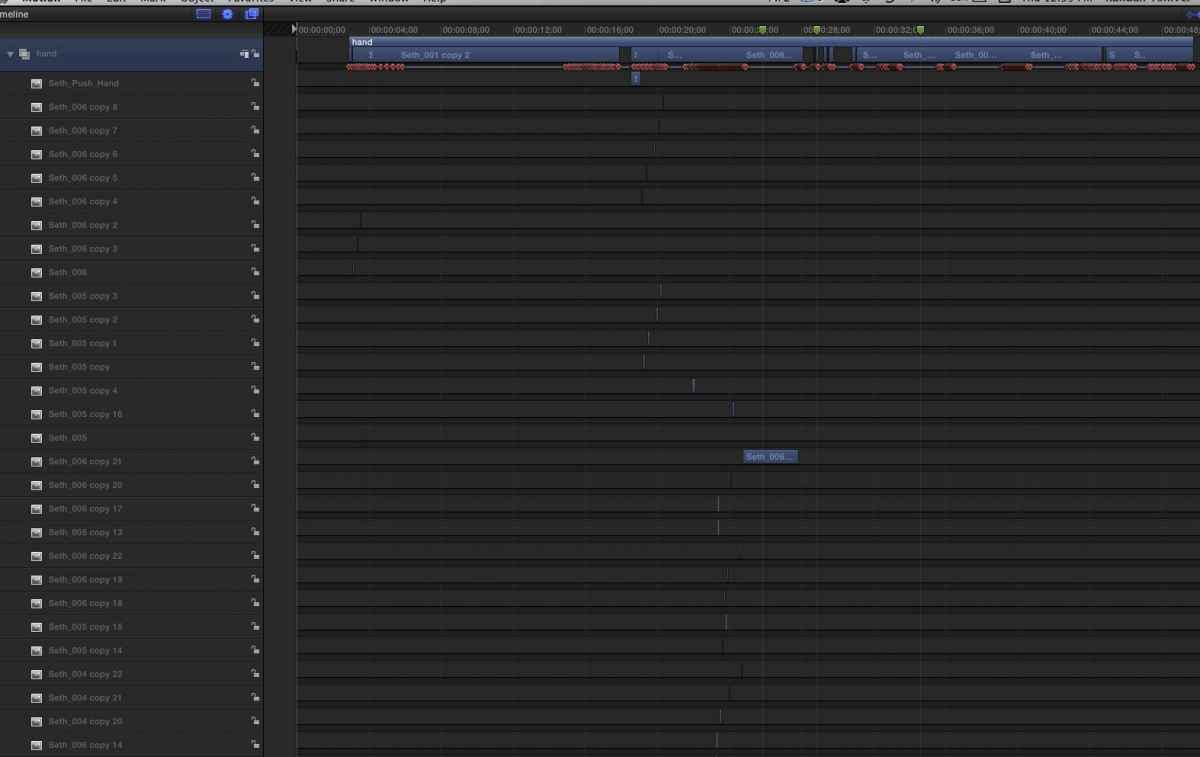
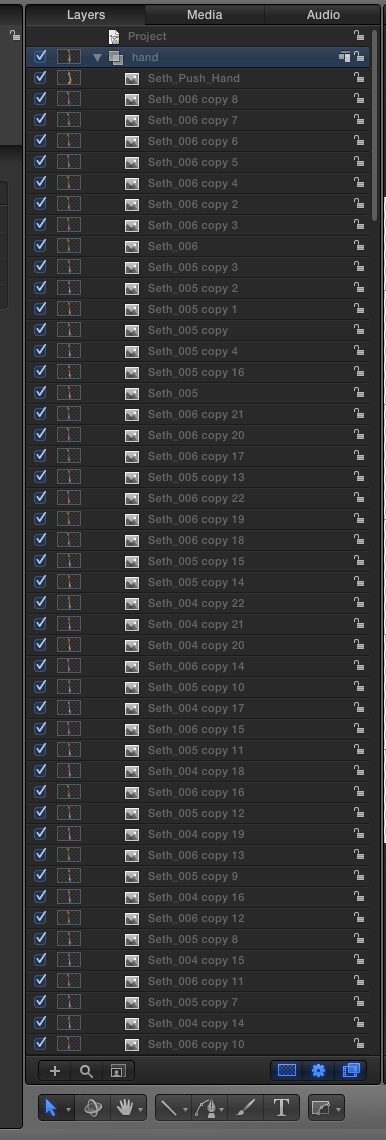
I have been working in motion for over 6 years and there is one issue that has been with me since the beginning. Currently when i duplicate a object it is added on top of that layer and can not be combined into the same layer. Which is fine if this is the same time frame, but just to make layers a lot less crowded, can you add the possibility of having multiple instances of an object occur on the layer multiple times...without having to do any key framing whatsoever. an example is in final cut 7 or logic, i can bring a clip in and out on the same layer multiple times, just by cutting out certain sections. Currently I am working on an animation where i am animating a dudes hand drawing objects. it's only 6 pngs. but I have over 100 layers of those 6 pngs.
wanted to know what you guys thought. Would u guys like a improvement like this????
I have been working in motion for over 6 years and there is one issue that has been with me since the beginning. Currently when i duplicate a object it is added on top of that layer and can not be combined into the same layer. Which is fine if this is the same time frame, but just to make layers a lot less crowded, can you add the possibility of having multiple instances of an object occur on the layer multiple times...without having to do any key framing whatsoever. an example is in final cut 7 or logic, i can bring a clip in and out on the same layer multiple times, just by cutting out certain sections. Currently I am working on an animation where i am animating a dudes hand drawing objects. it's only 6 pngs. but I have over 100 layers of those 6 pngs.
wanted to know what you guys thought. Would u guys like a improvement like this????
Last edit: 02 Oct 2014 16:54 by muddygun.
Please Log in to join the conversation.


08 Oct 2014 20:28 #53816
by anickt
Replied by anickt on topic layer duplication!!! so many layers!!!
I have done some similar projects in FCP. Then export a mov to use in Motion. Would that work for you?
Please Log in to join the conversation.


08 Oct 2014 22:25 #53825
by BenB
Replied by BenB on topic layer duplication!!! so many layers!!!
I'd personally never want multiple items in a single layer. Each item is its own entity, its own layer, not a video track. This is a graphics program, not an editing app. You may get lots of layers, but you can group them, too. Managing layers is part of using a graphics app.
Please Log in to join the conversation.
09 Oct 2014 04:18 #53839
by muddygun
Replied by muddygun on topic layer duplication!!! so many layers!!!
Im sure you weren't trying to be harsh, but I am fully aware it is a graphics program. i am in the program every day....even more than final cut pro x. I only used an editing app as an example....and don't forget i mentioned logic too. My problem with after effects and motion is that so many layers can be extremely cumbersome. especially in motion, at least in AE you can pre-compose...further reducing the layers on a screen at a time. grouping is also a pain when i can have as many as 40 to 50 groups...that all look the same besides text i apply to it. i can't give it any colors. it's not like you would be forced to use the same layer for two clips. but there have been a ton of instances where i would love to have the same item at different times throughout my project. i don't think its too much to ask for that one item on a single layer.
Please Log in to join the conversation.
- Karsten Schlüter
-

- Offline
- Moderator
-

Less
More
- Posts: 3790
- Thank you received: 718
09 Oct 2014 06:14 - 09 Oct 2014 06:20 #53840
by Karsten Schlüter
Replied by Karsten Schlüter on topic layer duplication!!! so many layers!!!
slightly off-topic (not discussing several instances in one track or not, but maybe a consideration about your general workflow in Motion5:
is a tutorial from Motion5 Master Mark Spencer about using Replicators from Image Sequences; in my own unaware words:
"you pre-produce a little movie and vary its starting (and ending) point every time you playback in M5."
This trick I'm using in a plugin I've done for my soccer-reports, which allows me to show in a list a short, animated video of any player at any position in the list (=timeline) - my rig just selects the correct starting point - done.
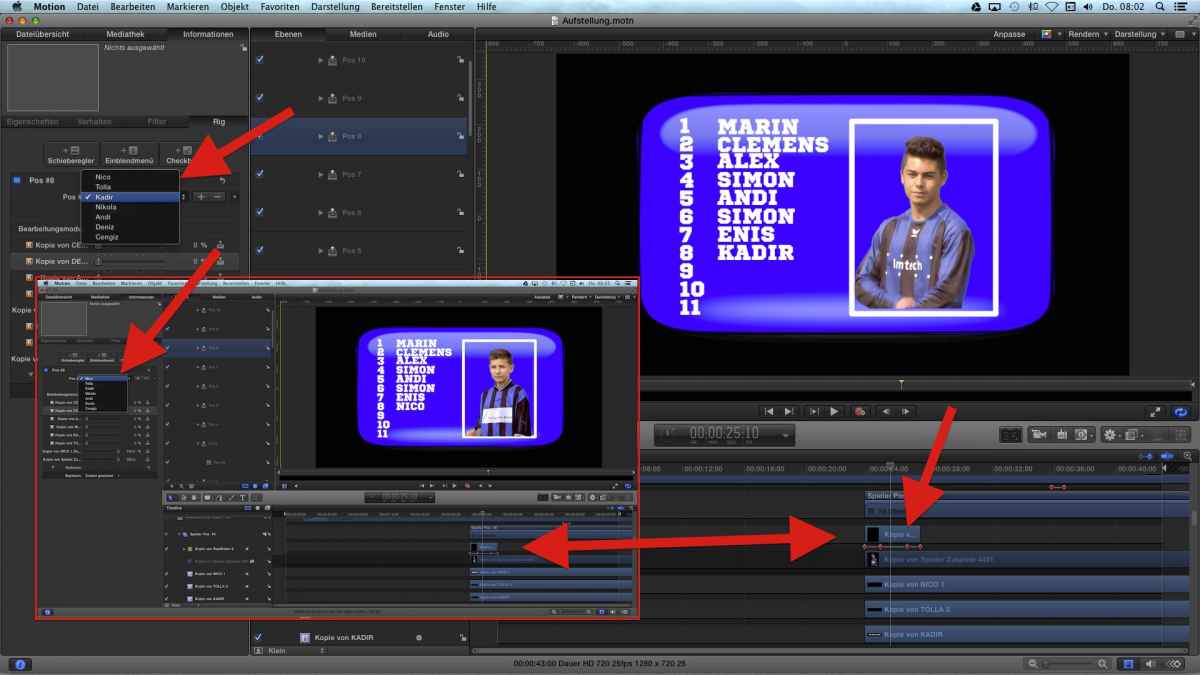
When starting this project I thought: "OMG - 11 positions, 23 players = 253 tracks!" (well- a little less. the goal keepers are just two to select from, and will never play as forwards.... anyhow). No, this 'launch video at frame# xx" makes the whole thing drop-dead easy... after about 2 weeks of blood&sweat understanding it :silly:
so, it's one 'instance', one track, but showing different points in time!
That comes very handy for instance for 'talking mouth'-animations: you have a pre-produced mov, showing all movements, and in M5 you just vary the starting points to show in one 'track/layer/instance' (whatever :blink: ) several, different animations ...
<creeping under my amateur stone> ... :lol:
is a tutorial from Motion5 Master Mark Spencer about using Replicators from Image Sequences; in my own unaware words:
"you pre-produce a little movie and vary its starting (and ending) point every time you playback in M5."
This trick I'm using in a plugin I've done for my soccer-reports, which allows me to show in a list a short, animated video of any player at any position in the list (=timeline) - my rig just selects the correct starting point - done.
When starting this project I thought: "OMG - 11 positions, 23 players = 253 tracks!" (well- a little less. the goal keepers are just two to select from, and will never play as forwards.... anyhow). No, this 'launch video at frame# xx" makes the whole thing drop-dead easy... after about 2 weeks of blood&sweat understanding it :silly:
so, it's one 'instance', one track, but showing different points in time!
That comes very handy for instance for 'talking mouth'-animations: you have a pre-produced mov, showing all movements, and in M5 you just vary the starting points to show in one 'track/layer/instance' (whatever :blink: ) several, different animations ...
<creeping under my amateur stone> ... :lol:
Last edit: 09 Oct 2014 06:20 by Karsten Schlüter.
Please Log in to join the conversation.
09 Oct 2014 10:55 #53848
by BenB
Replied by BenB on topic layer duplication!!! so many layers!!!
I'd have to see an example of the final product to comment further. Not knowing what is going on in a project, exactly, I'm not sure why you'd have 50 groups.
Please Log in to join the conversation.
09 Oct 2014 14:20 #53861
by muddygun
Replied by muddygun on topic layer duplication!!! so many layers!!!
Karsten. I have used a replicator with png sequences, and most of the time it works like a charm...but on some cases it just loses the sequence in which the frames are numbered. now i haven't tried this since 5.1. i usually don't mind replacing the png seq and that fixes things, but if this screwed up royally it would be hours i would have to fix...so i decided not to use a png seq inserted into a replicator. now i could have exported the png seq to a .mov and maybe had a easier time with it...but i was so far into the projis ect at that point. And your second thing you posted on sounds interesting, is that a plug in or could that easily be built in motion? it was hard to derive from what you wrote....
is that "launch video at frame xx" a command i can do in motion? if so i haven't seen that in the rigs....but i haven't used a rig for every element yet.
is that "launch video at frame xx" a command i can do in motion? if so i haven't seen that in the rigs....but i haven't used a rig for every element yet.
Please Log in to join the conversation.
- Karsten Schlüter
-
- Offline
- Moderator
-
Less
More
- Posts: 3790
- Thank you received: 718
10 Oct 2014 09:43 - 10 Oct 2014 10:28 #53941
by Karsten Schlüter
That is a plug-in I made myself; it allows me in FCPX to select from a list of players
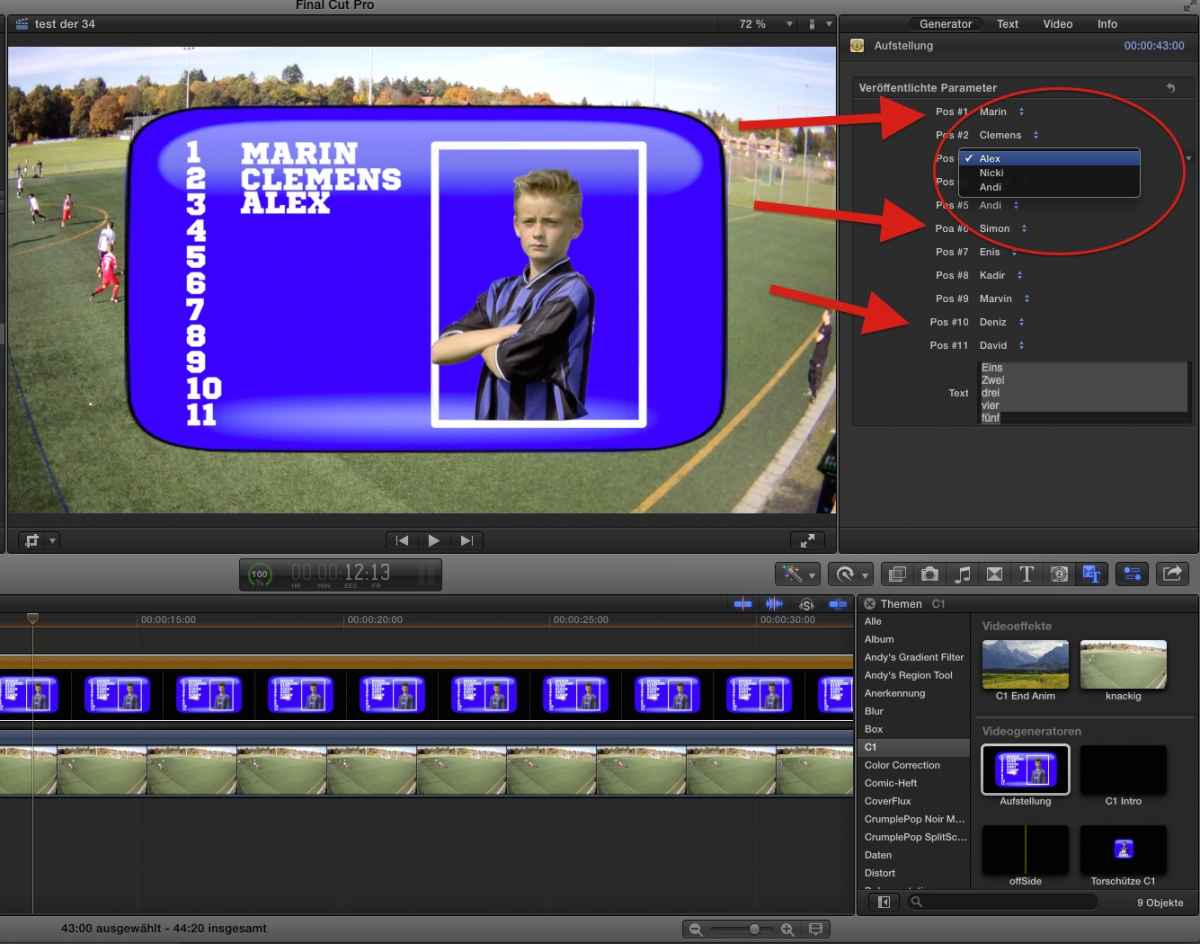
and generates then an animated team-intro, watch the first seconds here:
yeah, sorry, hard to explain in my native tongue, more difficult in a foreign one .. I try with pictures:
step#1
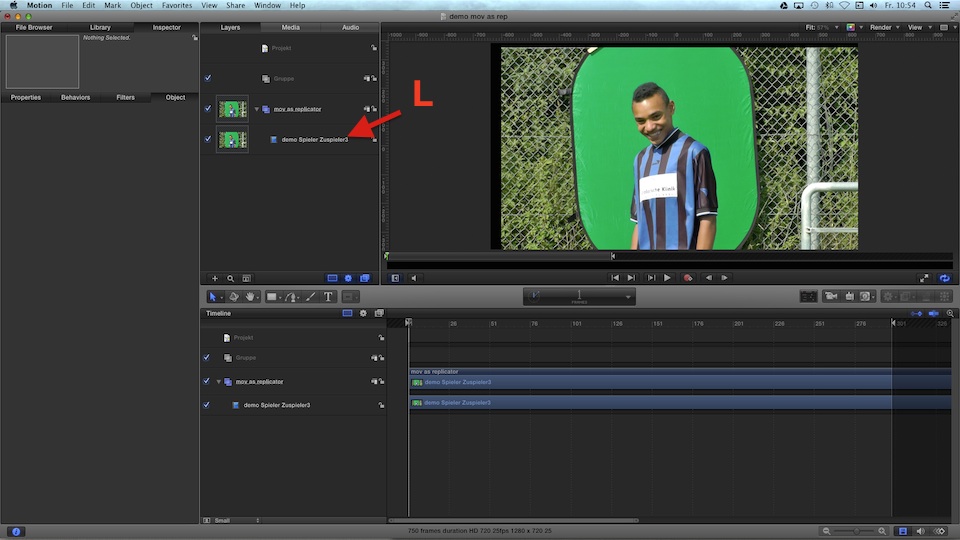
I prepped in FCPX a video, showing each player for exact 150 frames and, hobbyist at work! , had to adjust his position in the frame.... didn't matter, I'm using just a part of the frame (green screening) ..
step#2
drag that prepped mov into M5, select it and hit L => making it a Replicator
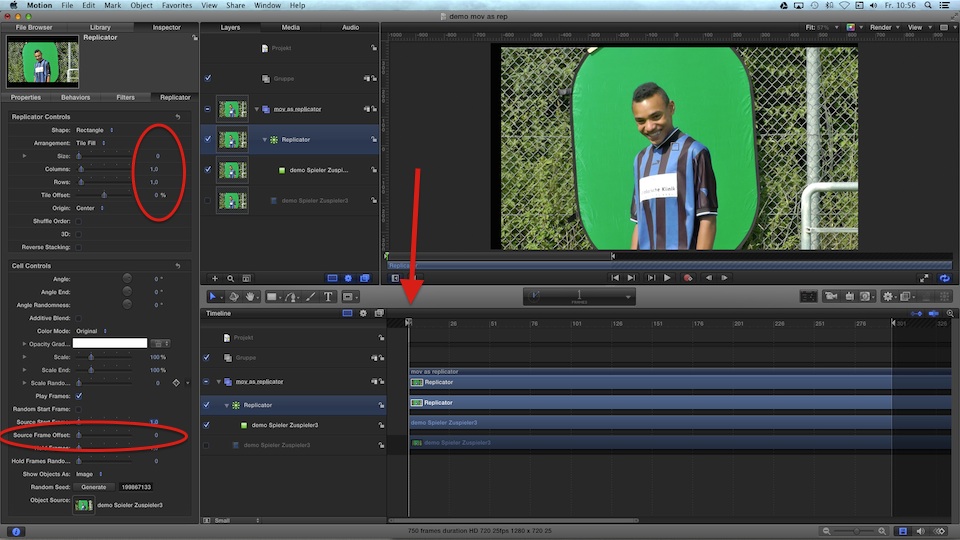
Now, it shouldn't (!) replicate, so 1 column/1row (or just drag down the 'size' to 0...)
When you now hit play, the video will start with Marvin...
step#3
notice the tiny 'Source Start Frame' in the Cell controls, red circle lower left:
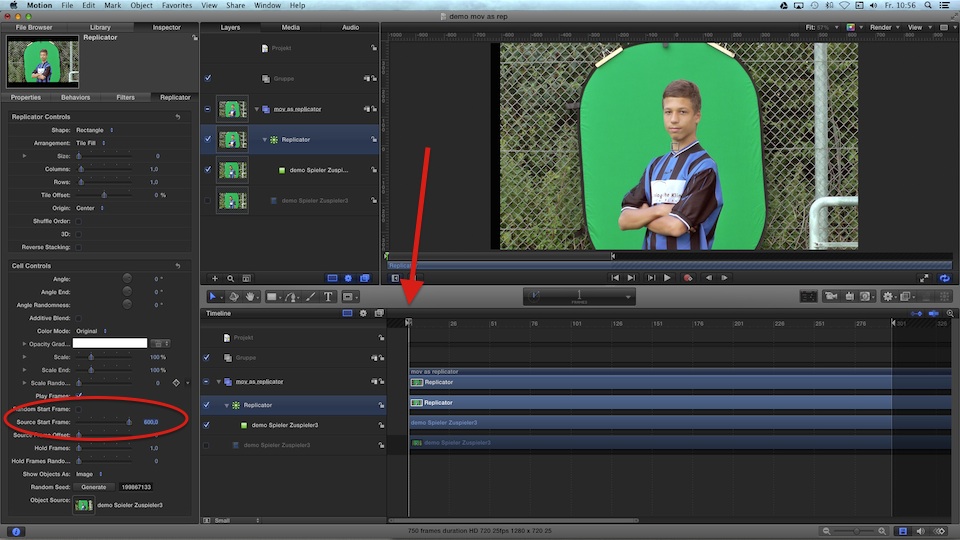
When you change that. e.g. to 600 (=24secs from the beginning, working in 25fps here), the video shows Simon - the 'bar' in the project hasn't moved, nor the playhead.
In Mark's tutorial, he randomize this starting point, and his 'videos' are showing a diff. pic per frame = a 'collection' of stills; in my plug-in, those are videos of 6secs, showing my lil' fighters...
(that design is [strike]stolen[/strike] inspired from this years WorldCup TV-design.. and the kids imitate that grumpy face expression the 'pros' did... :lol: )
The rigging is just to combine name+players video+position in list, and to simplify the usage:
As you see in my FCPX screenshot, the 'interface' is drop-dead-simple: position# + selection of players = some kitschy glowing effect revealing the name, player flies into frame, grumpy face, flowing out, next, list grows longer and longer... (the boys like to see their faces in the videos...)
summary:
you can 'abuse' the replicators cell-conrols to select the starting point of any applied video; that video can be a real video (as mine), or just a 'collection' of stills in a each-still-a-frame video, as in Mark's tutorial....
I was looking for 'sub routines' in M5 to avoid 253 tracks for 11 positions (=all players at all positions avail); now I have ... 11. And still all avail!
Replied by Karsten Schlüter on topic layer duplication!!! so many layers!!!
muddygun wrote: ... is that a plug in or could that easily be built in motion? it was hard to derive from what you wrote....
is that "launch video at frame xx" a command i can do in motion? ...
That is a plug-in I made myself; it allows me in FCPX to select from a list of players
and generates then an animated team-intro, watch the first seconds here:
yeah, sorry, hard to explain in my native tongue, more difficult in a foreign one .. I try with pictures:
step#1
I prepped in FCPX a video, showing each player for exact 150 frames and, hobbyist at work!
, had to adjust his position in the frame.... didn't matter, I'm using just a part of the frame (green screening) ..step#2
drag that prepped mov into M5, select it and hit L => making it a Replicator
Now, it shouldn't (!) replicate, so 1 column/1row (or just drag down the 'size' to 0...)
When you now hit play, the video will start with Marvin...
step#3
notice the tiny 'Source Start Frame' in the Cell controls, red circle lower left:
When you change that. e.g. to 600 (=24secs from the beginning, working in 25fps here), the video shows Simon - the 'bar' in the project hasn't moved, nor the playhead.
In Mark's tutorial, he randomize this starting point, and his 'videos' are showing a diff. pic per frame = a 'collection' of stills; in my plug-in, those are videos of 6secs, showing my lil' fighters...
(that design is [strike]stolen[/strike] inspired from this years WorldCup TV-design.. and the kids imitate that grumpy face expression the 'pros' did... :lol: )
The rigging is just to combine name+players video+position in list, and to simplify the usage:
As you see in my FCPX screenshot, the 'interface' is drop-dead-simple: position# + selection of players = some kitschy glowing effect revealing the name, player flies into frame, grumpy face, flowing out, next, list grows longer and longer... (the boys like to see their faces in the videos...)
summary:
you can 'abuse' the replicators cell-conrols to select the starting point of any applied video; that video can be a real video (as mine), or just a 'collection' of stills in a each-still-a-frame video, as in Mark's tutorial....
I was looking for 'sub routines' in M5 to avoid 253 tracks for 11 positions (=all players at all positions avail); now I have ... 11. And still all avail!
Last edit: 10 Oct 2014 10:28 by Karsten Schlüter.
Please Log in to join the conversation.
