


- Posts: 1080
- Thank you received: 106
3 Post Moderation Rule for New Boarders (25 Jan 2021)
New boarders will have their posts moderated - Don't worry if you cannot see your post immediately.
Rotoscoping in Motion?
26 Aug 2014 20:24 - 26 Aug 2014 20:25 #51824
by Redifer
Rotoscoping in Motion? was created by Redifer
I have been tasked with keying out this poorly-shot interview:

My first option is simply zooming it in in FCPX, but then that shot would be way too tight. I could rotoscope it out in After Effects CS6 but I have fond that not only does that take forever, it's just not very good at it. Is this possible in Motion? Can motion track the movement of their arms as they move like CS6 kind of can? Like, can I tell it what I want and don't want to keep? I don't want the shelving and stuff in the BG but I want the people and their extremities. Also that shadow in the middle will need to be removed as I doubt it can be properly keyed.
My first option is simply zooming it in in FCPX, but then that shot would be way too tight. I could rotoscope it out in After Effects CS6 but I have fond that not only does that take forever, it's just not very good at it. Is this possible in Motion? Can motion track the movement of their arms as they move like CS6 kind of can? Like, can I tell it what I want and don't want to keep? I don't want the shelving and stuff in the BG but I want the people and their extremities. Also that shadow in the middle will need to be removed as I doubt it can be properly keyed.
Last edit: 26 Aug 2014 20:25 by Redifer.
Please Log in to join the conversation.
- bradywurtz
-

- Offline
- Elite Member
-

Less
More
- Posts: 265
- Thank you received: 7
26 Aug 2014 22:14 #51828
by bradywurtz
Replied by bradywurtz on topic Rotoscoping in Motion?
as far as i know, i don't believe Motion will motion track points in a rotoscope. but hopefully someone else can chime in and tell me i'm wrong 
Please Log in to join the conversation.

26 Aug 2014 22:22 #51830
by BenB
Replied by BenB on topic Rotoscoping in Motion?
All your doing is a simple shape mask. To a limited extent you can do it in Motion. I'd do it all in FCPX with TrackX. Would be much faster and easier.
Please Log in to join the conversation.
26 Aug 2014 23:00 #51835
by Overturf
Replied by Overturf on topic Rotoscoping in Motion?
Same here, I guess TrackX is the way to go. And have a serious talk with the camera guy.
Please Log in to join the conversation.
27 Aug 2014 02:03 #51843
by cgbier
Replied by cgbier on topic Rotoscoping in Motion?
If you want to use AFX, I'd use the Roto Brush. It is still pretty slow, but does the trick for things like that. TrackX'll will be faster.
Please Log in to join the conversation.
27 Aug 2014 04:34 - 27 Aug 2014 04:35 #51847
by Redifer
Replied by Redifer on topic Rotoscoping in Motion?
Will Track X remove the green screen? From the video I watched it looks like it's mainly to put text and graphics on TOP of existing video. If it can do what I want (like the Roto Brush in After Effects only better) then Coremelt's video didn't make that clear. These guys move their arms around so a simple shape mask won't do.
Still kind of want Track X, though. Looks cool for other stuff.
Still kind of want Track X, though. Looks cool for other stuff.
Last edit: 27 Aug 2014 04:35 by Redifer.
Please Log in to join the conversation.
- Karsten Schlüter
-

- Offline
- Moderator
-

Less
More
- Posts: 3790
- Thank you received: 718
27 Aug 2014 05:29 - 27 Aug 2014 05:35 #51848
by Karsten Schlüter
Replied by Karsten Schlüter on topic Rotoscoping in Motion?
from the hobbyist corner (=quick'n dirty ...)
depending on how you 'pile' effects in the Inspector, and allowing to 'shadow' some parts with a vignette ( 'm a huge fan of the look of BBC' TopGear), you can result without tracking and 3rd party in FCPX this:
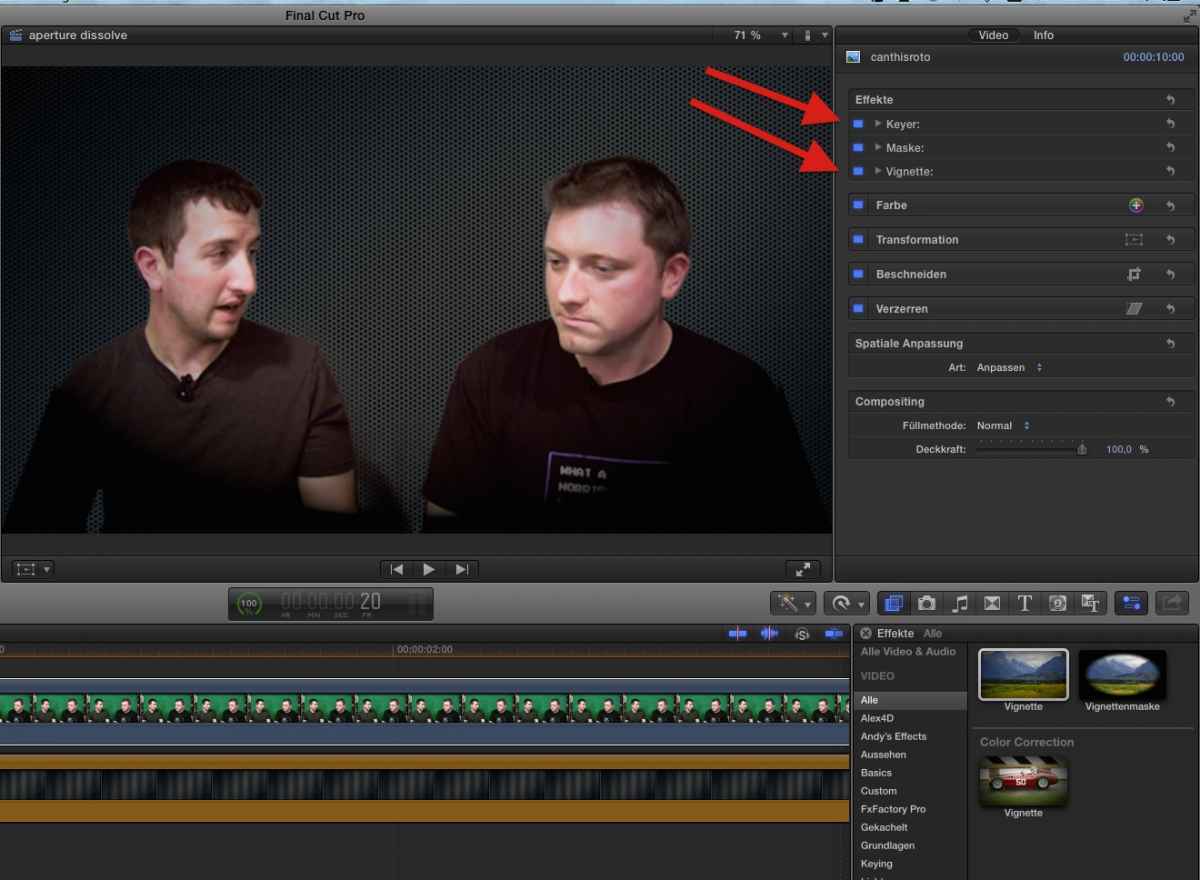
the 4-pt-mask cuts of the shelf (where's my copy of Alex4D-8pt-mask gone??) , the vignette hides the rest ...
that 'quality' of a green-screen recording could be one of my kiddies' school-projects :woohoo:
meant as a suggestion ...
depending on how you 'pile' effects in the Inspector, and allowing to 'shadow' some parts with a vignette (
'm a huge fan of the look of BBC' TopGear), you can result without tracking and 3rd party in FCPX this:
the 4-pt-mask cuts of the shelf (where's my copy of Alex4D-8pt-mask gone??) , the vignette hides the rest ...
that 'quality' of a green-screen recording could be one of my kiddies' school-projects :woohoo:
meant as a suggestion ...
Last edit: 27 Aug 2014 05:35 by Karsten Schlüter.
Please Log in to join the conversation.
27 Aug 2014 09:40 - 27 Aug 2014 09:42 #51851
by Redifer
Replied by Redifer on topic Rotoscoping in Motion?
Good job. The problem is that once either of them moves, the mask becomes obvious and unfortunately the mask can't be keyframed. I was able to get rid of the shadow with the keyer. This is as good as I can get using the built in tools. Notice his left arm as it moves:

I agree the quality of the shot could be much better on all fronts.
I agree the quality of the shot could be much better on all fronts.
Last edit: 27 Aug 2014 09:42 by Redifer.
Please Log in to join the conversation.
- Karsten Schlüter
-
- Offline
- Moderator
-
Less
More
- Posts: 3790
- Thank you received: 718
27 Aug 2014 10:04 #51853
by Karsten Schlüter
Great! esp. in reg. of the source material ... you applied some color-corrections, didn't you?
Again, my suggestion. 'cover' the bad parts by applying a vingette over the whole scenery...
Replied by Karsten Schlüter on topic Rotoscoping in Motion?
Redifer wrote: ... This is as good as I can get using the built in tools. Notice his left arm as it moves:... .
Great! esp. in reg. of the source material ... you applied some color-corrections, didn't you?
Again, my suggestion. 'cover' the bad parts by applying a vingette over the whole scenery...
Please Log in to join the conversation.
27 Aug 2014 11:47 - 27 Aug 2014 11:48 #51859
by BenB
Replied by BenB on topic Rotoscoping in Motion?
SliceX will rotoscope the mask shape around your guys while they're moving. I meant to say SliceX, not TrackX. TrackX tracks stuff to other stuff, SliceX is a matte shape animation tool with tracking.
No it will not key the green screen, but that is a whole different effect.
In chroma keying, normally there are two different effects involved; 1- garbage matte (matting out the garbage you don't want to deal with in the frame), 2- pulling the key.
Animating/tracking a mask is your garbage matte phase.
Keying the green screen is the second phase.
You don't do both at once.
No it will not key the green screen, but that is a whole different effect.
In chroma keying, normally there are two different effects involved; 1- garbage matte (matting out the garbage you don't want to deal with in the frame), 2- pulling the key.
Animating/tracking a mask is your garbage matte phase.
Keying the green screen is the second phase.
You don't do both at once.
Last edit: 27 Aug 2014 11:48 by BenB.
Please Log in to join the conversation.
27 Aug 2014 21:15 #51881
by Redifer
Replied by Redifer on topic Rotoscoping in Motion?
OK I bought the SliceX and TrackX bundle. Only SliceX installed. Where is Track X supposed to go? I only have C2 SliceX with a bunch of matte filters.
Anyway I must be using it wrong. Slice X is much more difficult to use and slower than After Effects' Roto Brush. It tracks extremely poorly. I make adjustments and it screws every previous frame up. Like I said, I must be using it wrong.
Anyway I must be using it wrong. Slice X is much more difficult to use and slower than After Effects' Roto Brush. It tracks extremely poorly. I make adjustments and it screws every previous frame up. Like I said, I must be using it wrong.
Please Log in to join the conversation.
- Squamish ed
-
- Offline
- Elite Member
-
Less
More
- Posts: 238
- Thank you received: 20
27 Aug 2014 22:03 #51884
by Squamish ed
Ed
Replied by Squamish ed on topic Rotoscoping in Motion?
When I installed SliceX and TrackX, TrackX showed up under the generators tab. Hopefully yours ended up there.
It has taken a bit of time getting used to how these Coremelt apps work. I found when I ran into some problems Roger responded very quickly and got me sorted out. I know this doesn't solve your problem but hopefully it'll get you a step closer. Good luck.
It has taken a bit of time getting used to how these Coremelt apps work. I found when I ran into some problems Roger responded very quickly and got me sorted out. I know this doesn't solve your problem but hopefully it'll get you a step closer. Good luck.
Ed
Please Log in to join the conversation.
28 Aug 2014 13:03 #51899
by BenB
Replied by BenB on topic Rotoscoping in Motion?
Watch the tutorials Roger has on the Coremelt site. I find SliceX to be fast, easy, and the tracker is the Mocha engine, so it is very high end.
Please Log in to join the conversation.
