


- Posts: 59
- Thank you received: 0
3 Post Moderation Rule for New Boarders (25 Jan 2021)
New boarders will have their posts moderated - Don't worry if you cannot see your post immediately.
Shortening a project in Motion 5?
13 Aug 2014 11:52 - 13 Aug 2014 13:05 #51238
by chk70
Shortening a project in Motion 5? was created by chk70
Hi workoholics,
I´ve made a intro with masks, animations etc etc. Now I need to make it shorter from 11 s to about 6 s however to keep all of the animations and masks where they are in relations to each other especially in the beginning and end seem´s like ALOT of work shortening every timeline bar on it´s own. There must be a easier way of doing this? Pls help.
/H
I´ve made a intro with masks, animations etc etc. Now I need to make it shorter from 11 s to about 6 s however to keep all of the animations and masks where they are in relations to each other especially in the beginning and end seem´s like ALOT of work shortening every timeline bar on it´s own. There must be a easier way of doing this? Pls help.
/H
Last edit: 13 Aug 2014 13:05 by chk70.
Please Log in to join the conversation.

13 Aug 2014 12:42 #51241
by BenB
Replied by BenB on topic Shortening a project in Motion 5?
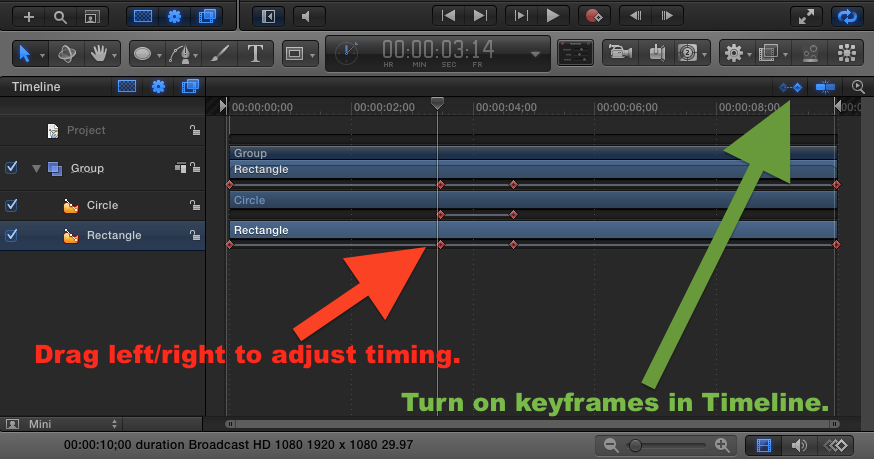
In Motion, turn on the keyframe indicator for the timeline. There you can adjust the timing of keyframes quickly and easily.
Please Log in to join the conversation.
13 Aug 2014 13:46 - 13 Aug 2014 13:47 #51249
by chk70
Replied by chk70 on topic Shortening a project in Motion 5?
BenB,
thank you for your answer. Isn´t there a way to just cut away the "middle" of the timeline? As you see in the attached pic nothing happens in the middle section of the intro. I´ve made 12 of these and the thought of adjusting every bar on the timeline as well as keyframes etc is a bit depressing.
Sorry I seem not to be able to attach pics.
/H
thank you for your answer. Isn´t there a way to just cut away the "middle" of the timeline? As you see in the attached pic nothing happens in the middle section of the intro. I´ve made 12 of these and the thought of adjusting every bar on the timeline as well as keyframes etc is a bit depressing.
Sorry I seem not to be able to attach pics.
/H
Last edit: 13 Aug 2014 13:47 by chk70.
Please Log in to join the conversation.
13 Aug 2014 15:17 #51257
by BenB
Replied by BenB on topic Shortening a project in Motion 5?
Be sure the screenshot you're attaching isn't too large of a file size. Make it JPEG to reduce file size, and perhaps make it smaller if it is full screen. There is some mysterious file size limit to attached graphics here.
Please Log in to join the conversation.
13 Aug 2014 15:25 - 13 Aug 2014 15:53 #51258
by BenB
Replied by BenB on topic Shortening a project in Motion 5?
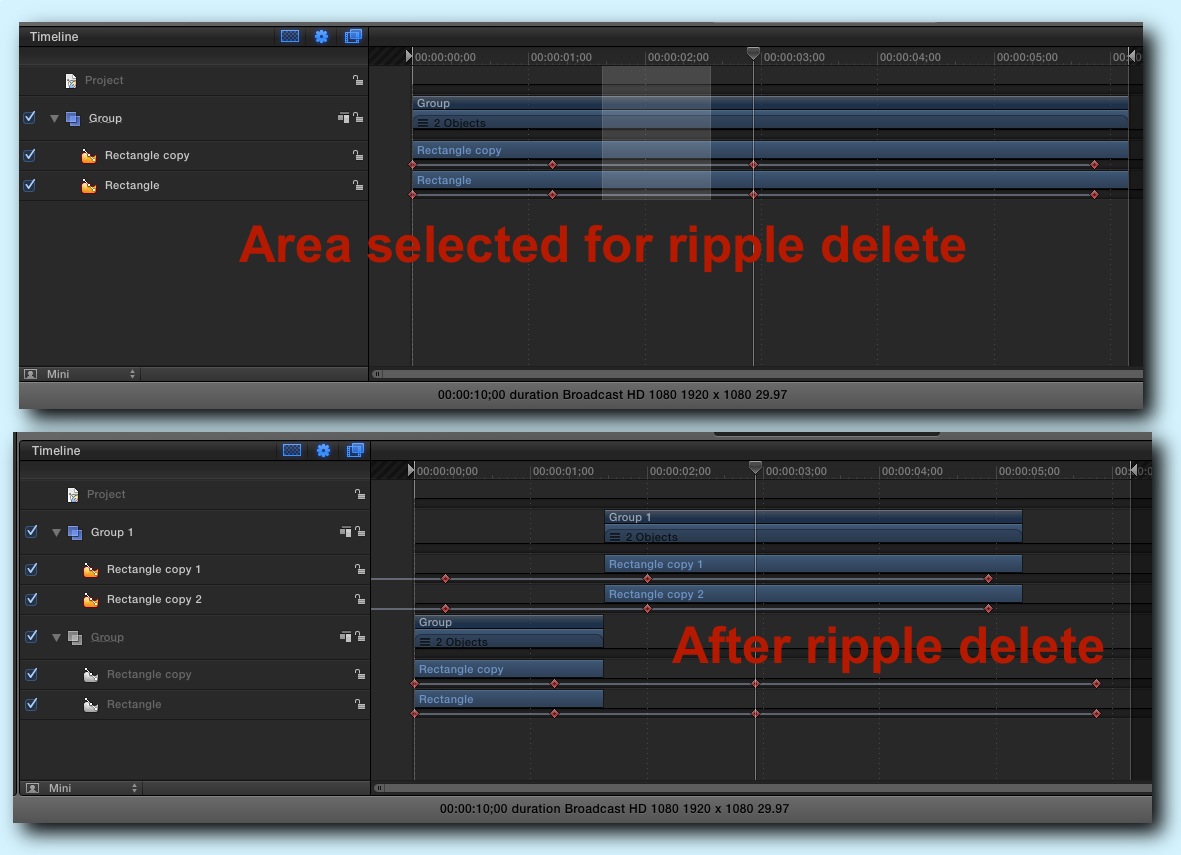
You can in fact do a Ripple Delete in Motion, but it will split your layers.
- Option+Command+drag to select the area to delete.
- File > Ripple Delete
* Keyframes will ripple in newly created layers.
* Keyframes will remain untouched in existing layers.
- Option+Command+drag to select the area to delete.
- File > Ripple Delete
* Keyframes will ripple in newly created layers.
* Keyframes will remain untouched in existing layers.
Last edit: 13 Aug 2014 15:53 by BenB.
Please Log in to join the conversation.
13 Aug 2014 15:33 - 13 Aug 2014 15:35 #51259
by BenB
Replied by BenB on topic Shortening a project in Motion 5?
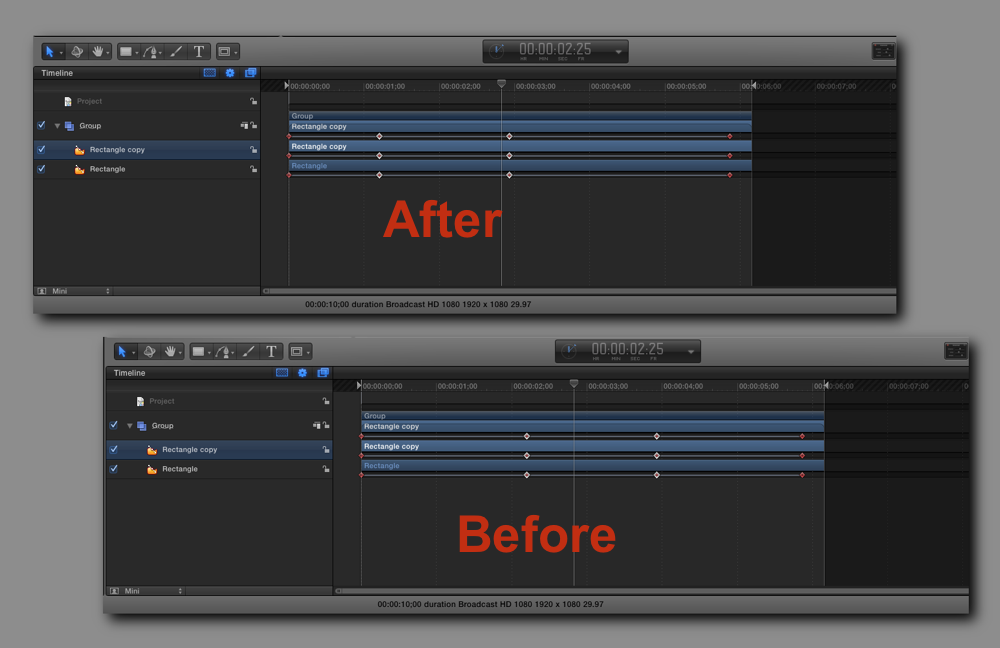
Oh, you can in fact select multiple keyframes at one time, using the Command key, then move them all at once in the Timeline. I should have mentioned that originally.
Last edit: 13 Aug 2014 15:35 by BenB.
Please Log in to join the conversation.
14 Aug 2014 08:07 #51282
by chk70
Replied by chk70 on topic Shortening a project in Motion 5?
BenB,
Thanks for the effort Ben, you the man. Unfortunately none of it worked. When I do a ripple delete all the animations go haywire. There seems to be no other way in Motion 5 but to do it all over I exported the movs to FcpX and did a simple edit, downside is that a lose a generation av quality which sucks. But rather then spending 9 h of correcting every layer and edit in Motion 5 this is the next best thing. Thank you again.
/H
Thanks for the effort Ben, you the man. Unfortunately none of it worked. When I do a ripple delete all the animations go haywire. There seems to be no other way in Motion 5 but to do it all over
I exported the movs to FcpX and did a simple edit, downside is that a lose a generation av quality which sucks. But rather then spending 9 h of correcting every layer and edit in Motion 5 this is the next best thing. Thank you again./H
Please Log in to join the conversation.
- peteramwiggins
-

- Offline
- Administrator
-

- The Administrator :)
Less
More
- Posts: 1049
- Thank you received: 404
14 Aug 2014 09:25 #51286
by peteramwiggins
Administrator
Replied by peteramwiggins on topic Shortening a project in Motion 5?
make a clone layer of your top layer that contains everything then alter that. You can retime it etc
Administrator
Please Log in to join the conversation.
14 Aug 2014 09:46 #51288
by chk70
Replied by chk70 on topic Shortening a project in Motion 5?
Peter,
Nope dosen´t work. I need my animations etc to stay intact. Thank´s anyway.
/H
Nope dosen´t work. I need my animations etc to stay intact. Thank´s anyway.
/H
Please Log in to join the conversation.
14 Aug 2014 13:24 #51299
by BenB
Replied by BenB on topic Shortening a project in Motion 5?
If you're exporting ProRes, you're not losing any noticeable generational quality at all. That's the whole point of ProRes.
Would like to see a screen shot of your Motion project.
Would like to see a screen shot of your Motion project.
Please Log in to join the conversation.
15 Aug 2014 12:03 #51345
by chk70
Replied by chk70 on topic Shortening a project in Motion 5?
Yes I know it surprised me. Picture quality is fine when paused but when I play the sequence it look´s like it has a mild blur effect like when you export in one format and play it in a different one. Still
can´t post any screenshot´s trying to figure out why.
/H
can´t post any screenshot´s trying to figure out why.
/H
Please Log in to join the conversation.
15 Aug 2014 12:12 #51346
by BenB
Replied by BenB on topic Shortening a project in Motion 5?
The pics you post here can't be too large of a file size. PNGs often make files too large. Full screen captures, for me at least, have to be shrunk slightly in frame size, and saved as JPEG.
Please Log in to join the conversation.
15 Aug 2014 13:00 #51347
by FvH
Replied by FvH on topic Shortening a project in Motion 5?
Hi, chk70, when your images look fine while paused and blurry while playing, it is most likely that you did not set your replay option to "higher quality". It will look fine after export, though, even if you do not change this.
Please Log in to join the conversation.
