


- Posts: 17
- Thank you received: 0
3 Post Moderation Rule for New Boarders (25 Jan 2021)
New boarders will have their posts moderated - Don't worry if you cannot see your post immediately.
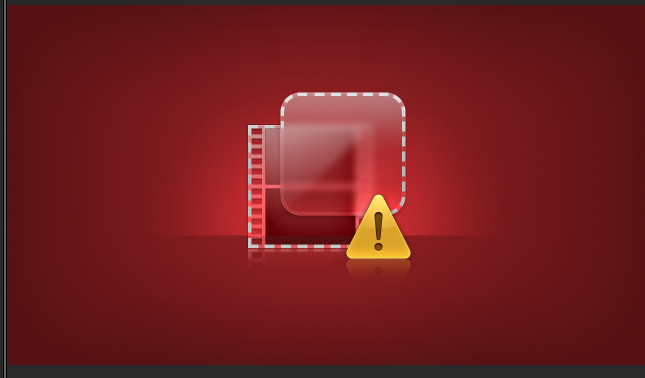
Tried to import a effect but I only get this red screen when using in FCPX, help!
- PhreaKwenCi
-
 Topic Author
- Offline
- New Member
-

Less
More
15 Jul 2014 03:02 #49954
by PhreaKwenCi
Tried to import a effect but I only get this red screen when using in FCPX, help! was created by PhreaKwenCi
I've attached a screen shot of what I get when I try to use it, I downloaded it from final cut king but I can't seem to get it to work... suggestions?
Please Log in to join the conversation.
06 Dec 2014 21:37 #57044
by mgeditor
Replied by mgeditor on topic Tried to import a effect but I only get this red screen when using in FCPX, help!
Hi Jan-David,
The effect you have downloaded is showing a media offline screen, which means the file has been moved from the original drive or is no longer in existence.
You could try to reconnect the clip File > Relink Files
You may need to download the clip again if this does not help, then relink the files.
Hope this is of help.
Thanks
Mark
The effect you have downloaded is showing a media offline screen, which means the file has been moved from the original drive or is no longer in existence.
You could try to reconnect the clip File > Relink Files
You may need to download the clip again if this does not help, then relink the files.
Hope this is of help.
Thanks
Mark
Please Log in to join the conversation.
- ronny courtens
-

- Offline
- Moderator
-

Less
More
- Posts: 4455
- Thank you received: 962
07 Dec 2014 09:59 #57050
by ronny courtens
Replied by ronny courtens on topic Tried to import a effect but I only get this red screen when using in FCPX, help!
That's a Missing Effect icon. There must be something wrong with the effect template you have downloaded, and I have a pretty good idea what is wrong. Is this the Tilt-Shift effect from the Final Cut King website?
- Ronny
- Ronny
Please Log in to join the conversation.


19 Mar 2015 12:03 - 19 Mar 2015 12:03 #61569
by Deyson
Replied by Deyson on topic Tried to import a effect but I only get this red screen when using in FCPX, help!
Hello,
This also happens if you are using an older version of FCPX of which the effect was created in.
Maybe Final Cut King created this in a newer version of Motion and if your version of FCPX is not the latest it gives you this error. From what I understand this is because Final Cut comes with Motion code inside.
Two ways to fix this are:
1. Update to latest version of FCPX
2. Update the Motion file to use an older version of Motion.
I have more detailed info on how to do part 2 here: support.motion-master-templates.com/arti...low-exclamation-mark
Please let me know if this helps. Have an amazing day!
This also happens if you are using an older version of FCPX of which the effect was created in.
Maybe Final Cut King created this in a newer version of Motion and if your version of FCPX is not the latest it gives you this error. From what I understand this is because Final Cut comes with Motion code inside.
Two ways to fix this are:
1. Update to latest version of FCPX
2. Update the Motion file to use an older version of Motion.
I have more detailed info on how to do part 2 here: support.motion-master-templates.com/arti...low-exclamation-mark
Please let me know if this helps. Have an amazing day!
Last edit: 19 Mar 2015 12:03 by Deyson.
Please Log in to join the conversation.
