


- Posts: 238
- Thank you received: 20
3 Post Moderation Rule for New Boarders (25 Jan 2021)
New boarders will have their posts moderated - Don't worry if you cannot see your post immediately.
HUD problem
- Squamish ed
-
 Topic Author
- Offline
- Elite Member
-

Less
More
15 Jun 2014 22:18 #47852
by Squamish ed
Ed
HUD problem was created by Squamish ed
I'm creating a few animated maps for an FCPX project. Everything works fine and the animations do what they're supposed to in both Motion & FCPX but I can't get the HUD to display. I've tried via F7 and also via the Menu but the HUD won't appear and the icon stays greyed out.
Is this a known problem or (gasp) an operator error???
Is this a known problem or (gasp) an operator error???
Ed
Please Log in to join the conversation.

16 Jun 2014 01:51 #47856
by BenB
Replied by BenB on topic HUD problem
I assume you mean the HUD in Motion, as it don'ts come up in FCPX.
There are some elements that don't have a HUD. What exactly do you have selected, before you hit F7?
There are some elements that don't have a HUD. What exactly do you have selected, before you hit F7?
Please Log in to join the conversation.
- Squamish ed
-
Topic Author
- Offline
- Elite Member
-
Less
More
- Posts: 238
- Thank you received: 20
16 Jun 2014 02:07 - 16 Jun 2014 02:09 #47857
by Squamish ed
Ed
Replied by Squamish ed on topic HUD problem
Should have been clearer - you're right I mean the HUD in Motion.
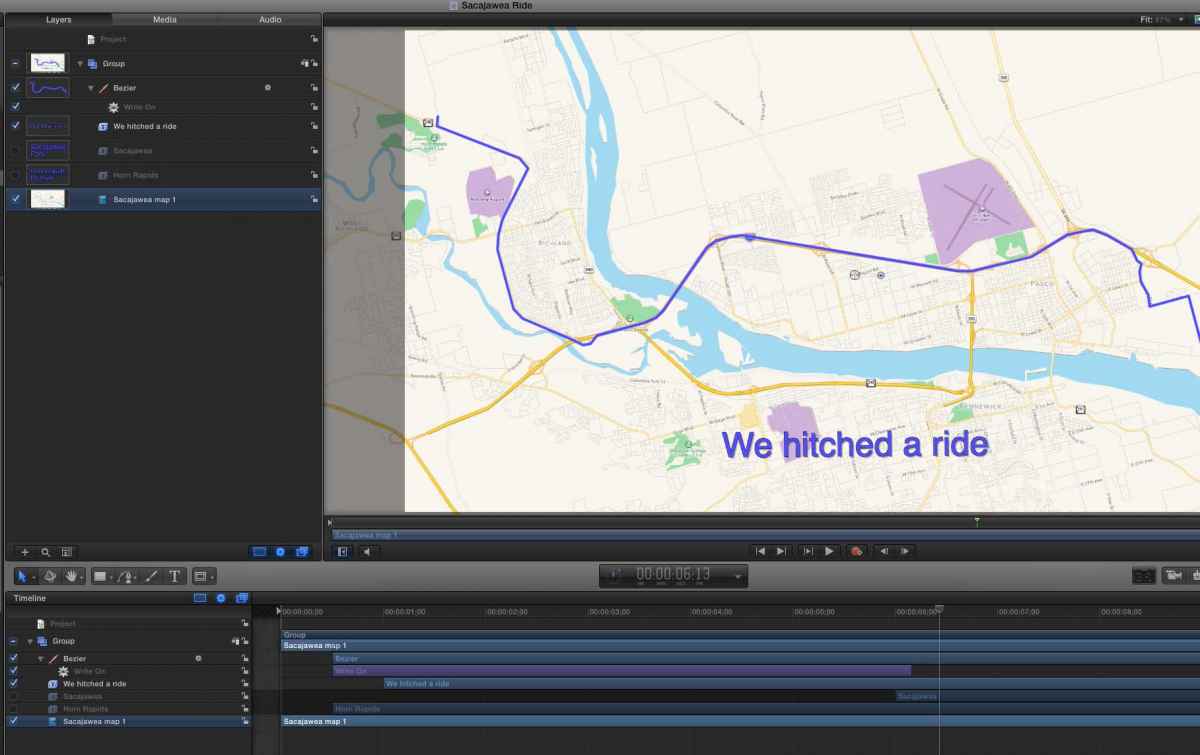
I've been selecting various elements and the HUD is just not cooperating. Specifically I've tried while selecting Group, Bezier, my background map and text items. I've also tried with different unrelated projects.
Tried to attach a screen shot but it too is causing me grief. I'll try again.
I've been selecting various elements and the HUD is just not cooperating. Specifically I've tried while selecting Group, Bezier, my background map and text items. I've also tried with different unrelated projects.
Tried to attach a screen shot but it too is causing me grief. I'll try again.
Ed
Last edit: 16 Jun 2014 02:09 by Squamish ed.
Please Log in to join the conversation.
- Squamish ed
-
Topic Author
- Offline
- Elite Member
-
Less
More
- Posts: 238
- Thank you received: 20
16 Jun 2014 04:18 #47862
by BenB
Replied by BenB on topic HUD problem
Two things to try off the top of my head.
First, it may have accidentally gotten pushed off the screen somehow. So use the free app "Preference Manager" from Digital Rebellion (dot com) to trash Motion's pref files. Second, if that doesn't work, go to System Preferences (OS X, not Motion), to Keyboard, to Shortcuts. Click the "Restore Defaults" option.
First, it may have accidentally gotten pushed off the screen somehow. So use the free app "Preference Manager" from Digital Rebellion (dot com) to trash Motion's pref files. Second, if that doesn't work, go to System Preferences (OS X, not Motion), to Keyboard, to Shortcuts. Click the "Restore Defaults" option.
Please Log in to join the conversation.
- Squamish ed
-
Topic Author
- Offline
- Elite Member
-
Less
More
- Posts: 238
- Thank you received: 20
16 Jun 2014 06:47 - 16 Jun 2014 06:48 #47866
by Squamish ed
Ed
Replied by Squamish ed on topic HUD problem
Thanks Ben. I appreciate your input and suggestions. I tried both your ideas but had no success. The HUD icon stays grey and the menu option doesn't work either. I find myself wondering if this could be related to the trouble I'm having with a variety of odd bugs in FCPX.
www.fcp.co/forum/4-final-cut-pro-x-fcpx/...s-suddenly-appearing
Do you think these problems could possibly be related through Mavericks in some way?
Do you think these problems could possibly be related through Mavericks in some way?
Ed
Last edit: 16 Jun 2014 06:48 by Squamish ed.
Please Log in to join the conversation.
16 Jun 2014 09:09 #47876
by BenB
Replied by BenB on topic HUD problem
I'm running in Mavericks without issue. But, who knows. First I've heard of this issue.
Please Log in to join the conversation.
- Squamish ed
-
Topic Author
- Offline
- Elite Member
-
Less
More
- Posts: 238
- Thank you received: 20
18 Jun 2014 03:06 #48005
by Squamish ed
Ed
Replied by Squamish ed on topic HUD problem
I haven't tried doing a fresh install of Motion. I see that FCS Remover has the option to erase Motion as it will with FCPX. Is there anything I need to be aware of before trying that and reinstalling from the App Store?
Ed
Please Log in to join the conversation.

18 Jun 2014 03:57 #48006
by tpayton
Replied by tpayton on topic HUD problem
Try creating a new user account and see if the problem persists in that new account.
Please Log in to join the conversation.
- Squamish ed
-
Topic Author
- Offline
- Elite Member
-
Less
More
- Posts: 238
- Thank you received: 20
18 Jun 2014 21:52 #48104
by Squamish ed
Ed
Replied by Squamish ed on topic HUD problem
Thanks tpayton. I tried a new user account and it solved the problem. Had tried everything else I could think of but not this because my new user tests with the FCPX problems I'm having didn't work.
www.fcp.co/forum/4-final-cut-pro-x-fcpx/...s-suddenly-appearing
Do you (or anyone else) know of a way I can fix my existing Admin user account without having to go through and reset all my preferences?
Do you (or anyone else) know of a way I can fix my existing Admin user account without having to go through and reset all my preferences?
Ed
Please Log in to join the conversation.
19 Jun 2014 14:40 #48146
by tpayton
Replied by tpayton on topic HUD problem
Sorry you are having so much trouble. Perhaps I missed it but can you tell me what model Mac you have and what OS version and FCPX and Motion version you are using?
By the way, sometime files for a OS or user accounts become corrupted, it's a unfortunate fact of digital life. So you might be looking at needing to do a fresh OS install, rather than a repair install. On the other hand it could be a hardware issue. Whatever the case, what you are experiencing is not normal. I have a bunch of macs running fcpx and motion and have not seen any of these issues.
By the way, sometime files for a OS or user accounts become corrupted, it's a unfortunate fact of digital life. So you might be looking at needing to do a fresh OS install, rather than a repair install. On the other hand it could be a hardware issue. Whatever the case, what you are experiencing is not normal. I have a bunch of macs running fcpx and motion and have not seen any of these issues.
Please Log in to join the conversation.
- Squamish ed
-
Topic Author
- Offline
- Elite Member
-
Less
More
- Posts: 238
- Thank you received: 20
19 Jun 2014 22:35 #48180
by Squamish ed
Ed
Replied by Squamish ed on topic HUD problem
iMac (late 2012), 3.4 GHz i7, OSX 10.9.3, FCPX 10.1.1, Motion 5.1.
I wondered about a hardware issue but none of my other apps have developed any 'quirks'. In FCPX bugs have been consistent and only this one has appeared in Motion. The lack of problems in my other apps leads me to suspect my problems are FCPX/OSX related.
Reinstalling OSX seems like the next logical step. I'm hoping to finish off a couple of projects I'm working on first in case I introduce or discover more problems. That may be being a bit overly cautious but I'm getting a little jumpy.
If I reinstall OSX would a simple reinstall do or would I need to erase the OSX and reinstall? Erasing everything and reinstalling OSX and all my apps is an approach I'm hoping to avoid though I understand it's the most thorough way.
I wondered about a hardware issue but none of my other apps have developed any 'quirks'. In FCPX bugs have been consistent and only this one has appeared in Motion. The lack of problems in my other apps leads me to suspect my problems are FCPX/OSX related.
Reinstalling OSX seems like the next logical step. I'm hoping to finish off a couple of projects I'm working on first in case I introduce or discover more problems. That may be being a bit overly cautious but I'm getting a little jumpy.
If I reinstall OSX would a simple reinstall do or would I need to erase the OSX and reinstall? Erasing everything and reinstalling OSX and all my apps is an approach I'm hoping to avoid though I understand it's the most thorough way.
Ed
Please Log in to join the conversation.
20 Jun 2014 05:41 #48193
by tpayton
Replied by tpayton on topic HUD problem
I highly doubt this is a repeatable bug with the either app.
FCPX is the most resource intensive App that I know of on the Mac. It will take advantage of all your GPU, Memory and CPU so it came exhibit problems that other usage wouldn't. However, I don't think this is that particular problem, but rather something corrupted in your user account. Corrupted user accounts are really quite common. This is not something unique to FCPX or Motion. I few years ago I a Mac that I Adobe Creative Suite 4 starting behaved very oddly with bizzar errors. A reinstall of OS, and the Apps didn't help after many repeated tries. A corrupted user account was to blame.
Corruption like this happens when the OS is writing to a disk, and something interrupts it. This can be a hardware failure on the SSD or HHD, bad memory, App crash, Kernal Panic or more likely a "brown out". In short these can cause a 1 to be written as a 0. Most common on the Mac is an app crash of some kind that improperly writes a plist (preference) file, although other files could be effected. If you have reoccurring crashes it can just compound the problem, and further write the wrong data. Something like this happened, which caused one of the files in your user library to be causing these problems.
Here are some specific Apple knowledge base articles about this. The second is referenced by the first.
Final Cut Pro X 10.1: Troubleshooting basics
support.apple.com/kb/ts3893
Isolating an issue by using another user account
support.apple.com/kb/TS4053
Since your Mac is hopefully still under Apple Care, I would bring it to an Apple Store and get it checked out, it will just take overnight to give it a thorough hardware test. If you have a fusion drive it is entirely possible something is up with the drives (not that I have heard of it, but it is possible). if all is well then you can move to different options.
You can surely try to fix a corrupted user account but frankly if you can't find it quickly, I would just make a new one and manually migrate files. Some editors I know of rebuilt their OS at least once a year, that is completely wipe their startup drive and do a fresh OS install. If you get into the habit of doing that, you'll come up with strategies so that allow your user accounts to be quickly rebuilt.
FCPX is the most resource intensive App that I know of on the Mac. It will take advantage of all your GPU, Memory and CPU so it came exhibit problems that other usage wouldn't. However, I don't think this is that particular problem, but rather something corrupted in your user account. Corrupted user accounts are really quite common. This is not something unique to FCPX or Motion. I few years ago I a Mac that I Adobe Creative Suite 4 starting behaved very oddly with bizzar errors. A reinstall of OS, and the Apps didn't help after many repeated tries. A corrupted user account was to blame.
Corruption like this happens when the OS is writing to a disk, and something interrupts it. This can be a hardware failure on the SSD or HHD, bad memory, App crash, Kernal Panic or more likely a "brown out". In short these can cause a 1 to be written as a 0. Most common on the Mac is an app crash of some kind that improperly writes a plist (preference) file, although other files could be effected. If you have reoccurring crashes it can just compound the problem, and further write the wrong data. Something like this happened, which caused one of the files in your user library to be causing these problems.
Here are some specific Apple knowledge base articles about this. The second is referenced by the first.
Final Cut Pro X 10.1: Troubleshooting basics
support.apple.com/kb/ts3893
Isolating an issue by using another user account
support.apple.com/kb/TS4053
Since your Mac is hopefully still under Apple Care, I would bring it to an Apple Store and get it checked out, it will just take overnight to give it a thorough hardware test. If you have a fusion drive it is entirely possible something is up with the drives (not that I have heard of it, but it is possible). if all is well then you can move to different options.
You can surely try to fix a corrupted user account but frankly if you can't find it quickly, I would just make a new one and manually migrate files. Some editors I know of rebuilt their OS at least once a year, that is completely wipe their startup drive and do a fresh OS install. If you get into the habit of doing that, you'll come up with strategies so that allow your user accounts to be quickly rebuilt.
Please Log in to join the conversation.
- Squamish ed
-
Topic Author
- Offline
- Elite Member
-
Less
More
- Posts: 238
- Thank you received: 20
21 Jun 2014 01:30 #48223
by Squamish ed
Ed
Replied by Squamish ed on topic HUD problem
Again thanks tpayton.
I've read the articles you attached and have followed them. My other system (MBP) doesn't have these issues. I thought I'd try attaching the appropriate HDs I'm using to it to see if the problems show up.
Next on my list is to see if Apple Care can sort me out - I am still covered there fortunately. I don't have the luxury of an Apple store nearby to have my hardware tested. Hopefully that won't become necessary. BTW I do have a fusion drive which I think has been trouble free.
I've read the articles you attached and have followed them. My other system (MBP) doesn't have these issues. I thought I'd try attaching the appropriate HDs I'm using to it to see if the problems show up.
Next on my list is to see if Apple Care can sort me out - I am still covered there fortunately. I don't have the luxury of an Apple store nearby to have my hardware tested. Hopefully that won't become necessary. BTW I do have a fusion drive which I think has been trouble free.
Ed
Please Log in to join the conversation.
- Squamish ed
-
Topic Author
- Offline
- Elite Member
-
Less
More
- Posts: 238
- Thank you received: 20
18 Jul 2014 02:20 - 18 Jul 2014 02:21 #50172
by Squamish ed
Ed
Replied by Squamish ed on topic HUD problem
An update. I spent some time with Apple Help on the phone and got it sorted. The first tech I spoke to had me worried: she didn't know FCPX and had never even heard of Motion - in faction she had me spell Motion a couple of times and wanted to know if it was a 3rd party app. Anyway I got put through to a tech who knew Motion and from him to a more senior tech.
The upshot was that after getting their guidance and suggestions I went through a lot of files and found the error was caused by a preferences file in a sub-directory called By Host. The offending file was com.apple.motionapp.(long alpha-numeric string).plist. By removing it the problem was cured.
I have no idea what caused this file to be corrupted. I've used Motion a fair bit since and it hasn't reoccurred. Discovering the offending file was a real time-intensive process. Hope this info might help someone else sometime.
The upshot was that after getting their guidance and suggestions I went through a lot of files and found the error was caused by a preferences file in a sub-directory called By Host. The offending file was com.apple.motionapp.(long alpha-numeric string).plist. By removing it the problem was cured.
I have no idea what caused this file to be corrupted. I've used Motion a fair bit since and it hasn't reoccurred. Discovering the offending file was a real time-intensive process. Hope this info might help someone else sometime.
Ed
Last edit: 18 Jul 2014 02:21 by Squamish ed.
Please Log in to join the conversation.
