


- Posts: 7
- Thank you received: 0
3 Post Moderation Rule for New Boarders (25 Jan 2021)
New boarders will have their posts moderated - Don't worry if you cannot see your post immediately.
How to convert Motion 5 project to Final Cut Titles template?
07 May 2014 12:06 #45720
by sylther
Greetings
I have a Motion 5 project - a lower third - that I would like to use as a Titles template i FCPX. How do I convert the project into a template?
I've been trying to find answers online, but no success. Someone mentioned "Publish as template" under the File-menu. However, that does not exist on my drop-down list.
Any help greatly appreciated. Thanks.
I have a Motion 5 project - a lower third - that I would like to use as a Titles template i FCPX. How do I convert the project into a template?
I've been trying to find answers online, but no success. Someone mentioned "Publish as template" under the File-menu. However, that does not exist on my drop-down list.
Any help greatly appreciated. Thanks.
Please Log in to join the conversation.

07 May 2014 14:33 - 07 May 2014 14:34 #45727
by BenB
Replied by BenB on topic How to convert Motion 5 project to Final Cut Titles template?
Did you create this from the FCPX Title Template or from a generic Motion template? When you open Motion, you have to choose which type of template you're starting with.
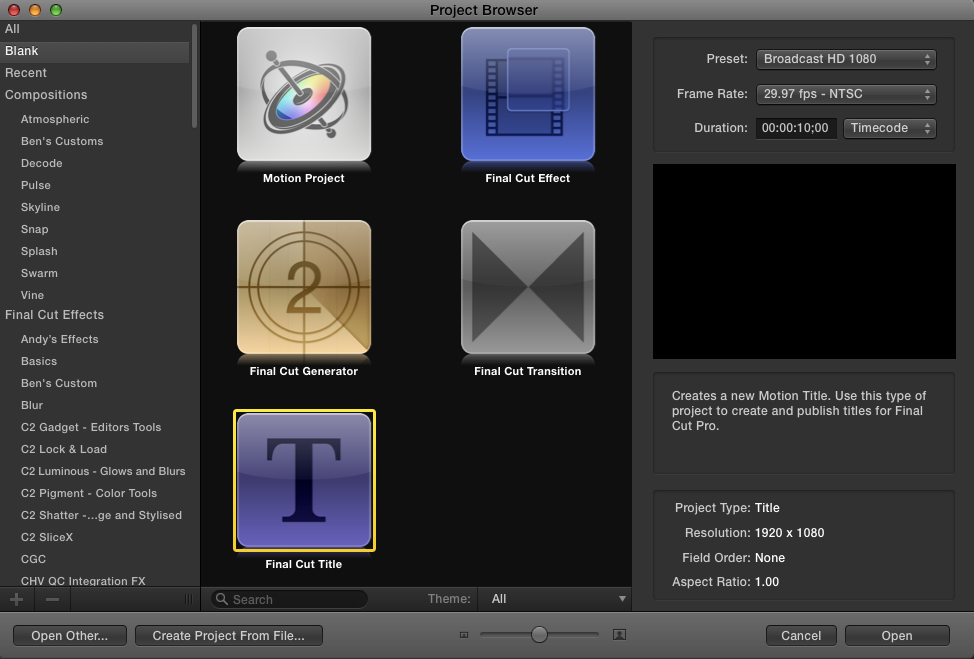
The "Publish To Template" option only shows up when you create a generic Motion project, and want to export it as a Generator in FCPX.
The "Publish To Template" option only shows up when you create a generic Motion project, and want to export it as a Generator in FCPX.
Last edit: 07 May 2014 14:34 by BenB.
Please Log in to join the conversation.
07 May 2014 14:48 #45729
by sylther
Replied by sylther on topic How to convert Motion 5 project to Final Cut Titles template?
Thank you for the fast reply, BenB.
It's actually an old Motion 4 project re-opened i Motion 5. It is from a blank standard motion project - not a template.
And no, the "Publish to template" option is nowhere to be seen.
It's actually an old Motion 4 project re-opened i Motion 5. It is from a blank standard motion project - not a template.
And no, the "Publish to template" option is nowhere to be seen.
Please Log in to join the conversation.
07 May 2014 16:22 #45740
by BenB
Replied by BenB on topic How to convert Motion 5 project to Final Cut Titles template?
Ah, I see, that is important information. So this is a legacy project. Easy. Motion 5 now allows you to open more than one project at once, and copy/paste between them.
Open the legacy project. Then, Cmd-N to create a new project, select the "Final Cut Title" template, set your duration, format, etc, click Open (see the graphic I posted above).
Now, with Cmd-`, that's the tilde key, to the left of the 1/! key, you can switch between the two. Go to the legacy project, select ALL layers in the Layer pane, and Copy. Switch back to the new titles project, Paste.
I'm sure there may be some tweaking to do, but then you can save it as an FCPX titles template.
Open the legacy project. Then, Cmd-N to create a new project, select the "Final Cut Title" template, set your duration, format, etc, click Open (see the graphic I posted above).
Now, with Cmd-`, that's the tilde key, to the left of the 1/! key, you can switch between the two. Go to the legacy project, select ALL layers in the Layer pane, and Copy. Switch back to the new titles project, Paste.
I'm sure there may be some tweaking to do, but then you can save it as an FCPX titles template.
Please Log in to join the conversation.
08 May 2014 11:12 #45776
by sylther
Replied by sylther on topic How to convert Motion 5 project to Final Cut Titles template?
Perfect solution, BenB  Didn't even have to do any adjusting. Thank you very much!
That's 2 for 2 in the help-needed department for me.This is a really great forum with very helpful and skilled members. Thanks, hopefully I can contribute at some time.
Didn't even have to do any adjusting. Thank you very much!That's 2 for 2 in the help-needed department for me.This is a really great forum with very helpful and skilled members. Thanks, hopefully I can contribute at some time.
Please Log in to join the conversation.
