


3 Post Moderation Rule for New Boarders (25 Jan 2021)
New boarders will have their posts moderated - Don't worry if you cannot see your post immediately.
Punched out Text on Blurred Layer


21 Apr 2014 19:41 #44870
by jakuuub
Punched out Text on Blurred Layer was created by jakuuub
Hello there!
I am looking for a way to generate this kind of text layer. I want the clip to be blurred and the text to be clear.
Any ideas on how to build this in Motion 5 and/or Final cut?

Thank you!
I am looking for a way to generate this kind of text layer. I want the clip to be blurred and the text to be clear.
Any ideas on how to build this in Motion 5 and/or Final cut?
Thank you!
Please Log in to join the conversation.

22 Apr 2014 19:20 - 22 Apr 2014 19:26 #44936
by BenB
Replied by BenB on topic Punched out Text on Blurred Layer
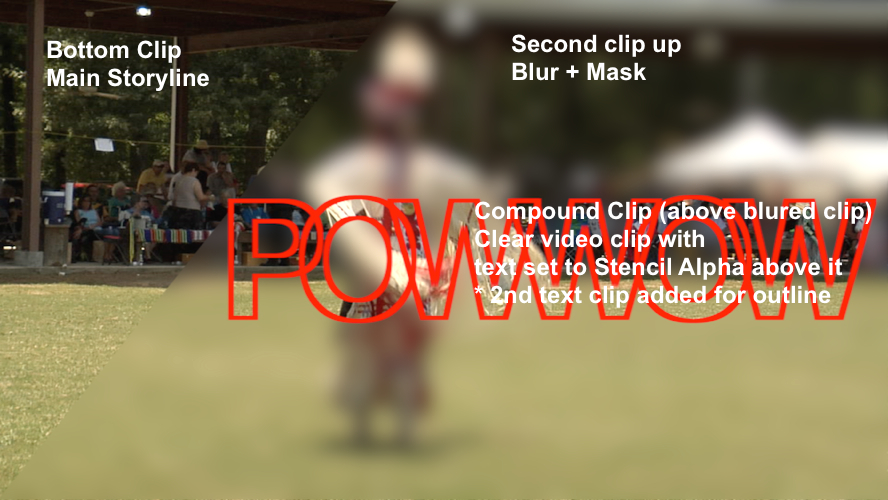
You'll need three copies of the same video clip on top of each other (Opt-drag the main Storyline clip upwards).
Then apply Gaussian Blur to the middle one, with a mask.
Apply text or graphic above top one, select that and the top copy of the video clip, create a new Compound Clip.
Open the Compound Clip, set the text or graphics clip's Compositing mode to Stencil Alpha (or Stencil Luma).
In my example below, I also duplicated the text clip above it self.
Set the "Face" opacity to 0%.
Set the "Outline" color and thickness.
Then apply Gaussian Blur to the middle one, with a mask.
Apply text or graphic above top one, select that and the top copy of the video clip, create a new Compound Clip.
Open the Compound Clip, set the text or graphics clip's Compositing mode to Stencil Alpha (or Stencil Luma).
In my example below, I also duplicated the text clip above it self.
Set the "Face" opacity to 0%.
Set the "Outline" color and thickness.
Last edit: 22 Apr 2014 19:26 by BenB.
Please Log in to join the conversation.
