


3 Post Moderation Rule for New Boarders (25 Jan 2021)
New boarders will have their posts moderated - Don't worry if you cannot see your post immediately.
color over stroke


26 Feb 2014 13:21 #41775
by foxytom
color over stroke was created by foxytom
Hello all,
I'm messing around with motion and am stumped on something.
I made a shape,
I chose Shape Style > Light Brush, which seems to work a bit like the write on behaviour, except that I have trouble adjusting it's speed.
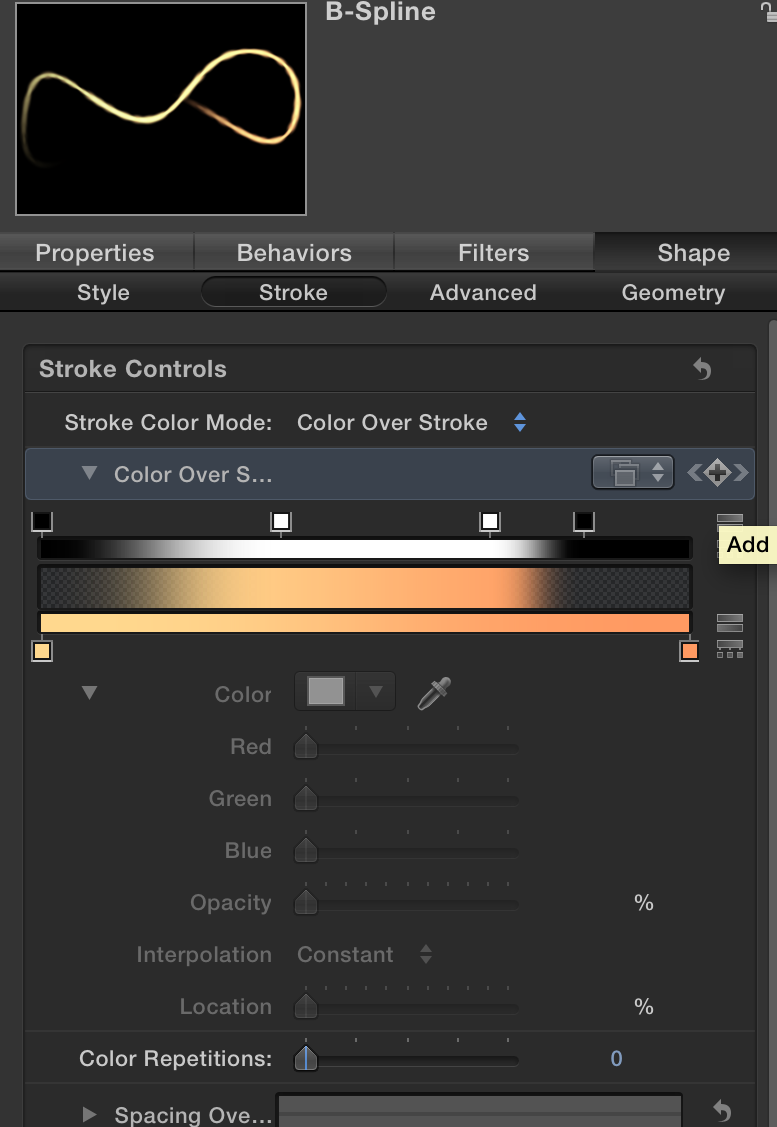
In the picture below, you will see that the "color over stroke" mode is keyframable. This seems to control the timing of the "write-on" effect of the light brush.
While I can edit the keyframes, I can't seem to find a way of moving them along the timeline (they do not appear in the keyframe editor.)
All I ultimately want to do is slow down the light brush.
What am I missing?
Thanks,
T
I'm messing around with motion and am stumped on something.
I made a shape,
I chose Shape Style > Light Brush, which seems to work a bit like the write on behaviour, except that I have trouble adjusting it's speed.
In the picture below, you will see that the "color over stroke" mode is keyframable. This seems to control the timing of the "write-on" effect of the light brush.
While I can edit the keyframes, I can't seem to find a way of moving them along the timeline (they do not appear in the keyframe editor.)
All I ultimately want to do is slow down the light brush.
What am I missing?
Thanks,
T
Please Log in to join the conversation.


28 Feb 2014 14:09 #41871
by kmz
Replied by kmz on topic color over stroke
right click at "color over stroke" and choose "show in keyframe editor"
Please Log in to join the conversation.
