


3 Post Moderation Rule for New Boarders (25 Jan 2021)
New boarders will have their posts moderated - Don't worry if you cannot see your post immediately.
Audio tracks won't delete
- tedtv
-
 Topic Author
- Offline
- Senior Member
-

- Digital Content Creator Sports photographer for CBS MaxPreps www.tedtv.tv (713)501-9706 youtube.com/tedirving tedirving@yahoo.com tedtv@facebook.com
Less
More
26 Jan 2014 18:06 #39865
by tedtv
Audio tracks won't delete was created by tedtv
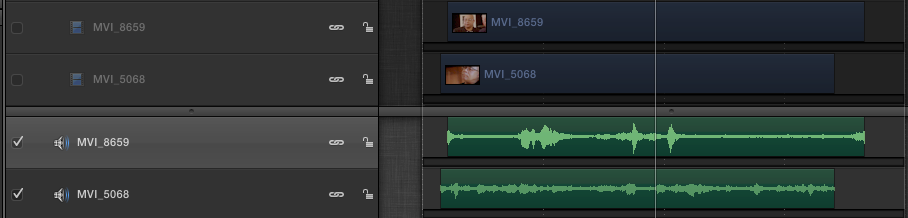
I followed the manual on this but no go. I have two video layers in Motion 5 but I need to totally delete their accompanying audio tracks. I've unchecked those video tracks, unlocked them as well. But clicking the link icon does nothing for the audio or video layers. I've tried every keystroke I can think of plus double clicking. The link icons won't unlink and I can't delete the audio tracks. any ideas?
Please Log in to join the conversation.

27 Jan 2014 02:16 - 27 Jan 2014 02:18 #39895
by BenB
Replied by BenB on topic Audio tracks won't delete
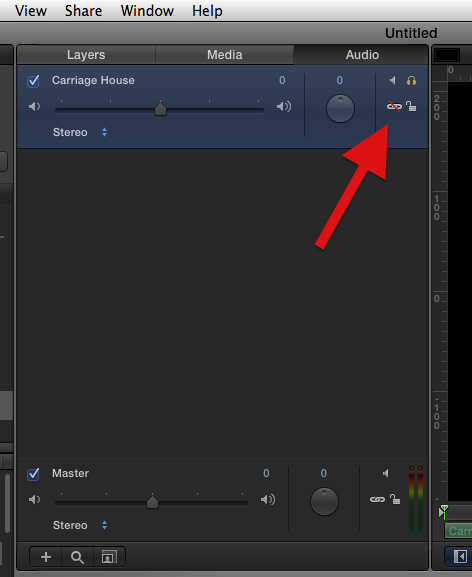
You need to do this in the "Audio" section. Make sure the layer isn't locked, then click the link icon to un-link the audio form it's accompanying video portion. Then select that audio layer there in the Audio section, hit the delete key. I've always had to do it in this section.
Last edit: 27 Jan 2014 02:18 by BenB.
Please Log in to join the conversation.
