


3 Post Moderation Rule for New Boarders (25 Jan 2021)
New boarders will have their posts moderated - Don't worry if you cannot see your post immediately.
Empty layer creating a crash and a corrupted file

10 Jan 2014 20:26 - 10 Jan 2014 20:27 #38689
by Waterbear
Empty layer creating a crash and a corrupted file was created by Waterbear
I have an empty layer in my project. I don't know how it got there. I can't delete it. If I try to delete it, move it, etc, Motion crashes, my project gets corrupt and will then crash Motion if i try to open the project.
I tried cutting the group with the bad layer out of my project, pasting the group into a new Motion project (which got rid of the bad layer), and then pasting the group back in to the original file. Upon saving and re opening, this yielded another file which crashed Motion.
Anyone know how to fix this?
Please see attached image
I tried cutting the group with the bad layer out of my project, pasting the group into a new Motion project (which got rid of the bad layer), and then pasting the group back in to the original file. Upon saving and re opening, this yielded another file which crashed Motion.
Anyone know how to fix this?
Please see attached image

Last edit: 10 Jan 2014 20:27 by Waterbear.
Please Log in to join the conversation.


10 Jan 2014 20:32 #38690
by grailz
Replied by grailz on topic Empty layer creating a crash and a corrupted file
A couple of suggestions. Close Motion and try trashing your preferences. Reboot your mac.
Please Log in to join the conversation.
10 Jan 2014 20:44 #38692
by Waterbear
Replied by Waterbear on topic Empty layer creating a crash and a corrupted file
Tried it, no luck.
Same issues remain
Same issues remain
Please Log in to join the conversation.
10 Jan 2014 20:59 #38694
by Waterbear
Replied by Waterbear on topic Empty layer creating a crash and a corrupted file
Did more digging. I cut all the layers out of the original project and pasted them into a new file.
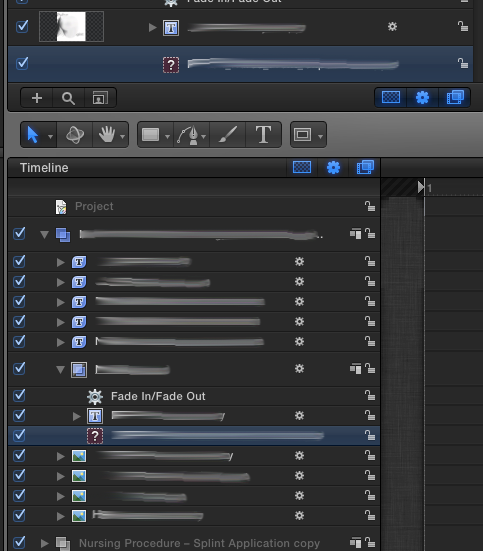
This yielded the result seen in the attached screenshot. Somehow a path to an image became corrupted, yet I can't find away to relink or update paths like you can in Indesign & Illustrator?
Is this feature in Motion, but I'm just not finding it?
Thanks!
This yielded the result seen in the attached screenshot. Somehow a path to an image became corrupted, yet I can't find away to relink or update paths like you can in Indesign & Illustrator?
Is this feature in Motion, but I'm just not finding it?
Thanks!
Please Log in to join the conversation.
13 Jan 2014 14:37 #38804
by Waterbear
Replied by Waterbear on topic Empty layer creating a crash and a corrupted file
43 views and the only response is the standard "reboot it all" one?
I can't be the only one who's seen this before.
I can't be the only one who's seen this before.
Please Log in to join the conversation.
- Scrubelicious
-

- Offline
- Platinum Member
-

Less
More
- Posts: 1228
- Thank you received: 114
13 Jan 2014 15:26 #38807
by Scrubelicious
Replied by Scrubelicious on topic Empty layer creating a crash and a corrupted file
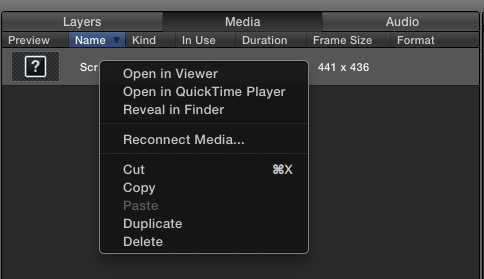
If you need to relink a object/media go into the Media TAB command - and right click the file and select reconnect.
Please Log in to join the conversation.
- Alessandro.Previti
-

- Offline
- New Member
-

Less
More
- Posts: 1
- Thank you received: 0
22 Mar 2014 11:39 #43194
by Alessandro.Previti
Replied by Alessandro.Previti on topic Empty layer creating a crash and a corrupted file
Easy, select the group containing the empty layer, delete the group, undo, the empty layer will now be a normal layer.
It's some sort of bug, easy to fix though.
It's some sort of bug, easy to fix though.
Please Log in to join the conversation.
- Stupid Raisins
-

- Offline
- Premium Member
-

23 Mar 2014 01:49 #43230
by Stupid Raisins
Raisins are the worst and I love making fcpx plugins !
Replied by Stupid Raisins on topic Empty layer creating a crash and a corrupted file
I've had the same problems. Here are some related support threads.
One
Two
Three
Since Motion 5.1 I haven't had these problems. What version of Motion are you using?
One
Two
Three
Since Motion 5.1 I haven't had these problems. What version of Motion are you using?
Raisins are the worst and I love making fcpx plugins !
Please Log in to join the conversation.
24 Apr 2014 18:20 #45025
by Waterbear
Replied by Waterbear on topic Empty layer creating a crash and a corrupted file
Looks like the 5.1 update might have fixed the issue for me as well.
Please Log in to join the conversation.
- Stupid Raisins
-
- Offline
- Premium Member
-
24 Apr 2014 18:23 #45027
by Stupid Raisins
Raisins are the worst and I love making fcpx plugins !
Replied by Stupid Raisins on topic Empty layer creating a crash and a corrupted file
Glad it's working better for you!
That problem caused me to lose all my hair...
That problem caused me to lose all my hair...
Raisins are the worst and I love making fcpx plugins !
Please Log in to join the conversation.
30 May 2014 14:16 #46988
by Waterbear
Replied by Waterbear on topic Empty layer creating a crash and a corrupted file
Grr, it's back and with a text layer now
Luckily, this fix did work.
thx!
Luckily, this fix did work.
"Easy, select the group containing the empty layer, delete the group, undo, the empty layer will now be a normal layer.
It's some sort of bug, easy to fix though."
thx!
Please Log in to join the conversation.
- Stupid Raisins
-
- Offline
- Premium Member
-
31 May 2014 23:33 #47070
by Stupid Raisins
Raisins are the worst and I love making fcpx plugins !
Replied by Stupid Raisins on topic Empty layer creating a crash and a corrupted file
Darn it! I was hoping that this would go AND stay away with 5.1.
I haven't had it happen to me...yet
I haven't had it happen to me...yet
Raisins are the worst and I love making fcpx plugins !
Please Log in to join the conversation.
