


- Posts: 138
- Thank you received: 15
3 Post Moderation Rule for New Boarders (25 Jan 2021)
New boarders will have their posts moderated - Don't worry if you cannot see your post immediately.
changing frame rate in Motion 5
21 Nov 2013 14:08 #34504
by muddygun
changing frame rate in Motion 5 was created by muddygun
Of course, you can use Motionvfx plugin to change frame rate, but i find it faster to just do it myself in the text file of the document.
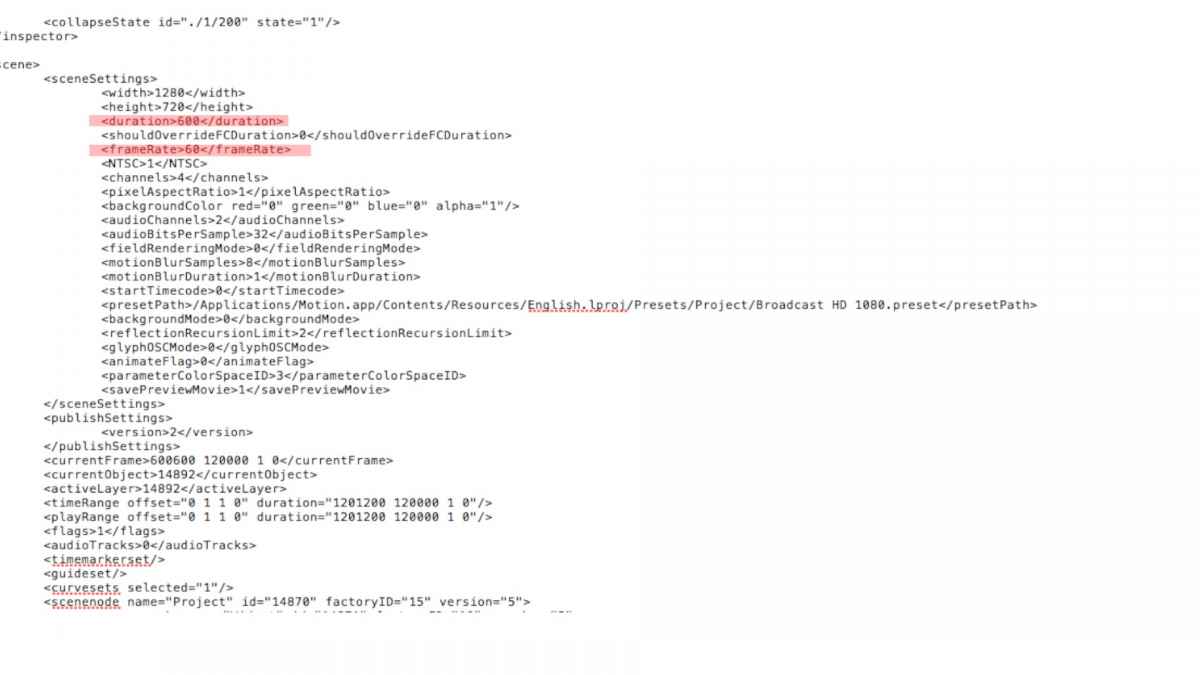
1. Open project in text edit
2. Scroll down till you see screen settings.
3. First, change your frame rate. Now, I need to do this on a regular basis because i make 1920x1080 30p graphics and then copy and make a 1280x720 60p version as well.
And for a while I thought that was it, but when you publish as a template it still thinks it should be the amount of frames it was to begin with. But when you look at the frame count, its the right amount, but it only exports half of the sequence. You will also notice that when exporting it will give a different time for entire duration...because it still thinks of the amount of frames you use to have. So...
4. Secondly, change the parameter <duration> to the amount of frames your project added. so, in my case i just usually have to double it. so for 30p footage the sequence was 150 frames, and for 60p footage i went to 300 frames.
1. Open project in text edit
2. Scroll down till you see screen settings.
3. First, change your frame rate. Now, I need to do this on a regular basis because i make 1920x1080 30p graphics and then copy and make a 1280x720 60p version as well.
And for a while I thought that was it, but when you publish as a template it still thinks it should be the amount of frames it was to begin with. But when you look at the frame count, its the right amount, but it only exports half of the sequence. You will also notice that when exporting it will give a different time for entire duration...because it still thinks of the amount of frames you use to have. So...
4. Secondly, change the parameter <duration> to the amount of frames your project added. so, in my case i just usually have to double it. so for 30p footage the sequence was 150 frames, and for 60p footage i went to 300 frames.
Please Log in to join the conversation.


21 Nov 2013 14:23 - 21 Nov 2013 14:42 #34506
by BenB
Replied by BenB on topic changing frame rate in Motion 5
Very interesting.
For versioning (as you mention in step 3), create a new project with the new frame size/rate, and then doing a copy/paste of your layers from the original to the new one. Being able to copy/paste layers from one project to another now is really nice.
But getting inside the project file can be very handy.
For versioning (as you mention in step 3), create a new project with the new frame size/rate, and then doing a copy/paste of your layers from the original to the new one. Being able to copy/paste layers from one project to another now is really nice.
But getting inside the project file can be very handy.
Last edit: 21 Nov 2013 14:42 by BenB.
Please Log in to join the conversation.
