


- Posts: 3
- Thank you received: 0
3 Post Moderation Rule for New Boarders (25 Jan 2021)
New boarders will have their posts moderated - Don't worry if you cannot see your post immediately.
Probably a noob question!?
22 Nov 2012 20:42 - 22 Nov 2012 20:42 #17658
by Rinaldo
Probably a noob question!? was created by Rinaldo
I have a straight cable cam clip through a forest and i want to add some "mist" on the ground coming towards you at the same speed as the clip including a scaling as it gets closer!
I chose a cloud from the library but when a try to keyframe the movement the second keyframe is not a movement but a scaling or similar!?
I can move it around as i want but as soon as i add keyframes it´s not doing what i wish for!
Anyone know why this is?
Thankful for an answer since i couldn´t find one that made sense in the help!
I chose a cloud from the library but when a try to keyframe the movement the second keyframe is not a movement but a scaling or similar!?
I can move it around as i want but as soon as i add keyframes it´s not doing what i wish for!
Anyone know why this is?
Thankful for an answer since i couldn´t find one that made sense in the help!
Last edit: 22 Nov 2012 20:42 by Rinaldo.
Please Log in to join the conversation.

28 Nov 2012 16:50 #17917
by BenB
Replied by BenB on topic Probably a noob question!?
Specifically what "cloud" are you using?
Please Log in to join the conversation.
28 Nov 2012 17:19 #17923
by Rinaldo
Replied by Rinaldo on topic Probably a noob question!?
The cloud is from the library in Motion5 and in this case i believe it was "smoke" from under
perticle emitters/nature.
I think the result will be the same with all the emitters and i don´t understand why i can´t keyframe it as with any other object!?
perticle emitters/nature.
I think the result will be the same with all the emitters and i don´t understand why i can´t keyframe it as with any other object!?
Please Log in to join the conversation.
28 Nov 2012 17:33 #17926
by BenB
Replied by BenB on topic Probably a noob question!?
There are 11 "smoke" emitters in the Nature collection. Which one?
What parameter specifically are you trying to keyframe?
Are you working in a 3D Group or 2D?
A sample of your video currently would help, too.
What parameter specifically are you trying to keyframe?
Are you working in a 3D Group or 2D?
A sample of your video currently would help, too.
Please Log in to join the conversation.
28 Nov 2012 17:49 #17931
by Rinaldo
Replied by Rinaldo on topic Probably a noob question!?
i think i tried both 2d and 3d.
the emitter i used is just called "fog" and that´s the only one i have with that name.
i tried keyframing the position but it didn´t work.
I could move it around manually but as soon as i added keyframe 1 there is no way of moving it any more.
It´s more a form of scaling!?
Hmmm, i see now that the group containing the fog is automatically a 3d group but i´m not sure the other groups were when i tried it.
Maybe you could just tell me how you would do it?
I´ve just placed a clip of a straight motion through a forrest and i want to add "mist" that moves by the ground and scales up as i move towards it.
Maybe i´m attacking this problem totally the wrong way!?
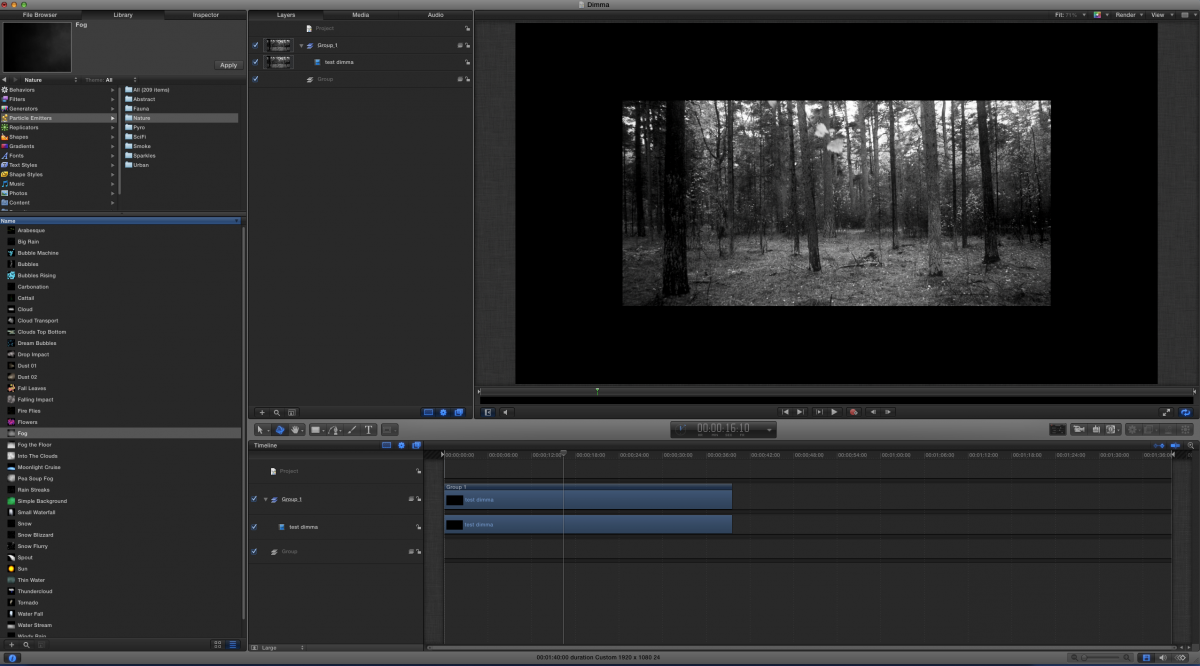
the emitter i used is just called "fog" and that´s the only one i have with that name.
i tried keyframing the position but it didn´t work.
I could move it around manually but as soon as i added keyframe 1 there is no way of moving it any more.
It´s more a form of scaling!?
Hmmm, i see now that the group containing the fog is automatically a 3d group but i´m not sure the other groups were when i tried it.
Maybe you could just tell me how you would do it?
I´ve just placed a clip of a straight motion through a forrest and i want to add "mist" that moves by the ground and scales up as i move towards it.
Maybe i´m attacking this problem totally the wrong way!?
Please Log in to join the conversation.


07 Dec 2012 10:45 #18359
by Deyson
Replied by Deyson on topic Probably a noob question!?
What I would also do to make it more realistic is to do a 2.5 D effect. Meaning I would rotoscope some of the trees on the image and pull them forward towards the camera. This way when the mist is pulled forward it goes past some of the trees. The added bonus is that is you move the camera side to side you get a 3d effect as well.
Here is something I did a while ago using Motion. I had to use Photoshop since I wanted an extreme 3D look. This effect was a achieved with on still image:
deysonortiz.com/RedHatGirl/index.html
Here is something I did a while ago using Motion. I had to use Photoshop since I wanted an extreme 3D look. This effect was a achieved with on still image:
deysonortiz.com/RedHatGirl/index.html
Please Log in to join the conversation.
