


- Posts: 6
- Thank you received: 0
3 Post Moderation Rule for New Boarders (25 Jan 2021)
New boarders will have their posts moderated - Don't worry if you cannot see your post immediately.
Motion 5 Problem with Keyframes
- bigolibagoli
-
 Topic Author
- Offline
- New Member
-

Less
More
29 Oct 2012 18:07 #16132
by bigolibagoli
Motion 5 Problem with Keyframes was created by bigolibagoli
Dear Friends,
I have a serious problem with Kframes:
after painting with paintstroke I select the shape style light streak 3 and I need to adjust the COLOR OVER STROKE commands into the Keyframes editor...I have no way to see the animated KF in editor...
I just tried to (with the right track selected):
-right click over the COLOR OVER STROKE+choose "show in KF editor" (a new untitled set is created but I cannot see the animated KF)
-drag the same COLOR OVER STROKE to the KF editor (a new untitled set is created but I cannot see the animated KF)
-drag from timeline the paint stroke track (a new untitled set is created but I cannot see the animated KF)
-choose "animated" in the KF editor but I cannot see the Animated colorstroke KF
-I trashed all the preferences
-I disclose color over stroke triangle, I select one color and click on the color KF, choose "show in the KF editor" and it's working but I can see only that animated parameter in the KF editor but I need to see all the animated parameters in the same KF editors to adjust them correctly toghether...
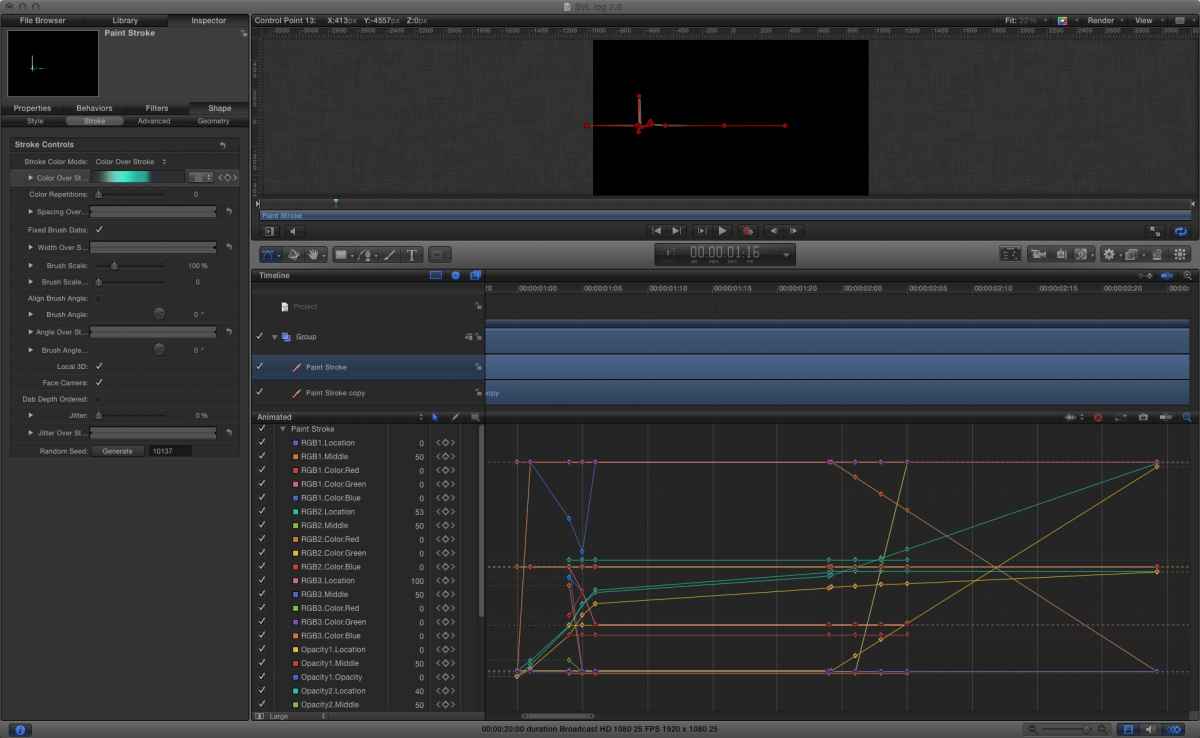
After many attempts now I can see al the animated KF only on the first track and not on the others I've copied...why..?
With Motion 4.x I have only to click on the COLOR OVER STROKE and choose SHOW IN KF EDITOR and I can see and edit all the animated parameters perfectly...
I have a serious problem with Kframes:
after painting with paintstroke I select the shape style light streak 3 and I need to adjust the COLOR OVER STROKE commands into the Keyframes editor...I have no way to see the animated KF in editor...
I just tried to (with the right track selected):
-right click over the COLOR OVER STROKE+choose "show in KF editor" (a new untitled set is created but I cannot see the animated KF)
-drag the same COLOR OVER STROKE to the KF editor (a new untitled set is created but I cannot see the animated KF)
-drag from timeline the paint stroke track (a new untitled set is created but I cannot see the animated KF)
-choose "animated" in the KF editor but I cannot see the Animated colorstroke KF
-I trashed all the preferences
-I disclose color over stroke triangle, I select one color and click on the color KF, choose "show in the KF editor" and it's working but I can see only that animated parameter in the KF editor but I need to see all the animated parameters in the same KF editors to adjust them correctly toghether...
After many attempts now I can see al the animated KF only on the first track and not on the others I've copied...why..?
With Motion 4.x I have only to click on the COLOR OVER STROKE and choose SHOW IN KF EDITOR and I can see and edit all the animated parameters perfectly...
Please Log in to join the conversation.

29 Oct 2012 18:51 #16142
by BenB
Replied by BenB on topic Motion 5 Problem with Keyframes
Yeah, the untitled set is a problem with 5. Just click that pop-up menu and set it to the Animated set. You'll see everything you need.
Please Log in to join the conversation.
- bigolibagoli
-
Topic Author
- Offline
- New Member
-
Less
More
- Posts: 6
- Thank you received: 0
29 Oct 2012 22:34 #16183
by bigolibagoli
Replied by bigolibagoli on topic Motion 5 Problem with Keyframes
dear Ben,
as I wrote...it is not working...you can see it yourself
Just click that pop-up menu and set it to the Animated set. You'll see everything you need.
as I wrote...it is not working...you can see it yourself
Please Log in to join the conversation.
- bigolibagoli
-
Topic Author
- Offline
- New Member
-
Less
More
- Posts: 6
- Thank you received: 0
29 Oct 2012 22:44 #16185
by bigolibagoli
Replied by bigolibagoli on topic Motion 5 Problem with Keyframes
mistery....it is successfull only in a track....
Please Log in to join the conversation.
