


- Posts: 19
- Thank you received: 0
3 Post Moderation Rule for New Boarders (25 Jan 2021)
New boarders will have their posts moderated - Don't worry if you cannot see your post immediately.
FCP7 Editing 4K in smaller resolution and conforming it later.
- tomasawyer
-
 Topic Author
- Offline
- New Member
-

Less
More
20 Apr 2015 02:35 #63250
by tomasawyer
Hi everyone, I have a question regarding editing my 4K footage on my FCP7.
What I do now is I transcode the 4K footage (H264) to 4K (ProRes) and edit away on a 1080 sequence - if the delivery asks for 1080.
The problem is that once I render the sequence and decide to change some small things around or add/trim clips, I have to render again for every step that I change and overall it can be very time consuming.
Is there a way to for example transcode the 4K original footage to a 720p small files JUST FOR THE EDIT and then once the sequence is a lock, conform the clips in the sequence back to their original size (4K) and export the sequence in 1080 and 4k in Pro Res?
Any other tips how to make this post production easier are appreciated!
Thank you so much.
What I do now is I transcode the 4K footage (H264) to 4K (ProRes) and edit away on a 1080 sequence - if the delivery asks for 1080.
The problem is that once I render the sequence and decide to change some small things around or add/trim clips, I have to render again for every step that I change and overall it can be very time consuming.
Is there a way to for example transcode the 4K original footage to a 720p small files JUST FOR THE EDIT and then once the sequence is a lock, conform the clips in the sequence back to their original size (4K) and export the sequence in 1080 and 4k in Pro Res?
Any other tips how to make this post production easier are appreciated!
Thank you so much.
Please Log in to join the conversation.

10 May 2015 09:49 #64254
by hyphen
Replied by hyphen on topic FCP7 Editing 4K in smaller resolution and conforming it later.
Once you transcode to 720p you will lose a lot of the information stored into the 4K file. This information can never be retrieved; it is gone for ever. That means that if you edit on a 720p sequence and then transcode the locked output to 1080p or 4K you will end up with nothing but an enlarged 720p quality video. Provided that your sequence settings match those of your clips, rendering should not be an issue especially with prores files (h264 is no go). That should be kept to a minimum unless you apply effects on each an every clip. If this is the case I would suggest that you lock your edit first and then apply any effects whatsoever.
Please Log in to join the conversation.
- tomasawyer
-
Topic Author
- Offline
- New Member
-
Less
More
- Posts: 19
- Thank you received: 0
10 May 2015 10:23 #64255
by tomasawyer
Replied by tomasawyer on topic FCP7 Editing 4K in smaller resolution and conforming it later.
Thanks for the reply... rendering only is an issue when I drag the 4K files into the 1080 timeline and after 3 minutes of raw edit footage i would like to see the result i need to render which takes a whie and then upon that every single little change i need to render again...
Please Log in to join the conversation.
12 May 2015 08:58 #64355
by hyphen
Replied by hyphen on topic FCP7 Editing 4K in smaller resolution and conforming it later.
FCP 7 does not support 4k. You can edit 4k if you convert the files to a max of 2k prores and once done conform your edit (via XML) to 4K for final output.
Please Log in to join the conversation.
- tomasawyer
-
Topic Author
- Offline
- New Member
-
Less
More
- Posts: 19
- Thank you received: 0
12 May 2015 09:14 #64356
by tomasawyer
Replied by tomasawyer on topic FCP7 Editing 4K in smaller resolution and conforming it later.
I have been told this information before, so how is it possible that I have a 4K pro res video, I import it to FCP7, drop it to a new sequence, say 'YES' - the sequence is now in 4K resolution, I do some edits and export and the exported file is a 4K file?
Please Log in to join the conversation.
12 May 2015 10:11 #64360
by lichinho
Replied by lichinho on topic FCP7 Editing 4K in smaller resolution and conforming it later.
There is a great NLE that does not require rendering all the time. I am not saying its name, but it ends in X, and can handle 4K material just great 
Please Log in to join the conversation.
12 May 2015 15:11 - 12 May 2015 15:26 #64379
by hyphen
Replied by hyphen on topic FCP7 Editing 4K in smaller resolution and conforming it later.
If you drag a 4K clip onto an empty new sequence the latter should conform to the clip's resolution and settings. Emphasis onto the "new empty sequence" part. Make sure the clips are converted to ProRes.
Which version of fcp do you have, is it 7.0 or 7.0.3?
Bear in mind that there may be issues as, as I mentioned, 4k is not really supported in FCP 7
Which version of fcp do you have, is it 7.0 or 7.0.3?
Bear in mind that there may be issues as, as I mentioned, 4k is not really supported in FCP 7
Last edit: 12 May 2015 15:26 by hyphen.
Please Log in to join the conversation.
- tomasawyer
-
Topic Author
- Offline
- New Member
-
Less
More
- Posts: 19
- Thank you received: 0
13 May 2015 00:08 #64392
by tomasawyer
Replied by tomasawyer on topic FCP7 Editing 4K in smaller resolution and conforming it later.
I have FCP7 7.0.3
As I said, I have a pro res 4K video and can drag it to new empty sequence and edit away and export no problem...?
As I said, I have a pro res 4K video and can drag it to new empty sequence and edit away and export no problem...?
Please Log in to join the conversation.

13 May 2015 08:30 #64405
by whitemax
Replied by whitemax on topic FCP7 Editing 4K in smaller resolution and conforming it later.
I'm more interested in how you transcode the 4K H.264 into ProRes?
Please Log in to join the conversation.
- tomasawyer
-
Topic Author
- Offline
- New Member
-
Less
More
- Posts: 19
- Thank you received: 0
13 May 2015 08:34 #64406
by tomasawyer
Replied by tomasawyer on topic FCP7 Editing 4K in smaller resolution and conforming it later.
Compressor or MPEG Streamclip.....
Please Log in to join the conversation.
- Scrubelicious
-

- Offline
- Platinum Member
-

Less
More
- Posts: 1228
- Thank you received: 114
13 May 2015 09:30 #64411
by Scrubelicious
Replied by Scrubelicious on topic FCP7 Editing 4K in smaller resolution and conforming it later.
Have you considered trying a Proxy workflow in Final cut Pro 7?
Please Log in to join the conversation.
- tomasawyer
-
Topic Author
- Offline
- New Member
-
Less
More
- Posts: 19
- Thank you received: 0
13 May 2015 09:54 #64412
by tomasawyer
Replied by tomasawyer on topic FCP7 Editing 4K in smaller resolution and conforming it later.
no, could you please elaborate? Convert to Proxy instead of 422? and then bringing it back?
Please Log in to join the conversation.
- Scrubelicious
-
- Offline
- Platinum Member
-
Less
More
- Posts: 1228
- Thank you received: 114
13 May 2015 11:37 #64417
by Scrubelicious
Replied by Scrubelicious on topic FCP7 Editing 4K in smaller resolution and conforming it later.
Before I start writing paragraphs on how to check out this nice video on Tapless Offline / Online Workflow from Shane Ross.
Creative COW FCP: Tapeless Offline / Online Workflow
It should give you a good idea and understanding. If you have any other questions after watching the video post your question here.
Cheers
Creative COW FCP: Tapeless Offline / Online Workflow
It should give you a good idea and understanding. If you have any other questions after watching the video post your question here.
Cheers
Please Log in to join the conversation.
- tomasawyer
-
Topic Author
- Offline
- New Member
-
Less
More
- Posts: 19
- Thank you received: 0
14 May 2015 02:44 #64460
by tomasawyer
Replied by tomasawyer on topic FCP7 Editing 4K in smaller resolution and conforming it later.
Thanks for this video.
I have two questions:
1) My camera is Lumix-GH4 so how would you recommend me going about log and transfer because right now FCP7 is not allowing me to log and transfer the native footage from GH4 - is there a plug in like for the Canon 5D?
2) My workflow now on smaller scale projects is: take the original GH4 footage - transcode it to ProRes 422 LT, Import to FCP, create a 1080p Sequence, drop and edit - export and for some Transode to .mp4 ... Many editing experts told me that there is no visible difference between ProRes 422 LT and 422 and HQ if I am not doing any VFX/graphics/green screen, just pure documentary form videos. Would you agree?
I have two questions:
1) My camera is Lumix-GH4 so how would you recommend me going about log and transfer because right now FCP7 is not allowing me to log and transfer the native footage from GH4 - is there a plug in like for the Canon 5D?
2) My workflow now on smaller scale projects is: take the original GH4 footage - transcode it to ProRes 422 LT, Import to FCP, create a 1080p Sequence, drop and edit - export and for some Transode to .mp4 ... Many editing experts told me that there is no visible difference between ProRes 422 LT and 422 and HQ if I am not doing any VFX/graphics/green screen, just pure documentary form videos. Would you agree?
Please Log in to join the conversation.
- Scrubelicious
-
- Offline
- Platinum Member
-
Less
More
- Posts: 1228
- Thank you received: 114
16 May 2015 20:04 - 16 May 2015 20:05 #64603
by Scrubelicious
Replied by Scrubelicious on topic FCP7 Editing 4K in smaller resolution and conforming it later.
Sorry I couldn't tell you if there is a plug for Final Cut Pro 7. I would have to do research myself since I stopped using Final Cut Pro 7 awhile back.
This is true that there "should not" be any visible difference for the eye when viewing the original transcoded footage.
ProRes LT is good if you are limited to bandwidth and hard drive space. Great in a Broadcast environment or a off-line to on-line process.
ProRes 422 will most closely match the original image quality.
ProRes 422 HQ is more in the direction RED, HDCAM, or HDCAM SR... overkill for DSLR.
I would go with ProRes 422 unless you are running on low drive space.
Take look at the Apple ProRes White Paper to give you a better understanding of the different flavours of ProRes.
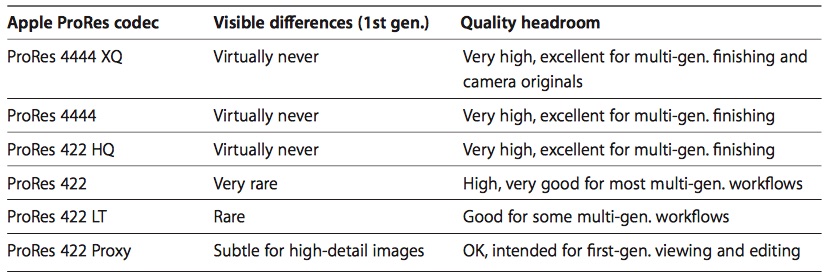
This is true that there "should not" be any visible difference for the eye when viewing the original transcoded footage.
ProRes LT is good if you are limited to bandwidth and hard drive space. Great in a Broadcast environment or a off-line to on-line process.
ProRes 422 will most closely match the original image quality.
ProRes 422 HQ is more in the direction RED, HDCAM, or HDCAM SR... overkill for DSLR.
I would go with ProRes 422 unless you are running on low drive space.
Take look at the Apple ProRes White Paper to give you a better understanding of the different flavours of ProRes.
Last edit: 16 May 2015 20:05 by Scrubelicious.
Please Log in to join the conversation.
- tomasawyer
-
Topic Author
- Offline
- New Member
-
Less
More
- Posts: 19
- Thank you received: 0
20 May 2015 04:48 #64713
by tomasawyer
Replied by tomasawyer on topic FCP7 Editing 4K in smaller resolution and conforming it later.
Thanks.
Watched the online/offline workflow again, and since option 1 (log and transfer) is not working for my GH4 the only option is option 2.
The problem is that it still leaves me hassled how to go about the workflow. Please consider this -
ORIGINAL Footage - is in h.264 4K
CONVERTED Footage would have to be Pro Res 422 4K (I heard that dropping 4K into a 1080 sequence is better than downscaling your videos while transcoding?)
for the offline workflow I would then have to create THIRD footage - Pro Res Proxy Offline
This means that ultimately I would be chewing up even more space and time trying to work that way.
Maybe it's just best to convert once to Pro Res 422 and then drop it to 1080 sequence and deal with the rendering when needed?
Thanks
Watched the online/offline workflow again, and since option 1 (log and transfer) is not working for my GH4 the only option is option 2.
The problem is that it still leaves me hassled how to go about the workflow. Please consider this -
ORIGINAL Footage - is in h.264 4K
CONVERTED Footage would have to be Pro Res 422 4K (I heard that dropping 4K into a 1080 sequence is better than downscaling your videos while transcoding?)
for the offline workflow I would then have to create THIRD footage - Pro Res Proxy Offline
This means that ultimately I would be chewing up even more space and time trying to work that way.
Maybe it's just best to convert once to Pro Res 422 and then drop it to 1080 sequence and deal with the rendering when needed?
Thanks
Please Log in to join the conversation.

20 May 2015 05:28 #64716
by AppleGuru
Replied by AppleGuru on topic FCP7 Editing 4K in smaller resolution and conforming it later.
Your concern can be easily solved by purchasing this App called Final Cut Pro X for a affordable price.
You won't need a workflow since the application will do it all for you.
you will have to create Proxy separately in your situation there is no other way around this.
You won't need a workflow since the application will do it all for you.
you will have to create Proxy separately in your situation there is no other way around this.
Please Log in to join the conversation.
20 May 2015 08:46 #64721
by whitemax
Replied by whitemax on topic FCP7 Editing 4K in smaller resolution and conforming it later.
Why not edit the 4K H.264 directly? After the editing done, you can save it as 4k ProRes later.
Please Log in to join the conversation.
- tomasawyer
-
Topic Author
- Offline
- New Member
-
Less
More
- Posts: 19
- Thank you received: 0
20 May 2015 09:29 #64723
by tomasawyer
Replied by tomasawyer on topic FCP7 Editing 4K in smaller resolution and conforming it later.
I can't. FCP 7 won't let me import the files in...
Please Log in to join the conversation.
- tomasawyer
-
Topic Author
- Offline
- New Member
-
Less
More
- Posts: 19
- Thank you received: 0
20 May 2015 11:09 #64725
by tomasawyer
Replied by tomasawyer on topic FCP7 Editing 4K in smaller resolution and conforming it later.
"You won't need a workflow since the application will do it all for you."
Do you mean FCP X will allow me to edit natively in H 264?
Do you mean FCP X will allow me to edit natively in H 264?
Please Log in to join the conversation.
