


- Posts: 3
- Thank you received: 0
3 Post Moderation Rule for New Boarders (25 Jan 2021)
New boarders will have their posts moderated - Don't worry if you cannot see your post immediately.
When I zoom in a image the format changes.. Help!
08 Oct 2014 15:51 #53808
by Gemma
When I zoom in a image the format changes.. Help! was created by Gemma
Hi guys,
I am editing a video for a while, and I recently tried to zoom in some images but when I do it the Format of the image changes, it doesn't zoom in following the sequence settings I set up... I have been trying to understand what's the problem but no idea!!
If you guys can help me please, I need to send this video asap and there is no way I can figure out what's happening.
The format of the video is:
720x576 PAL-CCIR (5:4)
Anamorphic
25fps
Compressor DV-PAL
Thank you,
Gemma
I am editing a video for a while, and I recently tried to zoom in some images but when I do it the Format of the image changes, it doesn't zoom in following the sequence settings I set up... I have been trying to understand what's the problem but no idea!!
If you guys can help me please, I need to send this video asap and there is no way I can figure out what's happening.
The format of the video is:
720x576 PAL-CCIR (5:4)
Anamorphic
25fps
Compressor DV-PAL
Thank you,
Gemma
Please Log in to join the conversation.

08 Oct 2014 16:12 #53809
by ddixon
Replied by ddixon on topic When I zoom in a image the format changes.. Help!
If you mean literally still images, and if you mean when you zoom in they get cropped off while any black areas outside the photo are maintained rather than zoomed - just make a compound clip of the image first.
If that's not what you meant, sorry. Maybe someone else will understand, or you could give more specifics.
If that's not what you meant, sorry. Maybe someone else will understand, or you could give more specifics.
Please Log in to join the conversation.

08 Oct 2014 16:20 - 08 Oct 2014 16:21 #53811
by BenB
Replied by BenB on topic When I zoom in a image the format changes.. Help!
FCP7 did not have Compound Clips.
I don't understand what is happening. Can you post screen shots? Where do you see the format changing? How are you zooming in?
I don't understand what is happening. Can you post screen shots? Where do you see the format changing? How are you zooming in?
Last edit: 08 Oct 2014 16:21 by BenB.
Please Log in to join the conversation.
08 Oct 2014 16:25 #53813
by ddixon
Replied by ddixon on topic When I zoom in a image the format changes.. Help!
Apologies - didn't realize this was in the FCP7 forum. As Ben said - please give more details.
Please Log in to join the conversation.
09 Oct 2014 16:19 - 09 Oct 2014 16:25 #53875
by Gemma
Replied by Gemma on topic When I zoom in a image the format changes.. Help!
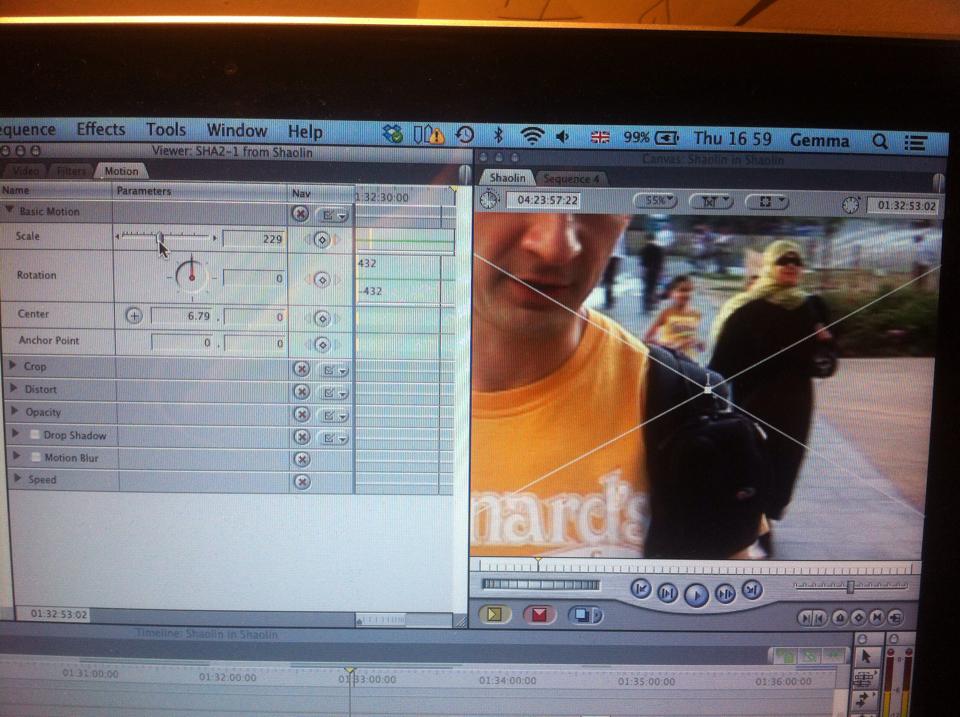
Sorry if I didn't explain myself properly, but yeah I am talking about a clip, no still image. So when I want to zoom in using Motion-scale the image I try to zoom in, changes format.
I tried to create another sequence and copy and paste- removing attributes- distort so as to have the format that I actually set up first. And that works but the quality of the image is not good, it is a bit blurry. Do you know if I can do something to have the same quality I had before? Or I still can use the old sequence if I know how to fix it.
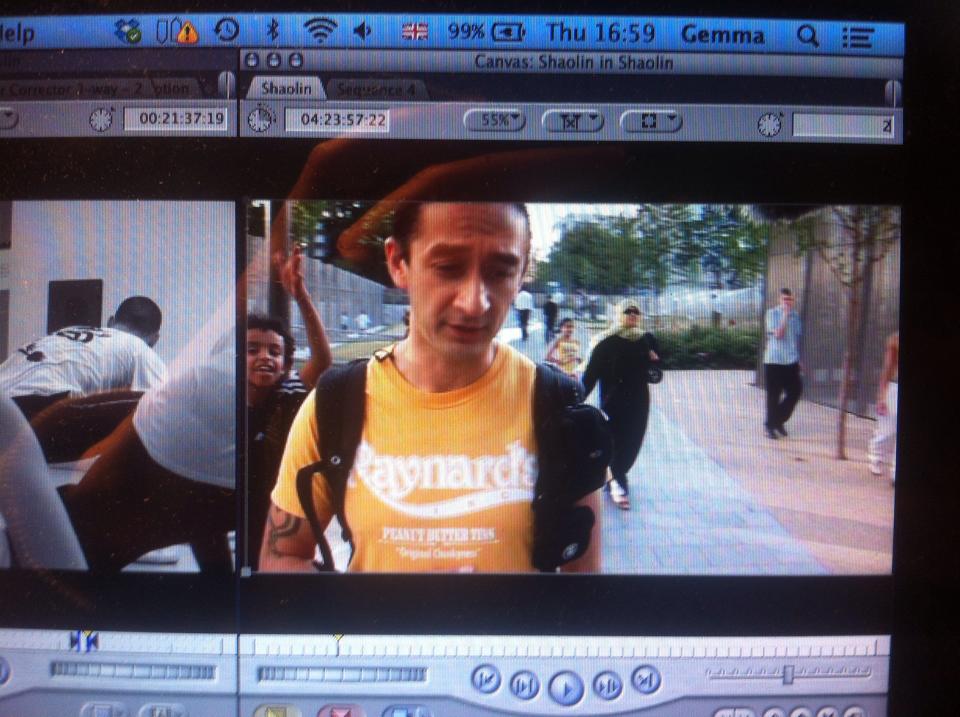
I attach pictures: the first one is the video is I have ( the format has been changed even if the settings are the same!) The second one you can see what happens when I Zoom in.
thanks guys
I tried to create another sequence and copy and paste- removing attributes- distort so as to have the format that I actually set up first. And that works but the quality of the image is not good, it is a bit blurry. Do you know if I can do something to have the same quality I had before? Or I still can use the old sequence if I know how to fix it.
I attach pictures: the first one is the video is I have ( the format has been changed even if the settings are the same!) The second one you can see what happens when I Zoom in.
thanks guys
Last edit: 09 Oct 2014 16:25 by Gemma.
Please Log in to join the conversation.
09 Oct 2014 16:47 - 09 Oct 2014 17:12 #53876
by BenB
Replied by BenB on topic When I zoom in a image the format changes.. Help!
To start with, I did an overlay of both of those photos, and the Sequence format/aspect ratio has not changed at all, only the "scale" of the photo.
"Format" is the set image frame size and aspect ratio. Photos are often not the same format (frame size & aspect ratio) of video, thus you get either black bars across the top/bottom (letterbox, as in your situation), or on the sides (pillar box, as in my example below). When you zoom in, the image is becoming larger, filling the full video frame. This is basic geometry, it will work this way in any NLE.
If you want to avoid this, you'll have to start by setting the photo's Scale so that it fills the full video frame without the letterbox (or pillarbox) that you're seeing.
Here, I have a video frame size of 1280x720. I have a photo that is 2592x1728. I have to resize the photo to force it to fit inside of the video frame either to see the full photo (giving pillarbox), or scale it so it fills the video frame (cropping the photo).
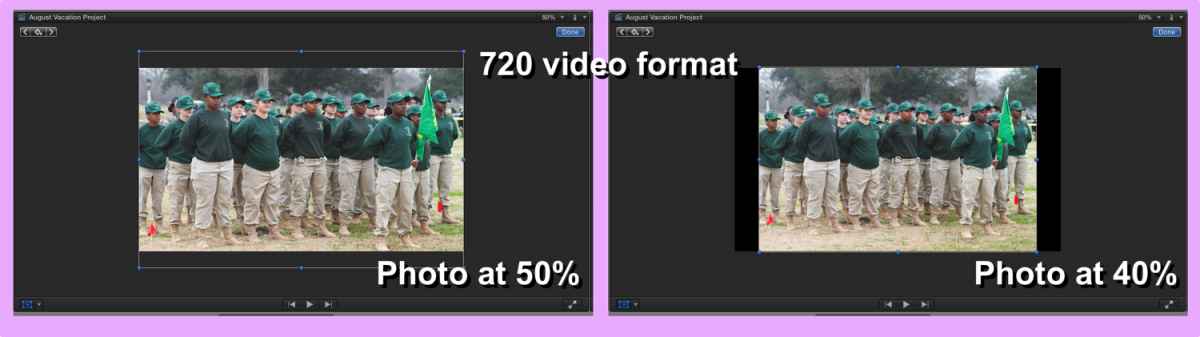
"Format" is the set image frame size and aspect ratio. Photos are often not the same format (frame size & aspect ratio) of video, thus you get either black bars across the top/bottom (letterbox, as in your situation), or on the sides (pillar box, as in my example below). When you zoom in, the image is becoming larger, filling the full video frame. This is basic geometry, it will work this way in any NLE.
If you want to avoid this, you'll have to start by setting the photo's Scale so that it fills the full video frame without the letterbox (or pillarbox) that you're seeing.
Here, I have a video frame size of 1280x720. I have a photo that is 2592x1728. I have to resize the photo to force it to fit inside of the video frame either to see the full photo (giving pillarbox), or scale it so it fills the video frame (cropping the photo).
Last edit: 09 Oct 2014 17:12 by BenB.
Please Log in to join the conversation.
