


- Posts: 4
- Thank you received: 0
3 Post Moderation Rule for New Boarders (25 Jan 2021)
New boarders will have their posts moderated - Don't worry if you cannot see your post immediately.
v1 source button disappears
15 Jan 2014 05:38 #38937
by jpborn
v1 source button disappears was created by jpborn
Hi I was editing a sequence of several clips of video...then I added a single audio file and when I went to edit the audio track to insert another audio file, I was unable to unhook the source for the v1 track because it simply wasn't there. I closed the program and turned back on same problem, tried to reset tracks, same thing, nothing, even deleted preferences and still didn't fixed...
Anybody know in simple terms what may have happened or if it is a bug, I mean what the heck, this makes it impossible to insert audio into a sequence!
Using FCP 7 in Mavericks, on a 2009 Macbook Pro,
thanks!
Anybody know in simple terms what may have happened or if it is a bug, I mean what the heck, this makes it impossible to insert audio into a sequence!
Using FCP 7 in Mavericks, on a 2009 Macbook Pro,
thanks!
Please Log in to join the conversation.
15 Jan 2014 13:51 #38961
by jpborn
Replied by jpborn on topic v1 source button disappears
18 views and no help with this? Is it that uncommon or weird?
Thanks very much, need help here!!
Thanks very much, need help here!!
Please Log in to join the conversation.

15 Jan 2014 19:00 #38999
by BenB
Replied by BenB on topic v1 source button disappears
Can we get a screen shot?
I know some folks have no issues with legacy FCP in Mavericks. I know some folks, including myself, had major issues.
I know some folks have no issues with legacy FCP in Mavericks. I know some folks, including myself, had major issues.
Please Log in to join the conversation.
15 Jan 2014 19:16 #39005
by jpborn
Replied by jpborn on topic v1 source button disappears
Hi Ben,
Thanks for responding, here are the screenshots...
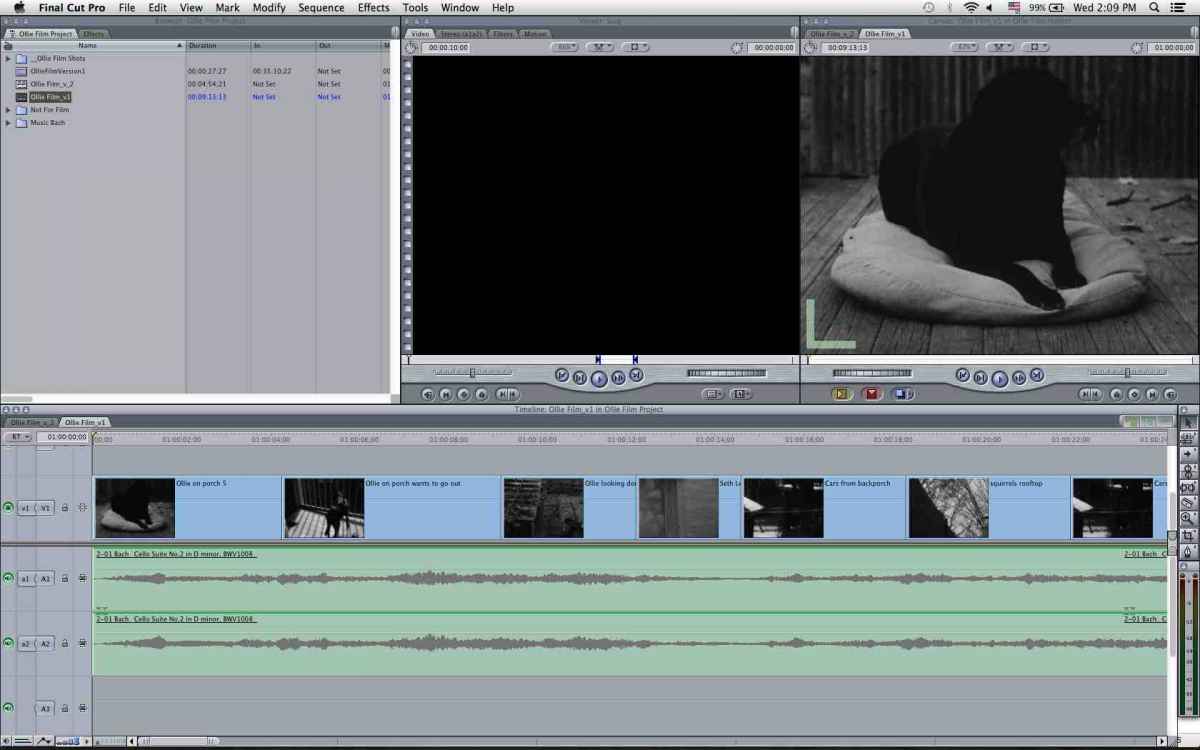
Screen shot 1-immediately upon opening the Sequence
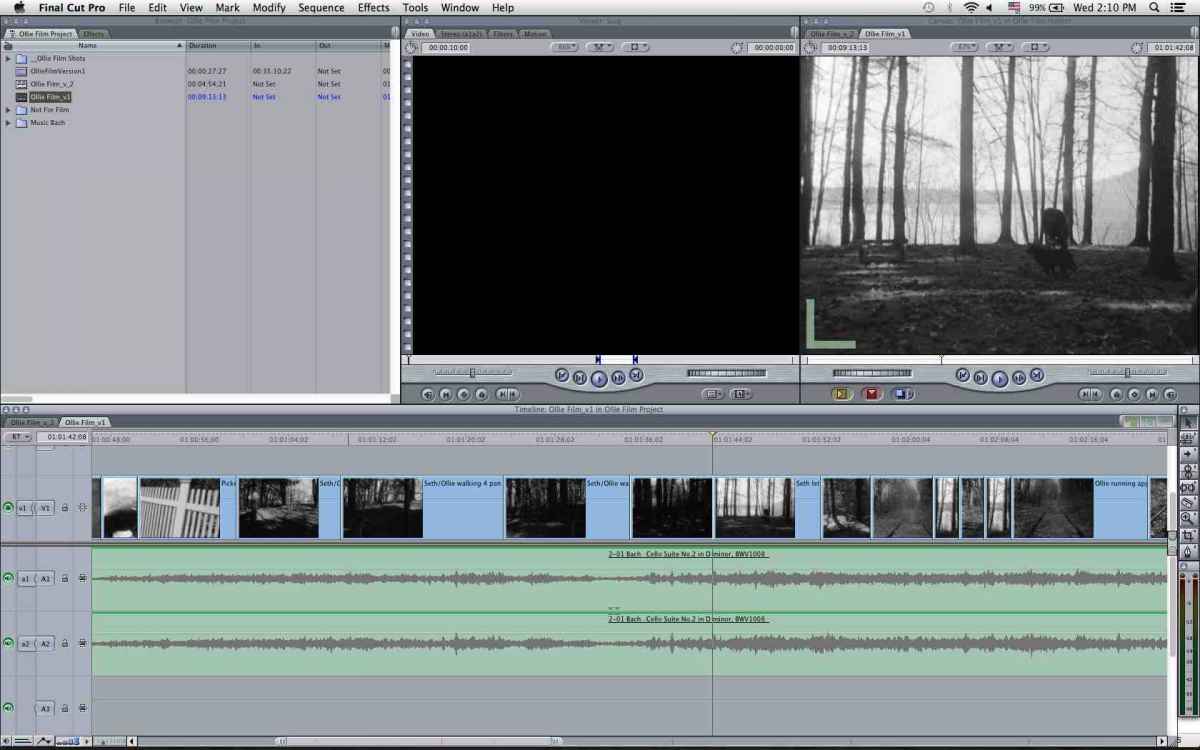
Screen shot 2-after disabling v1 from V! line
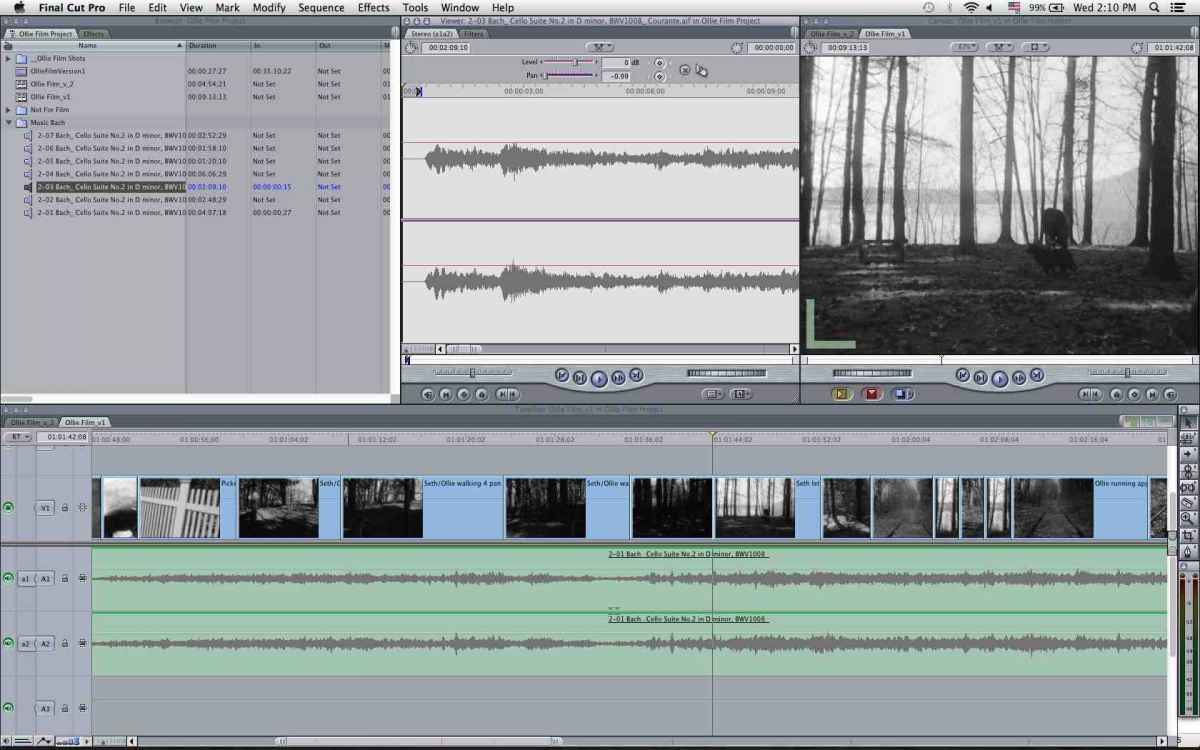
Screen shot 3-immeidately upon clicking a music file to open in the Viewer, you can see v1 button is completely gone...
Thanks for responding, here are the screenshots...
Screen shot 1-immediately upon opening the Sequence
Screen shot 2-after disabling v1 from V! line
Screen shot 3-immeidately upon clicking a music file to open in the Viewer, you can see v1 button is completely gone...
Please Log in to join the conversation.
16 Jan 2014 04:47 #39038
by jpborn
Replied by jpborn on topic v1 source button disappears
It's odd though, I was told that I could use mp3 files for the music, but I was unable to import m4a files into my Browser which is odd because it is an Apple program and it says in the manual that you should be able to use them. So I converted those back to aiff files and imported those.
What's odd is I decided to just go ahead and delete the music track from the sequence in the Timeline the v1 source button returned, but when I clicked on the music files in the Browser, it disappeared again!! With nothing being in the Timeline or having to do with the timeline at all just the Browser...so I decided to just delete all the music clips I imported and the button has come back! Very strange, so now I guess I'll experiment with different music files...but I really find that odd...
Any idea what that might be if it is a music program? Why it won't except m4a files and glitch with aiff files...very odd...
What's odd is I decided to just go ahead and delete the music track from the sequence in the Timeline the v1 source button returned, but when I clicked on the music files in the Browser, it disappeared again!! With nothing being in the Timeline or having to do with the timeline at all just the Browser...so I decided to just delete all the music clips I imported and the button has come back! Very strange, so now I guess I'll experiment with different music files...but I really find that odd...
Any idea what that might be if it is a music program? Why it won't except m4a files and glitch with aiff files...very odd...
Please Log in to join the conversation.
16 Jan 2014 18:01 #39088
by BenB
Replied by BenB on topic v1 source button disappears
You will only see the track patch tabs that are active in the file you have highlighted. If it is an audio only file, there won't be any video tabs, as there is no video to be able to patch through.
FCP 7 didn't work well with MP3 files, you need to transcode them to AIFF.
FCP 7 didn't work well with MP3 files, you need to transcode them to AIFF.
Please Log in to join the conversation.
