


- Posts: 1
- Thank you received: 0
3 Post Moderation Rule for New Boarders (25 Jan 2021)
New boarders will have their posts moderated - Don't worry if you cannot see your post immediately.
Technical issue FCP 7.0.3
04 Sep 2013 15:13 #30741
by CIAIDB
Technical issue FCP 7.0.3 was created by CIAIDB
Hi All
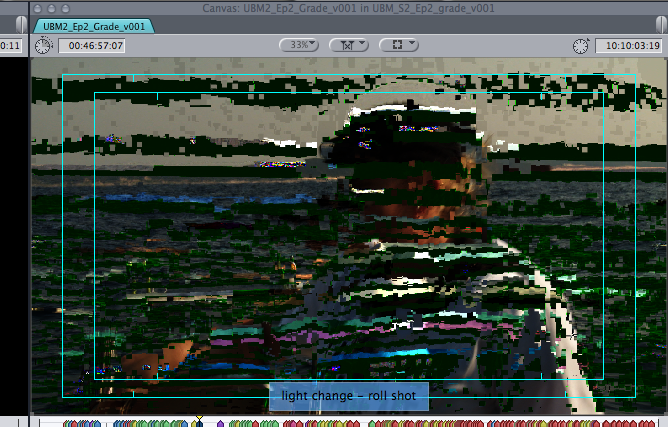
I'm working in FCP 7.0.3 and I'm experiencing crashes and the viewer/canvas image bombs out (see the attached pic). When working in Color it crashes and the broadcast monitor goes to black.
What could be the cause?
Specs:
OS Mountain Lion
Mac Pro
2x 2.4 GHz Quad-Core Intel Xeon
20GB DDR3
ATI Radeon HD 5770
Black Magic Decklink HD 3D
External monitor & broadcast monitor
Any advice/suggestions welcome!
Thanks!
I'm working in FCP 7.0.3 and I'm experiencing crashes and the viewer/canvas image bombs out (see the attached pic). When working in Color it crashes and the broadcast monitor goes to black.
What could be the cause?
Specs:
OS Mountain Lion
Mac Pro
2x 2.4 GHz Quad-Core Intel Xeon
20GB DDR3
ATI Radeon HD 5770
Black Magic Decklink HD 3D
External monitor & broadcast monitor
Any advice/suggestions welcome!
Thanks!
Please Log in to join the conversation.
- ronny courtens
-

- Offline
- Moderator
-

Less
More
- Posts: 4455
- Thank you received: 962
04 Sep 2013 16:38 - 04 Sep 2013 16:39 #30745
by ronny courtens
Replied by ronny courtens on topic Technical issue FCP 7.0.3
First thing you can do is shut the Mac down, wait a minute and switch it on again. If it's a graphics card issue this could set it straight.
You could try trashing your FCP preferences, but since you also have issues in Color this probably won't help.
Next thing you can do is disconnect everything from your Mac, start it up, launch FCP and see if you have the issue.
If you still have the issue with every external device disconnected: check your RAM to see if all your RAM is okay.
If not: start with connecting your second monitor, then launch FCP and see if the problem comes back.
You could try trashing your FCP preferences, but since you also have issues in Color this probably won't help.
Next thing you can do is disconnect everything from your Mac, start it up, launch FCP and see if you have the issue.
If you still have the issue with every external device disconnected: check your RAM to see if all your RAM is okay.
If not: start with connecting your second monitor, then launch FCP and see if the problem comes back.
Last edit: 04 Sep 2013 16:39 by ronny courtens.
Please Log in to join the conversation.
