


- Posts: 1
- Thank you received: 0
3 Post Moderation Rule for New Boarders (25 Jan 2021)
New boarders will have their posts moderated - Don't worry if you cannot see your post immediately.
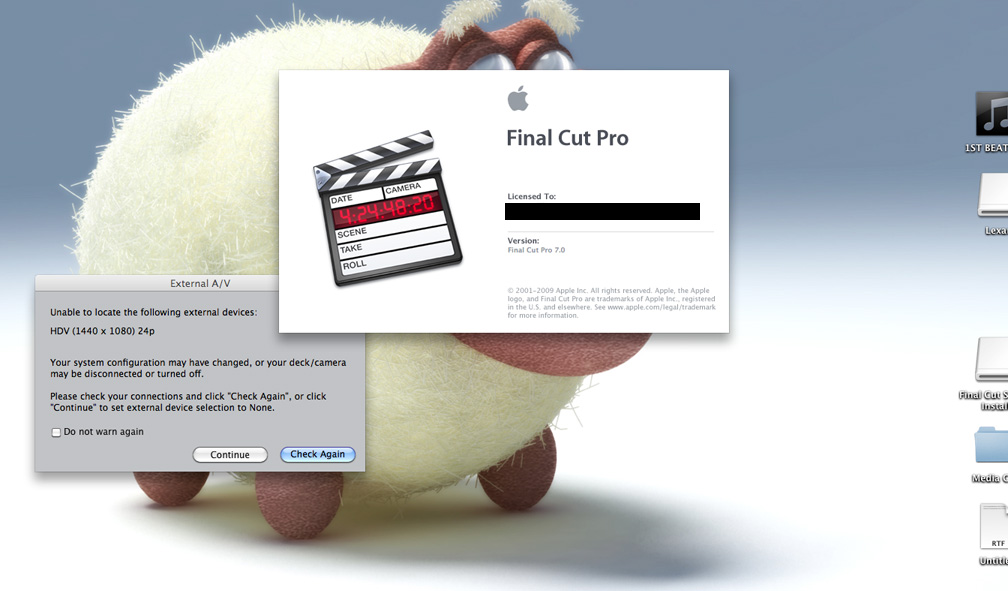
Unable to run program, due to External a/v error.
04 Dec 2012 10:03 #18153
by hde1989
Unable to run program, due to External a/v error. was created by hde1989
Hi there.
I went to open FCP today and this 'external A/V' window came up BEHIND the startup window*. When I click either option (to continue, or check again) it gives me an alert sound and am unable to select one. This is only my 2nd time opening this program on this computer and selected a totally wrong option in my initial setup (HDV 1440 X 1080 24 p).
I have already uninstalled, and re installed the program and am still receiving this message.
I am totally unable to start the program now, and am wondering if there is any system setting on my computer i could change? Or anyway at all even?
Thanks!
I went to open FCP today and this 'external A/V' window came up BEHIND the startup window*. When I click either option (to continue, or check again) it gives me an alert sound and am unable to select one. This is only my 2nd time opening this program on this computer and selected a totally wrong option in my initial setup (HDV 1440 X 1080 24 p).
I have already uninstalled, and re installed the program and am still receiving this message.
I am totally unable to start the program now, and am wondering if there is any system setting on my computer i could change? Or anyway at all even?
Thanks!
Please Log in to join the conversation.

04 Dec 2012 12:30 #18159
by cgbier
Replied by cgbier on topic Unable to run program, due to External a/v error.
Did you trash your Preferences already? When the A/V message shows up, you normally just click "Continue" and FCP continues its start up routines.
Please Log in to join the conversation.

04 Dec 2012 15:47 #18171
by dgwvideo
Creating history....one edit at a time !
Replied by dgwvideo on topic Unable to run program, due to External a/v error.
That is a system AV setting in preferences that needs to be set. FCP is looking for a previously connected device, (my guess is a Canon or some HDV camera that was once used and no longer connected). Selecting an EASY SETUP for what you now want to do should fix that.
Creating history....one edit at a time !
Please Log in to join the conversation.
