


- Posts: 8
- Thank you received: 0
3 Post Moderation Rule for New Boarders (25 Jan 2021)
New boarders will have their posts moderated - Don't worry if you cannot see your post immediately.
Stopmotion - directional fade and consistent background?
11 Jun 2012 13:04 - 11 Jun 2012 13:09 #9561
by vml_
Stopmotion - directional fade and consistent background? was created by vml_
Hello. I'm trying to create a stopmotion in which objects added to a frame fade in a specified direction. Here's some pictures which show what I'd like to achieve (taken from
here
):
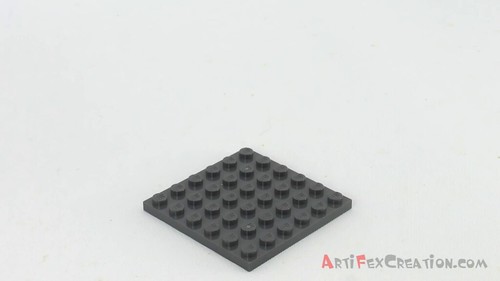
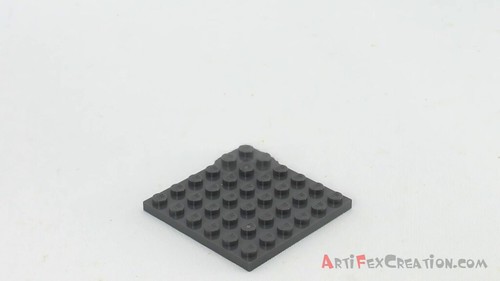
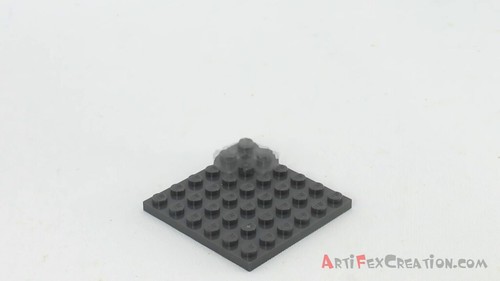
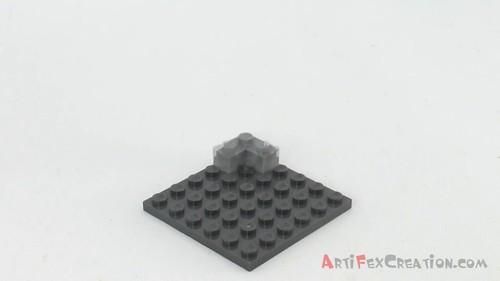
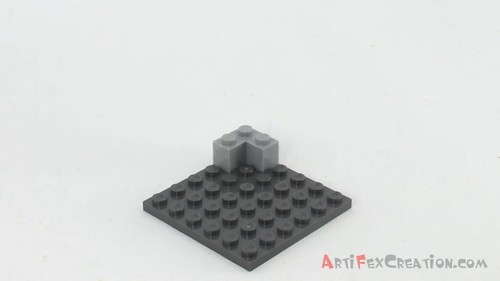
Is it possible to achieve this in FCPX?
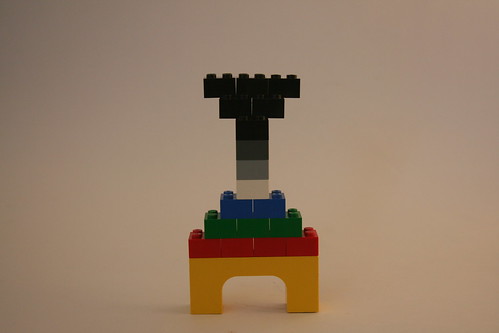
The second thing that has me stumped is how to achieve a consistent (white) background throughout a stop motion. FCPX's 'Match Color' works well for video, but seems to produce extremely inconsistent results for pictures, even across a simple ten-frame animation. I could use Photoshop, but would prefer not to. Here's one of the aforementioned ten-frames:
DIsclaimer: I'm seeking this knowledge for educational purposes, and not to compete with artifex. Lego just happens to be a convenient medium for testing this stuff. I actually plan to disassemble a printer, and reassemble it into another, for a class project.
Is it possible to achieve this in FCPX?
The second thing that has me stumped is how to achieve a consistent (white) background throughout a stop motion. FCPX's 'Match Color' works well for video, but seems to produce extremely inconsistent results for pictures, even across a simple ten-frame animation. I could use Photoshop, but would prefer not to. Here's one of the aforementioned ten-frames:
DIsclaimer: I'm seeking this knowledge for educational purposes, and not to compete with artifex. Lego just happens to be a convenient medium for testing this stuff. I actually plan to disassemble a printer, and reassemble it into another, for a class project.
Last edit: 11 Jun 2012 13:09 by vml_. Reason: Added disclaimer
Please Log in to join the conversation.
- Scrubelicious
-

- Offline
- Platinum Member
-

Less
More
- Posts: 1228
- Thank you received: 114
11 Jun 2012 13:40 - 11 Jun 2012 14:07 #9562
by Scrubelicious
Replied by Scrubelicious on topic Re: Stopmotion - directional fade and consistent background?
Well there many ways to do this effect.
The old school way would be (could) take photos from the Printer being disassembled. Make sure the camera and printer are in the same location.
Fade in and out from photo to photo.
The Artifex Lego video was likely done in a 3D Application like Cinema 4D or 3D Studio.
The old school way would be (could) take photos from the Printer being disassembled. Make sure the camera and printer are in the same location.
Fade in and out from photo to photo.
The Artifex Lego video was likely done in a 3D Application like Cinema 4D or 3D Studio.
Last edit: 11 Jun 2012 14:07 by Scrubelicious.
Please Log in to join the conversation.
11 Jun 2012 14:10 - 11 Jun 2012 14:14 #9563
by vml_
Replied by vml_ on topic Re: Stopmotion - directional fade and consistent background?
Thanks for the tips. I understand the basics of stop motion, and how to achieve basic fades. However, what I'd like to do is apply a 'directional fade' to an object to give the illusion of motion. In the image sequence I've posted, I believe only the first and last frames are actual pictures, and the rest are computer sorcery. That's what I'd like to learn.
Edit: I've now read the addendum to your post. He uses Adobe After Effects and Premiere, but withholds information on how to achieve the effects (I presume for commercial reasons).
Edit: I've now read the addendum to your post. He uses Adobe After Effects and Premiere, but withholds information on how to achieve the effects (I presume for commercial reasons).
Last edit: 11 Jun 2012 14:14 by vml_.
Please Log in to join the conversation.

12 Jun 2012 00:07 #9569
by BenB
Replied by BenB on topic Re: Stopmotion - directional fade and consistent background?
It looks like the second piece "grows" up from the surface of the first, as it fades in. Is that correct? Now sure without seeing the actual video clip.
If this is so, then a simple mask and opacity keyframe (crossfade) would do. super simple.
If he did this in AE and PPro, you can do it in Motion and FCP X, probably faster.
If this is so, then a simple mask and opacity keyframe (crossfade) would do. super simple.
If he did this in AE and PPro, you can do it in Motion and FCP X, probably faster.
Please Log in to join the conversation.
12 Jun 2012 01:50 #9589
by vml_
Replied by vml_ on topic Re: Stopmotion - directional fade and consistent background?
Yup, that's correct (the first piece is also being distorted, but that doesn't seem essential). Here's the video:
While the fading in of the second piece can be done in FCP X, it seems that Motion is required to make it "grow" out the first. Could you please show me how the latter is done/direct me to some tutorials? My searches on the topic haven't been successful.
While the fading in of the second piece can be done in FCP X, it seems that Motion is required to make it "grow" out the first. Could you please show me how the latter is done/direct me to some tutorials? My searches on the topic haven't been successful.
Please Log in to join the conversation.
12 Jun 2012 02:11 #9590
by BenB
Replied by BenB on topic Re: Stopmotion - directional fade and consistent background?
Well, you're asking for a lot in a detailed tutorial. It will require a custom matte, or the distortion and crop tools, and keyframing, very basics to using Motion. I'd highly recommend you do the Motion 5 Fast Track from Ripple Training and actually learn to use the basics of Motion properly. Or find someone to do the compositing and effects for you.
Are you familiar with the bezier tool and mattes in Motion at all?
Are you familiar with the bezier tool and mattes in Motion at all?
Please Log in to join the conversation.
12 Jun 2012 02:54 #9593
by vml_
Replied by vml_ on topic Re: Stopmotion - directional fade and consistent background?
Nope, I haven't got the program yet. I will have a look at some Motion tutorials; thanks for the suggestions. If that doesn't work out (or is too time consuming, since I need the whole project done in six days), a keyframed fade in FCP X seems a good compromise.
Thanks again for your help
Thanks again for your help
Please Log in to join the conversation.
12 Jun 2012 03:18 - 12 Jun 2012 03:18 #9595
by BenB
Replied by BenB on topic Re: Stopmotion - directional fade and consistent background?
Six days! OK, we need to get this done! Contact me off forum (email is in my profile here) and we'll get this worked out.
But it does give me an idea for a tutorial, and as soon as I'm done with my current project, I'll whip it up and post it. But not in six days. LOL!
But it does give me an idea for a tutorial, and as soon as I'm done with my current project, I'll whip it up and post it. But not in six days. LOL!
Last edit: 12 Jun 2012 03:18 by BenB.
Please Log in to join the conversation.
- Scrubelicious
-
- Offline
- Platinum Member
-
Less
More
- Posts: 1228
- Thank you received: 114
12 Jun 2012 13:07 #9632
by Scrubelicious
Replied by Scrubelicious on topic Re: Stopmotion - directional fade and consistent background?
What other Application do you have?
Please Log in to join the conversation.
12 Jun 2012 13:53 - 14 Aug 2012 11:04 #9635
by BenB
Replied by BenB on topic Re: Stopmotion - directional fade and consistent background?
This is what you want, right?
Video removed
Here's a Motion project that has three Groups. Two are set up to do this effect with a Matte in two different ways. The other set up to do this effect keyframing the Crop.Bottom parameter. The Mattes are quicker, easier, and smoother but I wanted to show there's more than one way of doing this.
If I was working with actual lego images, it'd be way easier. But I'm working with a photo of the final product. The techniques are still the same. I just wouldn't have to go into Pixelmator and isolate out the black logo by itself.
www.bbalser.com/downloads/LegoTest.zip
Mind you, this is a very rough sketch using pretty low quality images.
Video removed
Here's a Motion project that has three Groups. Two are set up to do this effect with a Matte in two different ways. The other set up to do this effect keyframing the Crop.Bottom parameter. The Mattes are quicker, easier, and smoother but I wanted to show there's more than one way of doing this.
If I was working with actual lego images, it'd be way easier. But I'm working with a photo of the final product. The techniques are still the same. I just wouldn't have to go into Pixelmator and isolate out the black logo by itself.
www.bbalser.com/downloads/LegoTest.zip
Mind you, this is a very rough sketch using pretty low quality images.
Last edit: 14 Aug 2012 11:04 by peteramwiggins.
Please Log in to join the conversation.
12 Jun 2012 14:42 #9639
by vml_
Replied by vml_ on topic Re: Stopmotion - directional fade and consistent background?
Woah! You're awesome; thanks so much for doing all this. And yeah, this is exactly what I want. I'm really excited to begin shooting images, since today I managed to disassemble both my printers (harder than it seems, due to their use of obscure tamper-resistant screws).
It's pretty late here, but tomorrow I'll download and learn Motion to see what you've done.
Scrubelicious; I have FCP X, and soon, Motion. That's what I'll be using to complete this project, but others may be interested in other programs/techniques.
It's pretty late here, but tomorrow I'll download and learn Motion to see what you've done.
Scrubelicious; I have FCP X, and soon, Motion. That's what I'll be using to complete this project, but others may be interested in other programs/techniques.
Please Log in to join the conversation.
12 Jun 2012 19:23 #9652
by BenB
Replied by BenB on topic Re: Stopmotion - directional fade and consistent background?
Reverse engineer the three Groups in that Motion project independently of each other. It'll be a learning experience.
Please Log in to join the conversation.
27 Jun 2012 19:26 #10424
by vml_
Replied by vml_ on topic Re: Stopmotion - directional fade and consistent background?
Thanks again Ben for your help with this project (
final product that I'm not too happy with
). Unfortunately, I wasn't able to shoot what I had planned to, and wasn't able to use the techniques you developed. However, they'll certainly come in handy for some future personal projects.
Please Log in to join the conversation.
27 Jun 2012 19:35 #10426
by BenB
Replied by BenB on topic Re: Stopmotion - directional fade and consistent background?
Far out, man! I dig it! That's pretty cool! I think it worked out well. Could be the start of a larger project!
Please Log in to join the conversation.
