


3 Post Moderation Rule for New Boarders (25 Jan 2021)
New boarders will have their posts moderated - Don't worry if you cannot see your post immediately.
'Current Settings' export in FCP X - Prores & Uncompressed only??
- Tom Wolsky
-

- Offline
- Moderator
-

Please Log in to join the conversation.

Please Log in to join the conversation.

Please Log in to join the conversation.
- Tom Wolsky
-
- Offline
- Moderator
-
Please Log in to join the conversation.
I'm a bit miffed that FCP X doesn't let me optimize HDV or mpeg from the Canon XF.
Please Log in to join the conversation.

Yes, that is the same kind of result I got with my tests, where exporting to current settings in FCP X (which transcoded to Prores) took 5 times as long as FCP 7 using Current Settings.
If I exported back to XDCAM, which is the original format, it took even longer.
Ben, it seems odd that I should transcode to Prores in this new FCP X that should work 'much faster with native media' while I never did it with FCP 7 (would not be a holdable workflow for our work, although I love Prores as a codec, just not for our specific workflow).
I have done a 2-camera multicam shoot, completely with XDCAM EX, 90 minutes long, from the boot drive of my Macbook Pro 13" (not an SSD). Went pretty well.
Don't know how a 4 camera shoot would be.
And I'm sure, working with filters and/or color correction, FCP X is the way to go. It's just that some of these small things can get really in the way of using it in our facility. I really would like to begin using FCP X more and more, just to 'force' us to use this new workflow, because I think it has a lot of advantages once you get used to it. Oh well.
Let's see what the results are if Apple gives us native MXF support later this year.
Please Log in to join the conversation.
- Tom Wolsky
-
- Offline
- Moderator
-
How much more native do you want it to be? The Canon utility rewraps to QuickTime and you edit it.
MXF is a dog that should have been put down at birth. The world really did not need another MPEG-2 based format.
Please Log in to join the conversation.
Please Log in to join the conversation.
- Tom Wolsky
-
- Offline
- Moderator
-
Please Log in to join the conversation.

But the reason of my initial posting was to check if I was 'missing' anything, or doing something wrong in my settings that could lead to this result, but apparently it's in the software's design.
The information in the thread can maybe be of assist to other people checking out their workflow in FCP X or comparing the pros and cons of FCP X.
Having extra information can never be wrong.
Please Log in to join the conversation.
Please Log in to join the conversation.

tpayton wrote: Ben - Indeed. However XDCAM and HDV are considered optimized already and cannot be transcoded to anything but Proxy in FCP X.
tpayton, I don't understand this exactly. I just imported several HDV tapes from a Canon XH-A1 camera and did in fact optimize to prores 422. I have both the original HDV footage an the optimized Prores footage. What am I missing with your comment here?
EDIT: I should add this is not proxy footage.
Creating history....one edit at a time !
Please Log in to join the conversation.
- Tom Wolsky
-
- Offline
- Moderator
-
Please Log in to join the conversation.
dgwvideo wrote: I just imported several HDV tapes from a Canon XH-A1 camera and did in fact optimize to prores 422. I have both the original HDV footage an the optimized Prores footage. What am I missing with your comment here?
EDIT: I should add this is not proxy footage.
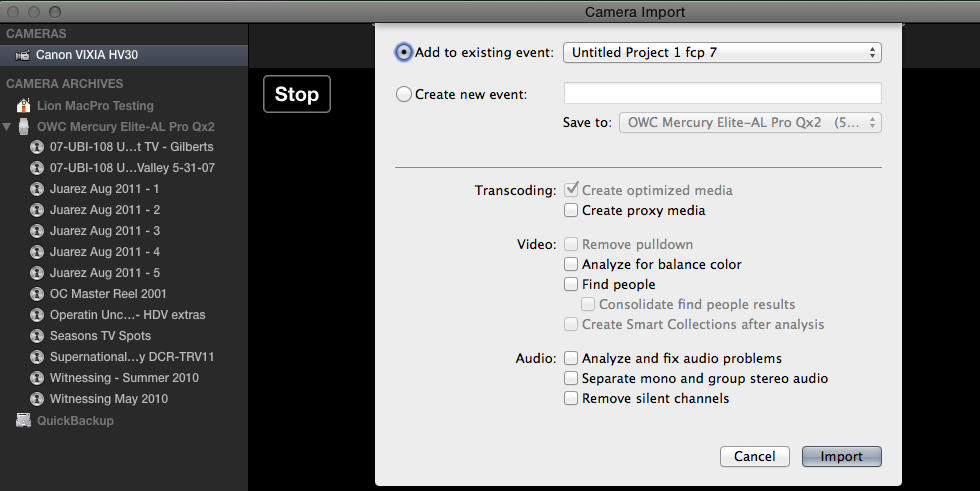
That is cool but not my experience. My HDV from my little Canon HV30 comes in HDV. Look at what FCP is telling me when I ask to optimize it both on capture and in an event.
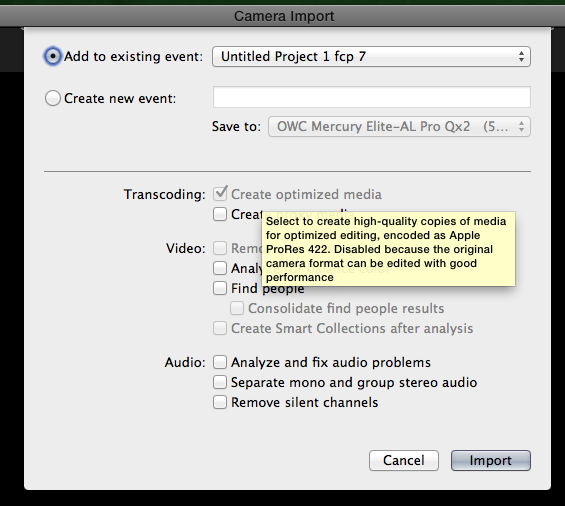
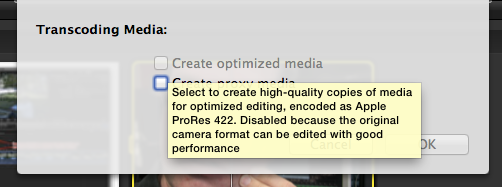
Capturing through Firewire BTW.
Please Log in to join the conversation.
Is not all HDV the same? Does FCPX see it differently based on what camera it originated from? Strange.
Creating history....one edit at a time !
Please Log in to join the conversation.
If you ever captured from HDV tape from different cameras in legacy FCP, you'll know the PITA it was tweaking the settings for capture. Canon needed some special BS, etc.
Example, you can't play an Mini-DV tape with HDV recorded to it on a Canon camera in a JVC or Sony HDV camera, or any other combo. But there's enough commonality for them all to work in most HDV Mini-DV decks. HDV was a freakin' mess, and I'm so happy I never have to touch it anymore.
Please Log in to join the conversation.
Creating history....one edit at a time !
Please Log in to join the conversation.
- eladberger
-

- Offline
- Junior Member
-

- Posts: 34
- Thank you received: 0
I think I tried every thing to speed it up apart from changing the hard drive to SSD.
Please Log in to join the conversation.
documentation.apple.com/en/finalcutpro/p...ction=2%26tasks=true
"Final Cut Pro does not have native editing support for AVCHD footage. You can use the Log and Transfer window to transcode AVCHD footage to an Apple ProRes codec or the Apple Intermediate Codec during transfer."
Further it says
"AVCHD footage is not captured natively but is transcoded to an Apple ProRes codec or the Apple Intermediate Codec. You can choose the destination codec in the Log and Transfer window preferences. For more information, see Choosing an AVCHD Destination Codec."
But that is pretty cool if your FCP 7 system somehow did it.

Please Log in to join the conversation.
X is the same plugin architecture, but they seem to be picking up the slack for the camera companies that were too lazy to do this themselves.
Please Log in to join the conversation.
