


- Posts: 22
- Thank you received: 0
3 Post Moderation Rule for New Boarders (25 Jan 2021)
New boarders will have their posts moderated - Don't worry if you cannot see your post immediately.
two different cameras: how to make the same colours?
- young_editor
-
 Topic Author
- Offline
- Junior Member
-

Less
More
01 Jun 2012 03:17 #9101
by young_editor
two different cameras: how to make the same colours? was created by young_editor
Please Log in to join the conversation.
- Tom Wolsky
-

- Offline
- Moderator
-

01 Jun 2012 05:46 #9105
by Tom Wolsky
Replied by Tom Wolsky on topic Re: two different cameras: how to make the same colours?
The first camera looks like it has no green. Need to do full color correction, but not sure how good it'll look.
Please Log in to join the conversation.


01 Jun 2012 06:13 #9107
by dgwvideo
Creating history....one edit at a time !
Replied by dgwvideo on topic Re: two different cameras: how to make the same colours?
The first camera appears to either have been incorrectly white balanced or not white balanced at all. The second may have used auto tracking white or have been manually white balanced. In FCPX you can try to match the color of your first cam clips to that of the better looking second cam and you will probably see an improvement, but that is so far off from the other that you would need, as Tom says, significant manual grading to make it close to correct.
Creating history....one edit at a time !
Please Log in to join the conversation.
- young_editor
-
Topic Author
- Offline
- Junior Member
-
Less
More
- Posts: 22
- Thank you received: 0
01 Jun 2012 06:47 #9111
by young_editor
Replied by young_editor on topic Re: two different cameras: how to make the same colours?
ok but still could you give me some advice on which part of color correction menu I should focus on ?
Please Log in to join the conversation.
- Tom Wolsky
-
- Offline
- Moderator
-
01 Jun 2012 07:08 #9112
by Tom Wolsky
Replied by Tom Wolsky on topic Re: two different cameras: how to make the same colours?
In the Color Board you'll need to set the exposure, pull down the shadows a lot and the midtones a bit using the waveform. In the color tab adjust the colors using the RGB Parade and the vectorscope as a guide. Push a little green into the shadows, take magenta down in the highlights, and blue in the midtones. Take down the global saturation, and a bit more in the shadows saturation. I don't know what the overall quality is like looking at this really compressed media. You'll have to play with it. It won't be easy when you're basically missing one color channel.
Please Log in to join the conversation.
01 Jun 2012 09:16 #9113
by Seanus
Sean Lander - Editing since 1982 - AVID 1991 - FCP 1999 - FCPX 2011
Replied by Seanus on topic Re: two different cameras: how to make the same colours?
I actually find the Match Colour function in FCP X to be amazingly good.
Give it a try, you've nothing to lose.
Give it a try, you've nothing to lose.
Sean Lander - Editing since 1982 - AVID 1991 - FCP 1999 - FCPX 2011
Please Log in to join the conversation.
- young_editor
-
Topic Author
- Offline
- Junior Member
-
Less
More
- Posts: 22
- Thank you received: 0
01 Jun 2012 16:43 #9122
by young_editor
Replied by young_editor on topic Re: two different cameras: how to make the same colours?
Well, if I use the match color function OR I play with the color board, I get 30-50% what I need and it takes time, but when i join those two techniques: first the match color and then a little bit color board i get 70-100% 
so thah's what need!
thanks
so thah's what need!
thanks
Please Log in to join the conversation.
- Tom Wolsky
-
- Offline
- Moderator
-
01 Jun 2012 16:57 #9123
by Tom Wolsky
Replied by Tom Wolsky on topic Re: two different cameras: how to make the same colours?
Correct the second camera first and then match to it.
Please Log in to join the conversation.
- young_editor
-
Topic Author
- Offline
- Junior Member
-
Less
More
- Posts: 22
- Thank you received: 0
01 Jun 2012 18:53 #9126
by young_editor
Replied by young_editor on topic Re: two different cameras: how to make the same colours?
works
and btw.: can you tell me what was wrong in camera settings? why I recorded such colors?
and btw.: can you tell me what was wrong in camera settings? why I recorded such colors?
Please Log in to join the conversation.
- mliebergot
-
- Offline
- Premium Member
-

Less
More
- Posts: 84
- Thank you received: 3
01 Jun 2012 19:13 - 01 Jun 2012 19:20 #9127
by mliebergot
I color correct one clip, select new cipher to be color corrected, then select match color and try to match the frame in the color corrected clip.
The results have been poor for me.
Am I doing something wrong?
Replied by mliebergot on topic Re: two different cameras: how to make the same colours?
Really. Everytime I have tried to use match color, the result is never close.Seanus wrote: I actually find the Match Colour function in FCP X to be amazingly good.
Give it a try, you've nothing to lose.
I color correct one clip, select new cipher to be color corrected, then select match color and try to match the frame in the color corrected clip.
The results have been poor for me.
Am I doing something wrong?
Last edit: 01 Jun 2012 19:20 by mliebergot.
Please Log in to join the conversation.
- young_editor
-
Topic Author
- Offline
- Junior Member
-
Less
More
- Posts: 22
- Thank you received: 0
01 Jun 2012 19:14 #9128
by young_editor
Replied by young_editor on topic Re: two different cameras: how to make the same colours?
Can you upload those two clips? as i did in first post.
Please Log in to join the conversation.
01 Jun 2012 20:00 #9131
by dgwvideo
Creating history....one edit at a time !
Replied by dgwvideo on topic Re: two different cameras: how to make the same colours?
@mliebergot I get mixed results with color match in fcpx, but I have to say, it does in fact give pretty good results when it works right. I think the scene complexity has something to do its ability to properly match all areas of the image. I have used it on outdoor scenes with 40 % sky and the rest simple objects, buildings, etc. and found it to do a great job. Other busy scenes with traffic, lots of movement and changing luma seem to cause it some problems.
Creating history....one edit at a time !
Please Log in to join the conversation.

01 Jun 2012 20:15 #9135
by BenB
Replied by BenB on topic Re: two different cameras: how to make the same colours?
Lesson learned: Always manually white balance your cameras before shooting in a new location.
Please Log in to join the conversation.
- Marcus Samuel-Gaskin
-
- Offline
- Junior Member
-
Less
More
- Posts: 24
- Thank you received: 1
05 Jun 2012 03:33 - 05 Jun 2012 03:44 #9261
by Marcus Samuel-Gaskin
Replied by Marcus Samuel-Gaskin on topic Re: two different cameras: how to make the same colours?
I had a crack at it. 10 Mins in Apple Color (R.I.P)


Deffo doable in FCP X using multiple corrections.
Deffo doable in FCP X using multiple corrections.
Last edit: 05 Jun 2012 03:44 by Marcus Samuel-Gaskin.
Please Log in to join the conversation.
05 Jun 2012 03:45 - 05 Jun 2012 03:46 #9262
by BenB
Replied by BenB on topic Re: two different cameras: how to make the same colours?
While we're talking about color correction, the "Apple Pro Training Series: Final Cut Pro X Advanced Editing" book has a few lesson on color correction that are really, really good. As much as I hate the color board, we're stuck with it. I very strongly recommend doing the color correction lessons 10-13 in that book.
I also very highly recommend Ripple Training's video course or color correction in FCP X. Both are excellent.
I also very highly recommend Ripple Training's video course or color correction in FCP X. Both are excellent.
Last edit: 05 Jun 2012 03:46 by BenB.
Please Log in to join the conversation.
- Lee Patterson
-
- Offline
- Elite Member
-

Less
More
- Posts: 239
- Thank you received: 20
05 Jun 2012 21:17 #9294
by Lee Patterson
Replied by Lee Patterson on topic Re: two different cameras: how to make the same colours?
Might be worth investigating the Tiffin FX plug ins, they have one called 'Kelvin' (as in degrees Kelvin) which can shift the temperature of the footage, bear in mind however, that you can only recover what is there and you might not have a lot to work with.
Please Log in to join the conversation.
05 Jun 2012 21:58 #9295
by BenB
Replied by BenB on topic Re: two different cameras: how to make the same colours?
Nothing an experienced colorist can't knock out quickly.
Please Log in to join the conversation.
05 Jun 2012 22:02 - 05 Jun 2012 22:04 #9296
by tpayton
Replied by tpayton on topic Re: two different cameras: how to make the same colours?
Try this in FCP X:
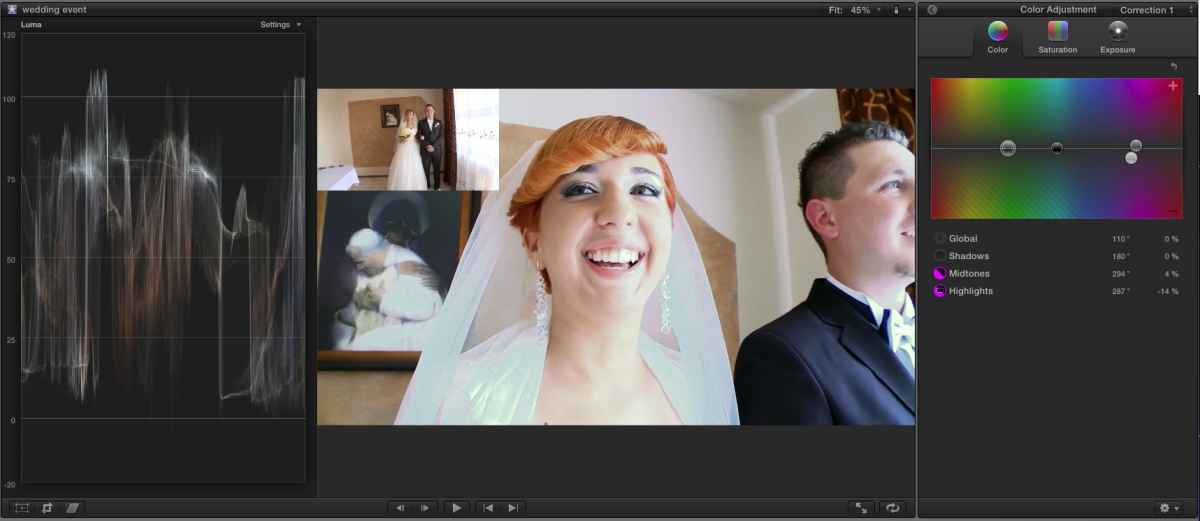
Enable "balance" on the pink shot. Then pull some pink out of the highlights and also pull down the saturation on the highlights. With just that you'll be in the ballpark and can tweak more.
C:\fakepath\wedding_corrected.png
Enable "balance" on the pink shot. Then pull some pink out of the highlights and also pull down the saturation on the highlights. With just that you'll be in the ballpark and can tweak more.
C:\fakepath\wedding_corrected.png
Last edit: 05 Jun 2012 22:04 by tpayton. Reason: Fixing screen shot.
Please Log in to join the conversation.
- Tom Wolsky
-
- Offline
- Moderator
-
05 Jun 2012 22:40 #9299
by Tom Wolsky
Replied by Tom Wolsky on topic Re: two different cameras: how to make the same colours?
It's more than a color balance problem. When you look at the vectorscope the image has no green. The green in the leaves is being created by yellow and blue. There's either a weird menu setting or a problem with the camera. I could get it to about what Tim could, used different settings though.
Please Log in to join the conversation.
05 Jun 2012 22:51 #9300
by tpayton
Replied by tpayton on topic Re: two different cameras: how to make the same colours?
Tom,
I was actually shocked that I was able to get it looking half way decent. I really wonder what happened to that poor camera and the white balance.
The green channel is there, just really week. It's a shame that the highlights on the bride's dress are gone. At least you have a nice image with Camera A.
Of course the good news is that rarely have I heard of a marriage going bad because of the couples wedding video going south
I was actually shocked that I was able to get it looking half way decent. I really wonder what happened to that poor camera and the white balance.
The green channel is there, just really week. It's a shame that the highlights on the bride's dress are gone. At least you have a nice image with Camera A.
Of course the good news is that rarely have I heard of a marriage going bad because of the couples wedding video going south
Please Log in to join the conversation.
