


- Posts: 172
- Thank you received: 2
3 Post Moderation Rule for New Boarders (25 Jan 2021)
New boarders will have their posts moderated - Don't worry if you cannot see your post immediately.
We Need to be able to turn of project rendering on specific archived project versions.
31 May 2012 20:02 #9072
by RonPriest
We Need to be able to turn of project rendering on specific archived project versions. was created by RonPriest
Okay, so I don't fully understand background rendering. If you want to copy a project version to move on to the next version, evidently FCPX doesn't simply cross-reference to the render files you've previously built in the project, (Like it did in FCP7) but you can select to copy the previously built render files, essentially doubling the space wasted on your hard drive every time you duplicate a project version unless you choose to NOT copy render files but then if you ever open that "archived project" again, and you have background rendering turned on, it will once again render new project files for that old project version which I don't want it to do that unless I specifically tell it to. So unless I'm missing something, we need to be able to turn render files off for specific project version and only allow those projects to render if I give it permission to do so (or whatever). Make sense?
Please Log in to join the conversation.
31 May 2012 20:05 #9073
by RonPriest
Replied by RonPriest on topic Re: We Need to be able to turn of project rendering on specific archived project versions.
Well... I guess the one solution right now is to ensure I turn off background rendering before I open an archived project if I don't want it to render new files for that project. Which is simple enough, until I forget to turn it off and open an archived project.
Please Log in to join the conversation.

31 May 2012 20:50 - 31 May 2012 20:52 #9075
by NocoDave
Replied by NocoDave on topic Re: We Need to be able to turn of project rendering on specific archived project versions.
I never thought of that before Ron, I always work with background rendering turned off so it hadn't been an issue, not yet anyway.
I think Apples decision to have it work this way might relate to the background rendering. If a duplicated project was to reference it's parents render files, then go on to create it's own additional render files on top of those being referenced, things could get a bit messed up behind the scenes if later deleting unused render files from the duplicate while the parent project may still need what the duplicate wants to delete.
I think Apples decision to have it work this way might relate to the background rendering. If a duplicated project was to reference it's parents render files, then go on to create it's own additional render files on top of those being referenced, things could get a bit messed up behind the scenes if later deleting unused render files from the duplicate while the parent project may still need what the duplicate wants to delete.
Last edit: 31 May 2012 20:52 by NocoDave. Reason: grammer fix, poor attempt
Please Log in to join the conversation.
31 May 2012 21:21 #9076
by RonPriest
Replied by RonPriest on topic Re: We Need to be able to turn of project rendering on specific archived project versions.
Okay, thanks for clearing that up? 
Anyway, I think it would be nice if Apple would fix it where there was some way to flag any specific project with a preference to not render it out unless the flag is turned off.
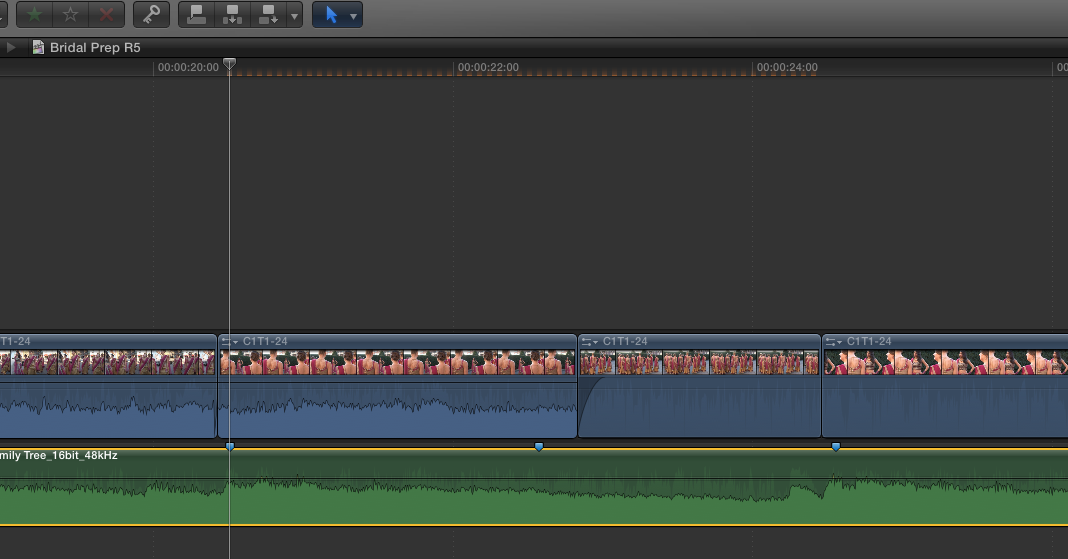
Now after messing with deleting, copying projects/files, I seem to 2 clips in my project that is showing brown dashes at the top of the project ruler as if portions of those 2 clips weren't rendered. It looks like a series of brown dashes. Any clue as to what that is? It shows all rendering is 100% on the project and I don't know of any way to "force" render a project. I've even deleted all render files from the project and allowed it to re-render and I have the same brown marks at the same location in the project.
Anyway, I think it would be nice if Apple would fix it where there was some way to flag any specific project with a preference to not render it out unless the flag is turned off.
Now after messing with deleting, copying projects/files, I seem to 2 clips in my project that is showing brown dashes at the top of the project ruler as if portions of those 2 clips weren't rendered. It looks like a series of brown dashes. Any clue as to what that is? It shows all rendering is 100% on the project and I don't know of any way to "force" render a project. I've even deleted all render files from the project and allowed it to re-render and I have the same brown marks at the same location in the project.
Please Log in to join the conversation.
31 May 2012 21:23 #9077
by RonPriest
Replied by RonPriest on topic Re: We Need to be able to turn of project rendering on specific archived project versions.
OOps, I did find the render all and render selection which I tried but still have those brown dashes above those 2 clips in the project.
Please Log in to join the conversation.

31 May 2012 21:47 - 31 May 2012 21:48 #9079
by BenB
Replied by BenB on topic Re: We Need to be able to turn of project rendering on specific archived project versions.
Interesting! Can you post a screen shot?
This is how FCP legacy and other NLE's do rendering, it's per Sequence. If you duplicate a new Sequence, it's a separate entity. But the concept is intriguing.
I find it fascinating how since FCP X was released and folks started to learn it, they're not asking for features that never existed in NLE's before. Sort of an NLE revolution. LOL!
This is how FCP legacy and other NLE's do rendering, it's per Sequence. If you duplicate a new Sequence, it's a separate entity. But the concept is intriguing.
I find it fascinating how since FCP X was released and folks started to learn it, they're not asking for features that never existed in NLE's before. Sort of an NLE revolution. LOL!
Last edit: 31 May 2012 21:48 by BenB.
Please Log in to join the conversation.
31 May 2012 22:20 #9085
by BenB
Replied by BenB on topic Re: We Need to be able to turn of project rendering on specific archived project versions.
I'd report that to Apple for sure. That's not right. Someone here had red lines at one time and Apple took a great interest in that. Yeah, fill out the feedback page about that for sure!
Please Log in to join the conversation.
31 May 2012 22:32 #9086
by RonPriest
Replied by RonPriest on topic Re: We Need to be able to turn of project rendering on specific archived project versions.
Where do I find the feedback form Ben?
Please Log in to join the conversation.
31 May 2012 22:44 #9087
by BenB
Replied by BenB on topic Re: We Need to be able to turn of project rendering on specific archived project versions.
In the "Final Cut Pro" menu.
Please Log in to join the conversation.
31 May 2012 23:20 #9088
by RonPriest
Replied by RonPriest on topic Re: We Need to be able to turn of project rendering on specific archived project versions.
In the Final Cut Pro Menu? Under Help, Service and Support which opens me up to FCP's complete support site? It's a pretty big site Ben.
Please Log in to join the conversation.
- Tom Wolsky
-

- Offline
- Moderator
-

31 May 2012 23:34 #9089
by Tom Wolsky
Replied by Tom Wolsky on topic Re: We Need to be able to turn of project rendering on specific archived project versions.
Not under Help. Under the Final Cut Pro menu in upper left. Provide Final Cut Pro Feedback.
Please Log in to join the conversation.
31 May 2012 23:45 #9090
by RonPriest
Replied by RonPriest on topic Re: We Need to be able to turn of project rendering on specific archived project versions.
Oh that was too easy Tom, thanks.
Please Log in to join the conversation.
01 Jun 2012 01:16 #9091
by RonPriest
Okay, maybe they are listening?
Hi Ron-
This is Noah from Apple. We recently received your feedback regarding Final Cut Pro X. You mentioned you were seeing brown dashes appearing at the top of a single specific project. Can you please send a screenshot?
Thanks,
Noah
Replied by RonPriest on topic Re: We Need to be able to turn of project rendering on specific archived project versions.
BenB wrote: I'd report that to Apple for sure. That's not right. Someone here had red lines at one time and Apple took a great interest in that. Yeah, fill out the feedback page about that for sure!
Okay, maybe they are listening?
Hi Ron-
This is Noah from Apple. We recently received your feedback regarding Final Cut Pro X. You mentioned you were seeing brown dashes appearing at the top of a single specific project. Can you please send a screenshot?
Thanks,
Noah
Please Log in to join the conversation.

01 Jun 2012 06:20 #9108
by dgwvideo
Creating history....one edit at a time !
Replied by dgwvideo on topic Re: We Need to be able to turn of project rendering on specific archived project versions.
Hey, Ron...are those compound clips you are seeing the dashes above?
Creating history....one edit at a time !
Please Log in to join the conversation.
01 Jun 2012 06:24 #9109
by RonPriest
Replied by RonPriest on topic Re: We Need to be able to turn of project rendering on specific archived project versions.
No sir, just a standard project timeline. Are you seeing any of this? As far as I know, it's not causing any issues with playback or export that I know of. Noah from Apple asked for the screen shot then had me upload my project file for them to look at. So, I don't know if it's a known issue and if it is, they haven't told me anything else.
Please Log in to join the conversation.
01 Jun 2012 06:29 #9110
by dgwvideo
Creating history....one edit at a time !
Replied by dgwvideo on topic Re: We Need to be able to turn of project rendering on specific archived project versions.
I've not seen exactly what your screenshot shows, but I have noticed in earlier FCPX versions that occasionally a compound clip would have staggered render bars and upon breaking apart the CC you could identify the individual clips that needed rendering. I always assumed this was an effect or color grade that perhaps didn't get rendered before I made the compound clip.
But if the clips in your timeline are individual single clips, then indeed it is very odd to see the staggered bars above it.
But if the clips in your timeline are individual single clips, then indeed it is very odd to see the staggered bars above it.
Creating history....one edit at a time !
Please Log in to join the conversation.
