


- Posts: 172
- Thank you received: 2
3 Post Moderation Rule for New Boarders (25 Jan 2021)
New boarders will have their posts moderated - Don't worry if you cannot see your post immediately.
How Do I Use Multiple Audio Sources from Multiple Angles in a Multicam Edit
18 May 2012 08:21 - 18 May 2012 08:22 #8614
by RonPriest
How Do I Use Multiple Audio Sources from Multiple Angles in a Multicam Edit was created by RonPriest
So, just how do you use multiple audio sources in a multicam edit? For example, I have 3 cameras with their attached audio and I have my primary audio recording that contains say 4 tracks of audio. I know how to edit the audio angle with the 4 tracks contained in the main audio source, but how do I include audio from my camera tracks also?
Last edit: 18 May 2012 08:22 by RonPriest.
Please Log in to join the conversation.

19 May 2012 09:01 #8636
by BenB
Replied by BenB on topic Re: How Do I Use Multiple Audio Sources from Multiple Angles in a Multicam Edit
So, you want to switch audio angles, AND video angles, but independently of each other? How do folks record audio in such a way that it's not organized better? Sorry...
Create a Compound Clip, put all of your needed audio in to that. Then you can use it as your main audio source, while you cut between video angles.
Create a Compound Clip, put all of your needed audio in to that. Then you can use it as your main audio source, while you cut between video angles.
Please Log in to join the conversation.
19 May 2012 17:14 #8646
by RonPriest
I'm not sure I understand your question Ben? How can I be more organized? My main audio angle is recorded on a 4 channel Edirol R4 recorder. However, there are times that I want to use some of my camera audio as a mix of nat audio when it's recorded closer to the source. So no I don't necessarily want to "switch" my audio independently from my video, as I never want to switch my main audio source off although I will manipulate the 4 tracks within the main audio angle.
So you're suggesting that I detach my audio from my video initially and sync all of my audio together into a compound clip with my R4 audio, then create my multicam clip, and manipulate the tracks in the compound clip as my main audio source?
Okay, it's a lot of extra work, but a plausible workaround, perhaps the only workaround until Apple comes out with a permanent fix, which I know they have promised. I check everyday for the next upgrade.
Replied by RonPriest on topic Re: How Do I Use Multiple Audio Sources from Multiple Angles in a Multicam Edit
BenB wrote: So, you want to switch audio angles, AND video angles, but independently of each other? How do folks record audio in such a way that it's not organized better? Sorry...
Create a Compound Clip, put all of your needed audio in to that. Then you can use it as your main audio source, while you cut between video angles.
I'm not sure I understand your question Ben? How can I be more organized? My main audio angle is recorded on a 4 channel Edirol R4 recorder. However, there are times that I want to use some of my camera audio as a mix of nat audio when it's recorded closer to the source. So no I don't necessarily want to "switch" my audio independently from my video, as I never want to switch my main audio source off although I will manipulate the 4 tracks within the main audio angle.
So you're suggesting that I detach my audio from my video initially and sync all of my audio together into a compound clip with my R4 audio, then create my multicam clip, and manipulate the tracks in the compound clip as my main audio source?
Okay, it's a lot of extra work, but a plausible workaround, perhaps the only workaround until Apple comes out with a permanent fix, which I know they have promised. I check everyday for the next upgrade.
Please Log in to join the conversation.
- mliebergot
-

- Offline
- Premium Member
-

Less
More
- Posts: 84
- Thank you received: 3
19 May 2012 18:47 #8647
by mliebergot
Replied by mliebergot on topic Re: How Do I Use Multiple Audio Sources from Multiple Angles in a Multicam Edit
Ron I use this method all the time now.
What I do is select my audio and video clips in the Event Browser. And create a synchronized clip.
Then I open il the sync clip in the event browser, detatch the videos from audio and use this as my master mix for my Multiclip.
I also meta tag portions of my clips (audio and video), and create multiclips from those keyword collections. Ie. 1st dance, speeches etc.
This saves me time over going through an entire 4 hours of synced footage.
What I do is select my audio and video clips in the Event Browser. And create a synchronized clip.
Then I open il the sync clip in the event browser, detatch the videos from audio and use this as my master mix for my Multiclip.
I also meta tag portions of my clips (audio and video), and create multiclips from those keyword collections. Ie. 1st dance, speeches etc.
This saves me time over going through an entire 4 hours of synced footage.
Please Log in to join the conversation.
19 May 2012 19:36 #8650
by RonPriest
Replied by RonPriest on topic Re: How Do I Use Multiple Audio Sources from Multiple Angles in a Multicam Edit
Okay Michael, I'll give that a try, thanks guys.
Please Log in to join the conversation.
19 May 2012 22:00 - 19 May 2012 22:00 #8651
by RonPriest
Replied by RonPriest on topic Re: How Do I Use Multiple Audio Sources from Multiple Angles in a Multicam Edit
Wow! How freakin' powerful it that? And not anyway near as hard or as complicated as I thought it would be. As a test, I sort of tested the procedure in reverse order, which in a way does help to insure everything is synced up properly.
After creating the new compound clip, I then added it as a new angle to my previously edited multicam project then synced it to the monitoring angle, and it worked flawlessly! FCPX's auto synchronizing features alone should be enough to convince editors thinking about bailing out on FCP to something else to stick with FCP and move on to X!
After creating the new compound clip, I then added it as a new angle to my previously edited multicam project then synced it to the monitoring angle, and it worked flawlessly! FCPX's auto synchronizing features alone should be enough to convince editors thinking about bailing out on FCP to something else to stick with FCP and move on to X!
Last edit: 19 May 2012 22:00 by RonPriest.
Please Log in to join the conversation.
- mliebergot
-
- Offline
- Premium Member
-
Less
More
- Posts: 84
- Thank you received: 3
20 May 2012 01:16 #8656
by mliebergot
Replied by mliebergot on topic Re: How Do I Use Multiple Audio Sources from Multiple Angles in a Multicam Edit
Ron, I was aware of being able to add an angle to an already created multiclip.
But how does one go about re-syncing the new angle with the active monitor angle in the multiclip?
But how does one go about re-syncing the new angle with the active monitor angle in the multiclip?
Please Log in to join the conversation.
20 May 2012 01:21 - 20 May 2012 02:25 #8658
by RonPriest
Replied by RonPriest on topic Re: How Do I Use Multiple Audio Sources from Multiple Angles in a Multicam Edit
Easy as pie.... well easy as eating pie, I don't know how to bake pie  if you have the videos from MacProVideo.com it's found in Final Cut Pro X 201: Section 5, video 19 titled: Adding and deleting angles. But for those that do not have this training here's how you do it.
After adding your new angle and dropping your compound clip onto that new angle, make sure you have designated the correct angle that you want to use as your "monitoring angle" properly selected in the Angle Editor. Then click the little arrow of your new angle containing your compound clip, and select the option "Sync Angle to Monitoring Angle using Audio"
After doing that, set back and eat your pie!
if you have the videos from MacProVideo.com it's found in Final Cut Pro X 201: Section 5, video 19 titled: Adding and deleting angles. But for those that do not have this training here's how you do it.After adding your new angle and dropping your compound clip onto that new angle, make sure you have designated the correct angle that you want to use as your "monitoring angle" properly selected in the Angle Editor. Then click the little arrow of your new angle containing your compound clip, and select the option "Sync Angle to Monitoring Angle using Audio"
After doing that, set back and eat your pie!
Last edit: 20 May 2012 02:25 by RonPriest.
Please Log in to join the conversation.
20 May 2012 04:15 #8659
by DaveG
Replied by DaveG on topic Re: How Do I Use Multiple Audio Sources from Multiple Angles in a Multicam Edit
Ron,
I think I missed something along the way, even after re-reading the thread a couple of times. I understand everything except the use of the Compound Clip. Is the Compound clip like a sub-mix of the additional audio tracks? Does a multi-cam clip not allow a single audio file to be added as an Angle?
Thanks,
Dave
I think I missed something along the way, even after re-reading the thread a couple of times. I understand everything except the use of the Compound Clip. Is the Compound clip like a sub-mix of the additional audio tracks? Does a multi-cam clip not allow a single audio file to be added as an Angle?
Thanks,
Dave
Please Log in to join the conversation.
20 May 2012 04:39 - 20 May 2012 04:43 #8660
by RonPriest
Replied by RonPriest on topic Re: How Do I Use Multiple Audio Sources from Multiple Angles in a Multicam Edit
Hi Dave
Yes, the compound clip is a mix of all audio into a single soundtrack, or clip to be used as your "soundtrack angle"
Yes, you can add a single audio file as an angle to a multiclip, but you can't play more than one audio angle at time, so you need all of your audio, or multiple tracks if you will, in a single audio file, but they have to all be in sync of course before you use them as an audio source (or angle) in the multiclip.
An angle doesn't have to be video, it can be audio, but it's still considered an angle.
Yes, the compound clip is a mix of all audio into a single soundtrack, or clip to be used as your "soundtrack angle"
Yes, you can add a single audio file as an angle to a multiclip, but you can't play more than one audio angle at time, so you need all of your audio, or multiple tracks if you will, in a single audio file, but they have to all be in sync of course before you use them as an audio source (or angle) in the multiclip.
An angle doesn't have to be video, it can be audio, but it's still considered an angle.
Last edit: 20 May 2012 04:43 by RonPriest.
Please Log in to join the conversation.
20 May 2012 07:27 - 20 May 2012 07:27 #8661
by DaveG
I think I've got it now. It's pretty cool using the Compound Clip as a "sub-mix" so to speak. It's kinda like the audio version of the Photoshop Layers clip. I haven't had a chance to really play with the multicam clips yet, but with the videos I've seen, it seems pretty straight forward.
Thanks,
Dave
Replied by DaveG on topic Re: How Do I Use Multiple Audio Sources from Multiple Angles in a Multicam Edit
...but only one audio angle can be used at one time.RonPriest wrote: An angle doesn't have to be video, it can be audio, but it's still considered an angle.
I think I've got it now. It's pretty cool using the Compound Clip as a "sub-mix" so to speak. It's kinda like the audio version of the Photoshop Layers clip. I haven't had a chance to really play with the multicam clips yet, but with the videos I've seen, it seems pretty straight forward.
Thanks,
Dave
Last edit: 20 May 2012 07:27 by DaveG.
Please Log in to join the conversation.

12 Jun 2016 11:52 #77757
by nick314
Replied by nick314 on topic How Do I Use Multiple Audio Sources from Multiple Angles in a Multicam Edit
Four years later...
A quick (but not so clean way) that works for me (for shorter edits) is to duplicate the multicam clip in place, detach audio from the duplicate clip, select the proper audio channel and use fades to go from one mic to the other...
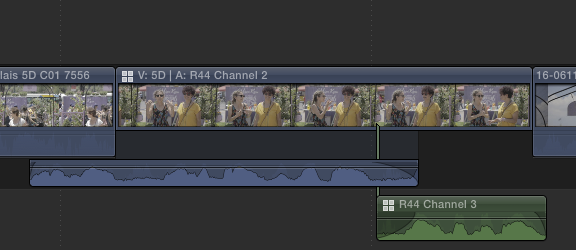
A quick (but not so clean way) that works for me (for shorter edits) is to duplicate the multicam clip in place, detach audio from the duplicate clip, select the proper audio channel and use fades to go from one mic to the other...
Please Log in to join the conversation.
12 Jun 2016 12:44 #77761
by BenB
Replied by BenB on topic How Do I Use Multiple Audio Sources from Multiple Angles in a Multicam Edit
And you don't have to detach the audio, just expand the audio Components, and use the Inspector to activate, deactivate the angles you need at that time.
Please Log in to join the conversation.
