


- Posts: 2
- Thank you received: 0
3 Post Moderation Rule for New Boarders (25 Jan 2021)
New boarders will have their posts moderated - Don't worry if you cannot see your post immediately.
Massive HDV Capture project seeks definitive answer.... X or 7
15 Aug 2011 22:59 #839
by Thrive
Hi Every One! This is my first post in this forum! 
Thank you for building such a vibrant community!
I am about to embark upon a 4 week capture project. 18 tapes per day! It is a LOT of HDV tape.
Well heres my dilemma, i currently own 7, and do not own X. I do not mind upgrading, BUT....
I want to capture using the best possible settings, and I would prefer to do this as automatic as possible.
Can any one think of a reason to NOT use X for this? i would assume that my Capture files from 7 would sitll work in X, but would X captured videos (not projects) work in 7?
Does any one know if scene split works with HDV in 8 (it does not work in fcp7)
The bottom line for me is quality..... i want the highest quality possible.
Could someone please provide insight here?
Thank you very much.
Thank you for building such a vibrant community!
I am about to embark upon a 4 week capture project. 18 tapes per day! It is a LOT of HDV tape.
Well heres my dilemma, i currently own 7, and do not own X. I do not mind upgrading, BUT....
I want to capture using the best possible settings, and I would prefer to do this as automatic as possible.
Can any one think of a reason to NOT use X for this? i would assume that my Capture files from 7 would sitll work in X, but would X captured videos (not projects) work in 7?
Does any one know if scene split works with HDV in 8 (it does not work in fcp7)
The bottom line for me is quality..... i want the highest quality possible.
Could someone please provide insight here?
Thank you very much.
Please Log in to join the conversation.
16 Aug 2011 10:10 #843
by tpayton
Replied by tpayton on topic Re: Massive HDV Capture project seeks definitive answer.... X or 7
I have to ingest 5 HDV tapes tomorrow. I"ll let you know how it goes in FCP X.
My guess it will actually be better than FCP 7 because of the shot detection and the somewhat automatic operation. However, if there are timecode breaks I'll have to see how FCP X handles that. The Camera archive might also come in handy.
As far a quality, I can tell you now it will be identical between the two apps. They are both using the same codec to capture.
My guess it will actually be better than FCP 7 because of the shot detection and the somewhat automatic operation. However, if there are timecode breaks I'll have to see how FCP X handles that. The Camera archive might also come in handy.
As far a quality, I can tell you now it will be identical between the two apps. They are both using the same codec to capture.
Please Log in to join the conversation.

16 Aug 2011 14:55 #847
by BenB
Replied by BenB on topic Re: Massive HDV Capture project seeks definitive answer.... X or 7
FCP 7 does scene detection for HDV, it's standard. The quality is what is on the tape. The tapes are digital data, what comes off will be the same digital data. What you need to think about is speed. Ingesting as ProRes 422 will make things go faster through the rest of the edit/output process.
A reason to not use FCP X? It's version 1.0 and has bugs. But I know people using it just fine with no real problems.
A reason to not use FCP X? It's version 1.0 and has bugs. But I know people using it just fine with no real problems.
Please Log in to join the conversation.
16 Aug 2011 22:27 - 16 Aug 2011 22:30 #861
by Thrive
Replied by Thrive on topic Re: Massive HDV Capture project seeks definitive answer.... X or 7
Wow, fast qualified responses... I  fop.co.... Thanks!
From my experience, Scene detection must be camera specific. Fcp7 does not automatically create individual clips from independant scenes (like hdvsplit does) on footage that is shot / captured on a canon xha1.
in an unrelated question, can iMovie handle prorez422? Editing hdv with 422 has been a dream, since converting from premiere 5.5. Sometimes I want to hand over my footage to clients with iMovie...can they buy the 422 codec?
Thanks
fop.co.... Thanks!From my experience, Scene detection must be camera specific. Fcp7 does not automatically create individual clips from independant scenes (like hdvsplit does) on footage that is shot / captured on a canon xha1.
in an unrelated question, can iMovie handle prorez422? Editing hdv with 422 has been a dream, since converting from premiere 5.5. Sometimes I want to hand over my footage to clients with iMovie...can they buy the 422 codec?
Thanks
Last edit: 16 Aug 2011 22:30 by Thrive.
Please Log in to join the conversation.
- macguruwales
-

- Offline
- New Member
-

Less
More
- Posts: 1
- Thank you received: 0
17 Aug 2011 22:17 #878
by macguruwales
Replied by macguruwales on topic Re: Massive HDV Capture project seeks definitive answer.... X or 7
The auto splitting seems to be based on the internal camera clock and not the timecode of the footage so will only work if you have a working internal battery in your camera and if the time has been set.
Its the same issue for miniDV footage too - theres a "DV Start/Stop detect" option in the edit menu I think and that only adds markers if your camera has a working battery and the time/date has been set.
Hope this helps if you have problems with the auto-detect - not sure if imovie uses the same feature or not though.
Its the same issue for miniDV footage too - theres a "DV Start/Stop detect" option in the edit menu I think and that only adds markers if your camera has a working battery and the time/date has been set.
Hope this helps if you have problems with the auto-detect - not sure if imovie uses the same feature or not though.
Please Log in to join the conversation.
17 Aug 2011 22:43 - 17 Aug 2011 22:50 #882
by BenB
Replied by BenB on topic Re: Massive HDV Capture project seeks definitive answer.... X or 7
For tape based workflow, only for HDV does Log & Capture split into scenes based on SMPTE timecode (hrs:min:sec:frm).
DV Start/Stop Detect is mainly for SD DV, and works on TOD (Time of Day) Timecode (calendar/watch time, and yes, camera's clock must be set at least once for this to activate on some cameras).
As for quality, you can capture from HDV tape as ProRes 422 in FCP.
For playback, I prefer the more universal and excellent quality H.264, but check this out for ProRes playback:
support.apple.com/downloads/Apple_ProRes...oder_1_0_for_Windows
DV Start/Stop Detect is mainly for SD DV, and works on TOD (Time of Day) Timecode (calendar/watch time, and yes, camera's clock must be set at least once for this to activate on some cameras).
As for quality, you can capture from HDV tape as ProRes 422 in FCP.
For playback, I prefer the more universal and excellent quality H.264, but check this out for ProRes playback:
support.apple.com/downloads/Apple_ProRes...oder_1_0_for_Windows
Last edit: 17 Aug 2011 22:50 by BenB.
Please Log in to join the conversation.
17 Aug 2011 23:54 #887
by tpayton
Replied by tpayton on topic Re: Massive HDV Capture project seeks definitive answer.... X or 7
Thrive -
I just finished my 5 HDV tapes, and I must say that ingest was a piece of cake and more automatic than FCP 7. I used a function called camera archive in FCP X, which creates a package with everything on the tape. What makes it great is you can just pop in a tape, hit "create archive" and it will rewind the tape, capture and then let you know when it is done and ready for the next tape. No intervention needed. I'm guessing it took about 5 minutes to setup in the morning and then about 30 seconds of intervention for me to switch out tapes.
I did this yesterday while finishing up some other work on the same machine and it worked flawlessly for 5 tapes.
I can confirm these files import into FCP 7 without a problem. Just right click on the archive and choose "open package" and then you can further organize the clips there. They even have a TOD time stamp on the clip name which is nice. But they do not retain the Reel name when importing.
From your project, I believe that FCP X would be faster because of the somewhat automated process. If you happen to have an extra camera and another Mac you can have FCP X running on multiple machines without a problem and get your work done that much faster.
However, with that said, since the final edit will be in FCP 7 (I assume). You are not gaining anything as far as quality but only the speed of the process with FCP X (which is very compelling), but you could potential run into trouble since it is 1.0 software (I actually doubt it would give you any trouble)..
If I had a large project like this I would setup this capture on my MacBook Pro in FCP X while I continue to do other work, that way if I have to restart my main edit machine it won't be a problem. You'll get all your tapes ingested and nicely organized, and you will have invested very little actual time (although you'll be capturing for weeks).
I just finished my 5 HDV tapes, and I must say that ingest was a piece of cake and more automatic than FCP 7. I used a function called camera archive in FCP X, which creates a package with everything on the tape. What makes it great is you can just pop in a tape, hit "create archive" and it will rewind the tape, capture and then let you know when it is done and ready for the next tape. No intervention needed. I'm guessing it took about 5 minutes to setup in the morning and then about 30 seconds of intervention for me to switch out tapes.
I did this yesterday while finishing up some other work on the same machine and it worked flawlessly for 5 tapes.
I can confirm these files import into FCP 7 without a problem. Just right click on the archive and choose "open package" and then you can further organize the clips there. They even have a TOD time stamp on the clip name which is nice. But they do not retain the Reel name when importing.
From your project, I believe that FCP X would be faster because of the somewhat automated process. If you happen to have an extra camera and another Mac you can have FCP X running on multiple machines without a problem and get your work done that much faster.
However, with that said, since the final edit will be in FCP 7 (I assume). You are not gaining anything as far as quality but only the speed of the process with FCP X (which is very compelling), but you could potential run into trouble since it is 1.0 software (I actually doubt it would give you any trouble)..
If I had a large project like this I would setup this capture on my MacBook Pro in FCP X while I continue to do other work, that way if I have to restart my main edit machine it won't be a problem. You'll get all your tapes ingested and nicely organized, and you will have invested very little actual time (although you'll be capturing for weeks).
Please Log in to join the conversation.
18 Aug 2011 08:18 #893
by tpayton
Replied by tpayton on topic Re: Massive HDV Capture project seeks definitive answer.... X or 7
One more thing. I think I'm actually recommending FCP X strongly now. I had a HDV tape with about 6 or 7 timecode breaks. I couldn't even capture this in FCP X normally. However, I tried again by creating the camera archive first, and it grabbed everything on the tape and didn't seem to mind the time code breaks.
Score one more point for FCP X.
Score one more point for FCP X.
Please Log in to join the conversation.
- oscarmeier
-
- Offline
- New Member
-
Less
More
- Posts: 2
- Thank you received: 0
23 Sep 2011 11:33 #1348
by oscarmeier
Replied by oscarmeier on topic Re: Massive HDV Capture project seeks definitive answer.... X or 7
Is there any way to have FCPX split up a tape capture that's brought in as a file? I have some old DV captures that were created as continuous Quicktimes that I'd like to split based on stop/start timecode.
Please Log in to join the conversation.
23 Sep 2011 11:58 #1349
by BenB
Replied by BenB on topic Re: Massive HDV Capture project seeks definitive answer.... X or 7
FCP 7 has a "DV Start/Stop Detect" function that did that. It read the Time-Of-Day timecode to achieve it. But FCP X has no such function at this time.
Please Log in to join the conversation.
- CBlakeston
-
- Offline
- Elite Member
-

Less
More
- Posts: 175
- Thank you received: 5
23 Sep 2011 13:02 #1350
by CBlakeston
Not quite true. If you can go back to the original tapes and make a 'Camera Archive' using FCPX - it will capture and auto magically split up all the footage into clips according to when it was Start/Stopped. It will even attribute the date and time in the files themselves to whenever they were actually recorded as though it was shot on a tapeless camera.
Replied by CBlakeston on topic Re: Massive HDV Capture project seeks definitive answer.... X or 7
BenB wrote: FCP 7 has a "DV Start/Stop Detect" function that did that. It read the Time-Of-Day timecode to achieve it. But FCP X has no such function at this time.
Not quite true. If you can go back to the original tapes and make a 'Camera Archive' using FCPX - it will capture and auto magically split up all the footage into clips according to when it was Start/Stopped. It will even attribute the date and time in the files themselves to whenever they were actually recorded as though it was shot on a tapeless camera.
Please Log in to join the conversation.
- Scrubelicious
-

- Offline
- Platinum Member
-

Less
More
- Posts: 1228
- Thank you received: 114
23 Sep 2011 16:29 #1354
by Scrubelicious
Replied by Scrubelicious on topic Re: Massive HDV Capture project seeks definitive answer.... X or 7
The same with just importing them into a event.
Please Log in to join the conversation.
- oscarmeier
-
- Offline
- New Member
-
Less
More
- Posts: 2
- Thank you received: 0
23 Sep 2011 18:09 #1360
by oscarmeier
The same as what? Sorry I don't quite follow... Is there a way to break up the file on import?
Replied by oscarmeier on topic Re: Massive HDV Capture project seeks definitive answer.... X or 7
Scrubelicious wrote: The same with just importing them into a event.
The same as what? Sorry I don't quite follow... Is there a way to break up the file on import?
Please Log in to join the conversation.
23 Sep 2011 18:10 - 23 Sep 2011 18:12 #1361
by BenB
Replied by BenB on topic Re: Massive HDV Capture project seeks definitive answer.... X or 7
Only for HDV tape, not SD tape, which is how v.7 worked. DV Start/Stop Detect was made for SD tape, HDV has the function built in to the codec and never needed this function.
Last edit: 23 Sep 2011 18:12 by BenB.
Please Log in to join the conversation.
- Scrubelicious
-
- Offline
- Platinum Member
-
Less
More
- Posts: 1228
- Thank you received: 114
24 Sep 2011 01:25 #1364
by Scrubelicious
Replied by Scrubelicious on topic Re: Massive HDV Capture project seeks definitive answer.... X or 7
hmm I can only say for myself that I have captured SD footage over FireWire into FCPX and it did separated the clips.
Just in case it was a Canon XL1s and another small camcorder.
And this is what I meant it will split the clips during capture or archiving.oscarmeier wrote:
The same as what? Sorry I don't quite follow... Is there a way to break up the file on import?
Just in case it was a Canon XL1s and another small camcorder.
Please Log in to join the conversation.
24 Sep 2011 01:53 #1366
by BenB
Replied by BenB on topic Re: Massive HDV Capture project seeks definitive answer.... X or 7
Really? It did? I only tried capturing from SD tape once, the first day we had FCP X, as we had a student's SD tape cam in the studio that day. Our studio hasn't seen a tape camera, much less an SD camera in so long, I forget what they look like. But we didn't have that experience with just one quick run. That's really great to hear! So, it does the Start/Stop Detect on the fly automatically? That's really awesome to hear! Way to go Apple! I stand corrected, and very gladly!
Please Log in to join the conversation.
- Scrubelicious
-
- Offline
- Platinum Member
-
Less
More
- Posts: 1228
- Thank you received: 114
24 Sep 2011 02:25 #1367
by Scrubelicious
Replied by Scrubelicious on topic Re: Massive HDV Capture project seeks definitive answer.... X or 7
Yeah I was thinking of the same since I could not find any info for a DV Start/Stop Detect function. Even before testing FCPX in any way we used FCP7 and Compressor to split the clips.
But after telling myself for a buddies project what the hell I went for it and boom FCPX did it!
That made my day!
But after telling myself for a buddies project what the hell I went for it and boom FCPX did it!
That made my day!
Please Log in to join the conversation.
24 Sep 2011 02:32 #1368
by BenB
Replied by BenB on topic Re: Massive HDV Capture project seeks definitive answer.... X or 7
Yeah, it's there in FCP 7. Highlight an SD capture clip in the Browser, I think it's in the Modify, or Markers menu. It was pretty cool when I used v.7 and SD tape, so long ago I can't remember when it was... But yes, it's been there in legacy FCP for a long time.
Please Log in to join the conversation.
24 Sep 2011 03:46 - 24 Sep 2011 03:47 #1369
by tpayton
Replied by tpayton on topic Re: Massive HDV Capture project seeks definitive answer.... X or 7
Just wanted to say I confirmed the DV start stop capture for my camera. I grabbed a Sony CDR-TRV11 and a DV tape from 2005.
It worked like a charm. Both as creating an archive and importing into an event straight from the camera. As you can see from the screen captures, the clips are stamped with date and time. For not supporting Tape formats FCP X does pretty well here.
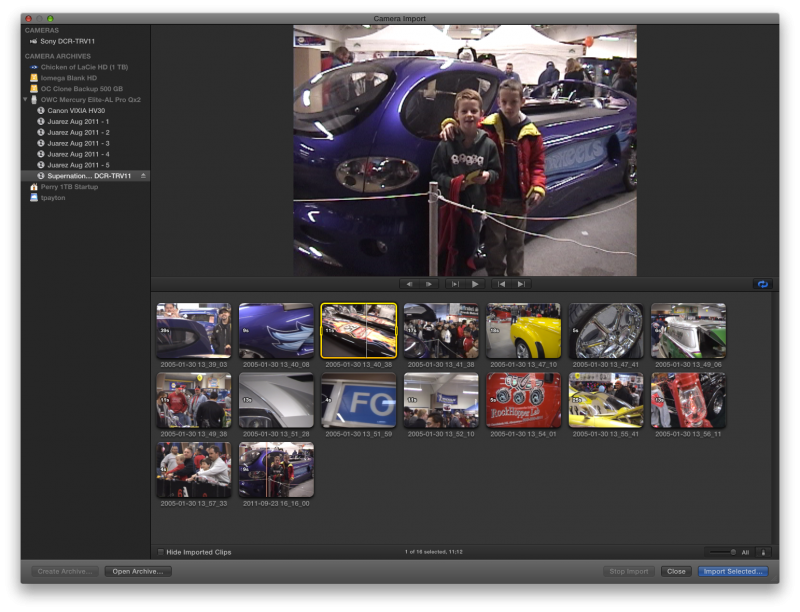
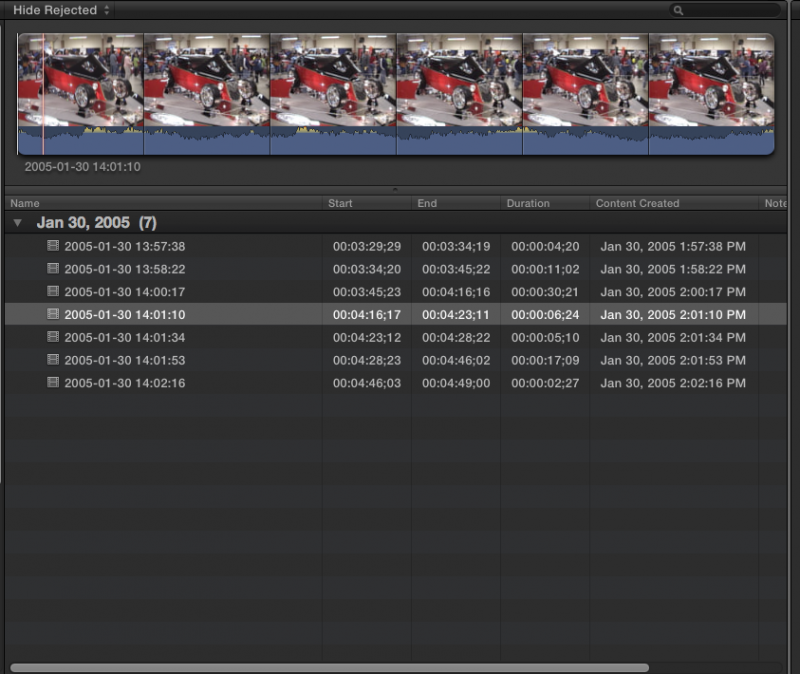
It worked like a charm. Both as creating an archive and importing into an event straight from the camera. As you can see from the screen captures, the clips are stamped with date and time. For not supporting Tape formats FCP X does pretty well here.
Last edit: 24 Sep 2011 03:47 by tpayton. Reason: typo
Please Log in to join the conversation.
