


- Thank you received: 0
3 Post Moderation Rule for New Boarders (25 Jan 2021)
New boarders will have their posts moderated - Don't worry if you cannot see your post immediately.
Having issues with Masks in FCPX
-
 Topic Author
- New Member
-

Less
More
29 Apr 2012 19:33 #7776
by
Having issues with Masks in FCPX was created by
Hi everybody.
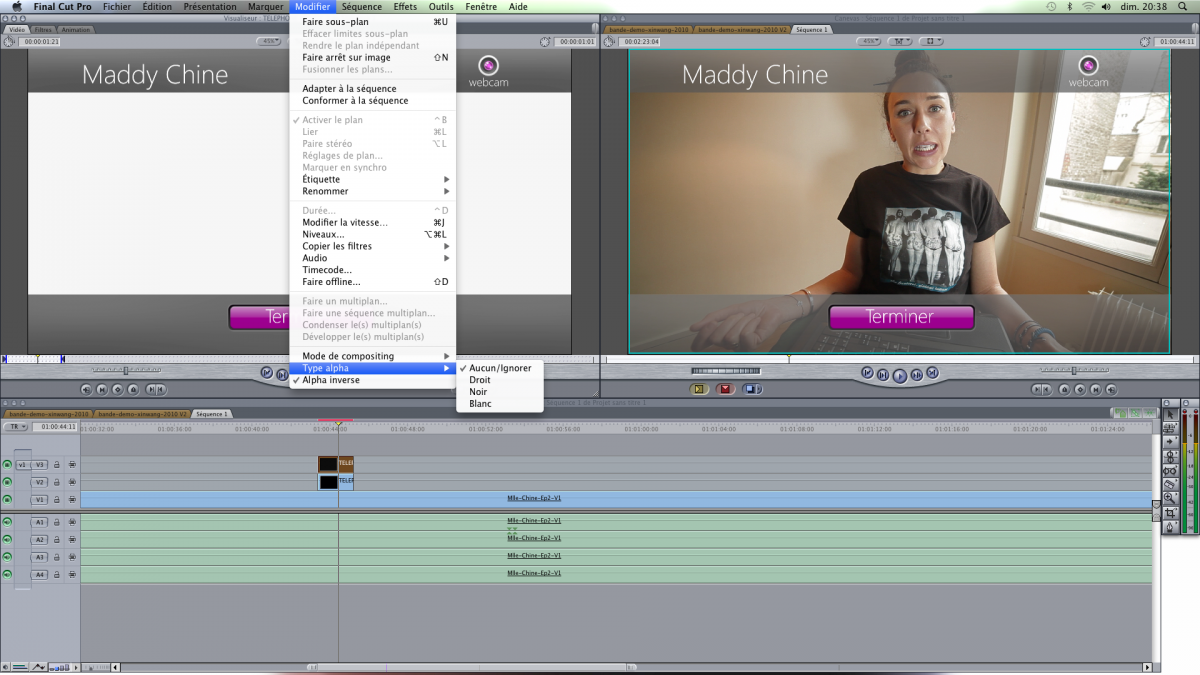
For some reasons, I can't get a clear black mask with gradients in FCPX. I remember we could use a Mask option in FCP7 that enable different mask "styles" ( Straight / Dark / White ). But it seems to have gone now. ( even I could find one in the "info" section ). My gradients are gray. And are supposed to be darker exported from an After Effects rendering. I tried separated files and ProRes 4444. Does not get the right key.
Can someone help
THX
Emmanuel
For some reasons, I can't get a clear black mask with gradients in FCPX. I remember we could use a Mask option in FCP7 that enable different mask "styles" ( Straight / Dark / White ). But it seems to have gone now. ( even I could find one in the "info" section ). My gradients are gray. And are supposed to be darker exported from an After Effects rendering. I tried separated files and ProRes 4444. Does not get the right key.
Can someone help
THX
Emmanuel
Please Log in to join the conversation.


29 Apr 2012 20:19 #7781
by BenB
Replied by BenB on topic Re: Having issues with Masks in FCPX
What exactly are you trying to do? Mask, composite modes, or key?
Please Log in to join the conversation.
-
Topic Author
- New Member
-
Less
More
- Thank you received: 0
29 Apr 2012 23:56 #7797
by
Replied by on topic Re: Having issues with Masks in FCPX
It is a compositing issue I show you what I use to do in FCP7 in a picture here..
Please Log in to join the conversation.
-
Topic Author
- New Member
-
Less
More
- Thank you received: 0
29 Apr 2012 23:58 #7798
by
Replied by on topic Re: Having issues with Masks in FCPX
Now I can't find equivalence in the FCPX menu to have control over my alpha image

Please Log in to join the conversation.
- Tom Wolsky
-

- Offline
- Moderator
-

30 Apr 2012 00:48 #7800
by Tom Wolsky
Replied by Tom Wolsky on topic Re: Having issues with Masks in FCPX
It's in the inspector.
Please Log in to join the conversation.
-
Topic Author
- New Member
-
Less
More
- Thank you received: 0
30 Apr 2012 00:56 #7801
by
Replied by on topic Re: Having issues with Masks in FCPX
Sorry Tom in the inspector I can only find : Premultiplied / straight / or ignore
I would need "white and black" options of the alpha matte because otherwise my shadows turn blemish.
thanks for helping anyway
E.
I would need "white and black" options of the alpha matte because otherwise my shadows turn blemish.
thanks for helping anyway
E.
Please Log in to join the conversation.
- Tom Wolsky
-
- Offline
- Moderator
-
30 Apr 2012 01:11 #7802
by Tom Wolsky
Replied by Tom Wolsky on topic Re: Having issues with Masks in FCPX
Premultiplied is with black. There is no white option. Does anything come with white? I've never had to use white.
Please Log in to join the conversation.
-
Topic Author
- New Member
-
Less
More
- Thank you received: 0
30 Apr 2012 01:14 #7803
by
Replied by on topic Re: Having issues with Masks in FCPX
Actually I used it a lot because when you use shades of gray or drop shadows it was very useful to avoid light gray thanks for your help
Please Log in to join the conversation.
- Tom Wolsky
-
- Offline
- Moderator
-
30 Apr 2012 01:26 #7804
by Tom Wolsky
Replied by Tom Wolsky on topic Re: Having issues with Masks in FCPX
I don't see what the image is that you're compositing with a white alpha. Is it whole image? Is it a still? Video? Where did it come from? What made it with the drop shadow and the white background?
Please Log in to join the conversation.
-
Topic Author
- New Member
-
Less
More
- Thank you received: 0
30 Apr 2012 01:43 #7805
by
Replied by on topic Re: Having issues with Masks in FCPX
It is an Animated Motion Graphic processed in After Effects. I also tried to make a ProRes 4444 but I still get the same results. I use to solve the drop shadows or transparency effect with the black/white clip menu in FCP7. Now with X it seems not to be possible. I was told the issue isn't there with Motion. Only I use AE all the time.:blink:
Please Log in to join the conversation.
-
Topic Author
- New Member
-
Less
More
- Thank you received: 0
30 Apr 2012 01:53 #7806
by
Replied by on topic Re: Having issues with Masks in FCPX
Solved ! I put After Effects Background in Black used ProRes 4444 and Trillions of colors. Matte render is put on "premultiplied". and it works that way. Before there was a way to solve this through FCP. Now you have to be really cautious with it.
Have a nice evening
Emmanuel
I'll send you the image with both renders so you see the difference.
Have a nice evening
Emmanuel
I'll send you the image with both renders so you see the difference.
Please Log in to join the conversation.
-
Topic Author
- New Member
-
Less
More
- Thank you received: 0
30 Apr 2012 01:55 - 30 Apr 2012 01:56 #7807
by


difficult to see with compression but there is a difference in the drop shadow
Replied by on topic Re: Having issues with Masks in FCPX
difficult to see with compression but there is a difference in the drop shadow
Last edit: 30 Apr 2012 01:56 by .
Please Log in to join the conversation.
30 Apr 2012 02:17 #7808
by BenB
Replied by BenB on topic Re: Having issues with Masks in FCPX
Personally I still have no idea what you are trying to do. What exactly is the animation you're applying to the video? Can you show us that by itself? I'm very confused...
Please Log in to join the conversation.
