


- Posts: 9
- Thank you received: 0
3 Post Moderation Rule for New Boarders (25 Jan 2021)
New boarders will have their posts moderated - Don't worry if you cannot see your post immediately.
Help needed please: Syncing 2 or more different frame rates with WAV audio
28 Apr 2012 15:58 #7742
by Burgs
Scenario: I shoot guitar effect pedal demos for a large US company. Pro Tools records the audio at 16 or 24 bit, an iPhone 4S concentrates on the pedal itself and a humble Sony HDR CX150E points and shoots me.
Those three mediums are then imported into a single event.
From the event I make a synchronised clip out of the WAV and the Sony (or iPhone) footage. It gets dragged into the project timeline where I then turn down the camera's native audio so as to hear only the superior Pro Tools master.
So far, so good.
I then bring in the iPhone's footage so I can place a little window within the Sony footage's frame - this shows the pedal being manipulated on the floor while the viewer can concentrate on me playing. Because the two camera's respective footage has different frame (and sample) rates, they're out of sync. No good. "Conform Speed" doesn't seem to work and I'm at a loss.
I can sync them all up nicely inside the Event Viewer with the Multicam function. That works fine. However, I can't for the life of me work out how to view more than one angle at once - a screen within a screen - using the multicam in the Timeline. Cuts are easy, as you would expect, but the screen within a screen thing eludes me.
What am I missing?
Any help would be appreciated.
Many thanks.
Those three mediums are then imported into a single event.
From the event I make a synchronised clip out of the WAV and the Sony (or iPhone) footage. It gets dragged into the project timeline where I then turn down the camera's native audio so as to hear only the superior Pro Tools master.
So far, so good.
I then bring in the iPhone's footage so I can place a little window within the Sony footage's frame - this shows the pedal being manipulated on the floor while the viewer can concentrate on me playing. Because the two camera's respective footage has different frame (and sample) rates, they're out of sync. No good. "Conform Speed" doesn't seem to work and I'm at a loss.
I can sync them all up nicely inside the Event Viewer with the Multicam function. That works fine. However, I can't for the life of me work out how to view more than one angle at once - a screen within a screen - using the multicam in the Timeline. Cuts are easy, as you would expect, but the screen within a screen thing eludes me.
What am I missing?
Any help would be appreciated.
Many thanks.
Please Log in to join the conversation.

28 Apr 2012 16:56 - 28 Apr 2012 17:05 #7743
by BenB
Replied by BenB on topic Re: Help needed please: Syncing 2 or more different frame rates with WAV audio
Conform is NOT what you want. That is used to create slow motion effects.
Sounds like you just need basic multicam training. First, I'd Optimize everything into ProRes 422 when I import it all, to make the multicam run more smoothly.
I'd highly recommend Ripple Training's multicam tutorial series, which is a fantastic deal for $30.
www.rippletraining.com/categories/final-...final-cut-pro-x.html
The user manual has extensive information on using multicam. You need to open the angle viewer, the angle editor, and have it in a project, all at once. The angle editor is where you're going to tweak your syncs. Also, place a marker in each of the two clips on a common location. FCPX will analyze the audio around the markers making audio sync faster and more reliable.
help.apple.com/finalcutpro/mac/10.0.4/#ver23c76439
Frame rates don't matter, but audio sample rates do VERY much. The video standard of 48kHz/16-bit AIFF, but the iPhone records at 44.1kHz. What I would do is create a droplette in Compressor for a ProRes 422 custom preset at 48kHz, and run the iPhone footage through that.
But I've never used iPhone footage in a multicam before. I'll have to test that out some day.
Sounds like you just need basic multicam training. First, I'd Optimize everything into ProRes 422 when I import it all, to make the multicam run more smoothly.
I'd highly recommend Ripple Training's multicam tutorial series, which is a fantastic deal for $30.
www.rippletraining.com/categories/final-...final-cut-pro-x.html
The user manual has extensive information on using multicam. You need to open the angle viewer, the angle editor, and have it in a project, all at once. The angle editor is where you're going to tweak your syncs. Also, place a marker in each of the two clips on a common location. FCPX will analyze the audio around the markers making audio sync faster and more reliable.
help.apple.com/finalcutpro/mac/10.0.4/#ver23c76439
Frame rates don't matter, but audio sample rates do VERY much. The video standard of 48kHz/16-bit AIFF, but the iPhone records at 44.1kHz. What I would do is create a droplette in Compressor for a ProRes 422 custom preset at 48kHz, and run the iPhone footage through that.
But I've never used iPhone footage in a multicam before. I'll have to test that out some day.
Last edit: 28 Apr 2012 17:05 by BenB.
Please Log in to join the conversation.
29 Apr 2012 07:16 - 29 Apr 2012 07:18 #7766
by Burgs
Replied by Burgs on topic Re: Help needed please: Syncing 2 or more different frame rates with WAV audio
Thanks for the detailed reply and the time you took to write it. Greatly appreciated. I'll investigate those links you pointed me to, thank you.
I tried the Compressor/Droplet advice you gave but the iPhone's audio waveform is still shorter, even at the converted 48kHz and therefore out of sync with the Sony and Pro Tools audio. I'm at a total loss now. I guess I'm missing something simple but I'm not sure what.
Thanks again,
Brett Kingman
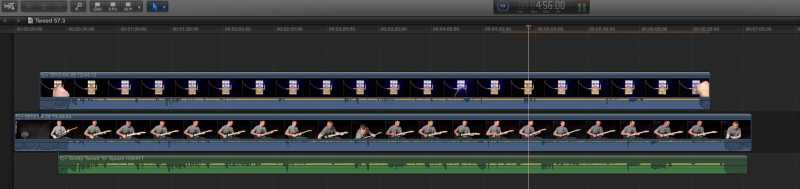
I tried the Compressor/Droplet advice you gave but the iPhone's audio waveform is still shorter, even at the converted 48kHz and therefore out of sync with the Sony and Pro Tools audio. I'm at a total loss now. I guess I'm missing something simple but I'm not sure what.
Thanks again,
Brett Kingman
Last edit: 29 Apr 2012 07:18 by Burgs.
Please Log in to join the conversation.
29 Apr 2012 18:34 #7773
by BenB
Replied by BenB on topic Re: Help needed please: Syncing 2 or more different frame rates with WAV audio
That image is too small for me to really see waveforms or anything. If you transcode all audio to the same sample rate, it should match up. But that image is way too small. Something I'm not happy with on this site, is poasted images are tiny, and we can't see them full screen or at any really clear, usable size. I hope that can be fixed.
Please Log in to join the conversation.
- Andreas Kiel
-

- Offline
- Platinum Member
-

Less
More
- Posts: 1077
- Thank you received: 189
29 Apr 2012 21:13 #7785
by Andreas Kiel
Replied by Andreas Kiel on topic Re: Help needed please: Syncing 2 or more different frame rates with WAV audio
Brett,
You've to be aware that the iPhone doesn't record at a constant frame rate -- it just works like "let's see what i can get".
I know this doesn't help, but you may find in/out sync points and then render the iPhone stuff with Motion AE Twixtor or something like that.
Andreas
You've to be aware that the iPhone doesn't record at a constant frame rate -- it just works like "let's see what i can get".
I know this doesn't help, but you may find in/out sync points and then render the iPhone stuff with Motion AE Twixtor or something like that.
Andreas
Please Log in to join the conversation.
30 Apr 2012 04:07 #7810
by Burgs
Thanks, Andreas. I have no idea what Motion AE Twixtor is (you're dealing with a relative newbie I'm afraid) but I'll investigate and check it out.
Re the iPhone random frame rate thing: that would suggest to me that there may be room for an App with which to control such parameters on the iPhone. Perhaps there's one already. I'll investigate.
Thanks again.
Replied by Burgs on topic Re: Help needed please: Syncing 2 or more different frame rates with WAV audio
Andreas Kiel wrote: Brett,
You've to be aware that the iPhone doesn't record at a constant frame rate -- it just works like "let's see what i can get".
I know this doesn't help, but you may find in/out sync points and then render the iPhone stuff with Motion AE Twixtor or something like that.
Andreas
Thanks, Andreas. I have no idea what Motion AE Twixtor is (you're dealing with a relative newbie I'm afraid) but I'll investigate and check it out.
Re the iPhone random frame rate thing: that would suggest to me that there may be room for an App with which to control such parameters on the iPhone. Perhaps there's one already. I'll investigate.
Thanks again.
Please Log in to join the conversation.
30 Apr 2012 04:17 #7811
by BenB
Replied by BenB on topic Re: Help needed please: Syncing 2 or more different frame rates with WAV audio
There are several apps that allow you to control the frame rate of video on an iPhone. There's a photographer that love to shoot and edit 100% on his iPhone. He recommend FILMIC Pro and MovieCamera. Both allow for setting the frame rate.
But a transcode in Compressor will take care of things if you end up with an odd frame rate.
Actually the brighter the light the faster the frame rate, to correspond to the auto aperture settings, in order to give the best quality automatically. But it is not "variable" frame rate in a single clip. Thus, a transcode in Compressor to the frame rate you choose will work.
But frame rate shouldn't throw a video out of sync in a Multiclip, that is an audio sample rate issue. But transcoding to a standard frame rate in Compressor doesn't hurt, and would fix any issues.
I have a local FCPUG member who shot a music video with 5 iPhones at once and Multiclip worked like a charm. He did Optimize all the clips when importing.
But a transcode in Compressor will take care of things if you end up with an odd frame rate.
Actually the brighter the light the faster the frame rate, to correspond to the auto aperture settings, in order to give the best quality automatically. But it is not "variable" frame rate in a single clip. Thus, a transcode in Compressor to the frame rate you choose will work.
But frame rate shouldn't throw a video out of sync in a Multiclip, that is an audio sample rate issue. But transcoding to a standard frame rate in Compressor doesn't hurt, and would fix any issues.
I have a local FCPUG member who shot a music video with 5 iPhones at once and Multiclip worked like a charm. He did Optimize all the clips when importing.
Please Log in to join the conversation.
01 May 2012 02:29 #7853
by Burgs
Replied by Burgs on topic Re: Help needed please: Syncing 2 or more different frame rates with WAV audio
Gents,
Thank you so much for the valuable info you've provided here. I tried the FILMIC Pro App and it works beautifully. Problems solved.
If you ever need guitar related advice, look me up!
Cheers,
Brett K.
Thank you so much for the valuable info you've provided here. I tried the FILMIC Pro App and it works beautifully. Problems solved.
If you ever need guitar related advice, look me up!
Cheers,
Brett K.
Please Log in to join the conversation.
