


- Posts: 222
- Thank you received: 3
3 Post Moderation Rule for New Boarders (25 Jan 2021)
New boarders will have their posts moderated - Don't worry if you cannot see your post immediately.
Interlaced Footage
21 Apr 2012 22:08 #7398
by Rbelfi
Interlaced Footage was created by Rbelfi
My original footage is AVCHD 1920x1080, the SD card the footage was shot on was copied to a hard drive before it was deleted. I tried doing a "log and transfer" in FCPX like you would in older versions, but it won't work without the SD card. I sent the footage to Toast and tried exporting the clips to h.264 with the current aspect ratio and checked off de-interlace. When I bring the converted clips in FCPX the footage is extremely interlaced.
I've done this same process before using older versions of FCP/Express and had no issues.
My project in FCPX defaults in 1080i, I'm thinking this may be the issue? So i think trying 720p or 1080p might give me different results, which I'll try now.
Any help with this issue would be greatly appreciated.
Thanks,
Rob
I've done this same process before using older versions of FCP/Express and had no issues.
My project in FCPX defaults in 1080i, I'm thinking this may be the issue? So i think trying 720p or 1080p might give me different results, which I'll try now.
Any help with this issue would be greatly appreciated.
Thanks,
Rob
Please Log in to join the conversation.

21 Apr 2012 22:20 #7401
by BenB
Replied by BenB on topic Re: Interlaced Footage
Did you shoot 1080i or 1080p originally?
What camera was it shot on?
What camera was it shot on?
Please Log in to join the conversation.
21 Apr 2012 22:55 #7403
by Rbelfi
Replied by Rbelfi on topic Re: Interlaced Footage
I didn't shoot the footage and the cameraman is out of the country for the next week so I'm not able to ask him. The footage was shot with the Sony HDR-AX2000, I'm pretty sure it was shot 1080i, but I can't be positive as the .mts files don't give me that information.
Please Log in to join the conversation.
21 Apr 2012 23:01 #7404
by Rbelfi
Replied by Rbelfi on topic Re: Interlaced Footage
When I select a clip in FCPX the info button within the program says it's 1080p, but my timeline is 1080i, this may be the problem?...I'll try changing it and see what happens.
Please Log in to join the conversation.
21 Apr 2012 23:04 #7405
by Rbelfi
Replied by Rbelfi on topic Re: Interlaced Footage
I changed to 1080p and it still looks the same.
Please Log in to join the conversation.


22 Apr 2012 01:59 #7428
by dgwvideo
Creating history....one edit at a time !
Replied by dgwvideo on topic Re: Interlaced Footage
Check the viewer parameters to see if you are showing both fields.
Creating history....one edit at a time !
Please Log in to join the conversation.
22 Apr 2012 10:31 #7465
by Rbelfi
Replied by Rbelfi on topic Re: Interlaced Footage
I checked off "show both fields" and it still looks the same
Please Log in to join the conversation.
22 Apr 2012 15:33 #7469
by BenB
Replied by BenB on topic Re: Interlaced Footage
Can you post a screen shot?
Please Log in to join the conversation.
22 Apr 2012 19:57 #7473
by Rbelfi
Replied by Rbelfi on topic Re: Interlaced Footage
Here is a screen shot of an example of what I've been seeing.
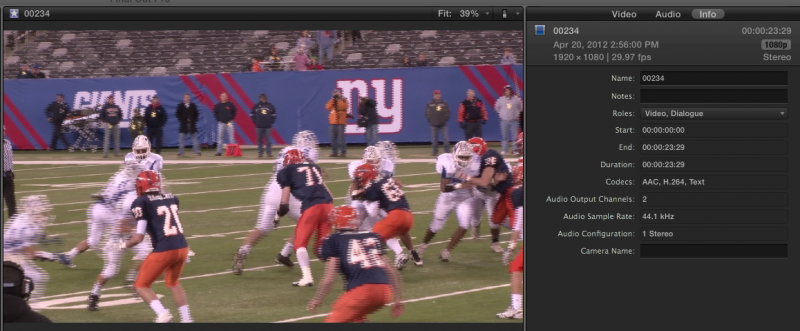
Please Log in to join the conversation.
22 Apr 2012 20:48 #7475
by BenB
Replied by BenB on topic Re: Interlaced Footage
Did you check the Deinterlace box in the Inspector?
Please Log in to join the conversation.
- Duncan Craig
-

- Offline
- Senior Member
-

- duncancraig.co.uk
22 Apr 2012 21:51 #7483
by Duncan Craig
Replied by Duncan Craig on topic Re: Interlaced Footage
That's interlaced for sure.
Please Log in to join the conversation.
23 Apr 2012 01:25 #7498
by Rbelfi
Replied by Rbelfi on topic Re: Interlaced Footage
I checked the De-interlace box and still had the same result.
Right above that I changed the Field Dominance Override from Progressive to Upper First and the footage looks normal. I'm not sure what caused the issue here, but glad something worked.
Right above that I changed the Field Dominance Override from Progressive to Upper First and the footage looks normal. I'm not sure what caused the issue here, but glad something worked.
Please Log in to join the conversation.
23 Apr 2012 02:53 #7500
by dgwvideo
Creating history....one edit at a time !
Replied by dgwvideo on topic Re: Interlaced Footage
If that is NTSC interlaced footage you'll probably want to change the field dominance to lower first.
Creating history....one edit at a time !
Please Log in to join the conversation.
23 Apr 2012 02:54 #7501
by Rbelfi
Replied by Rbelfi on topic Re: Interlaced Footage
Will do. What would the difference between the two be? Upper and Lower that is?
Please Log in to join the conversation.
23 Apr 2012 03:04 - 23 Apr 2012 03:17 #7502
by dgwvideo
Creating history....one edit at a time !
Replied by dgwvideo on topic Re: Interlaced Footage
It can actually be hardware specific based on how you're capturing, but typically upper field deals with 640 resolution devices and pro NTSC uses lower field dominance. See this link by Apple for a reasonably sound description.
support.apple.com/kb/TA26010?viewlocale=en_US
support.apple.com/kb/TA26010?viewlocale=en_US
Creating history....one edit at a time !
Last edit: 23 Apr 2012 03:17 by dgwvideo.
Please Log in to join the conversation.
23 Apr 2012 03:12 #7505
by Rbelfi
Replied by Rbelfi on topic Re: Interlaced Footage
That was very informative, thanks for your help.
Please Log in to join the conversation.
23 Apr 2012 03:19 #7507
by Rbelfi
Replied by Rbelfi on topic Re: Interlaced Footage
Do you know if there's a way to change the entire sequence to lower dominance instead of changing each clip individually?
Please Log in to join the conversation.
23 Apr 2012 04:21 #7513
by dgwvideo
Creating history....one edit at a time !
Replied by dgwvideo on topic Re: Interlaced Footage
Just select all your clips at once by rubber banding around them and then in the inspector select your dominance.
Creating history....one edit at a time !
Please Log in to join the conversation.
