




- Posts: 215
- Thank you received: 2
3 Post Moderation Rule for New Boarders (25 Jan 2021)
New boarders will have their posts moderated - Don't worry if you cannot see your post immediately.
24p + 60i HDV...Deinterlace? Change frame rates?
21 Apr 2012 02:06 #7354
by Shane M
24p + 60i HDV...Deinterlace? Change frame rates? was created by Shane M
Im cutting a commercial that has been shot with a Canon DSLR at 24p and a HDV tape camera shooting at 60i...
Is there any sort of frame conversion i need to do? I assuming it will automatically do it to whatever the sequence settings are...
Should I hit the deinterlace checkbox or change the field dominance? Not too familiar with HDV 60i stuff...
I have noticed that this particular project, which is only 30 seconds, has been incredibly slow and unresponsive in comparison to when i cut my own videos from my canon DSLR only...
I have a new MacBook Pro, 16gb ram, G-Raid through firewire 800....im assuming if my settings are correct that it must just be the firewire connection creating a bottleneck?
It basically just becomes unresponsive and unable to play back the video smoothly when it has something to render in the background...
orange bar = stutter and lag
Is there any sort of frame conversion i need to do? I assuming it will automatically do it to whatever the sequence settings are...
Should I hit the deinterlace checkbox or change the field dominance? Not too familiar with HDV 60i stuff...
I have noticed that this particular project, which is only 30 seconds, has been incredibly slow and unresponsive in comparison to when i cut my own videos from my canon DSLR only...
I have a new MacBook Pro, 16gb ram, G-Raid through firewire 800....im assuming if my settings are correct that it must just be the firewire connection creating a bottleneck?
It basically just becomes unresponsive and unable to play back the video smoothly when it has something to render in the background...
orange bar = stutter and lag
Please Log in to join the conversation.


21 Apr 2012 03:54 #7355
by dgwvideo
Creating history....one edit at a time !
Replied by dgwvideo on topic Re: 24p + 60i HDV...Deinterlace? Change frame rates?
FCPX will automatically conform the frame rate of the imported clip to the project frame rate that you established. You can further control how it does this, but if, for example, your project is at 23.98fps and you drop a 60i clip into it, FCPX will resample so that clip plays at 23.98.
See below for specific info:
help.apple.com/finalcutpro/mac/10.0.4/#ver3363b44e
As far as de-interlacing, I think there may be some issues with the newly added deinterlace function in the inspector of 10.0.4....there are posts about this elsewhere on the forum.
See how your footage looks when auto-conforming. If you see interlaced artifacts, there are several good and free de-interlace filters you might try. Also, experiment with the "show both fields" selection in the viewer parameters (this may only affect viewer playback...don't know if it gets to output).
See below for specific info:
help.apple.com/finalcutpro/mac/10.0.4/#ver3363b44e
As far as de-interlacing, I think there may be some issues with the newly added deinterlace function in the inspector of 10.0.4....there are posts about this elsewhere on the forum.
See how your footage looks when auto-conforming. If you see interlaced artifacts, there are several good and free de-interlace filters you might try. Also, experiment with the "show both fields" selection in the viewer parameters (this may only affect viewer playback...don't know if it gets to output).
Creating history....one edit at a time !
Please Log in to join the conversation.
21 Apr 2012 03:57 - 21 Apr 2012 03:58 #7356
by Shane M
Replied by Shane M on topic Re: 24p + 60i HDV...Deinterlace? Change frame rates?
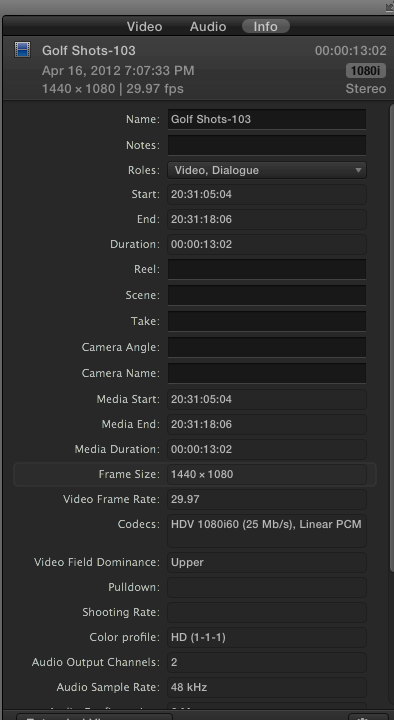
I noticed that the 60i footage i imported in to the event stats that it is 29.97 even though the DSLR footage and timeline is set to 24p...weird? Wrong?
My system keeps getting more and more bogged down. Any change at all pretty much locks it up completely until the render bar is gone.
My system keeps getting more and more bogged down. Any change at all pretty much locks it up completely until the render bar is gone.
Last edit: 21 Apr 2012 03:58 by Shane M.
Please Log in to join the conversation.
21 Apr 2012 05:01 - 21 Apr 2012 05:01 #7359
by dgwvideo
Creating history....one edit at a time !
Replied by dgwvideo on topic Re: 24p + 60i HDV...Deinterlace? Change frame rates?
I should have clarified that a bit better. The clip will show the framerate it was recorded at in the event browser, if you are looking at the clip data, which would be 29.97 fps. However, when dropped into the timeline it will be conformed to the 24p timebase. You should notice it plays at that correct speed.
As far as your system bogging down, that could be any number of things but I don't believe it's related to the mixed media. I have successfully mixed HDV, 30p and 24p on the same timeline without issues. When you imported, did you optimize the footage? Also, try setting your playback preferences to "Better Performance". A few other things you can do, but see how that goes for starters.
As far as your system bogging down, that could be any number of things but I don't believe it's related to the mixed media. I have successfully mixed HDV, 30p and 24p on the same timeline without issues. When you imported, did you optimize the footage? Also, try setting your playback preferences to "Better Performance". A few other things you can do, but see how that goes for starters.
Creating history....one edit at a time !
Last edit: 21 Apr 2012 05:01 by dgwvideo.
Please Log in to join the conversation.
21 Apr 2012 05:10 #7361
by Shane M
Ive optimized media (do it every time). Also i have it set to "better performance"...i even tried switching to proxy...it doesn't really help and makes the HDV footage look absolutely horrendous so i just turned it back to normal optimized media.
The HDV was recorded at 60i by the way...and its showing 29.97 in the event browser....i don't know why?
Replied by Shane M on topic Re: 24p + 60i HDV...Deinterlace? Change frame rates?
dgwvideo wrote: I should have clarified that a bit better. The clip will show the framerate it was recorded at in the event browser, if you are looking at the clip data, which would be 29.97 fps. However, when dropped into the timeline it will be conformed to the 24p timebase. You should notice it plays at that correct speed.
As far as your system bogging down, that could be any number of things but I don't believe it's related to the mixed media. I have successfully mixed HDV, 30p and 24p on the same timeline without issues. When you imported, did you optimize the footage? Also, try setting your playback preferences to "Better Performance". A few other things you can do, but see how that goes for starters.
Ive optimized media (do it every time). Also i have it set to "better performance"...i even tried switching to proxy...it doesn't really help and makes the HDV footage look absolutely horrendous so i just turned it back to normal optimized media.
The HDV was recorded at 60i by the way...and its showing 29.97 in the event browser....i don't know why?
Please Log in to join the conversation.
21 Apr 2012 05:17 #7362
by dgwvideo
Creating history....one edit at a time !
Replied by dgwvideo on topic Re: 24p + 60i HDV...Deinterlace? Change frame rates?
60i = 60/100.1=59.94 fields per second=29.97frames per second. This is normal.
Creating history....one edit at a time !
Please Log in to join the conversation.
21 Apr 2012 05:28 #7363
by Shane M
ahh ok i see, makes sense.
Replied by Shane M on topic Re: 24p + 60i HDV...Deinterlace? Change frame rates?
dgwvideo wrote: 60i = 60/100.1=59.94 fields per second=29.97frames per second. This is normal.
ahh ok i see, makes sense.
Please Log in to join the conversation.
