


3 Post Moderation Rule for New Boarders (25 Jan 2021)
New boarders will have their posts moderated - Don't worry if you cannot see your post immediately.
Deinterlace checkbox in the Settings view of the Info tab of the Inspector
- Tom Wolsky
-
 Topic Author
- Offline
- Moderator
-

Less
More
20 Apr 2012 21:13 - 20 Apr 2012 21:14 #7347
by Tom Wolsky
Deinterlace checkbox in the Settings view of the Info tab of the Inspector was created by Tom Wolsky
Been looking at the deinterlace function that appeared in Settings view of Info in 10.0.4. I can't see what it does, at least nothing good that I've found so far. It does not actually deinterlace interlaced footage, it works by doubling the frame rate. On the other hand if you set interlaced footage to a field dominance of progressive, effectively deinterlacing it (however well or not it does it), the Deinterlace check box will actually re-interlace the video. It changes the frame rate of the media from 29.97 to 59.94. I don't think I've ever seen anything like it.
If you have an SD clip is in the browser, and you use the Deinterlace checkbox not only is the frame rate changed, but the video is scaled and cropped into some bastardized HD.
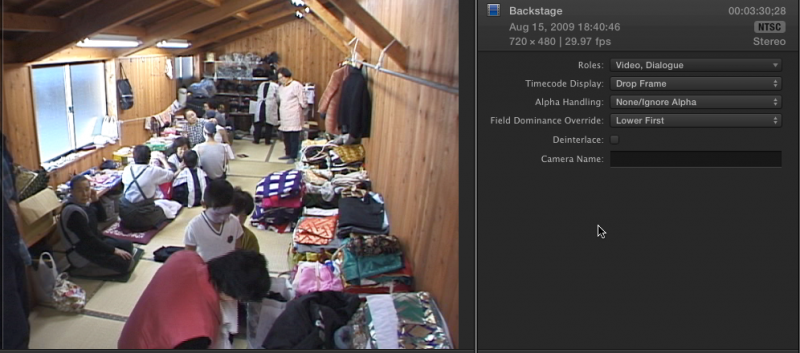
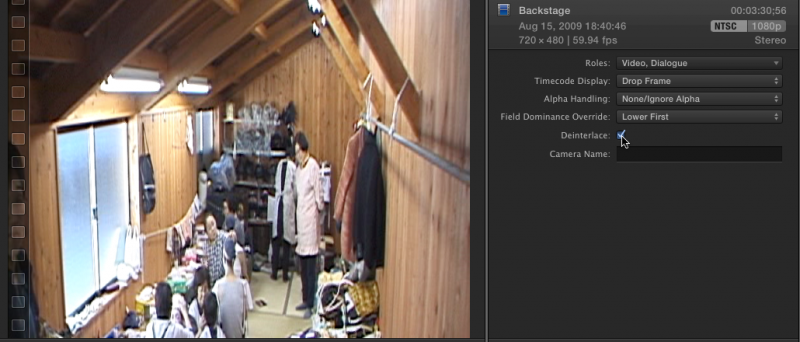
A really cute feature. You can't of course have a 59.94 SD project, not in FCP, so it's pretty useless all in all. I've heard reports of similar things happening with PsF media, but I've not been able to test it.
With HD media it sets the frame rate to 59.94 and can be edited into a 59.94 project and effectively deinterlaces the clips. The media does have to be rendered in the project however.
If any one can figure out what is really supposed to be happening here, and what this checkbox is supposed to do, in particular how it might work to alleviate problems with PsF media, I'd much appreciate being clued in. Thanks.
If you have an SD clip is in the browser, and you use the Deinterlace checkbox not only is the frame rate changed, but the video is scaled and cropped into some bastardized HD.
A really cute feature. You can't of course have a 59.94 SD project, not in FCP, so it's pretty useless all in all. I've heard reports of similar things happening with PsF media, but I've not been able to test it.
With HD media it sets the frame rate to 59.94 and can be edited into a 59.94 project and effectively deinterlaces the clips. The media does have to be rendered in the project however.
If any one can figure out what is really supposed to be happening here, and what this checkbox is supposed to do, in particular how it might work to alleviate problems with PsF media, I'd much appreciate being clued in. Thanks.
Last edit: 20 Apr 2012 21:14 by Tom Wolsky.
Please Log in to join the conversation.


21 Apr 2012 13:59 #7373
by NocoDave
Replied by NocoDave on topic Re: Deinterlace checkbox in the Settings view of the Info tab of the Inspector
I've been looking at this a bit this morning, nothing conclusive here either. I'm testing with PAL SD Anamorphic footage.
I noticed a few things first off. I got that strange scale and crop stuff appearing after trying a few bits and pieces, so I deleted the clip re-imported, now it doesn't do it. I can't get it to go wrong if I try, so not sure what's going on there.
I also get the display info changing from PAL to NTSC 1080p when I hit the deinterlace checkbox, but the frame size does stay they same in the display and for the clip, I first thought this could just be a display issue with FCPX not knowing what to call 720x576 clip at 50 frames a second.
But this is happening when I make the change in the Event Browser, as was the strange stretch/crop thing. If I make the change to a clip in the timeline it has no issues, it seems to work ok (touch wood) the frame rate changes to 50 fps as it should according to the FCPX help files, but it conforms to the 25 fps in the timeline and the settings view display still says PAL.
The FCPX help files also say to select high quality in the playback preferences, but doesn't say why. Just for previewing I'd imagine.
I noticed a few things first off. I got that strange scale and crop stuff appearing after trying a few bits and pieces, so I deleted the clip re-imported, now it doesn't do it. I can't get it to go wrong if I try, so not sure what's going on there.
I also get the display info changing from PAL to NTSC 1080p when I hit the deinterlace checkbox, but the frame size does stay they same in the display and for the clip, I first thought this could just be a display issue with FCPX not knowing what to call 720x576 clip at 50 frames a second.
But this is happening when I make the change in the Event Browser, as was the strange stretch/crop thing. If I make the change to a clip in the timeline it has no issues, it seems to work ok (touch wood) the frame rate changes to 50 fps as it should according to the FCPX help files, but it conforms to the 25 fps in the timeline and the settings view display still says PAL.
The FCPX help files also say to select high quality in the playback preferences, but doesn't say why. Just for previewing I'd imagine.
Please Log in to join the conversation.

21 Apr 2012 21:58 #7395
by BenB
Replied by BenB on topic Re: Deinterlace checkbox in the Settings view of the Info tab of the Inspector
Works just fine for me with 1080i footage. I don't have any SD footage to try it out with.
Please Log in to join the conversation.
