


3 Post Moderation Rule for New Boarders (25 Jan 2021)
New boarders will have their posts moderated - Don't worry if you cannot see your post immediately.
Deinterlace checkbox in the Settings view of the Info tab of the Inspector
- Tom Wolsky
-
 Topic Author
- Offline
- Moderator
-

Less
More
18 Apr 2012 03:13 #7214
by Tom Wolsky
Deinterlace checkbox in the Settings view of the Info tab of the Inspector was created by Tom Wolsky
Appeared in version 10.0.4.
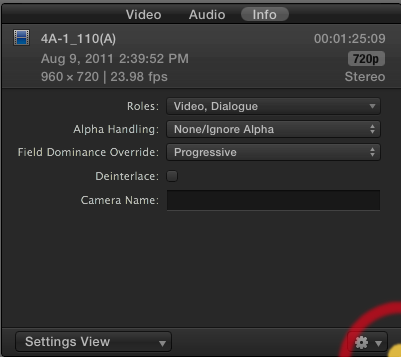
Haven't tested it. Curious about its effect on PsF media, which has been causing problems.
The function was not available in the previous version.
Haven't tested it. Curious about its effect on PsF media, which has been causing problems.
The function was not available in the previous version.
Please Log in to join the conversation.


18 Apr 2012 04:33 #7222
by BenB
Replied by BenB on topic Re: Deinterlace checkbox in the Settings view of the Info tab of the Inspector
Are you talking about Field Dominance Override? Yes, that's always been there. I played around with it months ago. It's really great. Play around with it a bit.
Please Log in to join the conversation.
- Tom Wolsky
-
Topic Author
- Offline
- Moderator
-
18 Apr 2012 06:40 #7229
by Tom Wolsky
Replied by Tom Wolsky on topic Re: Deinterlace checkbox in the Settings view of the Info tab of the Inspector
No, the checkbox for Deinterlace. There was no Deinterlace option in the metadata in previous versions.
Please Log in to join the conversation.
18 Apr 2012 06:58 - 18 Apr 2012 07:00 #7231
by BenB
Replied by BenB on topic Re: Deinterlace checkbox in the Settings view of the Info tab of the Inspector
Oh, the checkbox! I didn't notice that. Yeah, I've never seen that before... wow. That's really interesting. I think that is new for 10.0.4.
help.apple.com/finalcutpro/mac/10.0.4/#ver3363b44e
"Note: Selecting the Deinterlace setting causes the frame rate of the selected clips to double. For example, if the original interlaced clips have a frame rate of 29.97 fps, the deinterlaced clips will have a frame rate of 59.94 fps. Keep this in mind when you choose the video and audio settings for your project.
Tip: To confirm the absence of interlacing artifacts, you can press the Left Arrow and Right Arrow keys to step through the clips in the Timeline one frame at a time."
help.apple.com/finalcutpro/mac/10.0.4/#ver3363b44e
"Note: Selecting the Deinterlace setting causes the frame rate of the selected clips to double. For example, if the original interlaced clips have a frame rate of 29.97 fps, the deinterlaced clips will have a frame rate of 59.94 fps. Keep this in mind when you choose the video and audio settings for your project.
Tip: To confirm the absence of interlacing artifacts, you can press the Left Arrow and Right Arrow keys to step through the clips in the Timeline one frame at a time."
Last edit: 18 Apr 2012 07:00 by BenB.
Please Log in to join the conversation.
