


- Posts: 654
- Thank you received: 42
3 Post Moderation Rule for New Boarders (25 Jan 2021)
New boarders will have their posts moderated - Don't worry if you cannot see your post immediately.
Help with CoreMelt VeeYou V2 (in Motion) (update - I'll pay you!)
- simonpwood
-
 Topic Author
- Offline
- Platinum Member
-

Less
More
14 Apr 2012 19:55 - 15 Apr 2012 19:37 #7000
by simonpwood
Has anyone used CoreMelts VeeYou V2 in Motion 5?
I've been trying to get it to work with no luck. It looks like a really useful tool, and I'd like to get an effect for a video I'm going to edit soon.
Any tutorials or instructions available for Motion 5?
Any Motion Gurus who want to give it a try (its a free plug in)!?
I've been trying to get it to work with no luck. It looks like a really useful tool, and I'd like to get an effect for a video I'm going to edit soon.
Any tutorials or instructions available for Motion 5?
Any Motion Gurus who want to give it a try (its a free plug in)!?
Last edit: 15 Apr 2012 19:37 by simonpwood. Reason: update
Please Log in to join the conversation.
- simonpwood
-
Topic Author
- Offline
- Platinum Member
-
Less
More
- Posts: 654
- Thank you received: 42
15 Apr 2012 20:08 #7061
by simonpwood
Replied by simonpwood on topic Re: Help with CoreMelt VeeYou V2 (in Motion) (update - I'll pay you!)
I know time is money, so if someone can help me walkthrough this step by step then I'll gladly pay you for your time (through paypal).
Essentially, I need to do 2 things:
1) Create a waveform from a piece of music, and render it out as an animation. Using a digital projector the waveform will then be projected on set.
2) Render out the waveform on a transparent alpha layer that can then be composited in FCPX as necessary.
I'm sure I could work the out if I had a better understanding of Motion, but unfortunately I still have not got around to learning the program.
If there are any Motion experts out there who want to give this a go then please post here so I can PM you to discuss particulars etc.
Thanks!
Essentially, I need to do 2 things:
1) Create a waveform from a piece of music, and render it out as an animation. Using a digital projector the waveform will then be projected on set.
2) Render out the waveform on a transparent alpha layer that can then be composited in FCPX as necessary.
I'm sure I could work the out if I had a better understanding of Motion, but unfortunately I still have not got around to learning the program.
If there are any Motion experts out there who want to give this a go then please post here so I can PM you to discuss particulars etc.
Thanks!
Please Log in to join the conversation.

15 Apr 2012 20:23 #7065
by BenB
Replied by BenB on topic Re: Help with CoreMelt VeeYou V2 (in Motion) (update - I'll pay you!)
From what I can see, VeeYou is not Motion 5 compatible. I just emailed Ravian with CoreMelt to get the scoop.
Please Log in to join the conversation.
- simonpwood
-
Topic Author
- Offline
- Platinum Member
-
Less
More
- Posts: 654
- Thank you received: 42
15 Apr 2012 21:07 #7068
by simonpwood
Replied by simonpwood on topic Re: Help with CoreMelt VeeYou V2 (in Motion) (update - I'll pay you!)
Hi Ben,
Thanks I appreciate you looking into it!
I believe that it does not work with FCPX, but I'm sure I read that it was compatible with Motion 5. Certainly the generators are visible in Motion, so it seems to have installed, but I just can't figure how to make them work....
Thanks I appreciate you looking into it!
I believe that it does not work with FCPX, but I'm sure I read that it was compatible with Motion 5. Certainly the generators are visible in Motion, so it seems to have installed, but I just can't figure how to make them work....
Please Log in to join the conversation.
- simonpwood
-
Topic Author
- Offline
- Platinum Member
-
Less
More
- Posts: 654
- Thank you received: 42
15 Apr 2012 21:11 #7069
by simonpwood
Replied by simonpwood on topic Re: Help with CoreMelt VeeYou V2 (in Motion) (update - I'll pay you!)
Yeah; the installer has a Release Note PDF that says:
"RELEASE NOTES V2 31/10/11 2.50 New Features V2 2.5
• Support for Motion 5 and Final Cut Pro X. Please note all plugins work with full custom parameter support in Motion 5. PLEASE NOTE VEEYOU ONLY WORKS IN MOTION 5 NOT FCP X"
So it should work with Motion.

"RELEASE NOTES V2 31/10/11 2.50 New Features V2 2.5
• Support for Motion 5 and Final Cut Pro X. Please note all plugins work with full custom parameter support in Motion 5. PLEASE NOTE VEEYOU ONLY WORKS IN MOTION 5 NOT FCP X"
So it should work with Motion.
Please Log in to join the conversation.
15 Apr 2012 21:44 #7076
by BenB
Replied by BenB on topic Re: Help with CoreMelt VeeYou V2 (in Motion) (update - I'll pay you!)
I installed it and don't see it in Motion.
Please Log in to join the conversation.
- simonpwood
-
Topic Author
- Offline
- Platinum Member
-
Less
More
- Posts: 654
- Thank you received: 42
15 Apr 2012 21:50 #7077
by simonpwood
Replied by simonpwood on topic Re: Help with CoreMelt VeeYou V2 (in Motion) (update - I'll pay you!)
Hmm, thats peculiar.
I attached a snapshot of Motion with the generators on display:
The generators are in the Library.
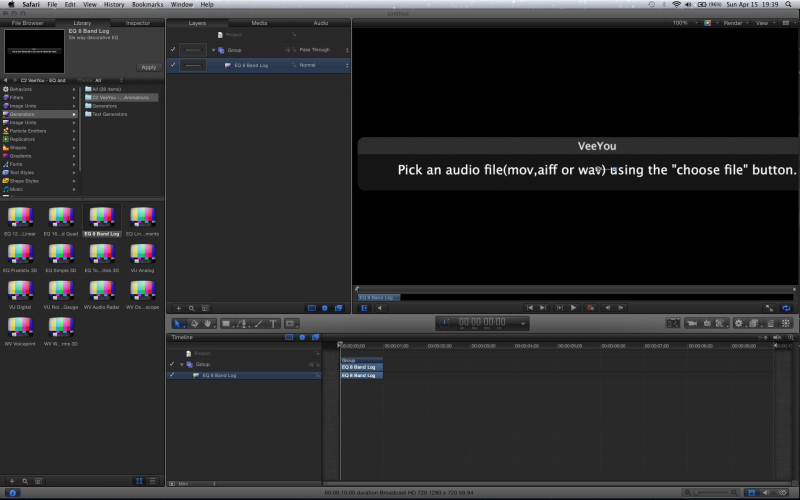
I attached a snapshot of Motion with the generators on display:
The generators are in the Library.
Please Log in to join the conversation.
- Scrubelicious
-

- Offline
- Platinum Member
-
Less
More
- Posts: 1228
- Thank you received: 114
15 Apr 2012 22:28 #7079
by Scrubelicious
Replied by Scrubelicious on topic Re: Help with CoreMelt VeeYou V2 (in Motion) (update - I'll pay you!)
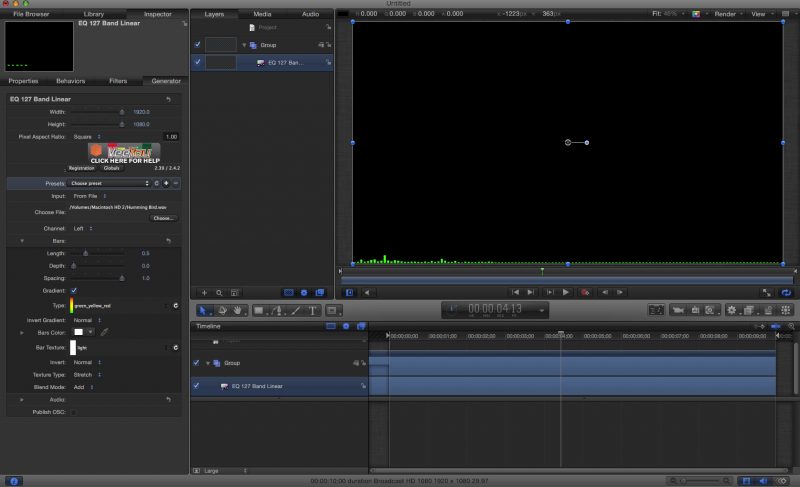
The Plugin works fine on my side of the house, what was the issue that you have it?
For creating a waveform, do you have After Effects?
For creating a waveform, do you have After Effects?
Please Log in to join the conversation.
- simonpwood
-
Topic Author
- Offline
- Platinum Member
-
Less
More
- Posts: 654
- Thank you received: 42
15 Apr 2012 22:36 #7080
by simonpwood
Replied by simonpwood on topic Re: Help with CoreMelt VeeYou V2 (in Motion) (update - I'll pay you!)
Good to know its working for you.
I don't have AE.
The issue I'm having is essentially that I don't really know how to use Motion, and just don't have the time to learn it right now (can't find the time; I've got kids and another non video related job!)
I've tried messing around with the effect, but can't seems to get it to work, and i can't find any tutorials for it with Motion 5.
So basically I just need someone to make a kind of tutorial from step 1 right (opening the program!) thru to rendering the 2 animations. Basically a step by step guide to creating animations with VeeYou.
I realize thats a lot to ask, so I'd be happy to pay for someones time to do that.
I notice my plugin looks different to yours (I don't have the image with the help bar on the left that you have).
I don't have AE.
The issue I'm having is essentially that I don't really know how to use Motion, and just don't have the time to learn it right now (can't find the time; I've got kids and another non video related job!)
I've tried messing around with the effect, but can't seems to get it to work, and i can't find any tutorials for it with Motion 5.
So basically I just need someone to make a kind of tutorial from step 1 right (opening the program!) thru to rendering the 2 animations. Basically a step by step guide to creating animations with VeeYou.
I realize thats a lot to ask, so I'd be happy to pay for someones time to do that.
I notice my plugin looks different to yours (I don't have the image with the help bar on the left that you have).
Please Log in to join the conversation.
- Scrubelicious
-
- Offline
- Platinum Member
-
Less
More
- Posts: 1228
- Thank you received: 114
15 Apr 2012 22:59 #7081
by Scrubelicious
Replied by Scrubelicious on topic Re: Help with CoreMelt VeeYou V2 (in Motion) (update - I'll pay you!)
you will find that if you have the Generator selected and you are in the Inspector tab.
Here is one tutorial for Motion 4
It all works the same in Motion 5 only thing that has change from 4 to 5 is under the hood and the look...
What kinda of waveform are looking for? Love to make one for you but as myself I am working on three other Projects and two of them are paid gigs.
If you see you will find all kinda cool tutorials and free little gadget to create waveform in After Effects, also get a better result.
Here is one tutorial for Motion 4
It all works the same in Motion 5 only thing that has change from 4 to 5 is under the hood and the look...
What kinda of waveform are looking for? Love to make one for you but as myself I am working on three other Projects and two of them are paid gigs.
If you see you will find all kinda cool tutorials and free little gadget to create waveform in After Effects, also get a better result.
Please Log in to join the conversation.
- simonpwood
-
Topic Author
- Offline
- Platinum Member
-
Less
More
- Posts: 654
- Thank you received: 42
15 Apr 2012 23:40 #7084
by simonpwood
Replied by simonpwood on topic Re: Help with CoreMelt VeeYou V2 (in Motion) (update - I'll pay you!)
Wow. That tutorial you pointed me to was very helpful. I was not aware that you could do this straight with Motion (without using the Coremelt VeeYou plug in).
This will probably work for me, at least it will be a good starting point.
I still can't get VeeYou to work, for some reason when I choose the audio file (a wav file) and drop it in the timeline I am unable to hear the audio, and the generator does not respond to it.
This will probably work for me, at least it will be a good starting point.
I still can't get VeeYou to work, for some reason when I choose the audio file (a wav file) and drop it in the timeline I am unable to hear the audio, and the generator does not respond to it.
Please Log in to join the conversation.
15 Apr 2012 23:45 - 15 Apr 2012 23:51 #7086
by BenB
Replied by BenB on topic Re: Help with CoreMelt VeeYou V2 (in Motion) (update - I'll pay you!)
Be sure your Project's duration is long enough to hear something in the audio file.
In the Audio tab, make sure the audio is enabled.
In the Audio tab, make sure the audio is enabled.
Last edit: 15 Apr 2012 23:51 by BenB.
Please Log in to join the conversation.
- simonpwood
-
Topic Author
- Offline
- Platinum Member
-
Less
More
- Posts: 654
- Thank you received: 42
16 Apr 2012 00:06 #7087
by simonpwood
Replied by simonpwood on topic Re: Help with CoreMelt VeeYou V2 (in Motion) (update - I'll pay you!)
Thank.
I have been stretching the timeline to accommodate the sound file (which is quite short).
Update: I have just realized that a couple of the Generators in VeeYou are actually working for me> Band Linear & VU Analog. Both of these seem to be responding to the audio file, however I can't actually hear the audio. The other generators are not responding.
When I look in the audio tab it seems to be empty (can't see anything to enable in it)?
Scrubelicious: I think the image you posted was the Band Linear generator, which does seem to work for me also. Did you hear the audio when you played it? Also have you been able to get any of the other generators to work in VeeYou?
Thanks guys.
I have been stretching the timeline to accommodate the sound file (which is quite short).
Update: I have just realized that a couple of the Generators in VeeYou are actually working for me> Band Linear & VU Analog. Both of these seem to be responding to the audio file, however I can't actually hear the audio. The other generators are not responding.
When I look in the audio tab it seems to be empty (can't see anything to enable in it)?
Scrubelicious: I think the image you posted was the Band Linear generator, which does seem to work for me also. Did you hear the audio when you played it? Also have you been able to get any of the other generators to work in VeeYou?
Thanks guys.
Please Log in to join the conversation.
- simonpwood
-
Topic Author
- Offline
- Platinum Member
-
Less
More
- Posts: 654
- Thank you received: 42
16 Apr 2012 00:23 #7088
by simonpwood
Replied by simonpwood on topic Re: Help with CoreMelt VeeYou V2 (in Motion) (update - I'll pay you!)
Update:
OK, I have been working with some wavs that were in a mono format. Just looked at the inspector and saw that the Right Channel was selected, so I tried changing to the left channel. Bingo! The waveforms are now animating.
Strangely there is no audio though?
OK, I have been working with some wavs that were in a mono format. Just looked at the inspector and saw that the Right Channel was selected, so I tried changing to the left channel. Bingo! The waveforms are now animating.
Strangely there is no audio though?
Please Log in to join the conversation.
- Scrubelicious
-
- Offline
- Platinum Member
-
Less
More
- Posts: 1228
- Thank you received: 114
16 Apr 2012 01:10 #7089
by Scrubelicious
Replied by Scrubelicious on topic Re: Help with CoreMelt VeeYou V2 (in Motion) (update - I'll pay you!)
No audio on my side ether, since the audio was never loaded into the project itself (Motion concept) it won't hear it. I haven't played with to much but there might be a way to load audio from the project itself.
All generator that I tried did work.
All generator that I tried did work.
Please Log in to join the conversation.
