


- Posts: 29
- Thank you received: 1
3 Post Moderation Rule for New Boarders (25 Jan 2021)
New boarders will have their posts moderated - Don't worry if you cannot see your post immediately.
Audio censor
- Magnetic_dud
-
 Topic Author
- Offline
- Junior Member
-

Less
More
11 Apr 2012 14:50 #6802
by Magnetic_dud
Audio censor was created by Magnetic_dud
I made a video too explicit, so I need to bleep some words.
How I could easily do that?
the only way that I could think about it is to place that region at volume zero then overlap the bleep sound.
There is a faster way?
How I could easily do that?
the only way that I could think about it is to place that region at volume zero then overlap the bleep sound.
There is a faster way?
Please Log in to join the conversation.

12 Apr 2012 03:47 #6839
by BenB
Replied by BenB on topic Re: Audio censor
Nope, no magical "detect bad words" filter.
Please Log in to join the conversation.
- Magnetic_dud
-
Topic Author
- Offline
- Junior Member
-
Less
More
- Posts: 29
- Thank you received: 1
12 Apr 2012 03:56 #6840
by Magnetic_dud
Replied by Magnetic_dud on topic oh no
ah no i expressed myself incorrectly :lol:
it's impossible to have an automagic filter that autolistens and autocensors some words for the next 10 years
I mean, to manually place an audio track on top to cover all the rest - but it seems there is no way to do that?
it's impossible to have an automagic filter that autolistens and autocensors some words for the next 10 years
I mean, to manually place an audio track on top to cover all the rest - but it seems there is no way to do that?
Please Log in to join the conversation.
- Magnetic_dud
-
Topic Author
- Offline
- Junior Member
-
Less
More
- Posts: 29
- Thank you received: 1
12 Apr 2012 03:56 #6841
by Magnetic_dud
Replied by Magnetic_dud on topic Re: Audio censor
ah no i expressed myself incorrectly :lol:
it's impossible to have an automagic filter that autolistens and autocensors some words for the next 10 years
I mean, to manually place an audio track on top to cover all the rest - but it seems there is no way to do that?
it's impossible to have an automagic filter that autolistens and autocensors some words for the next 10 years
I mean, to manually place an audio track on top to cover all the rest - but it seems there is no way to do that?
Please Log in to join the conversation.
12 Apr 2012 04:03 - 12 Apr 2012 04:10 #6845
by BenB
Replied by BenB on topic Re: Audio censor
Sure, why not? Use the Range too (R) to select the bad word, pull the volume down for that range. Then just the the beep audio clip there as a connected clip. Just like you originally said you were doing. I'm not sure how it could possibly be done any other way. You could just place the beep there, but, ten the persons voice will still exist.
I think if you could do Overwrite edits (D) to secondary storylines that would rock, but it's primary storyline only.
I think if you could do Overwrite edits (D) to secondary storylines that would rock, but it's primary storyline only.
Last edit: 12 Apr 2012 04:10 by BenB.
Please Log in to join the conversation.
- Magnetic_dud
-
Topic Author
- Offline
- Junior Member
-
Less
More
- Posts: 29
- Thank you received: 1
12 Apr 2012 04:10 #6848
by Magnetic_dud
Replied by Magnetic_dud on topic Re: Audio censor
I do that, but is boring :dry:
If i could just overlap the sound without pulling the volume down for that range, I would be more productive... :whistle:
If i could just overlap the sound without pulling the volume down for that range, I would be more productive... :whistle:
Please Log in to join the conversation.

12 Apr 2012 05:39 #6858
by dgwvideo
Creating history....one edit at a time !
Replied by dgwvideo on topic Re: Audio censor
You can connect any audio clip you'd like on top of that language you want to obscure. Just have to play with the level of the beep or sound you choose and the original voice to make sure it is not understandable (if that's what you want).
Put a sound effect in there to spice it up. Tons to choose from in the music browser.
Put a sound effect in there to spice it up. Tons to choose from in the music browser.
Creating history....one edit at a time !
Please Log in to join the conversation.
- Tom Wolsky
-

- Offline
- Moderator
-

12 Apr 2012 06:54 #6861
by Tom Wolsky
Replied by Tom Wolsky on topic Re: Audio censor
You can also overwrite a naughty word with tone to bleep it out. Don't have to fiddle with levels then.
Please Log in to join the conversation.
12 Apr 2012 07:09 #6863
by BenB
Replied by BenB on topic Re: Audio censor
You can only overwite edit to the primary storyline, though.
Please Log in to join the conversation.
- Magnetic_dud
-
Topic Author
- Offline
- Junior Member
-
Less
More
- Posts: 29
- Thank you received: 1
12 Apr 2012 12:48 #6875
by Magnetic_dud
Replied by Magnetic_dud on topic Re: oh no
ah it was a reply to this topic
www.fcp.co/forum/4-final-cut-pro-x-fcpx/6802-audio-censor
I pressed the "new topic" instead of "reply"
my bad
I pressed the "new topic" instead of "reply"
my bad
Please Log in to join the conversation.
- Scrubelicious
-

- Offline
- Platinum Member
-

Less
More
- Posts: 1228
- Thank you received: 114
12 Apr 2012 15:28 #6878
by Scrubelicious
Replied by Scrubelicious on topic Re: oh no
You mean something that could be done on a Cell Phone but not on a Workstation with "Pro" application?

Please Log in to join the conversation.
- Tom Wolsky
-
- Offline
- Moderator
-
12 Apr 2012 16:34 #6884
by Tom Wolsky
Replied by Tom Wolsky on topic Re: Audio censor
You can overwrite to a secondary storyline if it's selected.
Please Log in to join the conversation.
- Magnetic_dud
-
Topic Author
- Offline
- Junior Member
-
Less
More
- Posts: 29
- Thank you received: 1
12 Apr 2012 16:37 #6887
by Magnetic_dud
Replied by Magnetic_dud on topic Re: Audio censor
how i can overwrite?
Please Log in to join the conversation.
- Tom Wolsky
-
- Offline
- Moderator
-
12 Apr 2012 16:46 #6889
by Tom Wolsky
Replied by Tom Wolsky on topic Re: Audio censor
Press the D key to overwrite to the storyline. I don't know the exact state of your timeline, where the audio is, how it's connected or attached, so I can only give you the basic function. You might have to detach the audio if it isn't detached. You might have to make it into a separate storyline.
Please Log in to join the conversation.
12 Apr 2012 16:48 #6890
by BenB
I'm trying it now, and it always overwrites to the primary storyline, no matter what is selected. I'm in 10.0.4.
Replied by BenB on topic Re: Audio censor
Tom Wolsky wrote: You can overwrite to a secondary storyline if it's selected.
I'm trying it now, and it always overwrites to the primary storyline, no matter what is selected. I'm in 10.0.4.
Please Log in to join the conversation.
- ronny courtens
-

- Offline
- Moderator
-
Less
More
- Posts: 4455
- Thank you received: 962
12 Apr 2012 16:53 #6891
by ronny courtens
Replied by ronny courtens on topic Re: oh no
"You can only overwite edit to the primary storyline, though."
Actually you CAN overwrite edit to any secondary storyline.
Make your selection on your source clip in the Event Brower.
Click on the upper part of the secondary storyline to select it.
Place your skimmer (or playhead) at the spot where you wish to make your overwrite edit.
Press "D" to overwrite.
Only exception: you cannot overwrite video to an audio-only secondary storyline.
Actually you CAN overwrite edit to any secondary storyline.
Make your selection on your source clip in the Event Brower.
Click on the upper part of the secondary storyline to select it.
Place your skimmer (or playhead) at the spot where you wish to make your overwrite edit.
Press "D" to overwrite.
Only exception: you cannot overwrite video to an audio-only secondary storyline.
Please Log in to join the conversation.
- ronny courtens
-
- Offline
- Moderator
-
Less
More
- Posts: 4455
- Thank you received: 962
12 Apr 2012 17:23 #6894
by ronny courtens
Replied by ronny courtens on topic Re: oh no
Oops, I see now that Tom already has replied the same thing as I. I'm abroad sending my messages from an i-Pad and apparently it has taken over 30 minutes before my reply has appeared on the forum. Long live wireless internet connections :lol:
Please Log in to join the conversation.
- Tom Wolsky
-
- Offline
- Moderator
-
12 Apr 2012 19:26 #6897
by Tom Wolsky
Replied by Tom Wolsky on topic Re: Audio censor
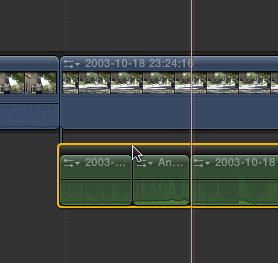
The audio is detached and made into a secondary. The secondary's shelf is selected, or I/O are marked in the secondary. The edit is set to audio only, and you press D. If you have a lot of bleeping to do, this might not be a bad method. Setting I/O on the secondary is very precise of course.
Please Log in to join the conversation.
