


- Posts: 28
- Thank you received: 0
3 Post Moderation Rule for New Boarders (25 Jan 2021)
New boarders will have their posts moderated - Don't worry if you cannot see your post immediately.
Corrupt Project File in FCPX.
11 Apr 2012 00:28 #6756
by sedvideo
Corrupt Project File in FCPX. was created by sedvideo
Truly need some assistance if any can be provided. I was doing some minor adjustments to my project about two hours ago, and it appears that my project file became corrupt. I've isolated it to the project file by taking all projects and events out of the proper folder in Finder, and one by one added them back, and FCPX locks up and/or crashes when this one project is accessed. Works fine with all others. I've deleted Preferences, render files, moved the project to another drive, still have the same issues. Any thoughts? I'm at the very end of the project and really just need to export it for the customer. Thanks.
Please Log in to join the conversation.
11 Apr 2012 17:27 #6812
by sedvideo
Replied by sedvideo on topic Re: Corrupt Project File in FCPX.
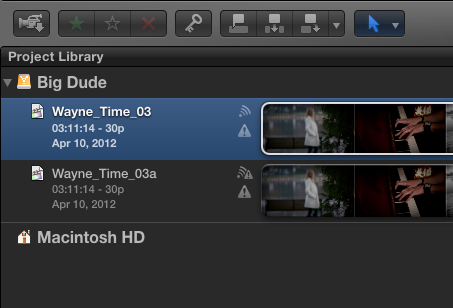
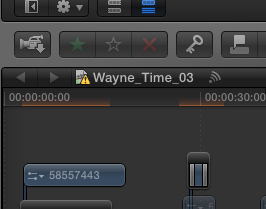
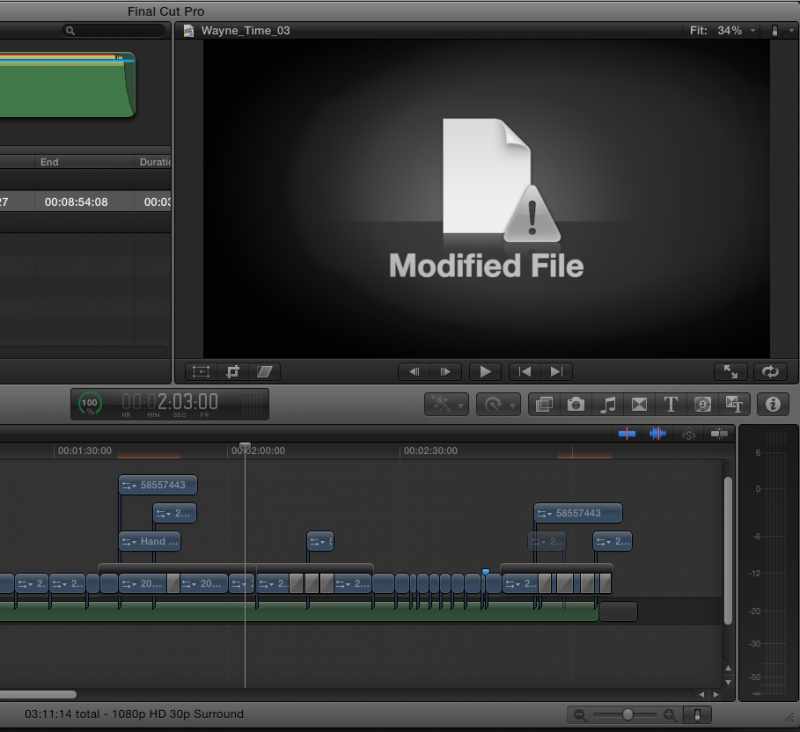
Strangely enough, after updating to 10.0.4 last night, I was able to access the project again. Its still corrupt, as it has a warning sign attached to the Project icon, see image, and there is an warning sign in the project library. I've locked up the app again just by trying to do some simple edits. One file in the event library, and its corresponding file in the timeline, sorry, "storyline", shows up as Modified File, and no matter what I do, I cannot relink this file. Its fully functional as a video file in Finder, but when I navigate to it, sorry, no luck. Just won't connect. I'm guessing this is what is causing all this headache, but not sure. What I've decided to do is export at full res what I have, import that full file into FCP7, and finish that way. I'm so close to being done with the project. Any thoughts are much appreciated. Thanks.
Brandon
Brandon
Please Log in to join the conversation.


11 Apr 2012 22:48 #6821
by dgwvideo
Creating history....one edit at a time !
Replied by dgwvideo on topic Re: Corrupt Project File in FCPX.
The symbol in the project library simply means that you have changed the project or made some edit to it since your last export. It does not indicate corruption. As far as re-linking files, unless this has been updated with the 10.0.4 release (which I doubt) maybe your original clip is now located on another drive which fcpx wouldn't relink. Again, unless 10.0.4 fixed this your original file must be completely unchanged and in the same location it was when you originally imported it. Is it possible you moved or changed that clip?
Creating history....one edit at a time !
Please Log in to join the conversation.
- Tom Wolsky
-

- Offline
- Moderator
-

11 Apr 2012 23:12 #6824
by Tom Wolsky
Replied by Tom Wolsky on topic Re: Corrupt Project File in FCPX.
There are two symbols in the project library. One means project change, the other means project error. The second project shows both symbols.
Please Log in to join the conversation.
11 Apr 2012 23:18 #6826
by sedvideo
Replied by sedvideo on topic Re: Corrupt Project File in FCPX.
I appreciate the reply. I was guessing that the triangle with the exclamation point indicated a corrupt project. I knew what the other one indicated.
The original file that is shown as modified has not been changed in any way. Nothing has been done to any of the media folders in the Final Cut Events folder. That is what is so bothersome to me. I've followed the "new way" of managing media in FCPX, and am rather frustrated that I seem to have no way to recover from a corrupt project.
Again, thanks for the replies. Any further thoughts are appreciated.
Brandon
The original file that is shown as modified has not been changed in any way. Nothing has been done to any of the media folders in the Final Cut Events folder. That is what is so bothersome to me. I've followed the "new way" of managing media in FCPX, and am rather frustrated that I seem to have no way to recover from a corrupt project.
Again, thanks for the replies. Any further thoughts are appreciated.
Brandon
Please Log in to join the conversation.
11 Apr 2012 23:19 #6827
by dgwvideo
Creating history....one edit at a time !
Replied by dgwvideo on topic Re: Corrupt Project File in FCPX.
I've not seen that before. Any idea what type of error it indicates?
Creating history....one edit at a time !
Please Log in to join the conversation.
11 Apr 2012 23:21 #6828
by sedvideo
Replied by sedvideo on topic Re: Corrupt Project File in FCPX.
unless this has been updated with the 10.0.4 release (which I doubt)
I had the file corruption take place yesterday around noon, and while searching and trouble shooting the problem, learned on this forum of the 10.0.4 release. I updated later that evening, and was able to actually open the project, while still corrupt, and export a full res version of the video. Updating to 10.0.4 actually saved my bacon by allowing me to at least open the project and export.
bm
I had the file corruption take place yesterday around noon, and while searching and trouble shooting the problem, learned on this forum of the 10.0.4 release. I updated later that evening, and was able to actually open the project, while still corrupt, and export a full res version of the video. Updating to 10.0.4 actually saved my bacon by allowing me to at least open the project and export.
bm
Please Log in to join the conversation.
- Tom Wolsky
-
- Offline
- Moderator
-
12 Apr 2012 00:15 #6831
by Tom Wolsky
Replied by Tom Wolsky on topic Re: Corrupt Project File in FCPX.
It usually means a missing file, which seems to be the case here. Usually if the project is corrupted it won't mount.
Please Log in to join the conversation.
12 Apr 2012 00:23 #6832
by sedvideo
Replied by sedvideo on topic Re: Corrupt Project File in FCPX.
Thats what I don't get, the file isn't missing. The original media, the High Quality, and Proxy Media are all present and accounted for. Trying to relink does not yield anything. It remains in the Modified state as in the image. Other simple edits such as an option-drag of a clip to later in the timeline cause the beachball and lockup, to the point that I need to restart the computer to get out of it.
bm
bm
Please Log in to join the conversation.
12 Apr 2012 20:02 #6901
by dgwvideo
Creating history....one edit at a time !
Replied by dgwvideo on topic Re: Corrupt Project File in FCPX.
Have you tried using the backup project that FCPX creates?
Creating history....one edit at a time !
Please Log in to join the conversation.
12 Apr 2012 20:27 #6903
by sedvideo
Replied by sedvideo on topic Re: Corrupt Project File in FCPX.
Yes. That one appears to be corrupt as well. Same results as the current project file.
Please Log in to join the conversation.
12 Apr 2012 21:24 #6905
by dgwvideo
Creating history....one edit at a time !
Replied by dgwvideo on topic Re: Corrupt Project File in FCPX.
I would try this in the following order:
Duplicate your project again to preserve the one you currently have.
In the duplicated project, manually delete all render files through the finder and not from within fcpx. Do this for the project and the events.
Use preference manager from Digital Rebellion to trash all FCPX preferences.
Repair (again) all permissions on the boot drive at both levels.
Restart your computer and launch FCPX.
Open the duplicated project (if you can) and re-render what needs to be rendered.
If you are still having problems, and if your clips load into the timeline when opening the project, then look for a corrupted clip.
Break apart any compound clips that may be within your project.
Expand your timeline large enough to clearly see all parts of it in sections.
You can disable individual clips one at a time to see if you can locate an offending clip. Click on a clip or series of clips and select to disable them and keep doing this. Perhaps you will find one or more that are causing the problem.
Assuming your other projects work fine, this would basically be rebuilding your entire project (less the importing stage). If you find a bad clip you will probably have to re-import it and edit it to fit your sequence.
Maybe you have tried most of these suggestions already, but I don't know what else you could do. Good luck.
Duplicate your project again to preserve the one you currently have.
In the duplicated project, manually delete all render files through the finder and not from within fcpx. Do this for the project and the events.
Use preference manager from Digital Rebellion to trash all FCPX preferences.
Repair (again) all permissions on the boot drive at both levels.
Restart your computer and launch FCPX.
Open the duplicated project (if you can) and re-render what needs to be rendered.
If you are still having problems, and if your clips load into the timeline when opening the project, then look for a corrupted clip.
Break apart any compound clips that may be within your project.
Expand your timeline large enough to clearly see all parts of it in sections.
You can disable individual clips one at a time to see if you can locate an offending clip. Click on a clip or series of clips and select to disable them and keep doing this. Perhaps you will find one or more that are causing the problem.
Assuming your other projects work fine, this would basically be rebuilding your entire project (less the importing stage). If you find a bad clip you will probably have to re-import it and edit it to fit your sequence.
Maybe you have tried most of these suggestions already, but I don't know what else you could do. Good luck.
Creating history....one edit at a time !
Please Log in to join the conversation.
12 Apr 2012 21:37 #6908
by sedvideo
Replied by sedvideo on topic Re: Corrupt Project File in FCPX.
I'll give this all a shot and report back. Thanks.
bm
bm
Please Log in to join the conversation.
13 Apr 2012 00:09 #6928
by sedvideo
Replied by sedvideo on topic Re: Corrupt Project File in FCPX.
Well. After many restarts, poking around in the project, deleting files, re-importing files, it appears as though I've got the project back. The yellow warning with the exclamation point in it indicated missing project files is gone, a file that showed up in the Event, but in Finder had this added to the file name: (fcp1). How that got there, and why it caused my project to crash and force a system restart is beyond me at this point. I am happy to report full editing function, minus any and all missing and unlinked warnings, is back to normal.
Thank you all for your kind assistance. After this little episode however, I have to say I'm kind of reluctant to start another client edit in this application. Does any one else feel this way after having issues like this? I have the option of working in FCP7, or CS4 on a PC. And given the news of the day, I'm seriously tempted to upgrade to CS6 in the near future. I still will maintain my Trainer Certification in FCPX, and will take this as a solid learning experience and pass along the particulars in class. But when there is a customer on the other end of the desk instead of a student, I am a little reluctant to start a project. I'll keep working in it to test it out, and when I feel its solid again, we'll see. I also understand any and all software goes haywire for any number of reasons. This just felt different to me.
Thank you all for your kind assistance. After this little episode however, I have to say I'm kind of reluctant to start another client edit in this application. Does any one else feel this way after having issues like this? I have the option of working in FCP7, or CS4 on a PC. And given the news of the day, I'm seriously tempted to upgrade to CS6 in the near future. I still will maintain my Trainer Certification in FCPX, and will take this as a solid learning experience and pass along the particulars in class. But when there is a customer on the other end of the desk instead of a student, I am a little reluctant to start a project. I'll keep working in it to test it out, and when I feel its solid again, we'll see. I also understand any and all software goes haywire for any number of reasons. This just felt different to me.
Please Log in to join the conversation.
13 Apr 2012 00:22 #6930
by dgwvideo
Creating history....one edit at a time !
Replied by dgwvideo on topic Re: Corrupt Project File in FCPX.
Well, glad you got it sorted out. The (fcp1) usually indicates that you've duplicated the project or event. Retains the same name with that appended as far as I know.
I completely understand your frustration, but I think for the most part FCPX will be pretty reliable for you. Most issues I have had similar to yours (and they have been few) have in part been my misuse of the program. Not sure of your complete setup, but the application does require some horsepower and fast drives to perform at its' best. The recent 10.0.4 upgrade really seems to improve a lot of things as well as performance. Don't give up on it.
I completely understand your frustration, but I think for the most part FCPX will be pretty reliable for you. Most issues I have had similar to yours (and they have been few) have in part been my misuse of the program. Not sure of your complete setup, but the application does require some horsepower and fast drives to perform at its' best. The recent 10.0.4 upgrade really seems to improve a lot of things as well as performance. Don't give up on it.
Creating history....one edit at a time !
Please Log in to join the conversation.
13 Apr 2012 01:03 #6938
by sedvideo
Replied by sedvideo on topic Re: Corrupt Project File in FCPX.
I too am glad I've got it back functioning.
I've spent the last hour or so re-doing a few things, re-tweeking a few effects and shots, and on my Core 2 Duo with 4gb RAM, editing from FW800, it does move along well.
Update:
As I finish typing this, FCPx crashes system... again. Sigh.
bm
I've spent the last hour or so re-doing a few things, re-tweeking a few effects and shots, and on my Core 2 Duo with 4gb RAM, editing from FW800, it does move along well.
Update:
As I finish typing this, FCPx crashes system... again. Sigh.
bm
Please Log in to join the conversation.
13 Apr 2012 01:13 #6940
by dgwvideo
Creating history....one edit at a time !
Replied by dgwvideo on topic Re: Corrupt Project File in FCPX.
Well that could likely be the source of your problems. That is a pretty light system spec to run FCPX, especially with HD media. 4GB of ram is barely going to let the app function and editing HD from Firewire 800 is not ideal. If it's a 7200RPM drive (the very minimum requirement) it will still be sluggish on 1080 projects. If you can obtain an external sata drive and get some more ram your experience will improve greatly. Also, not sure what GPU you have in there, but I'll bet that's a bottleneck too.
Creating history....one edit at a time !
Please Log in to join the conversation.
13 Apr 2012 01:21 #6942
by sedvideo
Replied by sedvideo on topic Re: Corrupt Project File in FCPX.
All great points. I know the hardware is at the bare minimum for specs to run, but alas, its what I have at the moment, for mobile. In the office its on a beefier machine.
Restarting the application went fine, will proceed. Again, thank you for the support
bm
Restarting the application went fine, will proceed. Again, thank you for the support
bm
Please Log in to join the conversation.
- rohit.badgujar
-

- Offline
- New Member
-

Less
More
- Posts: 1
- Thank you received: 0
29 Nov 2015 20:27 #71019
by rohit.badgujar
Replied by rohit.badgujar on topic Corrupt Project File in FCPX.
Hello,
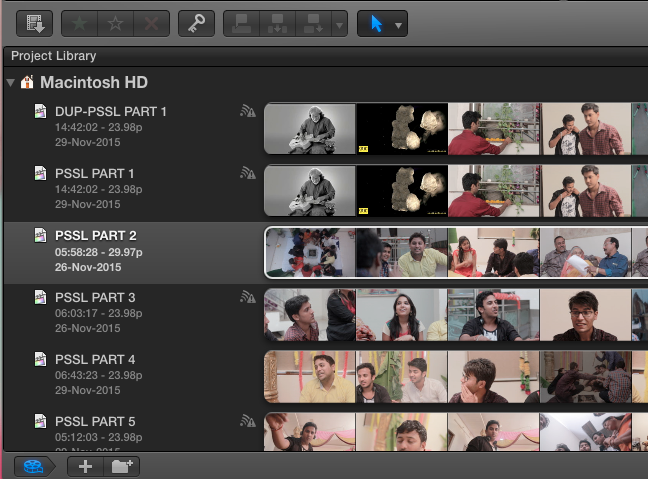
i am too facing same problem sign on my projects.
as i remember i was very proper with every steps, but what i did different i have used multiple events for one single project as i can see only those project have signs where i have used multiple events.
still not getting any problems due to this but i am on final stage of delivering my film, doing dialogue replacements, than cc & cg and than BGM.
so hope this will not going to be a problem. i am making duplicate projects right now, they too showing the same exclamatory sign on them.
hope i will get some solutions here.
thanks.
i am too facing same problem sign on my projects.
as i remember i was very proper with every steps, but what i did different i have used multiple events for one single project as i can see only those project have signs where i have used multiple events.
still not getting any problems due to this but i am on final stage of delivering my film, doing dialogue replacements, than cc & cg and than BGM.
so hope this will not going to be a problem. i am making duplicate projects right now, they too showing the same exclamatory sign on them.
hope i will get some solutions here.
thanks.
Please Log in to join the conversation.
