fbpx
3 Post Moderation Rule for New Boarders (25 Jan 2021)

New boarders will have their posts moderated - Don't worry if you cannot see your post immediately.

RED BAND in FCPX Timeline

More
07 Apr 2012 19:49 #6650 by dgwvideo
I posted this quite a while back, and to the best of my knowledge it was never solved. I've searched other forums also and apparently some users have seen this . Does anyone know what those red marks are in the timeline?


fcp.co/forum/4-final-cut-pro-x-fcpx/3777...in-1003-acts-strange

Creating history....one edit at a time !

Please Log in to join the conversation.

More
07 Apr 2012 20:32 #6651 by BenB
Replied by BenB on topic Re: RED BAND in FCPX Timeline
Are you still having them? I've never seen them anywhere else. Can you email me a full size screen shot? I have a few folks I'd like to show it to.

Please Log in to join the conversation.

More
07 Apr 2012 21:15 #6652 by Jimmyfinn
The first XML I brought in from 7toX had this red line across the WHOLE timeline.
It seems to indicate an error or mismatch of some sort as none of the clips would play
in the timeline. I had a clip with variable speed (ramp up and down) which I removed,
re-exported XML and all seemed fine. Should Have grabbed a screen Shot at the time but will try and recreate it.

Please Log in to join the conversation.

More
07 Apr 2012 22:44 #6657 by BenB
Replied by BenB on topic Re: RED BAND in FCPX Timeline
I asked the "7toX" guys.

"They are 'corruption indicators' but I'm not sure what the cause is. One time I saw this was a clip that had 2 timecode tracks, and 7toX translated the file in a way that FCPX didn't like.

Variable speed change may cause the problem (since that's not translated) but I'd be surprised because FCP7 calculates an 'average' speed change (the value that's shown on the clip in the timeline) and 7toX uses that average to create a constant speed changed clip."

Please Log in to join the conversation.

More
08 Apr 2012 03:44 #6662 by dgwvideo
@BenB No, I am not seeing this on a regular basis. I have noticed it maybe 2 or 3 times over the past 3 months and was just trying to get a handle on its cause. Unfortunately, I don't have a current example to email to you as the project has been completed long ago and most of those red bars evaporated when I deleted all render files manually. I say most because although the clip after re-rendering again played fine, there was still a small sliver of a red bar remaining at one spot which I never could eliminate. The old thread contains the best images of what I had at the time.

@Jimmyfinn I have always suspected that either retiming or optical flow may have had something to do with this as this was the only common denominator I could find. The few times I saw this issue I did have retimed clips in play and OF applied to some extent.

For me, this has strictly occurred within fcpx. I have never exported any xml from legacy versions of fcp. If and when I ever see it again, I'll be sure to screen grab a large view.

Creating history....one edit at a time !

Please Log in to join the conversation.

More
08 Apr 2012 06:03 #6668 by BenB
Replied by BenB on topic Re: RED BAND in FCPX Timeline
I think you need to detail this very precisely and clearly, and send it in to the feedback page at Apple. I think this shows a serious weakness in the app.

Please Log in to join the conversation.

More
08 Apr 2012 06:13 #6669 by dgwvideo
I'll do the best I can without knowing exactly the cause.

Creating history....one edit at a time !

Please Log in to join the conversation.

More
08 Apr 2012 06:24 #6670 by BenB
Replied by BenB on topic Re: RED BAND in FCPX Timeline
Don't need to know the cause, just document in great detail the symptoms. And then get with me off forum.

Please Log in to join the conversation.

More
08 Apr 2012 14:45 - 08 Apr 2012 14:48 #6675 by Lee Patterson
Hi, Better minds than mine are on this already but it might be worth deleting the render files associated with the compounded compound clips or perhaps exporting them as QT files and dropping those in.
Wonder about duplicating the project and stripping out everyhting except the areas showing the corrupt media indicators then pulling those apart. Hey, I feel for you, Its all a bit too forensic when all we want to do is make some moving images;)
Last edit: 08 Apr 2012 14:48 by Lee Patterson.

Please Log in to join the conversation.

More
08 Apr 2012 18:56 #6676 by dgwvideo
Thanks for the input, Lee. Corrupt render files do seem to play a role in this issue. They have been deleted with some success, and the project has also been duplicated without the offending section with some success back when this topic was originally posted months ago. I am in the process of documenting for Apple all the symptoms I remember at the time and will post any new developments here.

Creating history....one edit at a time !

Please Log in to join the conversation.

More
10 Apr 2012 07:18 #6733 by dgwvideo
@BenB I have some documentation for you. Sent you a PM. Also found a clue to the problem that involves detaching audio.

Creating history....one edit at a time !

Please Log in to join the conversation.

More
13 May 2012 01:09 - 13 May 2012 01:10 #8363 by Jimmyfinn
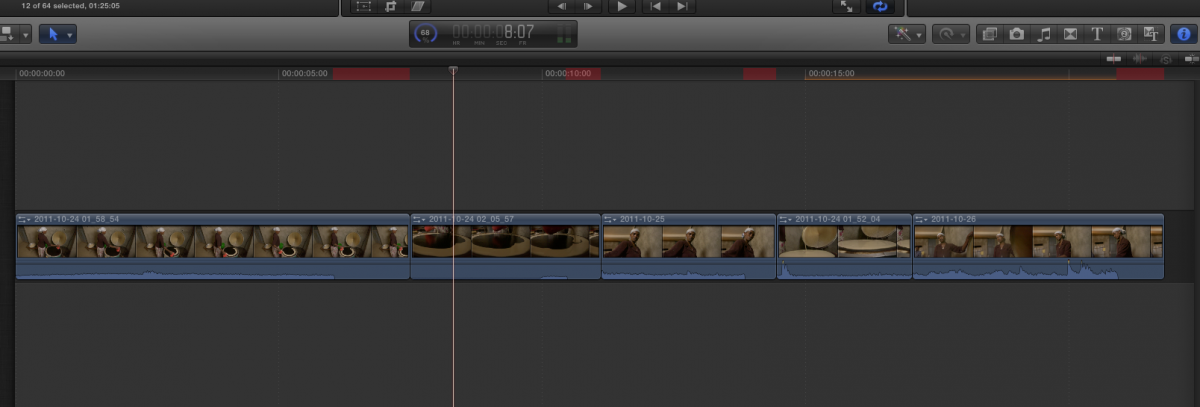
Going thru the Peachpit Advanced FCPX and came across the red band in the project.
It's the iMovie project imported into X and clips freeze at the red sections.
No speed ramping or detached audio involved. Would be good to nail what's causing
this glitch

10.0.4 on 10.6.8 may be relevant
Attachments:
Last edit: 13 May 2012 01:10 by Jimmyfinn.

Please Log in to join the conversation.

More
13 May 2012 01:20 #8364 by BenB
Replied by BenB on topic Re: RED BAND in FCPX Timeline
It is known that the disk images that come with the advanced FCP X APTS book are messed up some how. Seem 10.0.4 has a bug with disk images in general, but the Peachpit DVD's have bad copies on some of them. Contact Peachpit, they'll give you the URL to download the fixed disk images.

Please Log in to join the conversation.

More
13 May 2012 01:38 #8367 by Tom Wolsky
I've run this media on a number of machines and have not seen this problem. 10.0.4 on 10.7.x.

Please Log in to join the conversation.

More
13 May 2012 01:54 #8368 by ronny courtens
In the past months we have been spitting out quite a large number of programs using FCP10 and I have never seen this red line issue in any edit nor have I had any questions about such an issue from our editors. So I certainly would like to know what may be causing this, just in case we do get it. Please keep us updated on this. Thank you.

Please Log in to join the conversation.

More
13 May 2012 04:14 #8373 by dgwvideo
I have been working with Apple for three weeks now on this. I have submitted screen shots, events and various descriptions of what has been causing the issue. I am now in the process of uploading projects, events and screencasts to Apple's ftp site.

Apple has confirmed to me that this is a software bug, and an internal code that is not intended to be displayed. It appears it is caused and can be intermittently corrected by several various things.

Here is the latest data I am working on:

I have found a repeatable instance of this red band being created when certain clips are retimed using optical flow. I found this on three projects to date and under 10.0.3 and 10.0.4 and under Lion OS 10.7.2 and 10.7.3. If the retimed clips are trimmed in the timeline by extending or shortening them, the red band immediately appeared above the entire clip. If clicking outside the timeline and then back inside the timeline, the red band renders itself gone immediately. This doesn't always happen, but I got it to repeat 5 times in a row doing this.

Secondly, I have never used iMovie or imported any iMovie projects into FCPX, so I cannot comment on how that may cause the issue.

Thirdly, the initial project which prompted my post on this thread had a Motion Jpeg clip that was retimed with optical flow. This was the first time I noticed the red band. By detaching the audio from that clip, the red band immediately disappears. To bring it back, I simply selected the clip and the Audio and made it into a compound clip....like clockwork, the red band is back. Detach that audio and it's gone. This is how I originally got my initial project to work, having to go back and forth and detaching certain audio clips. Disabling the clip in the timeline will directly remove the associated red band also.

Finally, even though I seem to now be able to routinely reproduce the red band when retiming various clips, it does not appear to be causing any harmful issues with performance or playback, as it once did.

To date I have had several email correspondences with Apple on this and have supplied most of what they asked me for regarding this issue. I still need to get more data to them but I know they are committed to getting this resolved.

Creating history....one edit at a time !

Please Log in to join the conversation.

More
13 May 2012 04:19 #8374 by dgwvideo

Jimmyfinn wrote: No speed ramping or detached audio involved.


It is interesting here that the bands appear above the clip in sections where your attached audio is silent or have ended before the video.

Creating history....one edit at a time !

Please Log in to join the conversation.

More
13 May 2012 17:11 #8409 by ianstubbs
The clips in the iMovie project that the new Advanced FCPX book has you import have red indicators when the audio appears to finish earlier than the vision. The vision freezes as you play across the red blocks. Detaching the audio makes no difference. Then I realised that the offending source clips are shorter than their instances in the Timeline! I haven't opened the project in iMovie to see if it's a translation issue but trimming the clips in the Timeline so that they are the same length as the source clips fixes the issue.

Please Log in to join the conversation.

More
13 May 2012 20:05 #8416 by BenB
Replied by BenB on topic Re: RED BAND in FCPX Timeline
I just downloaded the media and will be checking it out on my system. I got an Apple trainers email the other day saying that Apple and Peachpit admit the original DMGs for download were bad and they fixed it. They claimed there's never been anything wrong with the book versions off the DVD. But I've had several students with similar problems with the DVD book versions. So re-downloaded new fresh copies.

Please Log in to join the conversation.

More
13 May 2012 20:13 #8419 by ianstubbs
You can 'fix' the downloaded sparseimage files by creating empty new ones of the same size and copying the contents of the downloaded ones into them. As far as I can tell there is nothing wrong with them at that level. Might work for the DVD versions too but I don't have those for the 'Advanced' book.

Please Log in to join the conversation.