


- Posts: 27
- Thank you received: 1
3 Post Moderation Rule for New Boarders (25 Jan 2021)
New boarders will have their posts moderated - Don't worry if you cannot see your post immediately.
Storage of events.
- MyCrummyApartment
-
 Topic Author
- Offline
- Junior Member
-

Less
More
29 Mar 2012 01:33 #6254
by MyCrummyApartment
Storage of events. was created by MyCrummyApartment
Okay here is another challenge I am facing.
I made the mistake (I think) of importing many recorded events onto my main hard drive, while there is more than a full TB on my external drive.
1. Can I somehow transfer these events (and associated projects) to an external drive, so as to free up my computers HD space, and ...
2. Is it better to work from video that is stored on my external HD?
Thanks Dudes.
I made the mistake (I think) of importing many recorded events onto my main hard drive, while there is more than a full TB on my external drive.
1. Can I somehow transfer these events (and associated projects) to an external drive, so as to free up my computers HD space, and ...
2. Is it better to work from video that is stored on my external HD?
Thanks Dudes.
Please Log in to join the conversation.

29 Mar 2012 03:34 #6255
by BenB
Replied by BenB on topic Re: Storage of events.
Don't put all your media on the system drive, correct.
In the Event and Project libraries, just drag the Events and Projects to the external drive. When the copy is done, and you've verified it works correctly, you can right click each original and move them to the trash.
In the Event and Project libraries, just drag the Events and Projects to the external drive. When the copy is done, and you've verified it works correctly, you can right click each original and move them to the trash.
Please Log in to join the conversation.

29 Mar 2012 03:35 #6256
by rickytin
Replied by rickytin on topic Re: Storage of events.
Select the event, go to file and select Move Event and then select to what hardrive you want to move.
Please Log in to join the conversation.
29 Mar 2012 04:07 #6263
by BenB
Replied by BenB on topic Re: Storage of events.
I'd say copy it first, don't move it. In case something goes wrong, you still have the original to fall back on. Move does a copy to the new drive then deletes the original immediately. Just being safe.
Please Log in to join the conversation.
29 Mar 2012 19:56 #6287
by rickytin
Replied by rickytin on topic Re: Storage of events.
That's a nice tip BenB, thanks.
Please Log in to join the conversation.
- MyCrummyApartment
-
Topic Author
- Offline
- Junior Member
-
Less
More
- Posts: 27
- Thank you received: 1
30 Mar 2012 23:12 #6335
by MyCrummyApartment
Replied by MyCrummyApartment on topic Re: Storage of events.
Thank you gentlemen. I am going to move all that I have done now to an external drive. I feel okay doing it too since I have final videos already uploaded.
Please Log in to join the conversation.
03 Apr 2012 02:21 #6478
by athanc
Replied by athanc on topic Re: Storage of events.
I remember seeing a tip where they suggested that you go ahead and do it in FCPX. The other option is to go into your hard drive's Final Cut Events/Projects folders and drag and drop manually. This was unadvised for one reason or another, so listen to rickytin and BenB if you want the best results.
Please Log in to join the conversation.
03 Apr 2012 02:27 #6479
by BenB
Replied by BenB on topic Re: Storage of events.
Move, copy, delete from inside FCP X updates the associated databases for Events and Projects.
Doing it manually does not.
The databases should correct and update when launched, and give you options for reconnecting things if it fails, or does it in some unexpected way.
Just seems safer to let FCP update it's own database and do what it knows is best.
FCP 7 and earlier, if you manually deleted render files in the Finder, and not through the Render Manager in legacy FCP's Tool menu, when you next launch your project, FCP would always tell you there were missing render files. Cause it's database wasn't updated.
Doing it manually does not.
The databases should correct and update when launched, and give you options for reconnecting things if it fails, or does it in some unexpected way.
Just seems safer to let FCP update it's own database and do what it knows is best.
FCP 7 and earlier, if you manually deleted render files in the Finder, and not through the Render Manager in legacy FCP's Tool menu, when you next launch your project, FCP would always tell you there were missing render files. Cause it's database wasn't updated.
Please Log in to join the conversation.
- MyCrummyApartment
-
Topic Author
- Offline
- Junior Member
-
Less
More
- Posts: 27
- Thank you received: 1
23 Apr 2012 01:07 #7495
by MyCrummyApartment
Replied by MyCrummyApartment on topic Re: Storage of events.
I am finally trying to organize my files now and transfer my projects/events. A couple questions have arisen.
Firstly, I cannot for the life of me find out how to tell FCPx to import my video camera footage to an external drive. There seems to be no menu for this in preferences.
Secondly, when transferring current projects and events to an external drive I am not sure how to go about it. Within FCP do I just grab and event and drag it onto my hard-drive? Should I grab the project and do the same as well?
Egad... help me. :S
Firstly, I cannot for the life of me find out how to tell FCPx to import my video camera footage to an external drive. There seems to be no menu for this in preferences.
Secondly, when transferring current projects and events to an external drive I am not sure how to go about it. Within FCP do I just grab and event and drag it onto my hard-drive? Should I grab the project and do the same as well?
Egad... help me. :S
Please Log in to join the conversation.
23 Apr 2012 01:18 #7496
by athanc
Replied by athanc on topic Re: Storage of events.
You should be able to transfer your events and projects to other drives by dragging and dropping them in your event browser or project browser. Literally take the event or project and drag it on top of the desired drive (which should be visible in your event browser or project browser).
If you want to import footage to a particular hard drive, make sure the drive is connected and boot up FCPX. Create a new event and make sure the event located on the drive you desire. Now import your footage and make sure it is being imported to the drive you desire.
Let me know if this helps.
If you want to import footage to a particular hard drive, make sure the drive is connected and boot up FCPX. Create a new event and make sure the event located on the drive you desire. Now import your footage and make sure it is being imported to the drive you desire.
Let me know if this helps.
Please Log in to join the conversation.
23 Apr 2012 01:21 - 23 Apr 2012 01:22 #7497
by BenB
Replied by BenB on topic Re: Storage of events.
In the Event Library or Project Library, highlight a drive (be sure you're set to sort Events by Drive) and File > Create New Event/Project.
Yes, just drag and drop to copy, or right-click one and select Duplicate, a window will then give you options.
This is all in the user manual in the Help menu, or here online.
help.apple.com/finalcutpro/mac/10.0.4/
Look in the "Managing Media Files" section, "Managing Your Event And Project Files" subsection. It's all there.
You can do it from the Finder, but doing it inside FCP X let's the app update the databases at that time, rather than having to correct for what are perceived to be mistakes when it launches.
It's all in my (shameless self promotion) Media Management In FCP X course at macProVideo.
Yes, just drag and drop to copy, or right-click one and select Duplicate, a window will then give you options.
This is all in the user manual in the Help menu, or here online.
help.apple.com/finalcutpro/mac/10.0.4/
Look in the "Managing Media Files" section, "Managing Your Event And Project Files" subsection. It's all there.
You can do it from the Finder, but doing it inside FCP X let's the app update the databases at that time, rather than having to correct for what are perceived to be mistakes when it launches.
It's all in my (shameless self promotion) Media Management In FCP X course at macProVideo.
Last edit: 23 Apr 2012 01:22 by BenB.
Please Log in to join the conversation.
23 Apr 2012 04:18 #7512
by marchyman
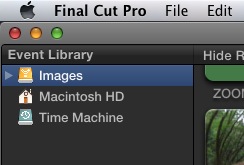
In the Event Library (select) click on the disk where you want your event to live before doing an import or creating an event. In the attached image the disk named Images is selected. That's where events will be created.
Replied by marchyman on topic Re: Storage of events.
MyCrummyApartment wrote: Firstly, I cannot for the life of me find out how to tell FCPx to import my video camera footage to an external drive. There seems to be no menu for this in preferences.
In the Event Library (select) click on the disk where you want your event to live before doing an import or creating an event. In the attached image the disk named Images is selected. That's where events will be created.
Please Log in to join the conversation.
- MyCrummyApartment
-
Topic Author
- Offline
- Junior Member
-
Less
More
- Posts: 27
- Thank you received: 1
24 Apr 2012 04:18 #7567
by MyCrummyApartment
Replied by MyCrummyApartment on topic Re: Storage of events.
Gents, thanks so much. It's actually easier than I thought it would be.
Please Log in to join the conversation.

27 Apr 2012 23:46 #7726
by doherc441
Replied by doherc441 on topic Re: Storage of events.
Great Forum - FCPX Newbie here - adding to this thread as my questions are related. Several questions related to simple home movie usage (sports events, dance recitals, birthdays, et al)
1) After reading various posts - please tell me if this will work: I don't store any projects or events on my iMac system disk, only on firewire DROBO disk (1st generation) (simple RAID solution). However, this drive is getting full and I want to archive projects and events to another storage option but this is NAS solution.
FCPX does not 'see' my NAS solution - so I need to manually move events and projects from my firewire drive onto my NAS solution. CORRECT? Is there a native way to perform this archiving in FCPX?
2) Can I delete all Transcoded Media directories once my projects are "completed"? I am using Canon HF GA10 and these files are very large and once I have the mp4 loaded into iTunes or created DVD, I don't think I need these files.
3) If I need to edit any old / archived projects, I can move the events and projects from the NAS storage back to my firewire drive, restart FCPX and generate the transcoded media to perform any new edits. Correct?
Thanks,
Chris
1) After reading various posts - please tell me if this will work: I don't store any projects or events on my iMac system disk, only on firewire DROBO disk (1st generation) (simple RAID solution). However, this drive is getting full and I want to archive projects and events to another storage option but this is NAS solution.
FCPX does not 'see' my NAS solution - so I need to manually move events and projects from my firewire drive onto my NAS solution. CORRECT? Is there a native way to perform this archiving in FCPX?
2) Can I delete all Transcoded Media directories once my projects are "completed"? I am using Canon HF GA10 and these files are very large and once I have the mp4 loaded into iTunes or created DVD, I don't think I need these files.
3) If I need to edit any old / archived projects, I can move the events and projects from the NAS storage back to my firewire drive, restart FCPX and generate the transcoded media to perform any new edits. Correct?
Thanks,
Chris
Please Log in to join the conversation.
27 Apr 2012 23:52 - 27 Apr 2012 23:52 #7727
by BenB
Replied by BenB on topic Re: Storage of events.
1) 1st gen Drobo was not the fastest drive for video edit, but should hold up for simple projects. Especially being a FW version and not an Ethernet version.
But I question what format your NAS drive is in. Being Ethernet, it's not fast enough to edit directly from, but good as a backup. On your Desktop, Cmd-i to get that NAS drive's info, and what format is it in?
2) You can move clips, Events, and Projects to the trash from inside FCP X. Right click one and you will have a Move To Trash option at the bottom of that pop-up menu.
3) Yes, that should work, if the Events, Projects, clips, everything is in tact and replaced to the proper location.
Question; do you use backup software, or do you just drag-and-drop stuff to your backup drive? No right or wrong way to do this, but I'm curious.
But I question what format your NAS drive is in. Being Ethernet, it's not fast enough to edit directly from, but good as a backup. On your Desktop, Cmd-i to get that NAS drive's info, and what format is it in?
2) You can move clips, Events, and Projects to the trash from inside FCP X. Right click one and you will have a Move To Trash option at the bottom of that pop-up menu.
3) Yes, that should work, if the Events, Projects, clips, everything is in tact and replaced to the proper location.
Question; do you use backup software, or do you just drag-and-drop stuff to your backup drive? No right or wrong way to do this, but I'm curious.
Last edit: 27 Apr 2012 23:52 by BenB.
Please Log in to join the conversation.
28 Apr 2012 00:10 #7728
by doherc441
Replied by doherc441 on topic Re: Storage of events.
Thanks for the reply.
I am using Synology solution (DS 1511) as my NAS - I have several Windows laptops (wife & kids) and have experienced too many HD crashes on laptops. All of their homework & projects are stored on the Synology so I can access from Mac or Windows as needed.
I also have a partition used for TimeMachine backups for my macs.
I am performing a simple copy from FW DROBO to NAS as I don't trust Time Machine recovering my projects.
Deleting the transcoding directory will save ample space on the DROBO (and Synology). Removing all of the old projects will keep FCPX from 'loading' all of these when FCPX starts.
Thanks for the help.
I am using Synology solution (DS 1511) as my NAS - I have several Windows laptops (wife & kids) and have experienced too many HD crashes on laptops. All of their homework & projects are stored on the Synology so I can access from Mac or Windows as needed.
I also have a partition used for TimeMachine backups for my macs.
I am performing a simple copy from FW DROBO to NAS as I don't trust Time Machine recovering my projects.
Deleting the transcoding directory will save ample space on the DROBO (and Synology). Removing all of the old projects will keep FCPX from 'loading' all of these when FCPX starts.
Thanks for the help.
Please Log in to join the conversation.
28 Apr 2012 00:23 #7730
by BenB
Replied by BenB on topic Re: Storage of events.
OK, yeah, your NAS is FAT-32 formatted then if Windows is accessing it. FCP won't deal with it.
TimeMachine can recover stuff really well. But I don't advise running it because it runs 24/7 while you're editing and uses up system resources FCP may need on occasion. But it is solid for backing up and restoring if you need a very basic "casual consumer" backup solution.
TimeMachine can recover stuff really well. But I don't advise running it because it runs 24/7 while you're editing and uses up system resources FCP may need on occasion. But it is solid for backing up and restoring if you need a very basic "casual consumer" backup solution.
Please Log in to join the conversation.


28 Apr 2012 01:31 #7733
by dgwvideo
This is true, and if you don't need them it's fine. But this issue was greatly improved in 10.0.4 so loading multiple projects is not the nightmare it once was in fcpx.
Creating history....one edit at a time !
Replied by dgwvideo on topic Re: Storage of events.
doherc441 wrote: Removing all of the old projects will keep FCPX from 'loading' all of these when FCPX starts.
This is true, and if you don't need them it's fine. But this issue was greatly improved in 10.0.4 so loading multiple projects is not the nightmare it once was in fcpx.
Creating history....one edit at a time !
Please Log in to join the conversation.
28 Apr 2012 04:20 #7736
by doherc441
Replied by doherc441 on topic Re: Storage of events.
Interesting - I have iMac with 2.8 ghz intel core i5, 12 gb ram
I have about 30 basketball projects - each with 30+ minutes of events and projects are similar in length.
I have multiple other events that are random times - dance recitals, soccer, family parties, school events, et al.
When you mention 10.0.4 (same version I have) is not a nightmare it once was - what since of projects and events is considered a nightmare in your mind? I am assuming that the number and size of projects + events the I am dealing with is trivial in comparison to others using FCPX.
Thoughts?
I have about 30 basketball projects - each with 30+ minutes of events and projects are similar in length.
I have multiple other events that are random times - dance recitals, soccer, family parties, school events, et al.
When you mention 10.0.4 (same version I have) is not a nightmare it once was - what since of projects and events is considered a nightmare in your mind? I am assuming that the number and size of projects + events the I am dealing with is trivial in comparison to others using FCPX.
Thoughts?
Please Log in to join the conversation.
28 Apr 2012 05:15 #7737
by dgwvideo
Creating history....one edit at a time !
Replied by dgwvideo on topic Re: Storage of events.
In previous versions of FCPX having too many open projects and events even in well equipped Mac's caused some erratic behavior, including poor performance and sluggish skimming, to name a few. 10.0.4 fixed this for sure. If you search this forum, you'll find quite a few threads discussing this, including a thread about the new 10.0.4 version fixing it.
Creating history....one edit at a time !
Please Log in to join the conversation.
