


- Posts: 2
- Thank you received: 0
3 Post Moderation Rule for New Boarders (25 Jan 2021)
New boarders will have their posts moderated - Don't worry if you cannot see your post immediately.
Blackmagic problem (output to hdmi)
27 Mar 2012 18:15 #6241
by MrRoza
Blackmagic problem (output to hdmi) was created by MrRoza
Hi all,
I just updated my Blackmagic Drivers to 9.2 and it although it does show my footage (I have a Panasonic flatscreen linked to the blackmagic-card with an hdmi-cable) it only shows the video in 480i.
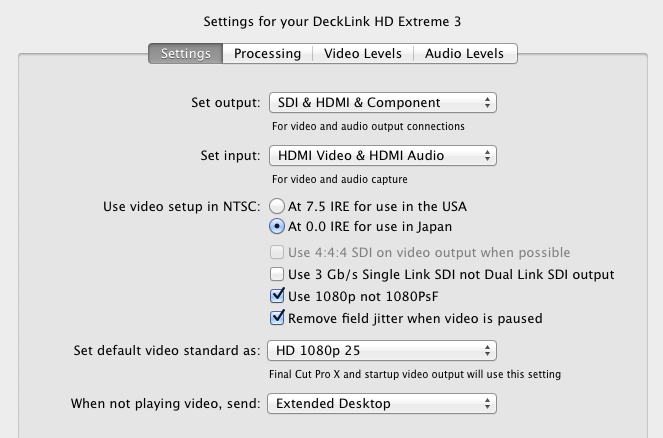
As you can see in the screengrabs I made, I have the Blackmagic preferences to 1080p25 (the same as my Project/Sequence), but in the Project preferences I can only select 720x486. Even more weird is that it says @29,97 as my Project is 25p.
Does someone have a solution for this?
Thanks!
Tim
I just updated my Blackmagic Drivers to 9.2 and it although it does show my footage (I have a Panasonic flatscreen linked to the blackmagic-card with an hdmi-cable) it only shows the video in 480i.
As you can see in the screengrabs I made, I have the Blackmagic preferences to 1080p25 (the same as my Project/Sequence), but in the Project preferences I can only select 720x486. Even more weird is that it says @29,97 as my Project is 25p.
Does someone have a solution for this?
Thanks!
Tim

Please Log in to join the conversation.

27 Mar 2012 19:26 #6242
by RonPriest
Replied by RonPriest on topic Re: Blackmagic problem (output to hdmi)
Have you tried to unselect the checkmark next to "Use 1080 P not 1080 Psf" setting in your Blackmagic preferences?
I don't use 25p so I don't suppose I'm much help but am interested in your problem.
Are you using the Blackmagic Intensity Pro?
I don't use 25p so I don't suppose I'm much help but am interested in your problem.
Are you using the Blackmagic Intensity Pro?
Please Log in to join the conversation.


29 Mar 2012 08:47 #6268
by dgwvideo
Creating history....one edit at a time !
Replied by dgwvideo on topic Re: Blackmagic problem (output to hdmi)
Progressive Segmented Frame (Psf) is only for broadcast or output to tape as it creates two interlace fields and combines them. Unless you need this, your settings on 1080p are correct as shown.
The 720 x 486 setting that you have in your fcpx prefs is what your Decklink HD Extreme 3 is reporting, so if there are no other settings in that drop down, that may be all that product currently offers within fcpx. That setting is at 29.97 fps and unless the device provides other options you won't be able to change that. You should contact Blackmagic to inquire about this unless another user on this forum has that similar setup and can offer any suggestions.
The 720 x 486 setting that you have in your fcpx prefs is what your Decklink HD Extreme 3 is reporting, so if there are no other settings in that drop down, that may be all that product currently offers within fcpx. That setting is at 29.97 fps and unless the device provides other options you won't be able to change that. You should contact Blackmagic to inquire about this unless another user on this forum has that similar setup and can offer any suggestions.
Creating history....one edit at a time !
Please Log in to join the conversation.
29 Mar 2012 13:43 #6278
by MrRoza
Replied by MrRoza on topic Re: Blackmagic problem (output to hdmi)
Hi all,
Thanks for the feedback. I tried unchecking the 1080 Psf mark, but sadly that didn't change anything. The card I have in my Mac Pro is indeed a Blackmagic Decklink HD (not the 3d, but the older version) and not the Intensity Pro, so it could be that my card is just to old to work well with FCP X. Although Media Composer 6 and FCP 7 don't seem to have any problems with it.
Oh well, thanks again and I guess I'll just email someone at Blackmagic.
Thanks for the feedback. I tried unchecking the 1080 Psf mark, but sadly that didn't change anything. The card I have in my Mac Pro is indeed a Blackmagic Decklink HD (not the 3d, but the older version) and not the Intensity Pro, so it could be that my card is just to old to work well with FCP X. Although Media Composer 6 and FCP 7 don't seem to have any problems with it.
Oh well, thanks again and I guess I'll just email someone at Blackmagic.
Please Log in to join the conversation.
