


- Posts: 9
- Thank you received: 0
3 Post Moderation Rule for New Boarders (25 Jan 2021)
New boarders will have their posts moderated - Don't worry if you cannot see your post immediately.
Where's my sub clips?
26 Mar 2012 18:36 #6204
by Huds
Where's my sub clips? was created by Huds
I used to use sub clips a lot in FCP7. I sometimes :ohmy: have to cut a lot of interviews and found them invaluable because they not only let me group clips, but I could identify clips in the timeline by content.
I'm a bit lost in FCPX, as I just can't find simple way to rename anything in the timeline. I have tried I+O+F to make favourites, I've tried keywords (and using keywords along with the list view in a project) and fiddling with the clip properties. They don't real work as well as sub clips. I just want to pick up clips and move them around in the timeline - and be able to easily and intuitively find them again.
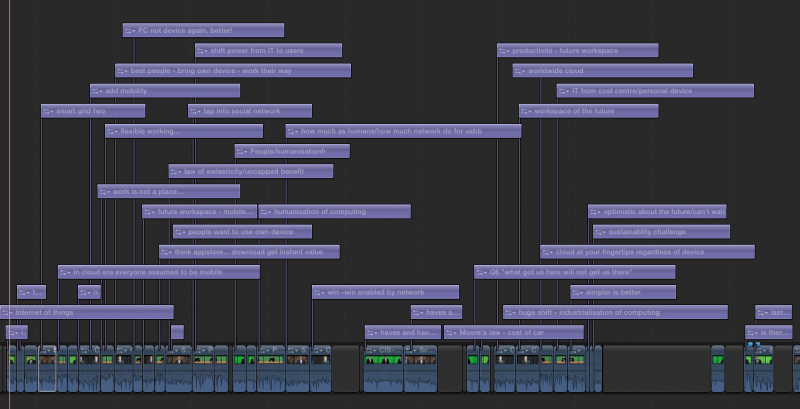
However - I have found something that works for me! Yay! I use the text tool to create a 'flag'on the clip in the timeline. I can then navigate through them to find links and stories and move the clip and the flag as one. If I cut the clip down it's easy to add another 'flag'. This works rather brilliantly. It may look a mess, but it's better than lots of identical looking shots, all called the same thing, or having to jump between the timeline and the browser all the time.
Please! Has anyone got a better way of doing interview footage?
H
I'm a bit lost in FCPX, as I just can't find simple way to rename anything in the timeline. I have tried I+O+F to make favourites, I've tried keywords (and using keywords along with the list view in a project) and fiddling with the clip properties. They don't real work as well as sub clips. I just want to pick up clips and move them around in the timeline - and be able to easily and intuitively find them again.
However - I have found something that works for me! Yay! I use the text tool to create a 'flag'on the clip in the timeline. I can then navigate through them to find links and stories and move the clip and the flag as one. If I cut the clip down it's easy to add another 'flag'. This works rather brilliantly. It may look a mess, but it's better than lots of identical looking shots, all called the same thing, or having to jump between the timeline and the browser all the time.
Please! Has anyone got a better way of doing interview footage?
H
Please Log in to join the conversation.
- Scrubelicious
-

- Offline
- Platinum Member
-

Less
More
- Posts: 1228
- Thank you received: 114
26 Mar 2012 21:23 #6210
by Scrubelicious
Replied by Scrubelicious on topic Re: Where's my sub clips?
I love your innovation! Being creative and make it work for you is the right way.
Subclips in FCPX.
Here is one way that should cover what you are asking for.
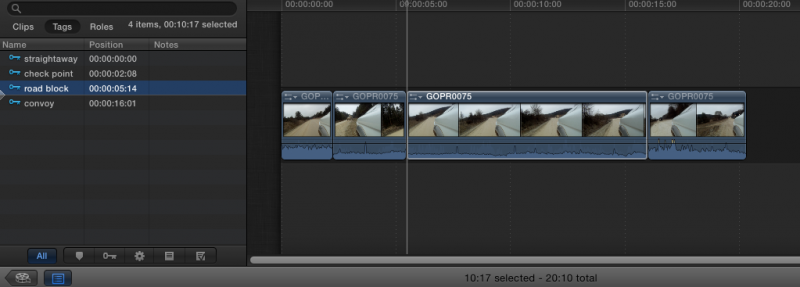
Create your "Subclips" by selecting your in and out and adding your corresponding keywords after you dragged all your wanted clips in the Timeline use the Timeline Index to track your clips. If you click the Tags tab it bring up your key worded collection:
Subclips in FCPX.
Here is one way that should cover what you are asking for.
Create your "Subclips" by selecting your in and out and adding your corresponding keywords after you dragged all your wanted clips in the Timeline use the Timeline Index to track your clips. If you click the Tags tab it bring up your key worded collection:
Please Log in to join the conversation.
26 Mar 2012 21:59 #6211
by Huds
Replied by Huds on topic Re: Where's my sub clips?
Thanks for that. I did actually try that before I did the 'tag' thing. It works much, much better with the metadata stuff in FCPX, but I found it frustrating as the project got more complex. I might give it another go... my way doesn't build any sort of information resource about the clips, and seems out of the spirit of FCPX, even if it works!
BTW if anyone tries the 'tag' method, I find it best to use 'basic title'. I make the first one and extend the tag outwards so I can read it when zoomed out. I then move it out of shot in the viewer (never need to read it), then copy it. I paste this in, and change the text as I go.
BTW if anyone tries the 'tag' method, I find it best to use 'basic title'. I make the first one and extend the tag outwards so I can read it when zoomed out. I then move it out of shot in the viewer (never need to read it), then copy it. I paste this in, and change the text as I go.
Please Log in to join the conversation.
26 Mar 2012 22:19 #6213
by NocoDave
Replied by NocoDave on topic Re: Where's my sub clips?
This is not ideal, but it's less of an inconvenience than your current solution.
When you add your favourite to the timeline, you can then rename it in the timeline index, this will show in your timeline clips but not alter the full clips name in the event browser.
When you add your favourite to the timeline, you can then rename it in the timeline index, this will show in your timeline clips but not alter the full clips name in the event browser.
Please Log in to join the conversation.
26 Mar 2012 22:43 #6214
by NocoDave
Replied by NocoDave on topic Re: Where's my sub clips?
I just had a rethink, maybe it is ideal to be able to work completely separate in timeline index to the event browser. Perhaps time will tell.
Please Log in to join the conversation.

26 Mar 2012 23:53 - 27 Mar 2012 02:36 #6216
by Dawar
Replied by Dawar on topic Re: Where's my sub clips?
I also work with keywords and timeline index, which I find very convenient.
But you absolutely can create subclips just like you did in Fcp7 if you want.
In event browser, in-out, then option-G will create a compound clip, or a "subclip" from your selection.
You can name it as you want, in the event or in the inspector.
Then in the timeline you will see the clips with the names you gave them.
In the event, you can also create a smart collection based on clip type (compound clip) to automatically get your "subclips" in there.
You can also treat them like regular clips and tag them with keywords, favorites... etc.
But you absolutely can create subclips just like you did in Fcp7 if you want.
In event browser, in-out, then option-G will create a compound clip, or a "subclip" from your selection.
You can name it as you want, in the event or in the inspector.
Then in the timeline you will see the clips with the names you gave them.
In the event, you can also create a smart collection based on clip type (compound clip) to automatically get your "subclips" in there.
You can also treat them like regular clips and tag them with keywords, favorites... etc.
Last edit: 27 Mar 2012 02:36 by Dawar.
Please Log in to join the conversation.
27 Mar 2012 00:23 #6217
by NocoDave
Replied by NocoDave on topic Re: Where's my sub clips?
The compound clip method also has the bonus of being a great way to create sub clips for use in Motion template drop zones.
Please Log in to join the conversation.
27 Mar 2012 01:35 #6221
by Huds
Replied by Huds on topic Re: Where's my sub clips?
Compound clips sounds like a brilliant idea... I am trying to keep with the metadata way of working when I can.
I like this place! Thanks.
I like this place! Thanks.
Please Log in to join the conversation.

28 Mar 2012 11:16 #6245
by andersu
Replied by andersu on topic Re: Where's my sub clips?
Hello,
Very good ideas! I've been looking into a good way of "taking notes" within FCP X. Even researched if I could print out the storyline somehow with notes attached to it as ideas/changes come to mind. Sometimes I just to take a break and lean back and think.
I have used markers with their built into To-do's but these ideas still show the actions and do not just disappear into marker with a different color.
Thanks and I will certainly test your suggestions.
BTW, any ideas about a printing application which one could use to print the storyboard and meta data, markers etc, besides grabbing a screen shot and cut and paste into another application?
Anders
Chicago, Illinois
Very good ideas! I've been looking into a good way of "taking notes" within FCP X. Even researched if I could print out the storyline somehow with notes attached to it as ideas/changes come to mind. Sometimes I just to take a break and lean back and think.
I have used markers with their built into To-do's but these ideas still show the actions and do not just disappear into marker with a different color.
Thanks and I will certainly test your suggestions.
BTW, any ideas about a printing application which one could use to print the storyboard and meta data, markers etc, besides grabbing a screen shot and cut and paste into another application?
Anders
Chicago, Illinois
Please Log in to join the conversation.

28 Mar 2012 21:40 #6252
by dgwvideo
I've not found any application yet to do this. Using screenshots and printing them seems to be the workaround most people are talking about. Digital Heaven makes "Final Print" for FCP 4 thru 7 which allows printing out thumbnails with metadata and notes, but even that is somewhat limited, but still a useful tool. Perhaps they'll migrate that to FCPX one of these days.
Creating history....one edit at a time !
Replied by dgwvideo on topic Re: Where's my sub clips?
andersu wrote: BTW, any ideas about a printing application which one could use to print the storyboard and meta data, markers etc, besides grabbing a screen shot and cut and paste into another application?
Anders
Chicago, Illinois
I've not found any application yet to do this. Using screenshots and printing them seems to be the workaround most people are talking about. Digital Heaven makes "Final Print" for FCP 4 thru 7 which allows printing out thumbnails with metadata and notes, but even that is somewhat limited, but still a useful tool. Perhaps they'll migrate that to FCPX one of these days.
Creating history....one edit at a time !
Please Log in to join the conversation.
30 Mar 2012 06:09 #6297
by andersu
I checked with Digital Heaven and they are not planning anything for FCP X as of yet. However, I started to use a connected title clip from the effects browser and they show up as small flags. Something I didn't think of at the time is, whatever you write shows up in the viewer when you skim over the text clip. Obviously you can copy and paste to your hearts' content and this works for me. Very handy!
Anders
Chicago, Illinois
Replied by andersu on topic Re: Where's my sub clips?
I've not found any application yet to do this. Using screenshots and printing them seems to be the workaround most people are talking about. Digital Heaven makes "Final Print" for FCP 4 thru 7 which allows printing out thumbnails with metadata and notes, but even that is somewhat limited, but still a useful tool. Perhaps they'll migrate that to FCPX one of these days.
I checked with Digital Heaven and they are not planning anything for FCP X as of yet. However, I started to use a connected title clip from the effects browser and they show up as small flags. Something I didn't think of at the time is, whatever you write shows up in the viewer when you skim over the text clip. Obviously you can copy and paste to your hearts' content and this works for me. Very handy!
Anders
Chicago, Illinois
Please Log in to join the conversation.


30 Mar 2012 08:16 #6302
by mmorache
Replied by mmorache on topic Re: Where's my sub clips?
I've tried attaching text files to clips as a way of marking them.
I like using the V key to disable the visibility so I don't worry about them rendering or slowing the playhead down. I can then see them just fine in the timeline.
Markers may work as well, and you can see them in the timeline index.
I like using the V key to disable the visibility so I don't worry about them rendering or slowing the playhead down. I can then see them just fine in the timeline.
Markers may work as well, and you can see them in the timeline index.
Please Log in to join the conversation.
31 Mar 2012 15:30 #6357
by NocoDave
Replied by NocoDave on topic Re: Where's my sub clips?
Here's a wee tip. Working with renaming in the timeline index is excellent when working on complex composites that have multiple versions of the same clip/generator etc.
Particularly inside a compound clip which has it's own index.
Particularly inside a compound clip which has it's own index.
Please Log in to join the conversation.
- Lee Patterson
-

- Offline
- Elite Member
-

Less
More
- Posts: 239
- Thank you received: 20
04 Apr 2012 16:53 - 04 Apr 2012 16:55 #6531
by Lee Patterson
Replied by Lee Patterson on topic Re: Where's my sub clips?
Ha! Didnt read the start well enough, sorry.
Last edit: 04 Apr 2012 16:55 by Lee Patterson. Reason: Im an idiot
Please Log in to join the conversation.

04 Apr 2012 18:10 #6537
by BenB
Replied by BenB on topic Re: Where's my sub clips?
Don't forget you have NOTES in the Timeline index, also. Use this to put quotes from interview clips, text from titles, etc. Just enough to quickly ID that Timeline asset. I like this because I then can identify the Master clip the asset came from, and have a note there to remind me exactly what part of that master, or which title, that asset is.
Please Log in to join the conversation.
- Scrubelicious
-
- Offline
- Platinum Member
-
Less
More
- Posts: 1228
- Thank you received: 114
05 Apr 2012 01:38 #6546
by Scrubelicious
Replied by Scrubelicious on topic Re: Where's my sub clips?
I don't know I really did the Timeline Index in any edit situation especially it is searchable.
But one thing that would be nice is also a color code in the timeline index as in the icons in the corresponding colors.
But one thing that would be nice is also a color code in the timeline index as in the icons in the corresponding colors.
Please Log in to join the conversation.
06 Apr 2012 18:34 - 06 Apr 2012 18:39 #6602
by parkerhqj
This looks like the silver bullet to me. I've never used the compound clips in the event browser before. It seems so obvious now. So how about this for a logging and editing workflow:
1) Go through your interviews & b-roll. Create & label compound clips for your sound bites and b-roll selects.
2) Assign keywords to each clip and organize into smart collections as you see fit.
3) Bring them down into the timeline from the browser.
This is better than sub clips in fcp7 because you can see the thumbnails and you can use keywords to organize them.
This eliminates the annoying aspect to favorites in fcpx which is that they don't maintain their label on the timeline and it can be messy working with them in list mode - and also in thumbnail mode for interviews. If this plan is as simple and easy as it seems, why would you use favorites at all?
One thing I noticed - if you use this method and you want to find out where in your clip your sub clip came from, you have to open it in its own timeline to use "reveal in browser" or reveal in finder". If you right click on your compound clip, it greys out this options.
Replied by parkerhqj on topic Re: Where's my sub clips?
Dawar wrote: I also work with keywords and timeline index, which I find very convenient.
But you absolutely can create subclips just like you did in Fcp7 if you want.
In event browser, in-out, then option-G will create a compound clip, or a "subclip" from your selection.
You can name it as you want, in the event or in the inspector.
Then in the timeline you will see the clips with the names you gave them.
In the event, you can also create a smart collection based on clip type (compound clip) to automatically get your "subclips" in there.
You can also treat them like regular clips and tag them with keywords, favorites... etc.
This looks like the silver bullet to me. I've never used the compound clips in the event browser before. It seems so obvious now. So how about this for a logging and editing workflow:
1) Go through your interviews & b-roll. Create & label compound clips for your sound bites and b-roll selects.
2) Assign keywords to each clip and organize into smart collections as you see fit.
3) Bring them down into the timeline from the browser.
This is better than sub clips in fcp7 because you can see the thumbnails and you can use keywords to organize them.
This eliminates the annoying aspect to favorites in fcpx which is that they don't maintain their label on the timeline and it can be messy working with them in list mode - and also in thumbnail mode for interviews. If this plan is as simple and easy as it seems, why would you use favorites at all?
One thing I noticed - if you use this method and you want to find out where in your clip your sub clip came from, you have to open it in its own timeline to use "reveal in browser" or reveal in finder". If you right click on your compound clip, it greys out this options.
Last edit: 06 Apr 2012 18:39 by parkerhqj.
Please Log in to join the conversation.
06 Apr 2012 18:40 #6603
by NocoDave
It all sounds good to me, but with one exception. Before doing what you describe, if you run through your footage and mark favourites and rejected, you can hide all the rejected footage and have a simple visual reference to the preferred footage among everything that's left.
Then continuing as you say you don't really need any labels from the favourites and I'm starting to like that you don't get any. Just a rough organisation followed by a fine tuning with all the metadata where and when you need it.
Replied by NocoDave on topic Re: Where's my sub clips?
If this plan is as simple and easy as it seems, why would you use favorites at all?
It all sounds good to me, but with one exception. Before doing what you describe, if you run through your footage and mark favourites and rejected, you can hide all the rejected footage and have a simple visual reference to the preferred footage among everything that's left.
Then continuing as you say you don't really need any labels from the favourites and I'm starting to like that you don't get any. Just a rough organisation followed by a fine tuning with all the metadata where and when you need it.
Please Log in to join the conversation.
06 Apr 2012 19:11 #6604
by parkerhqj
Replied by parkerhqj on topic Re: Where's my sub clips?
OK so someone has to explain the rejected footage thing to me. I consider my favorites (or the selected compound clips) to be the clips I want to use. Everything else to my mind is already rejected - I will simply return and select more if I need to. Why would I go to the trouble of choosing clips and then rejecting them? In the workflow that we are describing, If I have a collection of clips and there are clips among them that I wind up rejecting, I could then keyword them as rejected and go back to them later if need be. I may be confusing the purpose of the rejected clips feature.
Please Log in to join the conversation.
- Tom Wolsky
-

- Offline
- Moderator
-

06 Apr 2012 19:24 #6605
by Tom Wolsky
Replied by Tom Wolsky on topic Re: Where's my sub clips?
If you're positive you're only going to use favorites then don't bother with rejects, just set the browser to show only favorites. Not everyone works the same way as you.
I only reject shots or part of shots that are really garbage, camera pointed at the floor garbage, which is very common in run and gun shooting. I don't reject anything else. Rejecting these allows me to hide the garbage portions of clips in the browser and effectively breaks clips into its shot components.
I only reject shots or part of shots that are really garbage, camera pointed at the floor garbage, which is very common in run and gun shooting. I don't reject anything else. Rejecting these allows me to hide the garbage portions of clips in the browser and effectively breaks clips into its shot components.
Please Log in to join the conversation.
