


- Posts: 64
- Thank you received: 5
3 Post Moderation Rule for New Boarders (25 Jan 2021)
New boarders will have their posts moderated - Don't worry if you cannot see your post immediately.
Monitor problem again Intensity Pro Black magic design
17 Mar 2012 15:53 #5832
by maclamb
Monitor problem again Intensity Pro Black magic design was created by maclamb
Have tested the latest Desktop Video 9.2 for Macintosh published 16 mars with my Intensity pro video card just to get the same result as earlier.After trying to analyze when picture strobes and look bad I am quite sure that interlaced material is causing heavy problem for the Intensity Pro Card producing bad over all quality showing both fields at the same time but not deinterlaced. I have never been able to understand how interlaced material actually is shown on different monitors but I suppose it is deinterlaced to look good as it does on my apple computer screen. Intensity pro is not doing this in a right way.The strobe phenomena on the other hand comes and goes and can suddenly disappear to soon be back again. Viewer in FCPX is playing everything ok also with full screen and even if the intensity pro strobes .
If you have a video card that actually works please let us all know about that. I think am giving up Black Magic now.
If you have a video card that actually works please let us all know about that. I think am giving up Black Magic now.
Please Log in to join the conversation.

17 Mar 2012 20:11 #5840
by BenB
Replied by BenB on topic Re: Monitor problem again Intensity Pro Black magic design
I am a die hard AJA fan. Love my Kona LHi. Just waiting for updated drivers for FCP X 10.0.3, since the first one they had out for it was buggy. But I've been using it for years, with a Flanders Scientific LM-2551W monitor, and I'd never use anything else.
Please Log in to join the conversation.

17 Mar 2012 20:27 #5843
by RonPriest
I have the Blackmagic Intensity Pro PCIe card installed in my MacPro and it seems to be working fine with FCPX. I haven't noticed any of the problems you are speaking of.
Replied by RonPriest on topic Re: Monitor problem again Intensity Pro Black magic design
maclamb wrote: If you have a video card that actually works please let us all know about that. I think am giving up Black Magic now.
I have the Blackmagic Intensity Pro PCIe card installed in my MacPro and it seems to be working fine with FCPX. I haven't noticed any of the problems you are speaking of.
Please Log in to join the conversation.
18 Mar 2012 15:47 #5860
by maclamb
Replied by maclamb on topic Re: Monitor problem again Intensity Pro Black magic design
Very interesting. Can you please give some more information what kind of material you are working on as codec, interlaced or progressive etc. I made a test duplicating the timeline/project and changing to progressive in properties and after rendering the picture quality now looks good but the strobe effect is still there but only if something moves in picture or camera moves in a pano or a zoom.
Please Log in to join the conversation.
18 Mar 2012 17:30 #5861
by BenB
Replied by BenB on topic Re: Monitor problem again Intensity Pro Black magic design
So we know the media is fine, and FCP X is fine with the media assets, it's the BM Intensity Pro having some playback issues. I'm not familiar with that unit specifically, but I think you'll need to set it to something FCP X and Timeline friendly, and perhaps check with BM's support about any issues. Remember this is a beta function in FCP X, and all the I/O device manufactures are issuing beta drivers for it. So if there's an issue that is unable to be resolved right away, a fix will be coming soon.
But I'd look at compatibility between FCP X output and the playback setting of the IP.
But I'd look at compatibility between FCP X output and the playback setting of the IP.
Please Log in to join the conversation.
18 Mar 2012 17:34 - 18 Mar 2012 17:39 #5862
by RonPriest
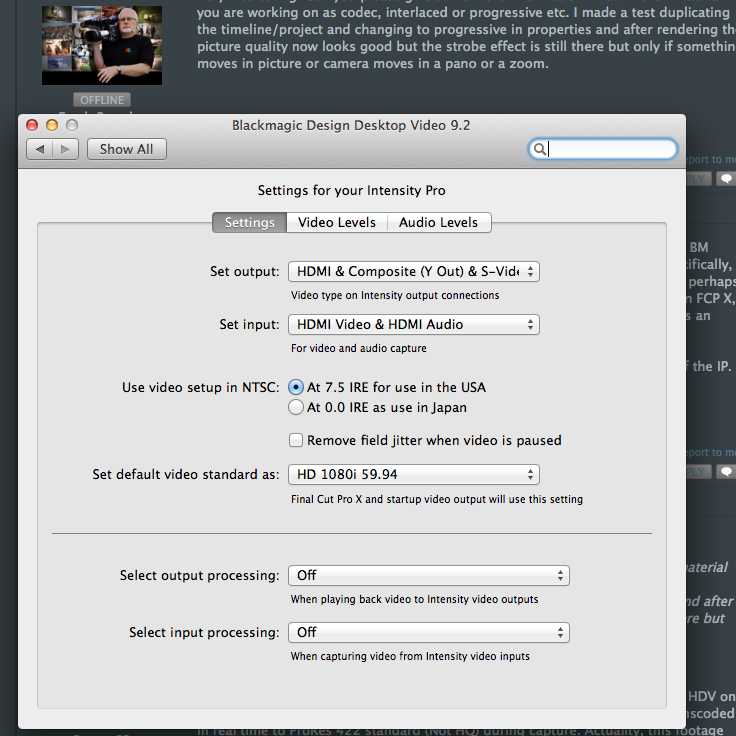
I'm editing HD 1080i (59.94) ProRes 422 footage which was originally shot in HDV on Sony FX1 and Z1 tape based cameras and originally captured in FCP7 and transcoded in real time to ProRes 422 standard (Not HQ) during capture. Actuality, this footage was originally 1440 x 1080. I never really did understand all of that square pixels verses rectangular pixels stuff, I just know it all comes out in the wash.
To be honest, I haven't spent an extensive amount of time monitoring my output via the beta desktop video and FCPX. I do most of my X editing on my iMac, and just recently installed FCPX on my old MacPro to see how well the driver worked so I can accomplish some basic color correction with a monitor.
Replied by RonPriest on topic Re: Monitor problem again Intensity Pro Black magic design
Attachment not found
Attachment not found
maclamb wrote: Very interesting. Can you please give some more information what kind of material you are working on as codec, interlaced or progressive etc. I made a test duplicating the timeline/project and changing to progressive in properties and after rendering the picture quality now looks good but the strobe effect is still there but only if something moves in picture or camera moves in a pano or a zoom.
I'm editing HD 1080i (59.94) ProRes 422 footage which was originally shot in HDV on Sony FX1 and Z1 tape based cameras and originally captured in FCP7 and transcoded in real time to ProRes 422 standard (Not HQ) during capture. Actuality, this footage was originally 1440 x 1080. I never really did understand all of that square pixels verses rectangular pixels stuff, I just know it all comes out in the wash.
To be honest, I haven't spent an extensive amount of time monitoring my output via the beta desktop video and FCPX. I do most of my X editing on my iMac, and just recently installed FCPX on my old MacPro to see how well the driver worked so I can accomplish some basic color correction with a monitor.
Last edit: 18 Mar 2012 17:39 by RonPriest.
Please Log in to join the conversation.
18 Mar 2012 18:16 #5867
by BenB
Replied by BenB on topic Re: Monitor problem again Intensity Pro Black magic design
Well, if you're using HDMI for color grading, you may as well just use your Mac monitor.
Please Log in to join the conversation.
08 Nov 2012 20:07 #16882
by RonPriest
Replied by RonPriest on topic Monitor problem again Intensity Pro Black magic design
Hey Maclamb, hows it going? Just thought I would followup with this conversation to see if you are having better luck these days with your Intensity Pro card and FCPX 10.0.6?
I finally bit the bullet and purchased the Thunderbolt version of the Blackmagic Intensity Extreme (am I the only one that has this) and it works pretty much perfectly with FCPX 10.0.6 and Blackmagic Design Desktop Video 9.6.7. Now I'm just wondering if I can capture analog video through it in FCPX if I ever need to? I'm also using the Intensity Extreme with Magic Bullet Looks 2.0.8 as it will now allow you to monitor your effects on an external monitor or HDTV via the HDMI output as you work on them.
Ben, if the extreme was connected to a quality HDTV, why couldn't you trust it for color correction?
I finally bit the bullet and purchased the Thunderbolt version of the Blackmagic Intensity Extreme (am I the only one that has this) and it works pretty much perfectly with FCPX 10.0.6 and Blackmagic Design Desktop Video 9.6.7. Now I'm just wondering if I can capture analog video through it in FCPX if I ever need to? I'm also using the Intensity Extreme with Magic Bullet Looks 2.0.8 as it will now allow you to monitor your effects on an external monitor or HDTV via the HDMI output as you work on them.
Ben, if the extreme was connected to a quality HDTV, why couldn't you trust it for color correction?
Please Log in to join the conversation.
08 Nov 2012 22:02 - 08 Nov 2012 22:03 #16891
by BenB
Replied by BenB on topic Monitor problem again Intensity Pro Black magic design
1- TV's have correction circuitry in them to correct the image to show its best on that specific HDTV. It is not the true, raw image data. Besides, the engineering to make an HDTV and to make a broadcast monitor are very different, each is achieving very different goals. A broadcast monitor only shows the true, raw image data.
2- HDMI is a two way protocol, negotiating image data in the process so that you can't guarantee true, raw image data. HD-SDI is a signal with true, raw image data.
That said, they to make marvelous preview monitors.
2- HDMI is a two way protocol, negotiating image data in the process so that you can't guarantee true, raw image data. HD-SDI is a signal with true, raw image data.
That said, they to make marvelous preview monitors.
Last edit: 08 Nov 2012 22:03 by BenB.
Please Log in to join the conversation.
08 Nov 2012 22:42 #16898
by RonPriest
Replied by RonPriest on topic Monitor problem again Intensity Pro Black magic design
So, I'm currently using a 24" Dell monitor with the Intensity Extreme connected to it's HDMI port. The Intensity Extreme of course only has an HDMI output, no HD-SDI port. Is that going to be a little truer than say a standard HDTV, or since it's using the HDMI port, it's no different?
In any case, it's pretty much serving my purpose which is being fulfilled as a preview monitor. As far as actual color correction, Im trusting my iMac display over the Dell.
In any case, it's pretty much serving my purpose which is being fulfilled as a preview monitor. As far as actual color correction, Im trusting my iMac display over the Dell.
Please Log in to join the conversation.
09 Nov 2012 13:35 #16936
by BenB
Replied by BenB on topic Monitor problem again Intensity Pro Black magic design
"Is that going to be a little truer than say a standard HDTV, or since it's using the HDMI port, it's no different?"
Not sure what "standard HDTV" is, but HDMI doesn't make an HDTV set any sort of super HDTV. Not sure what "standard HDTV" is. HDTV sets are HDTV sets, that's it. They "spice up" and show whatever signal is sent to them.
Not sure what "standard HDTV" is, but HDMI doesn't make an HDTV set any sort of super HDTV. Not sure what "standard HDTV" is. HDTV sets are HDTV sets, that's it. They "spice up" and show whatever signal is sent to them.
Please Log in to join the conversation.
