


- Posts: 2
- Thank you received: 0
3 Post Moderation Rule for New Boarders (25 Jan 2021)
New boarders will have their posts moderated - Don't worry if you cannot see your post immediately.
Can anyone help me with this weird multiclip issue?
08 Mar 2012 07:29 #5505
by mcguyver
Can anyone help me with this weird multiclip issue? was created by mcguyver
For those of you doing multiclip editing in FCPX, have you ever run across this issue?
I'm running FCPX10.0.3 on a dual quad Mac Pro with 10GB Ram OSX10.7.3. Working with optimized ProRes media converted from an XF100 and an XA10. System drive is an SSD, Footage is on a 2TB SATA(7200) in internal bay 2.
Tried editing what was SUPPOSED to be a simple 2 camera wedding ceremony using FCPX's new multicam feature. Since FCPX can handle up 64 camera angles, just 2 should be a piece of cake right?
Edited the multiclip ceremony cutting between both cameras, everything seemed fine. Played the ceremony through twice before I went to bed - everything looked and played fine. There were still some background renderings (broadcast color filters applied) that needed to be done, so I let it run overnight. Nothing else was running on the machine at the time, and I am the only user of this computer.
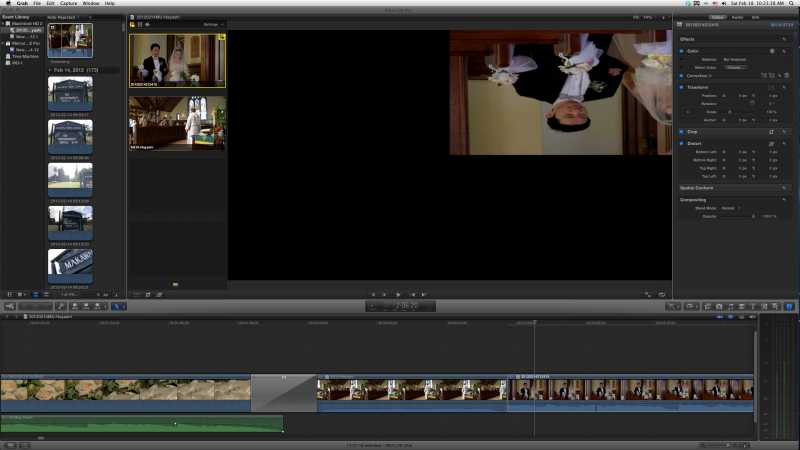
Came back in the morning, and for some reason, FCPX took EVERY instance where I had cut back to my main camera angle, squeezed it, flipped it 180 degrees and moved it into the upper right of the frame leaving 3/4 of the playback screen black. I checked the info tab, but all the positioning was set to normal. No keyframes of any kind were set. When I open the multiclip itself to view the individual video tracks, everything is normal. But going back to the timeline it keeps showing that angle flipped and repositioned.
Tried trashing preferences, reinstalling FCPX, etc. nothing resolved the problem. Basically had to start over and reedit in Premiere.
Any ideas anyone? I've posted this on several forums, including Apple's Discussion Boards. I also emailed instructor Larry Jordan directly about this and no one seems to have an idea of how it happened or how to fix it.
I'm running FCPX10.0.3 on a dual quad Mac Pro with 10GB Ram OSX10.7.3. Working with optimized ProRes media converted from an XF100 and an XA10. System drive is an SSD, Footage is on a 2TB SATA(7200) in internal bay 2.
Tried editing what was SUPPOSED to be a simple 2 camera wedding ceremony using FCPX's new multicam feature. Since FCPX can handle up 64 camera angles, just 2 should be a piece of cake right?
Edited the multiclip ceremony cutting between both cameras, everything seemed fine. Played the ceremony through twice before I went to bed - everything looked and played fine. There were still some background renderings (broadcast color filters applied) that needed to be done, so I let it run overnight. Nothing else was running on the machine at the time, and I am the only user of this computer.
Came back in the morning, and for some reason, FCPX took EVERY instance where I had cut back to my main camera angle, squeezed it, flipped it 180 degrees and moved it into the upper right of the frame leaving 3/4 of the playback screen black. I checked the info tab, but all the positioning was set to normal. No keyframes of any kind were set. When I open the multiclip itself to view the individual video tracks, everything is normal. But going back to the timeline it keeps showing that angle flipped and repositioned.
Tried trashing preferences, reinstalling FCPX, etc. nothing resolved the problem. Basically had to start over and reedit in Premiere.
Any ideas anyone? I've posted this on several forums, including Apple's Discussion Boards. I also emailed instructor Larry Jordan directly about this and no one seems to have an idea of how it happened or how to fix it.
Please Log in to join the conversation.

08 Mar 2012 07:45 #5507
by fcpguru
Replied by fcpguru on topic Re: Can anyone help me with this weird multiclip issue?
Very strange.
A few things I would try:
1. What happens when you change the position settings (squeeze it, etc) Change it from Fit to Fill to None.
2. Have you tried taking your multiclip and putting into a fresh new project?
3. Have you tried deleting the render files?
I've been doing heavy duty multicam work and from my experience it's pretty rock solid, so I'm sorry to hear you are having trouble with it.
Let me know if any of those ideas work.
A few things I would try:
1. What happens when you change the position settings (squeeze it, etc) Change it from Fit to Fill to None.
2. Have you tried taking your multiclip and putting into a fresh new project?
3. Have you tried deleting the render files?
I've been doing heavy duty multicam work and from my experience it's pretty rock solid, so I'm sorry to hear you are having trouble with it.
Let me know if any of those ideas work.
Please Log in to join the conversation.
08 Mar 2012 07:58 #5508
by mcguyver
Replied by mcguyver on topic Re: Can anyone help me with this weird multiclip issue?
Thanks for the quick response!
1. When I first saw how FCPX positioned the clip, I did try to change the position settings, resulting in several crashes. It continued to a point where FCPX would crash immediately after opening the project.
You are the first one to mention #2 and #3. I have not tried those yet.
Since I had to ship the video out right away, I ended up redoing the video in Premiere so the project is pretty much done already.
However, I will try those two additional ideas if the issue comes up again on a future project.
(What I would really like to know though, is how it happened in the first place.)
Thanks again for your help!
1. When I first saw how FCPX positioned the clip, I did try to change the position settings, resulting in several crashes. It continued to a point where FCPX would crash immediately after opening the project.
You are the first one to mention #2 and #3. I have not tried those yet.
Since I had to ship the video out right away, I ended up redoing the video in Premiere so the project is pretty much done already.
However, I will try those two additional ideas if the issue comes up again on a future project.
(What I would really like to know though, is how it happened in the first place.)
Thanks again for your help!
Please Log in to join the conversation.


08 Mar 2012 09:11 #5511
by dgwvideo
Creating history....one edit at a time !
Replied by dgwvideo on topic Re: Can anyone help me with this weird multiclip issue?
It does sound to me like the project got corrupted, so fcpguru's suggestion of #2 would be the next thing to try in my opinion. Even though you completed this project, you may want to make time to try it again with the same events so you actually know if it will work for the next time (as opposed to waiting to see if it occurs on your next project).
Creating history....one edit at a time !
Please Log in to join the conversation.

08 Mar 2012 09:20 #5513
by BenB
Replied by BenB on topic Re: Can anyone help me with this weird multiclip issue?
I just opened the multiclip I edited from the Ripple Training course. There is one specific angle that is now upside down and moved halfway out of the frame. Haven't done anything with it yet. Will take a closer look in the morning. BUG! Fill out the feedback forms ASAP!
Please Log in to join the conversation.
