


- Posts: 267
- Thank you received: 24
3 Post Moderation Rule for New Boarders (25 Jan 2021)
New boarders will have their posts moderated - Don't worry if you cannot see your post immediately.
Multicam Angle window
08 Mar 2012 04:35 #5500
by fcpguru
Multicam Angle window was created by fcpguru
Has anyone else noticed that if you have the multicam angle view window open that it also adjusts when you are trimming clips? It shows leaves the first frame of the next shot in the viewer as you trim the tail off the previous clip. Very cool.
Please Log in to join the conversation.

08 Mar 2012 20:21 #5524
by BenB
Replied by BenB on topic Re: Multicam Angle window
Can we get a screen shot? I'm not sure what you're describing. Do you mean when you have two clips in one lane?
Please Log in to join the conversation.
08 Mar 2012 22:16 #5529
by fcpguru
Replied by fcpguru on topic Re: Multicam Angle window
Yes - I don't remember anything that did this previous to 10.0.3 (mostly because the angle viewer window didn't exist!)
Notice how I am using the trim tool between two shots with the angle viewer open?
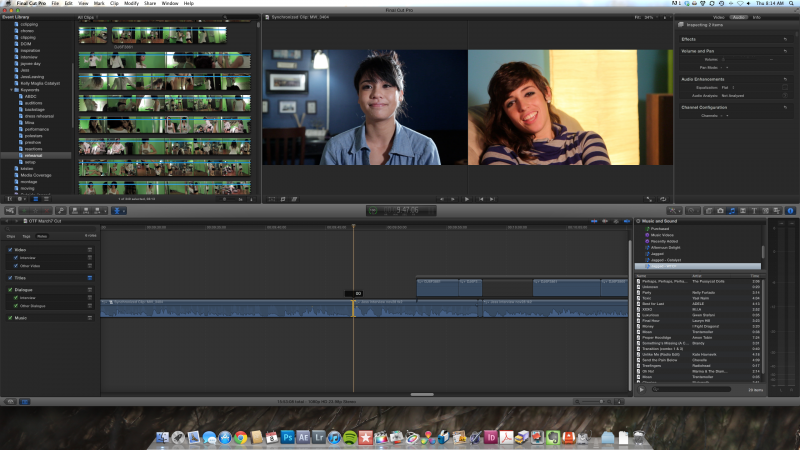
Notice how I am using the trim tool between two shots with the angle viewer open?
Please Log in to join the conversation.
08 Mar 2012 22:38 #5532
by BenB
Replied by BenB on topic Re: Multicam Angle window
Ah, right, the Viewer window takes over and shows In/Out points as usual in the Timeline. I thought you were referring to some other behavior. Got it.
Please Log in to join the conversation.

09 Mar 2012 16:42 #5554
by NocoDave
Replied by NocoDave on topic Re: Multicam Angle window
I've not done any multi camera work, I'm assuming this works the same as on a normal storyline, but hoping maybe not.
When you set the trim tool on the edit point does it instantly show the trim monitors or only when your click and drag (as with normal storyline edit points), if the former does it update when you use the "," & "." keys to trim?
Fingers are crossed on this one.
When you set the trim tool on the edit point does it instantly show the trim monitors or only when your click and drag (as with normal storyline edit points), if the former does it update when you use the "," & "." keys to trim?
Fingers are crossed on this one.
Please Log in to join the conversation.
09 Mar 2012 17:05 #5556
by BenB
Replied by BenB on topic Re: Multicam Angle window
Exactly like a regular Timeline. Only difference is that the edit points are dotted lines. For example, if you cut only video angles and not audio, audio section will be white dotted lines, showing it won't trim, it's the same angle all the way through.
If folks don't want to do the Ripple Training for multicam clips, at least watch the MacBreak Studio 3 part series on multicam. They're posted here. You'll get a lot out of them.
If folks don't want to do the Ripple Training for multicam clips, at least watch the MacBreak Studio 3 part series on multicam. They're posted here. You'll get a lot out of them.
Please Log in to join the conversation.
09 Mar 2012 17:21 #5557
by NocoDave
Replied by NocoDave on topic Re: Multicam Angle window
I've watched them, their very good. I even seen the stuff about the additional information you decided to add.
Even so, some folks don't actually do multi cam. I done a 3 cam shoot music video for a friend studying in the music department at a local college the year before Adobe Premiere introduced multi cam, I could have done with it then, and I done something on FCPX 10.0.1 with 2 angles in a compound clip that I could have used it for. Other than that nothing and non likely for a long time.
My question only related to a hope that maybe they introduced something to it that would indicate general improvements in the next FCPX update.
Even so, some folks don't actually do multi cam. I done a 3 cam shoot music video for a friend studying in the music department at a local college the year before Adobe Premiere introduced multi cam, I could have done with it then, and I done something on FCPX 10.0.1 with 2 angles in a compound clip that I could have used it for. Other than that nothing and non likely for a long time.
My question only related to a hope that maybe they introduced something to it that would indicate general improvements in the next FCPX update.
Please Log in to join the conversation.
