


- Posts: 299
- Thank you received: 10
3 Post Moderation Rule for New Boarders (25 Jan 2021)
New boarders will have their posts moderated - Don't worry if you cannot see your post immediately.
Cutting to music in FCPX
06 Mar 2012 15:53 #5369
by robertdee
Cutting to music in FCPX was created by robertdee
I was speaking to a fellow editor and singing the praises of 10.0.3 which has resolved a lot my issues, he asked how it was editing to music. I haven't tried this yet myself in any large capacity. My old approach (as was his) would have been to place markers at the signicant parts of the music track and use those. He was worried about the magnetic timeline moving everything out of sync but I told him he could simply have the audio as the primary track and cut the audio to as secondaries. I think he found this counterintuitive.
My question would be, how have people found using FCPX with regards to cutting to music (i.e. specifically matching actions to beats, etc. not audio syncing)? Problems, new paradigms? etc?
My question would be, how have people found using FCPX with regards to cutting to music (i.e. specifically matching actions to beats, etc. not audio syncing)? Problems, new paradigms? etc?
Please Log in to join the conversation.

06 Mar 2012 16:10 - 06 Mar 2012 16:11 #5371
by Pazu
Replied by Pazu on topic Re: Cutting to music in FCPX
I use Cmd+alt to extract the part of edit i want to change, from the main storyline. In this way, i am sure synchro don't move behind that. And when i finished, i put back the new edit in the main storyline.
Don't know if it is the best way to do it, but it works fine for me.
Don't know if it is the best way to do it, but it works fine for me.
Last edit: 06 Mar 2012 16:11 by Pazu.
Please Log in to join the conversation.

06 Mar 2012 16:21 #5373
by Dawar
Replied by Dawar on topic Re: Cutting to music in FCPX
I'd also put video on primary storyline, and connect the music to the first frame.
You can put some markers on the beats by first selectin your music then hit M.
The rough cut is easily done with magnetic timeline and markers with the trim head or trim tail functions.
Then use position tool to override magnetic behaviour, shift-delete to replace with a gap without rippling the timeline, trim tool to adjust the edits.
You can put some markers on the beats by first selectin your music then hit M.
The rough cut is easily done with magnetic timeline and markers with the trim head or trim tail functions.
Then use position tool to override magnetic behaviour, shift-delete to replace with a gap without rippling the timeline, trim tool to adjust the edits.
Please Log in to join the conversation.
06 Mar 2012 19:17 #5377
by RonPriest
Replied by RonPriest on topic Re: Cutting to music in FCPX
Yep, same here. Lay the first video clip down on the main storyline and then connect the song to the beginning of the first clip, then mark the song to the beat. Works like a charm.
Please Log in to join the conversation.

06 Mar 2012 19:35 #5379
by BenB
Replied by BenB on topic Re: Cutting to music in FCPX
When I cut to music, put the music clip as the primary storyline. The music is the spine of the production, that's what the primary storyline is for, the spine of your story.
I also use markers in the music clip to mark beats.
I also use markers in the music clip to mark beats.
Please Log in to join the conversation.
06 Mar 2012 19:51 #5382
by RonPriest
Replied by RonPriest on topic Re: Cutting to music in FCPX
Really? So then you lay down the video in a secondary storyline? I've become quite comfortable with connecting my song to the first clip, marking to the beat. Then after removing (deleting) all of my unusable sections of say, my bridal prep shots and then simply dumping all of those shots at once using the append edit to my storyline. Then it's a walk in the park to simply use my trim tool to cut each shot to the marks. It gives me a nice overview at the begging of the edit as I can see how much video I have past the audio that needs to be cut out.
Please Log in to join the conversation.
06 Mar 2012 20:20 - 06 Mar 2012 20:21 #5389
by Dawar
Replied by Dawar on topic Re: Cutting to music in FCPX
I have tested it but I don't like to put music in primary storyline, because in fcpx all keyboard shortcuts are designed for primary storyline, unless you intentionally select anything else, secondary storyline or connected clip.
I understand that some people will prefer put music in primary, but I'm rather a keyboard-shortcut editor, and I find it easier in FCPX when I edit video in primary.
I understand that some people will prefer put music in primary, but I'm rather a keyboard-shortcut editor, and I find it easier in FCPX when I edit video in primary.
Last edit: 06 Mar 2012 20:21 by Dawar.
Please Log in to join the conversation.
06 Mar 2012 20:21 #5390
by BenB
Replied by BenB on topic Re: Cutting to music in FCPX
I was thinking more of a music video, but even in that scenario I'd put the music in the primary storyline, as it is what everything else connects to editorially. But the other way around as you prefer works. There's no rules about what to do, just whatever works for you.
Please Log in to join the conversation.
- Scrubelicious
-

- Offline
- Platinum Member
-

Less
More
- Posts: 1228
- Thank you received: 114
06 Mar 2012 20:31 #5392
by Scrubelicious
Replied by Scrubelicious on topic Re: Cutting to music in FCPX
You could also pop your music underneath the Primary and lock it in with a gap/slug and edited away with the Primary.
It's all about your personal choice, markers work as well also.
It's all about your personal choice, markers work as well also.
Please Log in to join the conversation.
06 Mar 2012 20:47 #5396
by RonPriest
I was thinking the same thing but hadn't tried that yet. So, once you decide upon what clip you want to replace the gap clip with, I suppose it just automatically re-connects the music at the same point it was connected with the gap clip and leaves everything in sync? Or, do you have to move the connection from the audio to a different clip before you replace the slug?
Replied by RonPriest on topic Re: Cutting to music in FCPX
Scrubelicious wrote: You could also pop your music underneath the Primary and lock it in with a gap/slug and edited away with the Primary.
I was thinking the same thing but hadn't tried that yet. So, once you decide upon what clip you want to replace the gap clip with, I suppose it just automatically re-connects the music at the same point it was connected with the gap clip and leaves everything in sync? Or, do you have to move the connection from the audio to a different clip before you replace the slug?
Please Log in to join the conversation.
- Scrubelicious
-
- Offline
- Platinum Member
-
Less
More
- Posts: 1228
- Thank you received: 114
06 Mar 2012 21:04 #5403
by Scrubelicious
Replied by Scrubelicious on topic Re: Cutting to music in FCPX
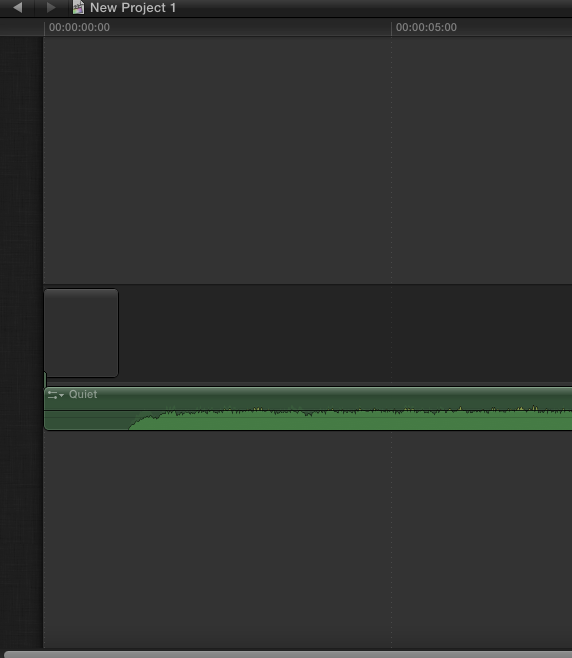
Well what I did was connected the audio (music) with a gap that had the same length of the silence or mute portion at the beginning of the audio.
Please Log in to join the conversation.
06 Mar 2012 21:12 #5407
by BenB
Replied by BenB on topic Re: Cutting to music in FCPX
In 10.0.3 when you Replace a clip, connected clips stay in place and adopted the new clip.
Please Log in to join the conversation.
06 Mar 2012 23:17 #5415
by NocoDave
Replied by NocoDave on topic Re: Cutting to music in FCPX
I'm doing what most here are, applying the audio as a connected clip below the primary storyline and editing away.
Doing this I find it feels very much like editing on Avid but with a couple of little bits and pieces missing that mean I need to use gap clips and the position tool way too often and at times when they shouldn't be necessary.
Sometimes to get round this I find it useful to match markers on the audio clip to strategically position markers on video clips to pull back and forward. I also find it useful to be able to reposition the audio clip connector to different video clips depending on where I am working.
I first done this to try to fix something that got messed up due to FCPX trimming behaviour and have found it to be very useful since.
Doing this I find it feels very much like editing on Avid but with a couple of little bits and pieces missing that mean I need to use gap clips and the position tool way too often and at times when they shouldn't be necessary.
Sometimes to get round this I find it useful to match markers on the audio clip to strategically position markers on video clips to pull back and forward. I also find it useful to be able to reposition the audio clip connector to different video clips depending on where I am working.
I first done this to try to fix something that got messed up due to FCPX trimming behaviour and have found it to be very useful since.
Please Log in to join the conversation.
07 Mar 2012 00:29 #5421
by BenB
Replied by BenB on topic Re: Cutting to music in FCPX
Precision tool and gap clips too often? In what way? Could you give examples? I'm curious. I rarely use anything but the Range and Trimming tools for anything.
Please Log in to join the conversation.
07 Mar 2012 16:12 #5464
by NocoDave
Replied by NocoDave on topic Re: Cutting to music in FCPX
There's no real point in giving examples there's too much in differences between works being done and editors styles.
The main problems are with the well documented on this forum issue with the behaviour when rolling an edit point and the behaviour of the trim monitors while working with trim tools.
The main problems are with the well documented on this forum issue with the behaviour when rolling an edit point and the behaviour of the trim monitors while working with trim tools.
Please Log in to join the conversation.
- Scrubelicious
-
- Offline
- Platinum Member
-
Less
More
- Posts: 1228
- Thank you received: 114
07 Mar 2012 16:36 #5465
by Scrubelicious
This is true.
Replied by Scrubelicious on topic Re: Cutting to music in FCPX
NocoDave wrote: There's no real point in giving examples there's too much in differences between works being done and editors styles.
The main problems are with the well documented on this forum issue with the behaviour when rolling an edit point and the behaviour of the trim monitors while working with trim tools.
This is true.
Please Log in to join the conversation.

07 Mar 2012 20:41 #5476
by alex4D
Replied by alex4D on topic Re: Cutting to music in FCPX
As well as marking video while the music plays, you can also blade while the music plays.
1. Create a gap clip as long as the music
2. Attach the music clip
3. Select the gap clip
4. Play from the start
5. Press M to mark where you want to match an action to the music
6. Press Command-B where you want an edit
7. To start populating your video, drag clips from your event to a gap clip, wait for it highlight release the mouse and choose whether to Replace From Start or Replace From End (Replace From Start: Option-R, use the Command Editor [Command-Option-K] to add a keyboard shortcut to Replace From End)
1. Create a gap clip as long as the music
2. Attach the music clip
3. Select the gap clip
4. Play from the start
5. Press M to mark where you want to match an action to the music
6. Press Command-B where you want an edit
7. To start populating your video, drag clips from your event to a gap clip, wait for it highlight release the mouse and choose whether to Replace From Start or Replace From End (Replace From Start: Option-R, use the Command Editor [Command-Option-K] to add a keyboard shortcut to Replace From End)
Please Log in to join the conversation.
07 Mar 2012 20:50 #5477
by NocoDave
Replied by NocoDave on topic Re: Cutting to music in FCPX
That's interesting Alex. I don't go as far as creating a full length gap clip. But I've also been doing this with small sections while working out what would fit well in certain places.
Please Log in to join the conversation.
30 Mar 2012 19:24 #6310
by sedvideo
Replied by sedvideo on topic Re: Cutting to music in FCPX
This is a fascinating thread. I'm cutting my first music video in FCPX and made the mistake of getting 90% through it, went to add some final shots, and mucked up the sync on the entire video because of where the music track was linked in the Primary Storyline. I had it connected to a clip about 3/4 of the way through the video. Bad idea. I've had to do a somewhat involved re-engineering of the edit to get all the clips out of the Primary Storyline, get the audio track into the Primary Storyline, and make all the clips connected to the audio track. Pretty crazy. It's very much a different way of working, as I am of course accustomed to being able to lock an audio track so it doesn't move. What bugs me about this is the inability to use traditional trimming tools with connected clips without making them into a secondary storyline or a compound clip. I can see the benefit, its just very different.
Great to read all of your thoughts and techniques though.
bm
Great to read all of your thoughts and techniques though.
bm
Please Log in to join the conversation.

10 Apr 2014 15:57 #44350
by waynekhin
Replied by waynekhin on topic Cutting to music in FCPX
Thank you all. I am a musician who wants to cut his own simple Music Video on FCPX. I am reading all your suggestions and comments.
Just started using FCPX today
Just started using FCPX today
Please Log in to join the conversation.
