


- Posts: 52
- Thank you received: 0
3 Post Moderation Rule for New Boarders (25 Jan 2021)
New boarders will have their posts moderated - Don't worry if you cannot see your post immediately.
Why no ability to view double mono tracks etc.
- Brad Parsons
-
 Topic Author
- Offline
- Senior Member
-

Less
More
05 Mar 2012 11:33 #5336
by Brad Parsons
Why no ability to view double mono tracks etc. was created by Brad Parsons
What happened to FCP? I finally downloaded the demo of FCPX when I heard they had come out with the multi cam function, something it had to have to appeal to me at all. I was at first very excited. The audio sync and the color correction features where instant and easy improvements but then, it hit the skids big time. First, no ability to view two mono tracks in multi cam edit unless one first breaks apart the clip and then resyncs the audio to the video manually. Huge drag. The magnetic timeline adds to the effort as well. Advantage 1 out the window. I always record two separate audio tracks , one from a line in and one ambient and then mix down in post. An absolute must in events. FCPX won't let me do this without undo hoops. Secondly, I can't delete a video portion of a clip without it taking the audio with it??? Who heard of such a thing? Maybe you get used to the magnetic timeline but at this point I hate it. I can't move anything the way I want to. At this point FCP 6 and 7 are light years more intuitive and capable. I don't understand the interest in this program at all. I had very high hopes but they are getting dashed at every corner. Is there hope if I stick with it??? At this point almost all edits I've done involve more steps and frustration than I ever experienced with FC 2-6. I was doing almost anything I wanted on FCP2 the first day I got it. I loved it, what happened??
Please Log in to join the conversation.

05 Mar 2012 11:50 #5337
by Seanus
Sean Lander - Editing since 1982 - AVID 1991 - FCP 1999 - FCPX 2011
Replied by Seanus on topic Re: Why no ability to view double mono tracks etc.
You're jumping the gun here. You can do all of those things. FCP X is very different and I suspect you will be flustered for a couple of weeks but be patient, read as much as you can and you're going to love it.
Sean Lander - Editing since 1982 - AVID 1991 - FCP 1999 - FCPX 2011
Please Log in to join the conversation.

05 Mar 2012 19:02 - 05 Mar 2012 19:05 #5340
by BenB
Replied by BenB on topic Re: Why no ability to view double mono tracks etc.
Agreed. When folks first opened legacy FCP versions, they didn't intuitively know how to do everything. Every one had to do some tutorial or take some class, or get some book. That's just a fact. I've been a trainer for many, many years and have seen this first hand across the country.
If you want to learn FCP X, do some training. It's very deep, and like all NLEs, all of its functions and workflows are not readily apparent.
I highly recommend Ripple Training's videos on FCP X, compositing in FCP X, and especially their Multicam Clip training . Multicam in FCP X is very powerful, very flexible, very deep. You're not going to just hit buttons and learn it. And much of what it can do is not in the user manual. Spend the $30 and save yourself a lot of time and headaches.
I will say that everything you want to do is actually easier and faster in FCP X than in legacy FCP versions. Learn the app properly first.
One great thing I love about FCP X multicam, is I can put a bunch of audio clips into a Compound Clip, and use that as an angle in my Multicam Clip. You can't do that with legacy FCP. The Multicam Angle Editor is very simple, but also very flexible and powerful. It's way too much to explain in a forum post. Get the Ripple Training video on Multicam, it's hands-on training, you download the tutorial material and go through the lessons with Mark Spencer, actually doing what he's showing you. Best way to learn, and the best price around.
If you want to learn FCP X, do some training. It's very deep, and like all NLEs, all of its functions and workflows are not readily apparent.
I highly recommend Ripple Training's videos on FCP X, compositing in FCP X, and especially their Multicam Clip training . Multicam in FCP X is very powerful, very flexible, very deep. You're not going to just hit buttons and learn it. And much of what it can do is not in the user manual. Spend the $30 and save yourself a lot of time and headaches.
I will say that everything you want to do is actually easier and faster in FCP X than in legacy FCP versions. Learn the app properly first.
One great thing I love about FCP X multicam, is I can put a bunch of audio clips into a Compound Clip, and use that as an angle in my Multicam Clip. You can't do that with legacy FCP. The Multicam Angle Editor is very simple, but also very flexible and powerful. It's way too much to explain in a forum post. Get the Ripple Training video on Multicam, it's hands-on training, you download the tutorial material and go through the lessons with Mark Spencer, actually doing what he's showing you. Best way to learn, and the best price around.
Last edit: 05 Mar 2012 19:05 by BenB.
Please Log in to join the conversation.

05 Mar 2012 20:24 #5345
by RonPriest
Brad, you also get the transcript with that Multicam training by Mark Spencer which makes the training course even that much more valuable. All of the other FCPX Ripple Training presented by Steve Martin is an excellent resource too along with macProVideo's FCPX training presented by Michael Wohl. I am learning from both training courses. Actually, I had the training courses a few months ago long before I even purchased and started learning FCPX.
FCPX is just like anything else, you get out of it what you put into it. Take a little time to learn it properly and it will pay off time and time again.
Replied by RonPriest on topic Re: Why no ability to view double mono tracks etc.
BenB wrote: Get the Ripple Training video on Multicam, it's hands-on training, you download the tutorial material and go through the lessons with Mark Spencer, actually doing what he's showing you. Best way to learn, and the best price around.
Brad, you also get the transcript with that Multicam training by Mark Spencer which makes the training course even that much more valuable. All of the other FCPX Ripple Training presented by Steve Martin is an excellent resource too along with macProVideo's FCPX training presented by Michael Wohl. I am learning from both training courses. Actually, I had the training courses a few months ago long before I even purchased and started learning FCPX.
FCPX is just like anything else, you get out of it what you put into it. Take a little time to learn it properly and it will pay off time and time again.
Please Log in to join the conversation.
05 Mar 2012 20:42 #5346
by BenB
Replied by BenB on topic Re: Why no ability to view double mono tracks etc.
At macProVideo.com I have a Media Management in FCP X course, a new one on graphic design applied to creating templates for FCP X, and several HUB articles out and coming out over the next few months. I'm also working now on a Sound Design for FCP X video course there. But check out "The HUB" at macProVideo for some neat quickie tutorials.
I totally agree with what Ron says, you get out of it what you put in to it.
I totally agree with what Ron says, you get out of it what you put in to it.
Please Log in to join the conversation.
- Brad Parsons
-
Topic Author
- Offline
- Senior Member
-
Less
More
- Posts: 52
- Thank you received: 0
06 Mar 2012 11:12 #5365
by Brad Parsons
Replied by Brad Parsons on topic Re: Why no ability to view double mono tracks etc.
Wow thanks everyone for your speedy response. I have had high hopes for FCPX. You really encouraged me. I was about to ditch the program even tho I didn't want to. I will definitely do some study. Thanks to all.
Brad
Brad
Please Log in to join the conversation.
06 Mar 2012 15:53 #5368
by Dawar
Replied by Dawar on topic Re: Why no ability to view double mono tracks etc.
Well I'm also trying to figure out the best workflow for dual mono audio. Not especially in multicam, even in a simple project.
It's very annoying to have to open a clip in its own timeline just to mix the 2 channels.
If we could set audio levels for each channel in the inspector that would be great.
We should also be able to attribute a different role for each channel right in the inspector, for several clips at once. For now I have to open each clip in its own timeline. For one clip it's ok, for 100+ clips it's pretty slow.
I like this "container philosophy" for audio/video, but it really needs serious improvements for those who edit multichannels audio.
For multicam I miss not being able to match frame the source clip (the active video/audio, not the multicam clip).
I'm also bothered with the fact that opening in timeline a clip/compound clip/multicam clip doesn't preserve playhead position, as Source Timecode is really difficult to read in fcpx.
It's very annoying to have to open a clip in its own timeline just to mix the 2 channels.
If we could set audio levels for each channel in the inspector that would be great.
We should also be able to attribute a different role for each channel right in the inspector, for several clips at once. For now I have to open each clip in its own timeline. For one clip it's ok, for 100+ clips it's pretty slow.
I like this "container philosophy" for audio/video, but it really needs serious improvements for those who edit multichannels audio.
For multicam I miss not being able to match frame the source clip (the active video/audio, not the multicam clip).
I'm also bothered with the fact that opening in timeline a clip/compound clip/multicam clip doesn't preserve playhead position, as Source Timecode is really difficult to read in fcpx.
Please Log in to join the conversation.
06 Mar 2012 19:29 #5378
by BenB
Replied by BenB on topic Re: Why no ability to view double mono tracks etc.
I suggest you do the Ripple Training courses, seriously.
Select a clip, in the Inspector, bottom of the Audio tab, you can configure the audio channels as you like. You can do pretty much everything you list here easily, but you're asking for more information than I am willing to write in a forum post. Get the training first.
Select a clip, in the Inspector, bottom of the Audio tab, you can configure the audio channels as you like. You can do pretty much everything you list here easily, but you're asking for more information than I am willing to write in a forum post. Get the training first.
Please Log in to join the conversation.
06 Mar 2012 19:43 #5381
by RonPriest
I certainly agree with that part, it's is a PITA when your viewing back a compound clip and need to edit a specific clip, then getting back into the storyline and having to search for the clip you were on while viewing the compound clip. Im still in training, so I was hoping I've overlooked a modifier key or something that I need to use when I double clicking on the compound clip.
Replied by RonPriest on topic Re: Why no ability to view double mono tracks etc.
Dawar wrote: I'm also bothered with the fact that opening in timeline a clip/compound clip/multicam clip doesn't preserve playhead position, as Source Timecode is really difficult to read in fcpx.
I certainly agree with that part, it's is a PITA when your viewing back a compound clip and need to edit a specific clip, then getting back into the storyline and having to search for the clip you were on while viewing the compound clip. Im still in training, so I was hoping I've overlooked a modifier key or something that I need to use when I double clicking on the compound clip.
Please Log in to join the conversation.
06 Mar 2012 20:03 - 06 Mar 2012 20:08 #5385
by Dawar
I'm not sure that you've understood what I'm looking for. Maybe it's a language problem, I'm french.
I know I can choose audio channels in the inspector.
But I can't adjust audio gain separately for A1 or A2 (I do mean right in the inspector, not by opening in timeline)
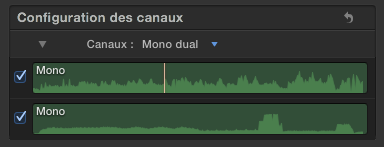
Same thing for roles, I'd like to set different roles here but I can't.
I don't want to break apart clips items.
I don't think it's a matter of training. I've learned FCPX since 10.0.0, and helped many people on my country forum since then.
I haven't seen any training resolving this issue, and it seems that I am not alone. I spoke about that on creative cow forum and it seems others have the same problems, including forum leaders.
-how to preserve playhead position in a compound/multicam/simple clip opened timeline,
-how to manage multichannel audio clips levels without opening in timeline
I'm sure it would interest many people over the world who already did training, and also many paid gigs on fcpx.
Replied by Dawar on topic Re: Why no ability to view double mono tracks etc.
BenB wrote: Select a clip, in the Inspector, bottom of the Audio tab, you can configure the audio channels as you like.
I'm not sure that you've understood what I'm looking for. Maybe it's a language problem, I'm french.
I know I can choose audio channels in the inspector.
But I can't adjust audio gain separately for A1 or A2 (I do mean right in the inspector, not by opening in timeline)
Same thing for roles, I'd like to set different roles here but I can't.
I don't want to break apart clips items.
I don't think it's a matter of training. I've learned FCPX since 10.0.0, and helped many people on my country forum since then.
I haven't seen any training resolving this issue, and it seems that I am not alone. I spoke about that on creative cow forum and it seems others have the same problems, including forum leaders.
Well, if you know :BenB wrote: You can do pretty much everything you list here easily
-how to preserve playhead position in a compound/multicam/simple clip opened timeline,
-how to manage multichannel audio clips levels without opening in timeline
I'm sure it would interest many people over the world who already did training, and also many paid gigs on fcpx.
Last edit: 06 Mar 2012 20:08 by Dawar.
Please Log in to join the conversation.
06 Mar 2012 20:19 #5388
by BenB
Replied by BenB on topic Re: Why no ability to view double mono tracks etc.
No, the playhead doesn't match when switching.
Adjusting audio in a clip's own timeline I actually like. But yes, I see your point. I just don't have any problem with it as it is.
I don't understand why two channels of a video asset would need different Roles or Sub-Roles. You'd want to break them apart physically if you wanted that. Remember Roles are there for working with Media Stems.
Remember we've gotten a LOT in only 8 months. More updates and maturing than any other NLE has ever gotten in that amount of time, thanks to the App Store model. And we have a long ways to go. Apple has said there is a 10 year development plan in place for FCP X. So fill out the feedback form for everything you want to see. I'm sure we'll see these things coming soon. Apple has a small team doing this, and they can't do everything at once.
We FCP users have been begging for a Major Overhaul of FCP for years now, and we got it.
Adjusting audio in a clip's own timeline I actually like. But yes, I see your point. I just don't have any problem with it as it is.
I don't understand why two channels of a video asset would need different Roles or Sub-Roles. You'd want to break them apart physically if you wanted that. Remember Roles are there for working with Media Stems.
Remember we've gotten a LOT in only 8 months. More updates and maturing than any other NLE has ever gotten in that amount of time, thanks to the App Store model. And we have a long ways to go. Apple has said there is a 10 year development plan in place for FCP X. So fill out the feedback form for everything you want to see. I'm sure we'll see these things coming soon. Apple has a small team doing this, and they can't do everything at once.
We FCP users have been begging for a Major Overhaul of FCP for years now, and we got it.
Please Log in to join the conversation.
07 Mar 2012 00:59 - 07 Mar 2012 01:02 #5428
by Dawar
Replied by Dawar on topic Re: Why no ability to view double mono tracks etc.
Two different subroles for the two audio channels of a video :
For example like Brad's first post was telling, when you've got a line-in in A1 and ambient sound in A2. Or character-A in A1 and character-B in A2.
In the timeline, if you assigned this subroles you can very easily mute one channel for the whole project, without having to select all the clips first.
But more important, I keep thinking about AAF export which arrives soon.
I'd prefer these two channels be considered like separate tracks in ProTools.
If X2pro changes the roles into tracks names, then, it would make sense to be able to manage different roles for multi-channels audio.
Another example I've got in mind is a 8-tracks Cantar recording with Audio TC.
I edited a documentary with this kind of thing in FCP7, and that was complicated to manage.
With FCPX and the synchronization function, this could be very simple, just compound clips from which I could mute all tracks, except the mixdown I want to hear during editing...
And the sound engineer could retrieve all his tracks perfectly arranged by roles/track names I assigned, in one time for all clips.
That's why I love this idea of containers, and I'd like see it to improve.
Otherwise I agree with you, we always want more (already feedbacked this since 10.0.0) but I'm not bashing for fun, these issues can typically affect my workflow, that's why I'm talking about it, but I'm really enjoying many others things. Indeed fcpx has a huge potential.
For example like Brad's first post was telling, when you've got a line-in in A1 and ambient sound in A2. Or character-A in A1 and character-B in A2.
In the timeline, if you assigned this subroles you can very easily mute one channel for the whole project, without having to select all the clips first.
But more important, I keep thinking about AAF export which arrives soon.
I'd prefer these two channels be considered like separate tracks in ProTools.
If X2pro changes the roles into tracks names, then, it would make sense to be able to manage different roles for multi-channels audio.
Another example I've got in mind is a 8-tracks Cantar recording with Audio TC.
I edited a documentary with this kind of thing in FCP7, and that was complicated to manage.
With FCPX and the synchronization function, this could be very simple, just compound clips from which I could mute all tracks, except the mixdown I want to hear during editing...
And the sound engineer could retrieve all his tracks perfectly arranged by roles/track names I assigned, in one time for all clips.
That's why I love this idea of containers, and I'd like see it to improve.
Otherwise I agree with you, we always want more (already feedbacked this since 10.0.0) but I'm not bashing for fun, these issues can typically affect my workflow, that's why I'm talking about it, but I'm really enjoying many others things. Indeed fcpx has a huge potential.
Last edit: 07 Mar 2012 01:02 by Dawar.
Please Log in to join the conversation.
- mliebergot
-

- Offline
- Premium Member
-

Less
More
- Posts: 84
- Thank you received: 3
07 Mar 2012 03:28 #5437
by mliebergot
Replied by mliebergot on topic Re: Why no ability to view double mono tracks etc.
Brad I work the same as youa dn this is what I do for settign up a Multicam clip and audio.
1. In the Event Browser "Create and Empty Compond Clip"
2. Double click the "empty" Compound clip to open in it's own timeline.
3. Drag recorder audio to "Primary Storyline"
4. Select "Audio" only for clip selection, then select the video clip you desire and add it as a connected clip to the Primary Storyline.
5. Sync audio in Compound Clip
Creating the multi cam clip.
1. Select media to be used in multi cam clip (video and "Audio Compound Clip"
2. Sync clips
3. Select "Audio" only and select "Audio Compound Clip"
4. Select "Video Only"
5. Cut Multi Cam as desired.
Now you will have a Master audio "Compound Clip" mix which you can open in the Angle Editor and adjust as needed.
1. In the Event Browser "Create and Empty Compond Clip"
2. Double click the "empty" Compound clip to open in it's own timeline.
3. Drag recorder audio to "Primary Storyline"
4. Select "Audio" only for clip selection, then select the video clip you desire and add it as a connected clip to the Primary Storyline.
5. Sync audio in Compound Clip
Creating the multi cam clip.
1. Select media to be used in multi cam clip (video and "Audio Compound Clip"
2. Sync clips
3. Select "Audio" only and select "Audio Compound Clip"
4. Select "Video Only"
5. Cut Multi Cam as desired.
Now you will have a Master audio "Compound Clip" mix which you can open in the Angle Editor and adjust as needed.
Please Log in to join the conversation.
- Brad Parsons
-
Topic Author
- Offline
- Senior Member
-
Less
More
- Posts: 52
- Thank you received: 0
07 Mar 2012 11:01 #5457
by Brad Parsons
Replied by Brad Parsons on topic Re: Why no ability to view double mono tracks etc.
I am amazed at the support found here. I will follow all your suggestions. Thank you.
Brad
Brad
Please Log in to join the conversation.
- Brad Parsons
-
Topic Author
- Offline
- Senior Member
-
Less
More
- Posts: 52
- Thank you received: 0
27 Mar 2012 10:26 #6232
by Brad Parsons
Replied by Brad Parsons on topic Re: Why no ability to view double mono tracks etc.
I've done the training both multi cam and the full FCPX ripple training. No one addresses this issue at all. Mleibergot comes the closest but i don't have audio recorded to a separate device. Dawar totally understands and knows what's happening here. Sorry Mleibergot, I can't seem to duplicate what you suggest. But I have a somewhat simple workaround but it has its problems. Go ahead and create the multi clip. Choose the clip you wish to draw your audio tracks from and drop that single camera angle to the timeline then break it apart. Next, replace the video portion of the clip with the multi clip. The audio will be in sync and you will have both tracks of audio to mix along the way. This will work great IF, your camera providing the audio was STARTED FIRST. If it was not one will have to manually align the audio tracks. I guess this is fairly simple but I must always be sure the A camera roles first when shooting a multi cam event. It would all be a no brainer and simple as pie if Apple would just simply put back in the dual audio track feature that has been there since FCP 2 for sure, that's where I started with FCP, had Premiere before that. Simple, simple fix and should've been included as default. Combining left and right audio tracks on the timeline may save space but they need to be able to be opened up without having to break apart a clip, which you can't do in multi cam editing. Please fix this simple issue Apple techs.
Please Log in to join the conversation.
