


- Posts: 4
- Thank you received: 0
3 Post Moderation Rule for New Boarders (25 Jan 2021)
New boarders will have their posts moderated - Don't worry if you cannot see your post immediately.
Long Export and Compressing
- Bobdenverfan
-
 Topic Author
- Offline
- New Member
-

Less
More
29 Feb 2012 04:26 #5076
by Bobdenverfan
Long Export and Compressing was created by Bobdenverfan
I use FCP 6.06 and Compressor 3.0.5
I export an hour long 1080i60 video it takes 20 minutes.
and only an hour to compress it into an h.264 codec...
Then I bought FCP X and Compressor 4.
to do the same exact export and compression on the same computer, it takes 3 times as long to export and 3 times as long to compress...
Does anyone have any idea why THE PROGRAMS would vary in HOW THEY GIVE ME MY FINAL PRODUCT??? Why do they do this?
I export an hour long 1080i60 video it takes 20 minutes.
and only an hour to compress it into an h.264 codec...
Then I bought FCP X and Compressor 4.
to do the same exact export and compression on the same computer, it takes 3 times as long to export and 3 times as long to compress...
Does anyone have any idea why THE PROGRAMS would vary in HOW THEY GIVE ME MY FINAL PRODUCT??? Why do they do this?
Please Log in to join the conversation.

29 Feb 2012 18:35 #5107
by BenB
Replied by BenB on topic Re: Long Export and Compressing
FCPX is running on a whole new Framework and performance is still being tweaked. It is also more dependent on GPU.
What are your hardware specs?
What codec are you editing with?
What are your hardware specs?
What codec are you editing with?
Please Log in to join the conversation.
- Bobdenverfan
-
Topic Author
- Offline
- New Member
-
Less
More
- Posts: 4
- Thank you received: 0
29 Feb 2012 19:15 #5109
by Bobdenverfan
Replied by Bobdenverfan on topic Re: Long Export and Compressing
We record my pastors sermons onto HDV1080i60 minidv.
I import them as such and export as such which generally produces a 12gb hour long video.
Then I compress it with a custom setting in compressor that is a 16x9 H.264 quicktime mov file for the web that produces a 200mb file.
Well my Mac Pro was too old to support the new FCPX so we stuck it on my iMac (which wasn't really my first choice) but my post is still based on the editing times with the iMac for FCP 6.
Anyway my specs are
Model Name: iMac
Model Identifier: iMac8,1
Processor Name: Intel Core 2 Duo
Processor Speed: 2.4 GHz
Number Of Processors: 1
Total Number Of Cores: 2
L2 Cache: 6 MB
Memory: 4 GB
Bus Speed: 1.07 GHz
Boot ROM Version: IM81.00C1.B00
SMC Version (system): 1.29f1
Serial Number (system): QP9060EWZE5
Hardware UUID: FA73E746-4FA3-5CBC-AAB4-1E78E1BA09B6
ATI Radeon HD 2400 XT:
Chipset Model: ATI Radeon HD 2400
Type: GPU
Bus: PCIe
PCIe Lane Width: x16
VRAM (Total): 128 MB
Vendor: ATI (0x1002)
Device ID: 0x94c8
Revision ID: 0x0000
ROM Revision: 113-B2250H-259
EFI Driver Version: 01.00.259
I import them as such and export as such which generally produces a 12gb hour long video.
Then I compress it with a custom setting in compressor that is a 16x9 H.264 quicktime mov file for the web that produces a 200mb file.
Well my Mac Pro was too old to support the new FCPX so we stuck it on my iMac (which wasn't really my first choice) but my post is still based on the editing times with the iMac for FCP 6.
Anyway my specs are
Model Name: iMac
Model Identifier: iMac8,1
Processor Name: Intel Core 2 Duo
Processor Speed: 2.4 GHz
Number Of Processors: 1
Total Number Of Cores: 2
L2 Cache: 6 MB
Memory: 4 GB
Bus Speed: 1.07 GHz
Boot ROM Version: IM81.00C1.B00
SMC Version (system): 1.29f1
Serial Number (system): QP9060EWZE5
Hardware UUID: FA73E746-4FA3-5CBC-AAB4-1E78E1BA09B6
ATI Radeon HD 2400 XT:
Chipset Model: ATI Radeon HD 2400
Type: GPU
Bus: PCIe
PCIe Lane Width: x16
VRAM (Total): 128 MB
Vendor: ATI (0x1002)
Device ID: 0x94c8
Revision ID: 0x0000
ROM Revision: 113-B2250H-259
EFI Driver Version: 01.00.259
Please Log in to join the conversation.
29 Feb 2012 19:30 - 29 Feb 2012 19:31 #5110
by BenB
Replied by BenB on topic Re: Long Export and Compressing
Even in FCP 6 you should be capturing as AIC. If you had v.7 I'd say convert it to ProRes 422. In FCP X you should be Optimizing that stuff (ProRes). Editing Long-GOP format simply sucks. And converting from one Long-GOP format to another takes more time, and doesn't hold up the image quality.
FCP 6 doesn't use too much RAM due to is being a 32-bit app. But FCP X needs RAM. 4GB for working with HD isn't going to really do well. You need at least 8GB RAM. That GPU is ok, but just barely. A quad-core or larger Mac, with 16GB RAM, and a more powerful GPU would make FCP X much faster than v.6.
And I'm assuming you're media (scratch disk, events, projects) are on an external FW800 drive? Correct?
What is the duration of these sermons?
FCP 6 doesn't use too much RAM due to is being a 32-bit app. But FCP X needs RAM. 4GB for working with HD isn't going to really do well. You need at least 8GB RAM. That GPU is ok, but just barely. A quad-core or larger Mac, with 16GB RAM, and a more powerful GPU would make FCP X much faster than v.6.
And I'm assuming you're media (scratch disk, events, projects) are on an external FW800 drive? Correct?
What is the duration of these sermons?
Last edit: 29 Feb 2012 19:31 by BenB.
Please Log in to join the conversation.
- Bobdenverfan
-
Topic Author
- Offline
- New Member
-
Less
More
- Posts: 4
- Thank you received: 0
29 Feb 2012 19:49 #5111
by Bobdenverfan
Replied by Bobdenverfan on topic Re: Long Export and Compressing
I guess i am just behind in understanding everything.
I have been doing this for 3 years and only doing what I was shown.
I dont have much education on video, it was really just a hobby which turned into this ministry for me. We film our pastors 50 minute sermons, like i said in HD 1080i60. We edit them for television and the web. I generally keep the edited sermons (being over 400+) on our external raids. I have been having them exported from FCP 6 in HD-1080i60 as the "base" format from which I then compress to the SD settings for the tv station. I also then compress the base format into the H.264 for web.
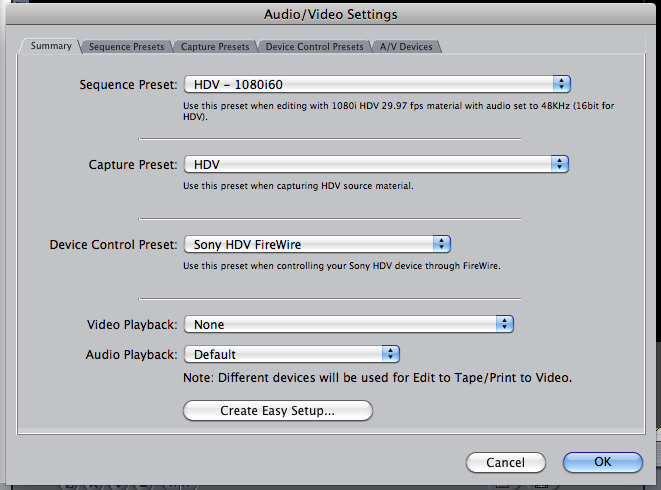
This screenshot should show you what I import into FCP6 with...
I have been doing this for 3 years and only doing what I was shown.
I dont have much education on video, it was really just a hobby which turned into this ministry for me. We film our pastors 50 minute sermons, like i said in HD 1080i60. We edit them for television and the web. I generally keep the edited sermons (being over 400+) on our external raids. I have been having them exported from FCP 6 in HD-1080i60 as the "base" format from which I then compress to the SD settings for the tv station. I also then compress the base format into the H.264 for web.
This screenshot should show you what I import into FCP6 with...
Please Log in to join the conversation.
- Bobdenverfan
-
Topic Author
- Offline
- New Member
-
Less
More
- Posts: 4
- Thank you received: 0
29 Feb 2012 23:07 #5124
by Bobdenverfan
Replied by Bobdenverfan on topic Re: Long Export and Compressing
After reading about the Prores Codecs, i still dont understand them...
Why would I want to create bigger file sizes using Prores 422 instead of using HDV 1080i60...
I've never experienced any editing problems working in real time these few years...
I cant see a difference in the final product anyway...
I think its manageable to film in 1080i60, edit in 1080i60, export to 1080i60 and then compress it to whatever I need to for web or television from there....
There is no way to have the storage space for so many prores 422 videos.
But I want to keep up with the times...
Why would I want to create bigger file sizes using Prores 422 instead of using HDV 1080i60...
I've never experienced any editing problems working in real time these few years...
I cant see a difference in the final product anyway...
I think its manageable to film in 1080i60, edit in 1080i60, export to 1080i60 and then compress it to whatever I need to for web or television from there....
There is no way to have the storage space for so many prores 422 videos.
But I want to keep up with the times...
Please Log in to join the conversation.
29 Feb 2012 23:59 #5130
by BenB
Replied by BenB on topic Re: Long Export and Compressing
Long-GOP (Group Of Pictures) formats such as HDV and H.264 are super compressed. They require 8-12 frames to be read together in order to reconstruct a single frame for playback. This is because every frame only has a tiny portion of the data that makes it up. The first frame of the GOP is an I-Frame which contains 100% of it's frame's data. Cuts can only happen on I-Frames, certain effects must reassign I-Frames. The rest are B and P frames which are only a tiny percent of the original data for that frame, because they actually throw away data for those frames. The compression algorithm uses data from all 12 frames in the Group to re-build each single frame. When you are editing, you are doing a lot more rendering, and see a "Conforming Frames" process run when renders happen.
Yes, it's smaller than normal file size, but does not hold up to manipulation or multiple transcodes and retain quality. For what you do you probably are not noticing anything. But you've never worked with AIC, or "Apple Intermediate Codec" for HDV (you don't have ProRes in FCP 6).
AIC, ProRes and DVCPRO-HD are all I-Frame format where every frame has 100% of it's own data. Each frame only needs to be read by itself for playback and transcoding. Not data is thrown away. The CPU works much less and faster, much less render time, never any "conforming frames" time at all, exporting is infinity faster.
Does an all I-Frame codec make larger files? Yes, because 100% of the data for each frame is there, it holds up to multiple transcodes such as required for rendering, color grading, export, etc. These are not "large" files, but the actual "normal" size of those video files. Is it impossible to have enough drive space for ProRes, AIC, or DVCPRO-HD? Not at all! A 2TB drive will still hold a ton of footage. And your clients should be paying for drive space in the fees they pay you for your work. That's simple business.
FCP X does not "require" ProRes, but on older, weaker Macs it will help, along with editing with Proxies. It does require more RAM, more GPU power, and more CPU power, as all modern apps do. Simple fact of life, as computers get more powerful, software developers take advantage of that power, and eventually a computer gets too old to run more modern software versions.
Now, back to your specific situation. IF you had ever been shown the AIC workflow, you'd be getting through your work much faster, I can assure you of that. I see you also are not monitoring externally, so that saves FCP on some of it's work. Bear in mind FCP X is built primarily for a tapeless workflow, as it's not common to find a camera that uses tape any more. Those Mini-DV HDV cameras you're using are dated, too. But, if your current workflow works just fine, why change it? Changing it to "keep up with the times" means getting a new Mac, new tapless cameras, etc. If what you're doing works, it works.
FCP X on my Mac Pro flies, it's infinity faster than FCP 7, exports are faster than ever, rendering is pretty much a thing of the past. If you want to use FCP X, you need to have the updated hardware to take advantage of it. It's a whole new animal that runs on a whole new underlying Framework technology (QuickTime is pretty much an almost extinct dinosaur).
But I will say if you captured with AIC instead of native HDV, your work would fly even faster. And yes, you'd need more drive space. It's a trade off.
Yes, it's smaller than normal file size, but does not hold up to manipulation or multiple transcodes and retain quality. For what you do you probably are not noticing anything. But you've never worked with AIC, or "Apple Intermediate Codec" for HDV (you don't have ProRes in FCP 6).
AIC, ProRes and DVCPRO-HD are all I-Frame format where every frame has 100% of it's own data. Each frame only needs to be read by itself for playback and transcoding. Not data is thrown away. The CPU works much less and faster, much less render time, never any "conforming frames" time at all, exporting is infinity faster.
Does an all I-Frame codec make larger files? Yes, because 100% of the data for each frame is there, it holds up to multiple transcodes such as required for rendering, color grading, export, etc. These are not "large" files, but the actual "normal" size of those video files. Is it impossible to have enough drive space for ProRes, AIC, or DVCPRO-HD? Not at all! A 2TB drive will still hold a ton of footage. And your clients should be paying for drive space in the fees they pay you for your work. That's simple business.
FCP X does not "require" ProRes, but on older, weaker Macs it will help, along with editing with Proxies. It does require more RAM, more GPU power, and more CPU power, as all modern apps do. Simple fact of life, as computers get more powerful, software developers take advantage of that power, and eventually a computer gets too old to run more modern software versions.
Now, back to your specific situation. IF you had ever been shown the AIC workflow, you'd be getting through your work much faster, I can assure you of that. I see you also are not monitoring externally, so that saves FCP on some of it's work. Bear in mind FCP X is built primarily for a tapeless workflow, as it's not common to find a camera that uses tape any more. Those Mini-DV HDV cameras you're using are dated, too. But, if your current workflow works just fine, why change it? Changing it to "keep up with the times" means getting a new Mac, new tapless cameras, etc. If what you're doing works, it works.
FCP X on my Mac Pro flies, it's infinity faster than FCP 7, exports are faster than ever, rendering is pretty much a thing of the past. If you want to use FCP X, you need to have the updated hardware to take advantage of it. It's a whole new animal that runs on a whole new underlying Framework technology (QuickTime is pretty much an almost extinct dinosaur).
But I will say if you captured with AIC instead of native HDV, your work would fly even faster. And yes, you'd need more drive space. It's a trade off.
Please Log in to join the conversation.


01 Mar 2012 07:46 #5169
by dgwvideo
Creating history....one edit at a time !
Replied by dgwvideo on topic Re: Long Export and Compressing
I use FCP 6.06 on a dual G5 along with FCPX on a MAc Pro. While there is no Prores422 capture preset in FCP6, there are compressor presets in the sequence settings for Prores 422 and Prores 422HQ. Would there be any benefit for the OP to capture using AIC, and then exporting from the timeline a full res movie that is set for Prores 422? Or is this a completely redundant procedure?
Creating history....one edit at a time !
Please Log in to join the conversation.
01 Mar 2012 07:58 #5173
by BenB
Replied by BenB on topic Re: Long Export and Compressing
AIC was the first step towards ProRes. It's not as robust or flexible, it's made specifically for HDV material. But yeah, that would work.
Please Log in to join the conversation.
