


- Posts: 131
- Thank you received: 15
3 Post Moderation Rule for New Boarders (25 Jan 2021)
New boarders will have their posts moderated - Don't worry if you cannot see your post immediately.
Anamorphic clips are not read correctly in FCPX
23 Jul 2011 21:15 - 23 Jul 2011 21:16 #507
by Jimmyfinn
Anamorphic clips are not read correctly in FCPX was created by Jimmyfinn
Going around in circles on this one!
I have imported clips from a previous project finished on FCP 7.
They were captured from Digibeta using the AJA Kona Preset Prores 720x576 Anamorphic.
When imported into FC X, there seems to be no way of telling it how to display those clips
correctly. I need to apply + 33% on X in tranform to display correctly. My Project is custom set to 720x576 Anamorphic but the clips do not conform to that size in the timeline.
How do I get FC X to display previously captured media correctly?
Also, where have they hidden the 'travel matte' comp mode!!!!
Help appreciated!
I have imported clips from a previous project finished on FCP 7.
They were captured from Digibeta using the AJA Kona Preset Prores 720x576 Anamorphic.
When imported into FC X, there seems to be no way of telling it how to display those clips
correctly. I need to apply + 33% on X in tranform to display correctly. My Project is custom set to 720x576 Anamorphic but the clips do not conform to that size in the timeline.
How do I get FC X to display previously captured media correctly?
Also, where have they hidden the 'travel matte' comp mode!!!!
Help appreciated!
Last edit: 23 Jul 2011 21:16 by Jimmyfinn.
Please Log in to join the conversation.
- DejitaruKyonshi
-

- Offline
- New Member
-

Less
More
- Posts: 1
- Thank you received: 0
24 Jul 2011 01:33 - 24 Jul 2011 01:34 #508
by DejitaruKyonshi
Replied by DejitaruKyonshi on topic Re: Anamorphic clips are not read correctly in FCPX
After having a bit of a mess about it seems using compressor is the magic wand you need for this, if you convert the file using the pro-res settings and then changing the size settings to 720x576, then chose the aspect ratio to PAL 16:9, or NTSC 16:9 in the inspector and export. Then as you can see in the screen grab of FCPX the SD footage appears in FCPX in the correct ratio.
As for the Travel Matte it's now using motion 5's comp modes so you are looking for Stencil Alpha, or Silhouette Alpha, I think either one of those does the the same as the Travel Matte.
Hope that helps.
As for the Travel Matte it's now using motion 5's comp modes so you are looking for Stencil Alpha, or Silhouette Alpha, I think either one of those does the the same as the Travel Matte.
Hope that helps.
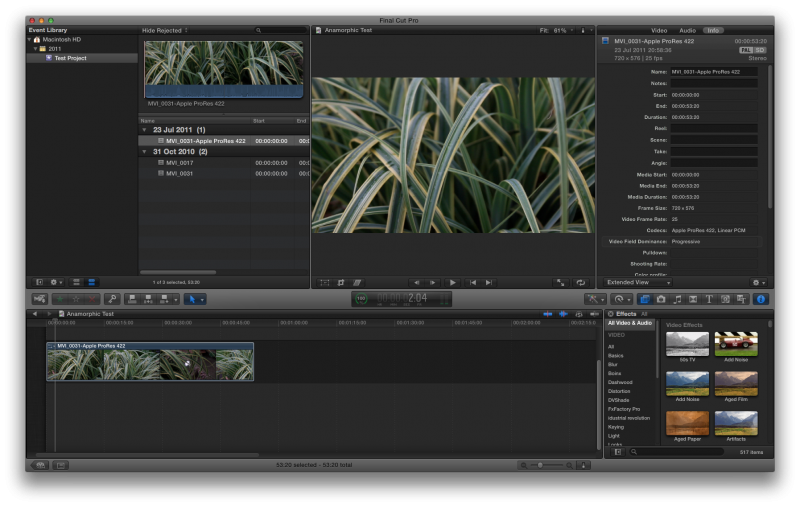
Last edit: 24 Jul 2011 01:34 by DejitaruKyonshi. Reason: Spelling
Please Log in to join the conversation.
24 Jul 2011 19:27 - 24 Jul 2011 19:29 #512
by Jimmyfinn
Replied by Jimmyfinn on topic Re: Anamorphic clips are not read correctly in FCPX
Many thanks for the solution. I was really hoping there was a way within the app to
flag clips as anamorphic, the workaround seems arduous if you have hundreds of clips.
Regarding the simulation of Travel matte composite mode, after a little (well alright then.. a LOT) of experimentation it seems that I can get it work by putting my matte on V3 and fill on V2, applying STENCIL LUMA to V3 and then making a compound clip from V2 & V3 to reveal V1 (or primary storyline in modern parlance!) Phew!
If there is an easier way can someone please chime in!
Regards
flag clips as anamorphic, the workaround seems arduous if you have hundreds of clips.
Regarding the simulation of Travel matte composite mode, after a little (well alright then.. a LOT) of experimentation it seems that I can get it work by putting my matte on V3 and fill on V2, applying STENCIL LUMA to V3 and then making a compound clip from V2 & V3 to reveal V1 (or primary storyline in modern parlance!) Phew!
If there is an easier way can someone please chime in!
Regards
Last edit: 24 Jul 2011 19:29 by Jimmyfinn.
Please Log in to join the conversation.
