


- Posts: 172
- Thank you received: 2
3 Post Moderation Rule for New Boarders (25 Jan 2021)
New boarders will have their posts moderated - Don't worry if you cannot see your post immediately.
Anyone Else Using the Sonnet Echo Thunderbolt Adapter
27 Feb 2012 20:30 - 28 Feb 2012 03:43 #4955
by RonPriest
Anyone Else Using the Sonnet Echo Thunderbolt Adapter was created by RonPriest
I'm saving up for a Promise Pegasus RAID enclosure, but for the time being, I'm using an eSATA enclosure containing two independent SATA 7200 rpm 1 TB drives set up as a JBOD configuration connected to an i7 iMac via the Sonnet Echo Thunderbolt adapter and the Sonnet Tempo Pro ExpressCard. I haven't been able to find many people using this adapter, so I wasn't extremely positive about going this route before I made the purchase, but I needed a temporary solution in the interim while saving up for the Thunderbolt RAID and BTW, I found the Echo $20 cheeper at B&H than anyone else selling them.
My results are, so far so good. I'm not terribly impressed with the write and read speeds that I'm getting, but to be honest, they are about the same speeds as I get on my old 2006 Mac Pro with the same external eSATA enclosure setup as a JBOD configuration. I'm not getting any spinning beach balls on the iMac (knock on wood) and so far I haven't received any dropped frame warnings editing ProRes 422 optimized footage, even with Multicam clips (although I have only tried 2 streams of multicam so far).
So anyway, I was looking for any feedback from others using the Sonnet Echo Thunderbolt Adapter.
My results are, so far so good. I'm not terribly impressed with the write and read speeds that I'm getting, but to be honest, they are about the same speeds as I get on my old 2006 Mac Pro with the same external eSATA enclosure setup as a JBOD configuration. I'm not getting any spinning beach balls on the iMac (knock on wood) and so far I haven't received any dropped frame warnings editing ProRes 422 optimized footage, even with Multicam clips (although I have only tried 2 streams of multicam so far).
So anyway, I was looking for any feedback from others using the Sonnet Echo Thunderbolt Adapter.
Last edit: 28 Feb 2012 03:43 by RonPriest.
Please Log in to join the conversation.

28 Feb 2012 00:46 #4967
by BenB
Replied by BenB on topic Re: Anyone Else Using the Sonnet Echo Thunderbolt Adapter
I'd have set up a simple RAID 1 for only two drives like that. But you say they are independent, meaning in two different enclosures? I'd find me a single eSATA RAID enclosure (OtherWorldComputing) to put them both in that with RAID 1.
I'd like to know (although no one is going to admit it) if that T'bolt to eSATA adapter introduces any latency in the data pipeline.
As for dropped frames on playback, that's something that has been happening with NLE's for years, and normally not considered an issue. Mostly it doesn't really interfere with actual playback/editing. I ignore those warning, turning them off. When you export, every frame will be there. But it's great to read you're having no dropped frames.
I'd like to know (although no one is going to admit it) if that T'bolt to eSATA adapter introduces any latency in the data pipeline.
As for dropped frames on playback, that's something that has been happening with NLE's for years, and normally not considered an issue. Mostly it doesn't really interfere with actual playback/editing. I ignore those warning, turning them off. When you export, every frame will be there. But it's great to read you're having no dropped frames.
Please Log in to join the conversation.
28 Feb 2012 02:27 #4976
by RonPriest
It is an eSATA only enclosure which can house 2 independent 3.5 SATA drives with their own eSATA connector. The specs state that it can be configured as single drives, RAID 0 Striped, or RAID 1 mirrored using software. So I'm assuming if you set it up as a RAID 0 or RAID 1, you must do it through software. Would that still be better (faster) than using it as 2 single drives? I bought it at MacSales, here is the link:
eshop.macsales.com/item/OWC/MESATATBEK/
I'm not sure what you mean by "introduces any latency in the data pipeline." I assume your asking if is slows it down? I'm sure it does, between the adapter and the ExpressCard I would imagine something would cause a bottleneck. But, It's the cheapest way for me right now to connect eSATA drives to my iMac unless a firewire RAID would be faster? Is that possible to get a 2 drive eSATA RAID enclosure configured as a raid 0 via hardware and connect it to the iMac via firewire? Isn't the overall speed still going to be just as slow as a standard firewire drive by itself?
Replied by RonPriest on topic Re: Anyone Else Using the Sonnet Echo Thunderbolt Adapter
BenB wrote: I'd have set up a simple RAID 1 for only two drives like that. But you say they are independent, meaning in two different enclosures? I'd find me a single eSATA RAID enclosure (OtherWorldComputing) to put them both in that with RAID 1.
It is an eSATA only enclosure which can house 2 independent 3.5 SATA drives with their own eSATA connector. The specs state that it can be configured as single drives, RAID 0 Striped, or RAID 1 mirrored using software. So I'm assuming if you set it up as a RAID 0 or RAID 1, you must do it through software. Would that still be better (faster) than using it as 2 single drives? I bought it at MacSales, here is the link:
eshop.macsales.com/item/OWC/MESATATBEK/
BenB wrote: I'd like to know (although no one is going to admit it) if that T'bolt to eSATA adapter introduces any latency in the data pipeline.
I'm not sure what you mean by "introduces any latency in the data pipeline." I assume your asking if is slows it down? I'm sure it does, between the adapter and the ExpressCard I would imagine something would cause a bottleneck. But, It's the cheapest way for me right now to connect eSATA drives to my iMac unless a firewire RAID would be faster? Is that possible to get a 2 drive eSATA RAID enclosure configured as a raid 0 via hardware and connect it to the iMac via firewire? Isn't the overall speed still going to be just as slow as a standard firewire drive by itself?
Please Log in to join the conversation.
28 Feb 2012 03:05 - 28 Feb 2012 03:06 #4983
by BenB
Replied by BenB on topic Re: Anyone Else Using the Sonnet Echo Thunderbolt Adapter
I just checked out that drive's user manual and I think you're reading the meaning of "via software" incorrectly. It does in fact have hardware RAID built in, from what I'm reading. You use "software" (Disk Utilities specifically) to configure it. Some RAID enclosures have DIP Switches you set to configure the RAID, this one lets you configure it via software such as Disk Utility, but it's hardware RAID capable, you'd only use one eSATA cable, and you'd get faster throughput from it, because the enclosure's RAID hardware would do the work, not the Mac's internal software, which it is doing now.
Can you back up all of that data somewhere? If so, I'd configure it as a single RAID 1 enclosure. But you may want to call OtherWorldComputing's tech support (the best around) and ask them about it. They could give you more definitive info than I can.
Can you back up all of that data somewhere? If so, I'd configure it as a single RAID 1 enclosure. But you may want to call OtherWorldComputing's tech support (the best around) and ask them about it. They could give you more definitive info than I can.
Last edit: 28 Feb 2012 03:06 by BenB.
Please Log in to join the conversation.
28 Feb 2012 03:29 #4987
by RonPriest
Sure, I back up the entire drive to a cloned drive setting in another enclosure over on my Old Mac Pro every night (if I've actually got any work accomplished that is The old 2006 Mac Pro doesn't have FCPX installed on it. It's getting kind of old and I have to humor it every now and then. I've introduced it to Lion and their getting along okay, but it's crawl every now and then kind of scares the old Mac and it starts crying and .... stuff. So, I don't think it would be able to handle too many more changes, FCPX might just put it in it's grave
Thanks for looking into those specs for that enclosure for me. I just might do some experimenting, those Pegasus drives may be able to wait a little longer, like after uncle Sam's birthday (April 15th
Replied by RonPriest on topic Re: Anyone Else Using the Sonnet Echo Thunderbolt Adapter
BenB wrote: Can you back up all of that data somewhere? If so, I'd configure it as a single RAID 1 enclosure. But you may want to call OtherWorldComputing's tech support (the best around) and ask them about it. They could give you more definitive info than I can.
Sure, I back up the entire drive to a cloned drive setting in another enclosure over on my Old Mac Pro every night (if I've actually got any work accomplished that is
The old 2006 Mac Pro doesn't have FCPX installed on it. It's getting kind of old and I have to humor it every now and then. I've introduced it to Lion and their getting along okay, but it's crawl every now and then kind of scares the old Mac and it starts crying and .... stuff. So, I don't think it would be able to handle too many more changes, FCPX might just put it in it's grave Thanks for looking into those specs for that enclosure for me. I just might do some experimenting, those Pegasus drives may be able to wait a little longer, like after uncle Sam's birthday (April 15th
Please Log in to join the conversation.
- mliebergot
-

- Offline
- Premium Member
-

Less
More
- Posts: 84
- Thank you received: 3
28 Feb 2012 21:27 #5023
by mliebergot
Replied by mliebergot on topic Re: Anyone Else Using the Sonnet Echo Thunderbolt Adapter
Ron I thought that this might be of interest to you.
It's a Thunderbolt adapter from Seagate. It will let you use any external hard drive, like a GoFlex with a Thunderbolt port and give you 10gbs of throughput.
www.eteknix.com/news/first-thunderbolt-adapter-from-seagate/
It's a Thunderbolt adapter from Seagate. It will let you use any external hard drive, like a GoFlex with a Thunderbolt port and give you 10gbs of throughput.
www.eteknix.com/news/first-thunderbolt-adapter-from-seagate/
Please Log in to join the conversation.
28 Feb 2012 21:39 - 28 Feb 2012 21:55 #5024
by RonPriest
Replied by RonPriest on topic Re: Anyone Else Using the Sonnet Echo Thunderbolt Adapter
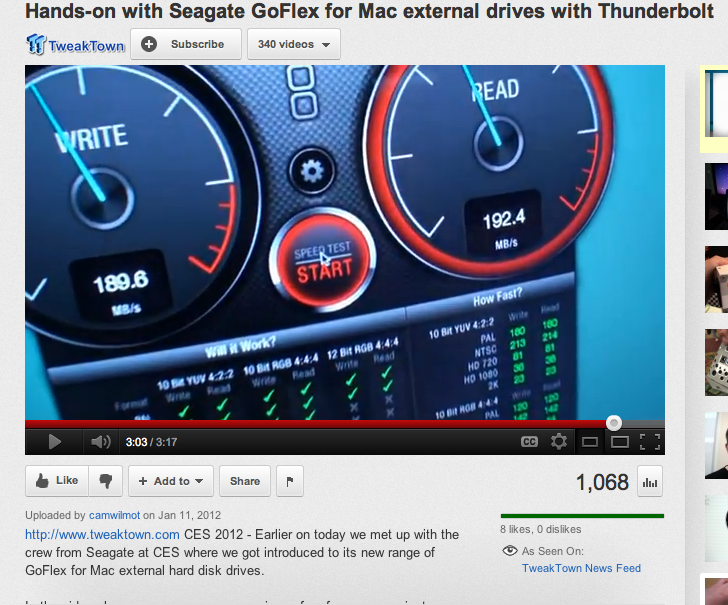
Wow, so you can plug in any 2.5 or 3.5 SATA drive into it and expect to get 10 gbs of throughput? I'll take 2 please!
Was just watching this YouTube video on it.
Was just watching this YouTube video on it.
Last edit: 28 Feb 2012 21:55 by RonPriest.
Please Log in to join the conversation.
28 Feb 2012 22:27 #5028
by BenB
Replied by BenB on topic Re: Anyone Else Using the Sonnet Echo Thunderbolt Adapter
And at $139, that's pretty sweet.
www.bhphotovideo.com/bnh/controller/home...endecaSearch&ci=1&Q=
The one thing to bear in mind it, you won't get the full 10gbs bandwidth at all, the drive itself won't do that. A RAID will get closer to it, as RAID's are much, much faster than individual drives.
But for a single drive on Thunderbolt, it's nice.
Personally, I'd rather the greater storage space and greater speed of a T'bolt RAID.
www.bhphotovideo.com/bnh/controller/home...endecaSearch&ci=1&Q=
The one thing to bear in mind it, you won't get the full 10gbs bandwidth at all, the drive itself won't do that. A RAID will get closer to it, as RAID's are much, much faster than individual drives.
But for a single drive on Thunderbolt, it's nice.
Personally, I'd rather the greater storage space and greater speed of a T'bolt RAID.
Please Log in to join the conversation.
- mliebergot
-
- Offline
- Premium Member
-
Less
More
- Posts: 84
- Thank you received: 3
28 Feb 2012 22:49 #5033
by mliebergot
But until people start putting out Thunderbolt RAID enclosures, this isn't a bad option for using your existing drives and Thunderbolt connectivity.
And BTW, when I mentioned Thunderbolt RAID enclosures, I mean just the enclosure with no drives installed.
This way I could use my existing 2TB WD Caviar Black drives with an empty TB enclosure.
Replied by mliebergot on topic Re: Anyone Else Using the Sonnet Echo Thunderbolt Adapter
Ben, I agree.BenB wrote: And at $139, that's pretty sweet.
www.bhphotovideo.com/bnh/controller/home...endecaSearch&ci=1&Q=
The one thing to bear in mind it, you won't get the full 10gbs bandwidth at all, the drive itself won't do that. A RAID will get closer to it, as RAID's are much, much faster than individual drives.
But for a single drive on Thunderbolt, it's nice.
Personally, I'd rather the greater storage space and greater speed of a T'bolt RAID.
But until people start putting out Thunderbolt RAID enclosures, this isn't a bad option for using your existing drives and Thunderbolt connectivity.
And BTW, when I mentioned Thunderbolt RAID enclosures, I mean just the enclosure with no drives installed.
This way I could use my existing 2TB WD Caviar Black drives with an empty TB enclosure.
Please Log in to join the conversation.
28 Feb 2012 22:52 #5034
by RonPriest
Replied by RonPriest on topic Re: Anyone Else Using the Sonnet Echo Thunderbolt Adapter
$139.00, What happen to the expected price of $99? I guess since gas keeps going up, we are having to pay an extra $39 for shipping huh?
Also, Im sure they are using the fastest SATA III drive they can install in that Flex case to get those speeds shown in the video, not your standard 3GB 7200 rpm SATA II drive.
Also, Im sure they are using the fastest SATA III drive they can install in that Flex case to get those speeds shown in the video, not your standard 3GB 7200 rpm SATA II drive.
Please Log in to join the conversation.
28 Feb 2012 23:03 #5040
by BenB
Replied by BenB on topic Re: Anyone Else Using the Sonnet Echo Thunderbolt Adapter
Yes, I'm currently upgrading the 1TB drives in my Mac Pro to 2TB drives. I'll use these old 1TB drives if I get a new Mac with T'bolt and someone starts shipping an empty T'bolt RAID enclosure. That would be pretty nice. But I haven't seen any yet.
Please Log in to join the conversation.
