


- Posts: 10
- Thank you received: 0
3 Post Moderation Rule for New Boarders (25 Jan 2021)
New boarders will have their posts moderated - Don't worry if you cannot see your post immediately.
How do i import HD videos
25 Feb 2012 16:18 #4845
by Copyright
How do i import HD videos was created by Copyright
Hey everyone,
I've tried to import a large (3.6 GB) video that has an extention of .avi , however when i've imported it into FCPx only AUDIo worked with a black screen.
So i decided to convert it into .mov with the same video/audio quality, and when i've imported it into FCPx, video and audio worked, and is as clear as original, however it keeps on jamming, it doesn't go smooth!
I need suggestions please!! how can i import HD (multi-giga) video's to run smoothly on FCPX!!
thaanks!
I've tried to import a large (3.6 GB) video that has an extention of .avi , however when i've imported it into FCPx only AUDIo worked with a black screen.
So i decided to convert it into .mov with the same video/audio quality, and when i've imported it into FCPx, video and audio worked, and is as clear as original, however it keeps on jamming, it doesn't go smooth!
I need suggestions please!! how can i import HD (multi-giga) video's to run smoothly on FCPX!!
thaanks!
Please Log in to join the conversation.
- Tom Wolsky
-

- Offline
- Moderator
-

25 Feb 2012 16:40 #4847
by Tom Wolsky
Replied by Tom Wolsky on topic Re: How do i import HD videos
How did you convert it, and what exactly did you convert it to? Jamming? Not smooth? You mean like dropping frames on playback? What version of FCP are you using?
Please Log in to join the conversation.
25 Feb 2012 17:14 #4848
by Copyright
Replied by Copyright on topic Re: How do i import HD videos
I've used a video converter on a mac, i converted it into .mov 1080p HD
not smooth, i meant dopping frames you're right.
Btw i've tried to open the first movie (.avi) with VLC it worked perfectly
and i've used VLC again to open the converted (.mov) file it worked perfectly too..
but in FCPx ( .avi) only voice
(.mov) dopping frames.
I wonder whats wrong?
not smooth, i meant dopping frames you're right.
Btw i've tried to open the first movie (.avi) with VLC it worked perfectly
and i've used VLC again to open the converted (.mov) file it worked perfectly too..
but in FCPx ( .avi) only voice
(.mov) dopping frames.
I wonder whats wrong?
Please Log in to join the conversation.

25 Feb 2012 19:03 #4851
by cgbier
Replied by cgbier on topic Re: How do i import HD videos
.mov is only a container. What codec is inside? What specs does your Mac have?
Please Log in to join the conversation.
- ronny courtens
-

- Offline
- Moderator
-
Less
More
- Posts: 4455
- Thank you received: 962
25 Feb 2012 19:32 #4854
by ronny courtens
Replied by ronny courtens on topic Re: How do i import HD videos
3.5 GB is not really a huge file in full HD world. Instead of converting it yourself just let FCP10 do the work for you. Import the file in FCP10 and make sure "Create Optimized Media" is checked in your import settings. FCP10 will convert your AVI to ProRes 422, probably one of the smoothest codecs in editing paradise. Let FCP10 do its background magic, create a project then play your video in the timeline. If the file does not play smoothly there may be something wrong with your system setup. In this case please provide the following information so we can help you find where the real problem is:
Computer type and model
Graphics card
Amount of RAM you have
What drive you use to store your media on
Version of OSX
Version of FCPX
Best wishes,
Ronny
Computer type and model
Graphics card
Amount of RAM you have
What drive you use to store your media on
Version of OSX
Version of FCPX
Best wishes,
Ronny
Please Log in to join the conversation.
- Tom Wolsky
-
- Offline
- Moderator
-
25 Feb 2012 19:54 #4855
by Tom Wolsky
Replied by Tom Wolsky on topic Re: How do i import HD videos
One the file in the QuickTime player and report exactly what it says in the movie inspector. Post a screenshot if you can.
Please Log in to join the conversation.
26 Feb 2012 04:33 #4867
by Copyright
Replied by Copyright on topic Re: How do i import HD videos
@ronny courtens : Thanks for your advice, I've tried to tick the "Create Optimized Media" however i got a red star and an exlamation mark icon (Figure 1).
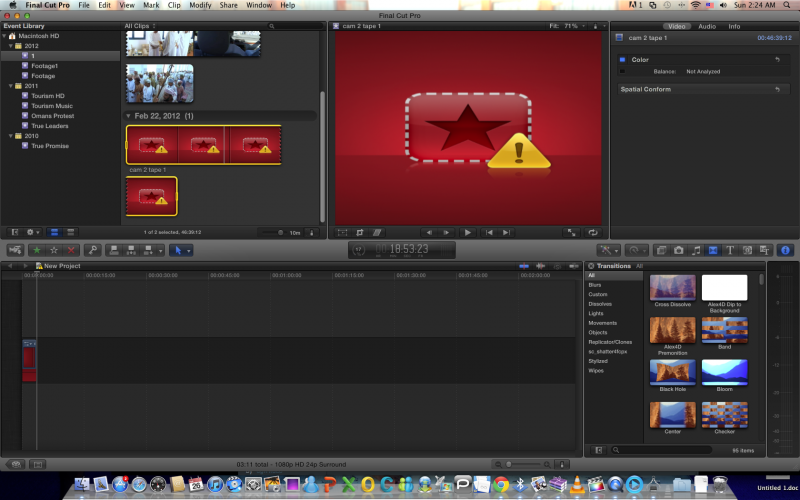
in my mac mini
Model Name: Mac mini
Model Identifier: Macmini3,1
Processor Name: Intel Core 2 Duo
Processor Speed: 2.53 GHz
Number Of Processors: 1
Total Number Of Cores: 2
L2 Cache: 3 MB
Memory: 4 GB
Bus Speed: 1.07 GHz
OSX 10.6.8
GRAPHICS CARD: NVIDIA GeForce 9400
And i've tried to do the same thing on my other laptop
Model Name: MaxBook Pro
Model Identifier: MacBookPro6,2
Processor Name: Intel Core i7
Processor Speed: 2.66 Ghz
Number Of Processors: 1
Total Number Of Cores: 2
L2 Cache (per core): 256 KB
L3 CacheL 4MB
Memory: 4 GB
Processor Interconnect Speed : 4.8 GT/s
GRAPHICS CARD: NVIDIA GeForce GT 330M
I got a white sheet of a red backgroung with an exclamation mark.
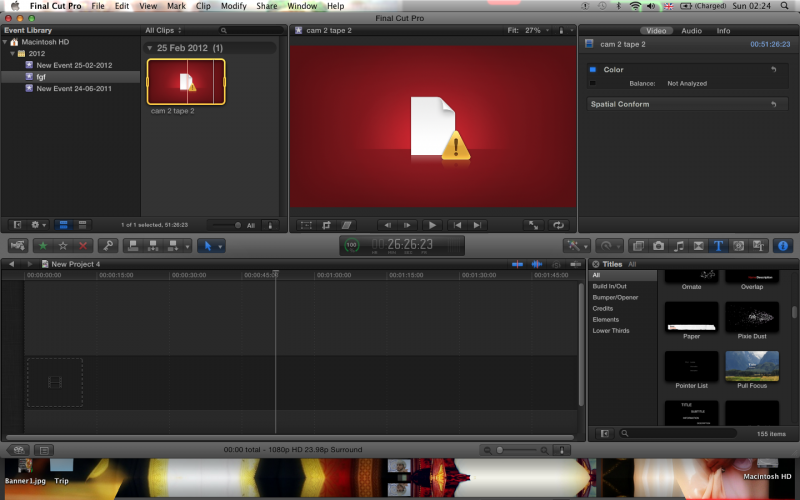
( Figure 2)
:Notice I'm importing them from my hardrive.
@Tom Wolsky when i open the original .avi file i get the output (figure 3)
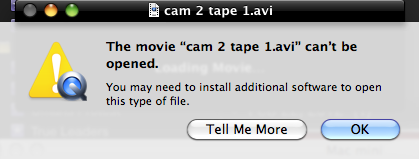
in my mac mini
Model Name: Mac mini
Model Identifier: Macmini3,1
Processor Name: Intel Core 2 Duo
Processor Speed: 2.53 GHz
Number Of Processors: 1
Total Number Of Cores: 2
L2 Cache: 3 MB
Memory: 4 GB
Bus Speed: 1.07 GHz
OSX 10.6.8
GRAPHICS CARD: NVIDIA GeForce 9400
And i've tried to do the same thing on my other laptop
Model Name: MaxBook Pro
Model Identifier: MacBookPro6,2
Processor Name: Intel Core i7
Processor Speed: 2.66 Ghz
Number Of Processors: 1
Total Number Of Cores: 2
L2 Cache (per core): 256 KB
L3 CacheL 4MB
Memory: 4 GB
Processor Interconnect Speed : 4.8 GT/s
GRAPHICS CARD: NVIDIA GeForce GT 330M
I got a white sheet of a red backgroung with an exclamation mark.
( Figure 2)
:Notice I'm importing them from my hardrive.
@Tom Wolsky when i open the original .avi file i get the output (figure 3)
Please Log in to join the conversation.
- Tom Wolsky
-
- Offline
- Moderator
-
26 Feb 2012 04:51 #4868
by Tom Wolsky
Replied by Tom Wolsky on topic Re: How do i import HD videos
The offline indicator most commonly appears when playback preference is set to proxy and you don't have any proxy media.
Not he AVI, but the QuickTime file you converted the AVI to. The one that's causing the problems in FCP. What did you use to convert the AVIs?
Not he AVI, but the QuickTime file you converted the AVI to. The one that's causing the problems in FCP. What did you use to convert the AVIs?
Please Log in to join the conversation.
26 Feb 2012 05:11 #4869
by Copyright
Replied by Copyright on topic Re: How do i import HD videos
@Tom Wolsky .avi is the original file, .mov is the converted one.
I got that error in QuickTime when i tried to open the original .avi
however, i've used Total Video Converter For mac to convert the avi. to .mov just for the sake of trying.
I've tried to open .mov file with QuickTime, however it appears to be in slow motion.. the entire clip
What are the settings i should use while converting?
I got that error in QuickTime when i tried to open the original .avi
however, i've used Total Video Converter For mac to convert the avi. to .mov just for the sake of trying.
I've tried to open .mov file with QuickTime, however it appears to be in slow motion.. the entire clip
What are the settings i should use while converting?
Please Log in to join the conversation.
- Tom Wolsky
-
- Offline
- Moderator
-
26 Feb 2012 05:34 - 26 Feb 2012 05:34 #4870
by Tom Wolsky
Replied by Tom Wolsky on topic Re: How do i import HD videos
What does the movie inspector say for the converted material? Exactly.
Does what the movie inspector say match the specifications of the original media?
You might to download another player like MPlayerX, which has an info window and should be able to open the AVI.
Does what the movie inspector say match the specifications of the original media?
You might to download another player like MPlayerX, which has an info window and should be able to open the AVI.
Last edit: 26 Feb 2012 05:34 by Tom Wolsky. Reason: correction
Please Log in to join the conversation.
26 Feb 2012 05:36 #4871
by Copyright
Replied by Copyright on topic Re: How do i import HD videos
I don't want it to open in QuickTime,
All i want is for the original .avi to be imported into FCPx smoothly!
whats happening now is:
Original .avi in fcpx : only audio
convereted .mov: audio and video but keep on dropping frames.
All i want is for the original .avi to be imported into FCPx smoothly!
whats happening now is:
Original .avi in fcpx : only audio
convereted .mov: audio and video but keep on dropping frames.
Please Log in to join the conversation.
26 Feb 2012 05:54 - 26 Feb 2012 05:57 #4872
by cgbier
Replied by cgbier on topic Re: How do i import HD videos
You want to open it in QT to be able to see what codec, frame rate, etc. is embedded in your mov file.
I'd rather think your hardware is not up to the task when it's dropping frames. Do you see the orange bar on top of the storyline? Grab yourself a coffee and let your footage render. Once the orange bar is gone, your footage should play more fluid.
Download Perian and MPEG Streamclip. You can export avi to ProRes with it (in most cases).
I'd rather think your hardware is not up to the task when it's dropping frames. Do you see the orange bar on top of the storyline? Grab yourself a coffee and let your footage render. Once the orange bar is gone, your footage should play more fluid.
Download Perian and MPEG Streamclip. You can export avi to ProRes with it (in most cases).
Last edit: 26 Feb 2012 05:57 by cgbier.
Please Log in to join the conversation.
26 Feb 2012 12:34 #4875
by Copyright
Replied by Copyright on topic Re: How do i import HD videos
@cgbier i've tried to open the original .avi with MPEG streamclip however a white screen apears and only audio works. you still want me to export?
Please Log in to join the conversation.
26 Feb 2012 13:27 #4876
by Copyright
Replied by Copyright on topic Re: How do i import HD videos
So guys the problem again,
I've got .avi files on my harddrive and i would like to import them into FCPx.
NOTE: When i try launching the .avi from my hardrive via (MPEG StreamClip + QuickTime i only get Audio) and when i launch it with (VLC) it works perfectly in high quality too.
So tell me what i need to do?
for example..
I need to extract those files to my desktop first and then import them into FCPx?
I need to convert the original .avi?
or..? what exactly..
I've got .avi files on my harddrive and i would like to import them into FCPx.
NOTE: When i try launching the .avi from my hardrive via (MPEG StreamClip + QuickTime i only get Audio) and when i launch it with (VLC) it works perfectly in high quality too.
So tell me what i need to do?
for example..
I need to extract those files to my desktop first and then import them into FCPx?
I need to convert the original .avi?
or..? what exactly..
Please Log in to join the conversation.
- Tom Wolsky
-
- Offline
- Moderator
-
26 Feb 2012 14:15 #4878
by Tom Wolsky
Replied by Tom Wolsky on topic Re: How do i import HD videos
We're going around this in endless circles. We can't tell you what to convert the AVI to because we don't know anything about the AVI. Is it 320x240 at 15fps or is 4k at 59.94, or anything in between? I've asked you repeatedly to open the QT file and give us exact information about it. You still have not done that. We don't know anything about what you're doing and you just will not give us any information.
Please Log in to join the conversation.
26 Feb 2012 14:19 #4880
by Copyright
Replied by Copyright on topic Re: How do i import HD videos
Here we go, i got some useful information.
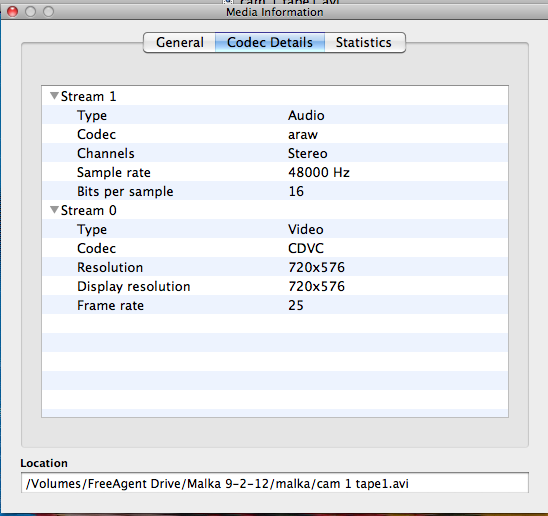
Looks like QT and FCPx has a problem with aram<
anyway. what do you guys suggest me convert it to .. with the best quality..?
Thanks.
Looks like QT and FCPx has a problem with aram<
anyway. what do you guys suggest me convert it to .. with the best quality..?
Thanks.
Please Log in to join the conversation.
26 Feb 2012 14:50 #4881
by cgbier
Replied by cgbier on topic Re: How do i import HD videos
No, QT doesn't have a problem with your audio, but with the Canopus Digital Video Codec your .avi is encoded in. AFAIK, this is a proprietary Edius codec with no Mac solution.
If VLC has worked, then this seems to be the only solution. You are stuck with MP4 though.
If VLC has worked, then this seems to be the only solution. You are stuck with MP4 though.
Please Log in to join the conversation.
26 Feb 2012 15:49 #4884
by cgbier
Replied by cgbier on topic Re: How do i import HD videos
BTW: Your footage isn't HD, but good, old PAL Standard Definition.
How old is your footage? I haven't seen that CDVC stuff for years (was in DV-Storm).
How old is your footage? I haven't seen that CDVC stuff for years (was in DV-Storm).
Please Log in to join the conversation.
- ronny courtens
-
- Offline
- Moderator
-
Less
More
- Posts: 4455
- Thank you received: 962
26 Feb 2012 22:48 #4902
by ronny courtens
Replied by ronny courtens on topic Re: How do i import HD videos
Thank you for the information. Now at least we know what you are dealing with.
You say you have been able to convert the AVI file to a QT movie using "a video encoder for Mac". This means the encoder can read the CDVC file and it can successfully convert it to QuickTime. Now just tell us which encoder this is and we can help you find the correct settings to make your QT movie.
You say you have been able to convert the AVI file to a QT movie using "a video encoder for Mac". This means the encoder can read the CDVC file and it can successfully convert it to QuickTime. Now just tell us which encoder this is and we can help you find the correct settings to make your QT movie.
Please Log in to join the conversation.
- Mikeybouchereau
-

- Offline
- Elite Member
-

Less
More
- Posts: 201
- Thank you received: 81
27 Feb 2012 07:59 #4933
by Mikeybouchereau
Replied by Mikeybouchereau on topic Re: How do i import HD videos
If VLC is the only program that can playback your media, you may want to try VLC's export wizard to get a useable file out of it. Like many are saying the CDVC stuff is from Canopus and I haven't seen it in quite a long time but maybe someone else knows more about it.
As for using the VLC exporter, after looking at its settings I would just export it to h.264 using mp4 container.
Now if you have exported it and it plays in FCPX but drops frames, open up the converted file in quicktime and let us see what the video and audio codecs are for that clip.
As for using the VLC exporter, after looking at its settings I would just export it to h.264 using mp4 container.
Now if you have exported it and it plays in FCPX but drops frames, open up the converted file in quicktime and let us see what the video and audio codecs are for that clip.
Please Log in to join the conversation.
